

Also what GPU suitable for 4 monitors? Unker don't need gaming.

[img]https://hackernoon.com/hn-images/1*gRNCnSRrV5JUxbMagFV0CA.jpeg[img]
This post has been edited by NB01: Aug 23 2020, 09:29 PM
Multi Monitor setup, Need recommendation
|
|
 Aug 23 2020, 09:19 PM, updated 6y ago Aug 23 2020, 09:19 PM, updated 6y ago
Show posts by this member only | Post
#1
|
 
Junior Member
280 posts Joined: Jul 2020  
|
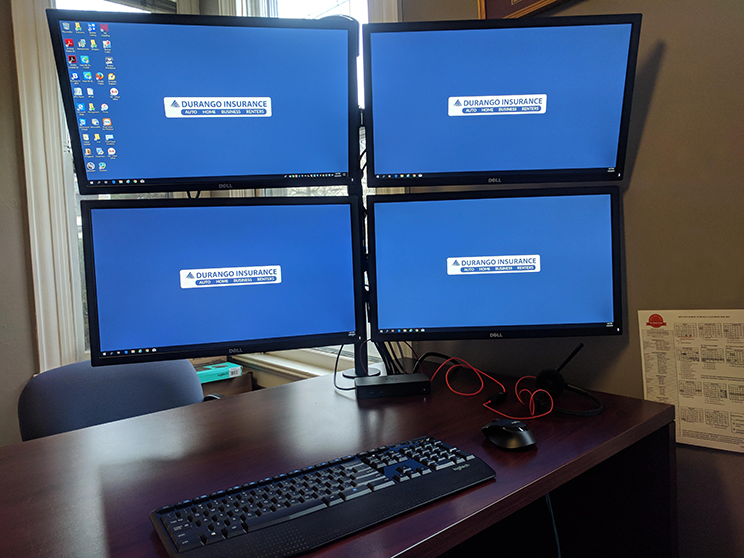
Unker need a multi monitor setup. Maybe 3 to 4 monitors. How to stack the thing in a 2 x 2 arrangement? Any recommendations. Also what GPU suitable for 4 monitors? Unker don't need gaming. [img]https://hackernoon.com/hn-images/1*gRNCnSRrV5JUxbMagFV0CA.jpeg[img] This post has been edited by NB01: Aug 23 2020, 09:29 PM langstrasse liked this post
|
|
|
|
|
|
Aug 23 2020, 09:21 PM
Show posts by this member only | IPv6 | Post
#2
|

Senior Member
1,885 posts Joined: Jan 2003 From: Bangsar,Kuala Lumpur 
|
Any graphics card that has 4 outputs would work
Get a loctek monitor mount for your setup |
|
|
Aug 23 2020, 09:21 PM
Show posts by this member only | Post
#3
|

Junior Member
208 posts Joined: Apr 2009
|
3 bawah 1 atas foursome 1 hdmi 3 dp double penetra..... noobz4ever liked this post
|
|
|
Aug 23 2020, 09:21 PM
Show posts by this member only | Post
#4
|

Junior Member
196 posts Joined: Sep 2019
|
2x2 arrangement? Maybe you could try using VESA mounting? Any gpu would be ok as long as you make sure that it has enough ports for your 3-4 monitors
|
|
|
Aug 23 2020, 09:22 PM
Show posts by this member only | IPv6 | Post
#5
|

Junior Member
637 posts Joined: Nov 2018 From: Taman Sri Muda
|
Almost all GPU will support up to 3 monitors with no problems.
However, there may be limitations with supporting up to 4. need to check GPU manufacturer website |
|
|
Aug 23 2020, 09:25 PM
Show posts by this member only | IPv6 | Post
#6
|

Senior Member
4,561 posts Joined: Jan 2003 From: Penangites 
|
i use 29" + 27"
good enough d. no need to move neck so often |
|
|
|
|
|
Aug 23 2020, 09:27 PM
Show posts by this member only | Post
#7
|
|
Junior Member
280 posts Joined: Jul 2020
|
QUOTE(AllnGap @ Aug 23 2020, 09:25 PM) i use 29" + 27" Like freaking big wor. I don't need so big. I think 24" x 4 will do fine.good enough d. no need to move neck so often  |
|
|
Aug 23 2020, 09:30 PM
Show posts by this member only | Post
#8
|
|
Junior Member
193 posts Joined: Dec 2019
|
QUOTE(NB01 @ Aug 23 2020, 04:27 PM) Like freaking big wor. I don't need so big. I think 24" x 4 will do fine. Think 4 23" will do fine. I have 2 27" and it gives me a sore neck and shoulder because of the angles. The 2 23" in my office are much better ergonomically for me. |
|
|
Aug 23 2020, 09:31 PM
Show posts by this member only | Post
#9
|
|
Junior Member
280 posts Joined: Jul 2020
|
QUOTE(notadupe999 @ Aug 23 2020, 09:30 PM) Think 4 23" will do fine. Thanks for the tip.I have 2 27" and it gives me a sore neck and shoulder because of the angles. The 2 23" in my office are much better ergonomically for me. What kind of mount should i get? I think this is the part i am most unfamiliar with. All the different mountings. Some seems to stick to tables, some stick to walls? |
|
|
Aug 23 2020, 09:35 PM
|
|
Junior Member
193 posts Joined: Dec 2019
|
QUOTE(NB01 @ Aug 23 2020, 04:31 PM) Thanks for the tip. House using Loctek. Office has ergohuman.What kind of mount should i get? I think this is the part i am most unfamiliar with. All the different mountings. Some seems to stick to tables, some stick to walls? Loctek one just screw on to the table. Seems stable enough for one monitor each stand (I bought single arm stand and added another one later). Haven't tried the multiple arms per stand, so can't comment. The ergohuman one requires a huge hole to be drilled into the desk. Has two arms for two monitors. Think can add on more arms if you want 4 monitors. |
|
|
Aug 23 2020, 09:36 PM
Show posts by this member only | IPv6 | Post
#11
|

All Stars
17,021 posts Joined: Jan 2005
|
Nvidia RTX 2060 8gb GPU. 3 display port + 1 HDMI.
Vivo vertical quad monitor mount. 4 mon mount. |
|
|
Aug 23 2020, 09:38 PM
Show posts by this member only | IPv6 | Post
#12
|

Junior Member
181 posts Joined: May 2006
|
Man. The 15" + 27+27 at work also leceh wanna move neck at work. Can't imagine 4 full size
|
|
|
Aug 23 2020, 09:40 PM
|

Junior Member
109 posts Joined: May 2013
|
2 ultrawide, top and bottom
» Click to show Spoiler - click again to hide... « |
|
|
|
|
|
Aug 23 2020, 09:43 PM
|

Junior Member
16 posts Joined: Aug 2015 From: WDMO
|
QUOTE(NB01 @ Aug 23 2020, 09:19 PM) Unker need a multi monitor setup. Maybe 3 to 4 monitors. How to stack the thing in a 2 x 2 arrangement? Any recommendations. https://forum.lowyat.net/topic/5009921Also what GPU suitable for 4 monitors? Unker don't need gaming. [img]https://hackernoon.com/hn-images/1*gRNCnSRrV5JUxbMagFV0CA.jpeg[img] 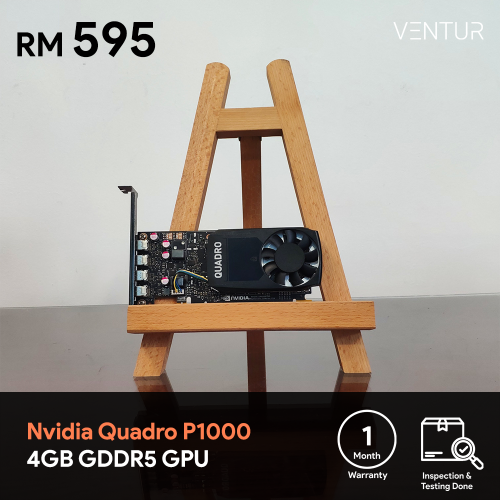 |
|
|
Aug 23 2020, 09:46 PM
|

Senior Member
1,820 posts Joined: May 2010 From: Kuala Lumpur
|
You don’t need a GPU with 4 outputs as DP supports daisy chaining. I use a 5700 XT - 2 DP outputs to 6 x 24” screens (so 3 per DP). Of course bandwidth is limited and I’m only running 1080p 60Hz as not for gaming The stand is free standing or screwed into desk (mine is screwed in) Got it from these guys : https://www.antsys.com.my/ NB01 liked this post
|
|
|
Aug 23 2020, 09:50 PM
Show posts by this member only | IPv6 | Post
#16
|

Senior Member
4,234 posts Joined: Sep 2006
|
Ts consider buy 1x 43 inch monitor 4k? These usually take in 4 inputs.
Save a lot headache. |
|
|
Aug 23 2020, 10:01 PM
Show posts by this member only | IPv6 | Post
#17
|
|
Senior Member
4,561 posts Joined: Jan 2003 From: Penangites
|
QUOTE(NB01 @ Aug 23 2020, 09:27 PM) Like freaking big wor. I don't need so big. I think 24" x 4 will do fine. 29" is widescreenyou have to consider vertical height of stacking 2 screen. need to toggle up/down cause neck pain |
|
|
Aug 23 2020, 10:09 PM
|

Junior Member
13 posts Joined: Jan 2020
|
get 2 unit 49" inch
|
|
|
Sep 2 2020, 04:56 PM
Show posts by this member only | IPv6 | Post
#19
|
|
Junior Member
280 posts Joined: Jul 2020
|
QUOTE(AllnGap @ Aug 23 2020, 09:25 PM) i use 29" + 27" good enough d. no need to move neck so often QUOTE(AllnGap @ Aug 23 2020, 10:01 PM) 29" is widescreen Now I am considering 1 ultra widescreen + my existing normal 23".you have to consider vertical height of stacking 2 screen. need to toggle up/down cause neck pain Just now went to Digital.Mall, not many choices. Mostly 34" only. Got this Gigabyte 34", 144Hz, but expensive. RM 2099. How do you arrange your monitor? 27 on top, 29 at bottom? |
|
|
Sep 2 2020, 07:03 PM
Show posts by this member only | IPv6 | Post
#20
|
|
Senior Member
4,561 posts Joined: Jan 2003 From: Penangites
|
QUOTE(NB01 @ Sep 2 2020, 04:56 PM) Now I am considering 1 ultra widescreen + my existing normal 23". side by side.Just now went to Digital.Mall, not many choices. Mostly 34" only. Got this Gigabyte 34", 144Hz, but expensive. RM 2099. How do you arrange your monitor? 27 on top, 29 at bottom? if you have too tall screen very hard to utilize the upper and lower part of the screen. |
| Change to: |  0.0171sec 0.0171sec
 0.36 0.36
 5 queries 5 queries
 GZIP Disabled GZIP Disabled
Time is now: 14th December 2025 - 07:49 PM |
 Quote
Quote
