

Also what GPU suitable for 4 monitors? Unker don't need gaming.
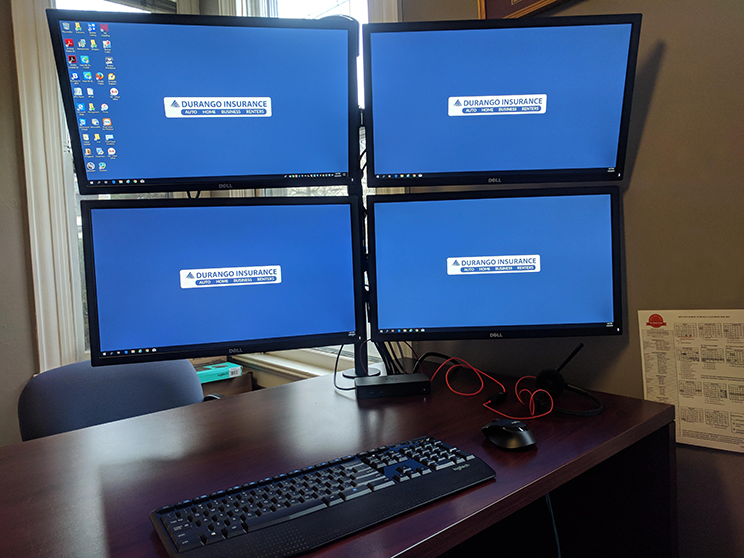

[img]https://hackernoon.com/hn-images/1*gRNCnSRrV5JUxbMagFV0CA.jpeg[img]
This post has been edited by NB01: Aug 23 2020, 09:29 PM
Multi Monitor setup, Need recommendation
|
|
 Aug 23 2020, 09:19 PM, updated 6y ago Aug 23 2020, 09:19 PM, updated 6y ago
Return to original view | Post
#1
|
 
Junior Member
280 posts Joined: Jul 2020  
|
Unker need a multi monitor setup. Maybe 3 to 4 monitors. How to stack the thing in a 2 x 2 arrangement? Any recommendations. Also what GPU suitable for 4 monitors? Unker don't need gaming. [img]https://hackernoon.com/hn-images/1*gRNCnSRrV5JUxbMagFV0CA.jpeg[img] This post has been edited by NB01: Aug 23 2020, 09:29 PM langstrasse liked this post
|
|
|
|
|
|
Aug 23 2020, 09:27 PM
Return to original view | Post
#2
|
|
Junior Member
280 posts Joined: Jul 2020
|
QUOTE(AllnGap @ Aug 23 2020, 09:25 PM) i use 29" + 27" Like freaking big wor. I don't need so big. I think 24" x 4 will do fine.good enough d. no need to move neck so often  |
|
|
Aug 23 2020, 09:31 PM
Return to original view | Post
#3
|
|
Junior Member
280 posts Joined: Jul 2020
|
QUOTE(notadupe999 @ Aug 23 2020, 09:30 PM) Think 4 23" will do fine. Thanks for the tip.I have 2 27" and it gives me a sore neck and shoulder because of the angles. The 2 23" in my office are much better ergonomically for me. What kind of mount should i get? I think this is the part i am most unfamiliar with. All the different mountings. Some seems to stick to tables, some stick to walls? |
|
|
Sep 2 2020, 04:56 PM
Return to original view | IPv6 | Post
#4
|
|
Junior Member
280 posts Joined: Jul 2020
|
QUOTE(AllnGap @ Aug 23 2020, 09:25 PM) i use 29" + 27" good enough d. no need to move neck so often QUOTE(AllnGap @ Aug 23 2020, 10:01 PM) 29" is widescreen Now I am considering 1 ultra widescreen + my existing normal 23".you have to consider vertical height of stacking 2 screen. need to toggle up/down cause neck pain Just now went to Digital.Mall, not many choices. Mostly 34" only. Got this Gigabyte 34", 144Hz, but expensive. RM 2099. How do you arrange your monitor? 27 on top, 29 at bottom? |
|
|
Sep 2 2020, 07:05 PM
Return to original view | Post
#5
|
|
Junior Member
280 posts Joined: Jul 2020
|
QUOTE(AllnGap @ Sep 2 2020, 07:03 PM) side by side. So it's consider 3 screens? 29 (Ultrawide?) + 1 wide screen (27")?if you have too tall screen very hard to utilize the upper and lower part of the screen. |
|
|
Sep 2 2020, 07:11 PM
Return to original view | Post
#6
|
|
Junior Member
280 posts Joined: Jul 2020
|
QUOTE(hirano @ Sep 2 2020, 07:07 PM) What u gonna do with 4? Most pipu 2 only Maybe not 4, i think 3 enough for now. Mainly for stock trading. |
|
|
Sep 2 2020, 07:12 PM
Return to original view | Post
#7
|
|
Junior Member
280 posts Joined: Jul 2020
|
QUOTE(james.6831 @ Sep 2 2020, 07:11 PM) I seen Vesa mount for Dell...mahal siot... Unker don't want mahal. |
|
|
Sep 2 2020, 07:21 PM
Return to original view | Post
#8
|
|
Junior Member
280 posts Joined: Jul 2020
|
QUOTE(AllnGap @ Sep 2 2020, 07:12 PM) something like that. i see, but my desk not that long...don't think can put 27"+29" side by side. Btw, i assume your 29" is thinner than your 27" (height)? Or can they match the size of the height? Otherwise, it would be awkward.my 27" i use it to watch movie, 29" do work |
| Change to: |  0.0187sec 0.0187sec
 0.91 0.91
 6 queries 6 queries
 GZIP Disabled GZIP Disabled
Time is now: 14th December 2025 - 12:05 PM |
 Quote
Quote