Welcome Guest ( Log In | Register )

17 Pages « < 13 14 15 16 17 >Bottom

Outline · [ Standard ] · Linear+

 Proton X50 2020 v1, B-Segment killer

views
     
muncheno
post Mar 10 2023, 01:14 PM

Enthusiast
*****
Senior Member
736 posts

Joined: Jun 2006
From: Ipoh
QUOTE(adamletham @ Mar 9 2023, 09:47 PM)
What is the custom launcher?
*
No specific of launcher here.
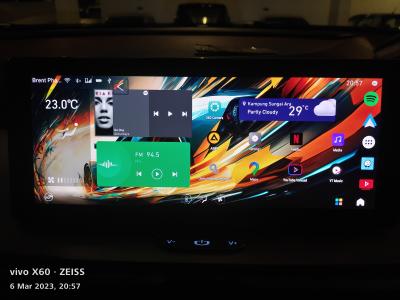
For my own preferences, below is what I'm using at this moment (currently still on AtlasOS, later when I'm GKUI19 then I can show again).

» Click to show Spoiler - click again to hide... «

muncheno
post Mar 10 2023, 06:02 PM

Enthusiast
*****
Senior Member
736 posts

Joined: Jun 2006
From: Ipoh
QUOTE(Asus @ Mar 10 2023, 04:36 PM)
im on version 617..the early version prior to 2nd march
*
if you run the installation script here without any app will also help you to disable Ota update.
However if you want to block also the manual update by SC, then you may install lock app such as LockIt.

https://github.com/xeon1989/Proton-X50-APK-...our_Own_Apps.md

If you must install the lockit app, you can also follow the script link above to prepare the files. I can check the app folder for you after you prepared it.
muncheno
post Mar 10 2023, 08:05 PM

Enthusiast
*****
Senior Member
736 posts

Joined: Jun 2006
From: Ipoh
QUOTE(Asus @ Mar 10 2023, 07:01 PM)
correct me if im wrong..i already run the script by xeon1989..meaning there wont be OTA update anymore is it? its already disable by the script?
*
Yes yes, you are right ota already disabled with Xeonn1989 Atlas script.
Unless your reinstall the ota update from A-Store again.
muncheno
post Mar 10 2023, 08:06 PM

Enthusiast
*****
Senior Member
736 posts

Joined: Jun 2006
From: Ipoh
edited.
Removed - double post.

This post has been edited by muncheno: Mar 10 2023, 08:06 PM
muncheno
post Mar 11 2023, 08:29 PM

Enthusiast
*****
Senior Member
736 posts

Joined: Jun 2006
From: Ipoh
QUOTE(cyh03176 @ Mar 11 2023, 07:02 PM)
just collected my car today. i found out that android auto stopped working (android auto was installed by the SC) after i got an WeChat video call. is there any way to solve this issue?
*
QDlink?
muncheno
post Mar 13 2023, 02:18 PM

Enthusiast
*****
Senior Member
736 posts

Joined: Jun 2006
From: Ipoh
QUOTE(cyh03176 @ Mar 13 2023, 02:01 PM)
nope, android auto. just clear the data and cache and all is well now.
*
Interesting which SC help install Android Auto? Can PM me?
For Android Auto, you are using wired or wireless ? What phone you are using?

Considering you already reset the HUR/AA app, do you know 1st time activation or on wireless will or may need to "Start Head Server Unit" ?

I don't recall is supported in AA, I presume you refer to your usage of WeChat in your phone has cause the disconnection and since then you can't get to connect your to HUR/AA.
muncheno
post Mar 18 2023, 03:55 PM

Enthusiast
*****
Senior Member
736 posts

Joined: Jun 2006
From: Ipoh
QUOTE(coolguy99 @ Mar 18 2023, 12:50 PM)
Will the carlinkit app be able to install after the 2 March patch?

Is there anyway to revert back to GKUI after upgrading to ATLAS?
*
Already stated a numbers of times here in this thread, after AtlasOS updated after 2nd March cant run the script/ install apk anymore.

So no app no carlinkit app.

Downgrade is the only option I know.

This post has been edited by muncheno: Mar 18 2023, 06:21 PM
muncheno
post Mar 21 2023, 03:36 PM

Enthusiast
*****
Senior Member
736 posts

Joined: Jun 2006
From: Ipoh
QUOTE(ycs @ Mar 21 2023, 01:44 PM)
for 3rd year insurance , do you notice the agreed value remains at 93k for FS? using MSIG
*
Yes, due to X50 car value increased..1st batch.. bought cheaper.

This post has been edited by muncheno: Mar 21 2023, 03:37 PM
muncheno
post Mar 21 2023, 08:04 PM

Enthusiast
*****
Senior Member
736 posts

Joined: Jun 2006
From: Ipoh
QUOTE(ycs @ Mar 21 2023, 01:44 PM)
for 3rd year insurance , do you notice the agreed value remains at 93k for FS? using MSIG
*
just checked mine, my car (X50 FS from jan/2021) agreed value at Rm85k.
muncheno
post Mar 21 2023, 08:34 PM

Enthusiast
*****
Senior Member
736 posts

Joined: Jun 2006
From: Ipoh
QUOTE(ycs @ Mar 21 2023, 08:29 PM)
which insurer?
*
Berjaya Sampo
muncheno
post Mar 23 2023, 07:04 PM

Enthusiast
*****
Senior Member
736 posts

Joined: Jun 2006
From: Ipoh
QUOTE(rc2x @ Mar 23 2023, 06:19 PM)
Hi, I cant even open the ES file manager after installation complete. Help please.  icon_question.gif
https://github.com/xeon1989/Proton-X50-APK-Installer-GKUI
*
Your IHU is running AtlasOS or GKUI19 OS ?
Precisely your IHU currently running which version no?
muncheno
post Mar 23 2023, 07:53 PM

Enthusiast
*****
Senior Member
736 posts

Joined: Jun 2006
From: Ipoh
QUOTE(rc2x @ Mar 23 2023, 07:27 PM)
Does this GKUI version works?
user posted image
*
Sorry for asking more details again.
You successfully installed and you have the ES file manager icon on the IHU, but you can't start it?
If yes, I will suggest you to delete the ES icon (press and hold until it jiggles to delete) and then insert the uninstallation script to try again.

If you still can't then I will share with you another script.
muncheno
post Mar 24 2023, 01:07 PM

Enthusiast
*****
Senior Member
736 posts

Joined: Jun 2006
From: Ipoh
QUOTE(rc2x @ Mar 24 2023, 12:48 PM)
Yes can't start the ES file manager application. It will just return to the main screen. Already change the file manager version, still the same.

Would appreciate if you could share with me another script. Any changes with the one from xeon?
*
Had you tried the uninstallation first?
If my guess is correct, did you downgraded from AtlasOS?
Lastly, what you are trying to install here on the GKUI19? I may able to help address it with a script.
muncheno
post Mar 24 2023, 03:05 PM

Enthusiast
*****
Senior Member
736 posts

Joined: Jun 2006
From: Ipoh
Here is a link to GKUI19 installation script that different from Xeon1989.

https://mega.nz/file/UYNWhRbZ#QtZfDnMwmCnur...hAd9tXiOvAjWsoU

Note the script is meant for someone who minimumly already know how to use Xeon1989 script.

To use, extract the script to root of usb drive.

Before plug into IHU usb port, set car volume to:-

Volume level 0 - Special script ( only intended from my use or very advance user, so I won't explain much)

Volume level 1 - This installed all the apk files located in the APK folder, so put you own choice of apk files there before running the script.

Volume Level 2 - This installed bunch of apks, everyone need is different so after installed, delete those apps which not needed by you.

Volume level 3 and above - This is install minimal/basic apks.

Important Note:
1-To run the script, required to have internet connection.
2-For the apks listed in Vol level 2 or 3 & above, it will try to download for the net on first time if it detected it is not in the APK folder.
3-Script may not run properly - like failed to install or halfway stop there whenever I'm updating the server, if that happens try again on another time or day
4-Lastly if your IHU already containing the same app, it is set not to overwrite existing app. If you need it to update the app pls removed the old version first.

This post has been edited by muncheno: Mar 24 2023, 04:15 PM

muncheno
post Mar 24 2023, 05:34 PM

Enthusiast
*****
Senior Member
736 posts

Joined: Jun 2006
From: Ipoh
QUOTE(rc2x @ Mar 24 2023, 05:19 PM)
Yup, using the uninstallation script and then reinstall back. Stock, never upgrde to atlas.
Just google map / waze..
Thanks, will try it during weekends. To uninstall still use back the script by xeon? or is there another way?
*
The apps installed with the script shared by me can be deleted directly, no special script needed.

For automated script process then you need to set to Volume Level 0 (special menu) before plug in the USB, and then when option popup you need to change the volume up to 14 or 15 and later another confirmation need to set Volume down to 0 again to confirm. It can be hard as this is not intended for normal user.
Each time when question popup, you only have few seconds to Set the volume.
Of course, I will not recommend you to use this as it was intended for my own use.

Edited: I don't use google maps... thus it is not there, you could install manually using the X-plorer file manager provided. Click an hold the apk file, then choose install.

This post has been edited by muncheno: Mar 24 2023, 05:36 PM
muncheno
post Apr 2 2023, 08:54 PM

Enthusiast
*****
Senior Member
736 posts

Joined: Jun 2006
From: Ipoh
QUOTE(Voonz @ Apr 2 2023, 08:16 PM)
Is there a way for me to make my Android auto only answer phone calls using cable instead of Bluetooth?

Due to the Bluetooth issue of x50 (have to manually reconnect sometimes), it's really annoying.

Also when i answer phone or make calls on bluetooth, it doesn't automatically goes to car speaker. I have to manually turn to loudspeaker on the Android auto app
*
In the HUR, under settings -> audio, there is something like a audio sinkin option, I think that is related to Bluetooth audio.
You may want to try that.
muncheno
post Apr 3 2023, 12:59 PM

Enthusiast
*****
Senior Member
736 posts

Joined: Jun 2006
From: Ipoh
QUOTE(stxksy @ Apr 3 2023, 12:08 PM)
May I ask how do you customized the UI homepage into like that as shown in your attachment?
*
For launcher customization, I prefer to use Nova launcher at the moment.

If you are on AtlasOS, you can follow Xeon1989 guide here to install Nova launcher.

https://github.com/xeon1989/Proton-X50-APK-...our_Own_Apps.md

Else if you are on GKUI19, just download the Nova launcher and install.

Make sure you downloaded the version suitable for Android 5.1.
» Click to show Spoiler - click again to hide... «


muncheno
post Apr 5 2023, 05:34 PM

Enthusiast
*****
Senior Member
736 posts

Joined: Jun 2006
From: Ipoh
QUOTE(ycs @ Apr 5 2023, 12:41 PM)
» Click to show Spoiler - click again to hide... «

which version of Nova you using? i tried 6.2.3, can install but the apps dont appear on home screen even at Landscape format
*
I'm using the pro version but no different than 6.2.3.

You have to add the app drawers icon, app and widgets manually.

Basic stuff you will need:-
--------------------------
App Drawer:
Press on hold on the empty space until it pop up menu for wallpaper/widget/settings.
Choose Nova Actions shortcuts and pull it to the home screen, then set the nova action as App drawer.

Dock:
You will also need to enable the DOCK to set the apps shortcuts on the side.

Wallpaper:
Copy any wallpaper your prefer to your IHU sdcard if can't open USBDrive (can't remember this for AtlasOS, if not mistaken you need to install a file manager).

This post has been edited by muncheno: Apr 5 2023, 07:26 PM
muncheno
post Apr 6 2023, 12:16 AM

Enthusiast
*****
Senior Member
736 posts

Joined: Jun 2006
From: Ipoh
QUOTE(ycs @ Apr 5 2023, 10:42 PM)
the proton widgets too big, cant stick to Home screen; can show your Home screen setup; now YT Vanced also not working, have to find another version
*
You can set your home screen the grid to finer so it can accommodate the widgets. After pull the widgets out then resized the widgets to a proper size.
No sure what you need to see on my home screen setup, previously shared the AtlasOS and now running GKUI19.

For YT, what I familiar is newpipe or smarttube.
My favorite is smarttube.

https://github.com/yuliskov/SmartTubeNext

smarttubenext.com
https://smarttubenext.com
SmartTubeNext APK 17.54 Download Official (2023)

To login your Google account, run smarttube on your smart TV first and login ur google acc.
Then backup and restore it to your car.

Note, smarttube designed to work with remote control.
To scroll, you need to hop(to click) on the thumbnails.

Alternatively, you can link smarttube with your phone. Use phone to cast video on 1st time then use your phone as remote control.

This post has been edited by muncheno: Apr 6 2023, 01:25 PM
muncheno
post Apr 6 2023, 12:20 AM

Enthusiast
*****
Senior Member
736 posts

Joined: Jun 2006
From: Ipoh
For those who likes to remove the YT on AtlasOS can try this script.

https://drive.google.com/file/d/1rEaTYDAVjv...ew?usp=drivesdk

The zip file contains:-

1-uninstall will remove YT.
2-install will put newpipe/smartTube, please remove the subfolder if you don't needed the app.

This post has been edited by muncheno: Apr 6 2023, 12:24 AM

17 Pages « < 13 14 15 16 17 >Top
 

Change to:
| Lo-Fi Version
0.0327sec    0.91    7 queries    GZIP Disabled
Time is now: 15th December 2025 - 05:38 AM