Welcome Guest ( Log In | Register )

Outline · [ Standard ] · Linear+

 XiaoMi AX3600 AX1800 AX5 Vlan tagging

views
     
TSheidarren
post Sep 26 2020, 02:25 AM

Getting Started
**
Junior Member
248 posts

Joined: Aug 2018
QUOTE(eugenecctan @ Sep 26 2020, 02:23 AM)
My Ax1800 shipped with latest firmware. No issue to follow the step. Anyhow.. My line was disconnected jst now. Not sure unifi issue or router. After restart then OK. Will monitor these few days. Thanks.
*
I always set the daily reboot for maximizing stability, so I can leave it at corners and forget about it
TSheidarren
post Nov 30 2020, 01:02 PM

Getting Started
**
Junior Member
248 posts

Joined: Aug 2018
QUOTE(cle900706 @ Nov 30 2020, 10:12 AM)
hi guys, having the ax5 for couple of months now.
once in awhile it will disconnect from internet. in the router options it shows connected. need to connect n reconnect several times to get it connected again.

besides that, after restart router, seems like need try couple of times to connect and reconnect in settings to get connected.

any advice of fix for this?
*
Try to change the LAN cable, these Xiaomi routers seem as picky as AC86U, I had an issue like you, in the end I found that it jumped between 100mbps and 1000mbps for cable connection speed causes connection issue, solved by changing to a better cable.
TSheidarren
post Nov 30 2020, 01:09 PM

Getting Started
**
Junior Member
248 posts

Joined: Aug 2018
Also, these Xiaomi routers come with a power adaptor which just enough for it to power up, as a power supply we do recommend to have more than 50% power reserve but Xiaomi original power adaptor only has about 20% power reserve, it might cause some instability issue depending on the stability of your house electricity supply. I upgraded AX3600's original 12v/2a to 12v/3a, and use the 12v/2a to power AX1800 which originally came with only 12v/1a. It's not necessary unless you are facing stability issue, I did it just because I have an extra 12v/3a power adaptor.
TSheidarren
post Dec 1 2020, 06:57 PM

Getting Started
**
Junior Member
248 posts

Joined: Aug 2018
QUOTE(flubear @ Dec 1 2020, 05:19 PM)
just sharing
don't know why sometimes Unifi on some place can't use MTU 1492 and need to use MTU 1480.
Had several clients with this issue where if using AX3600 with MTU1492, their website fails to load.... setting to MTU1480 it works ... Unifi's prob..

Time's line using MTU 1492 is ok.
*
This is due to MSS clamping, some router will change MSS according to the MTU that you set and some doesn’t, so I will always use default since I never notice any different between 1480 and 1492, no lower ping and no faster speed, an extra 12 of MTU doesn’t make things day and night, so just leave it at 1480 and you are good to go.

This post has been edited by heidarren: Dec 1 2020, 07:00 PM
TSheidarren
post Dec 1 2020, 06:59 PM

Getting Started
**
Junior Member
248 posts

Joined: Aug 2018
QUOTE(heidarren @ Dec 1 2020, 06:57 PM)
This is due to MSS clamping, some router will change MSS according to the MTU that you set and some doesn’t, so I will always use default since I never notice any different between 1480 and 1492, no lower ping and no faster speed, an extra 12 of MTU doesn’t make things day and night, so just leave it at 1480 and you are good to go.
*
TSheidarren
post Dec 5 2020, 06:46 PM

Getting Started
**
Junior Member
248 posts

Joined: Aug 2018
user posted image

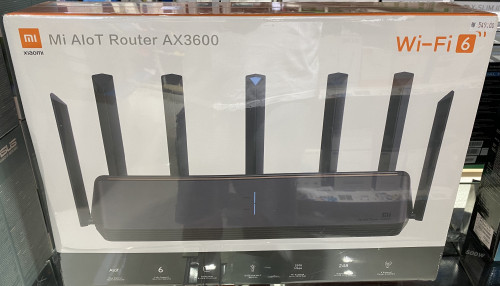
Saw this in Low Yat Plaza, RM549....... It might come with international firmware, from what I found in openwrt forums regarding int firmware is it has language option, with lower txpower, and no VLAN tagging option.

Check via SSH command, China AX3600 has 31dBm/29dBm/27dBm for txpower high/mid/low, int firmware might have much lower txpower in order to match worldwide regulations.
TSheidarren
post Dec 31 2020, 06:02 PM

Getting Started
**
Junior Member
248 posts

Joined: Aug 2018
QUOTE(daigoking @ Dec 31 2020, 03:57 PM)
Xiaomi AX6000 seem going to sell on 08 Jan...anyone plan to buy it?
*
1. CPU downgraded, I think this processor can only do 500mbps QoS, AX3600 can even handle 1000mbps QoS.
2. The extra speed required client to support, unless u have the latest Snapdragon 888 phone, or else it’s nothing to u.
3. SSH cracking is unknown, hopefully XiaoMi doesn’t lock SSH access like AX6.

Conclusion, unless u have 2.5G LAN or have latest Snapdragon 888 phone, or else AX3600 is better for u
TSheidarren
post Dec 31 2020, 06:03 PM

Getting Started
**
Junior Member
248 posts

Joined: Aug 2018
QUOTE(daigoking @ Dec 31 2020, 03:48 PM)
Anyone tried this AX1800 or AX3600 work for Celcom Fiber? I can see Celcom Fiber also need vlan tagging (I saw 623 in my router setting). Just want to confirmed Xiaomi AX3600 will work for Celcom fiber before place order.
*
It should be work if u have the correct VLAN tagging
TSheidarren
post Jan 6 2021, 10:37 PM

Getting Started
**
Junior Member
248 posts

Joined: Aug 2018
Since it’s actually openwrt based, you may look for solution in openwrt forums, see what commands can set VLAN for iptv for LAN port 2/3
TSheidarren
post Jan 23 2021, 06:26 PM

Getting Started
**
Junior Member
248 posts

Joined: Aug 2018
QUOTE(jchong @ Jan 23 2021, 04:34 PM)
Another question, how to connect my AX1800 to the Mi Wi-Fi app on my phone?

After launching the app, I come to this screen and tap "+Add Mi Router"
[attachmentid=10763912]

Then the app shows searching...
[attachmentid=10763917]

Then it jumps to this screen...
[attachmentid=10763920]

Basically I'm stuck here. The app can't seem to find any devices to connect to.
*
Change app region to mainland China
TSheidarren
post Feb 15 2021, 02:19 AM

Getting Started
**
Junior Member
248 posts

Joined: Aug 2018
QUOTE(jianwei87 @ Feb 15 2021, 01:18 AM)
Possible using mikrotik as router and ax3600 as AP with Mesh?
*
Xiaomi just released AX3600 firmware with AP mesh mode supported, just go to official website download the latest firmware and update manually.
TSheidarren
post Feb 22 2021, 08:23 PM

Getting Started
**
Junior Member
248 posts

Joined: Aug 2018
QUOTE(go626201 @ Feb 22 2021, 06:43 PM)
AX6000 better wifi performance and coverage for AP usage,if use as router better with ax3600 for better CPU/NPU.
Just a few watts only not a big issue in malaysia but getting big improvement for wifi, Worth It.

And singapore users said that global rom wifi coverage smaller.
*
Unless u have 4x4 160MHz client (which I can’t seems to find any Wi-Fi adaptors or smartphone/laptop supported in the market), or else u can’t tell any diff between this 2 models for Wi-Fi, but AX6000 has some obvious downside 1. CPU is much weaker, 2. beside of the 2.5G LAN port, the rest of those 3 LAN ports shared 1gbps to CPU which will seriously limit ur speed, unless u only need 1 LAN port only.

For me, AX6000 looks good on paper, but AX3600 is much practical in real life.
TSheidarren
post Feb 26 2021, 07:06 PM

Getting Started
**
Junior Member
248 posts

Joined: Aug 2018
QUOTE(Mushi.Nv @ Feb 25 2021, 05:16 PM)
Using Ax3600 now as AP.
Anyone know for ipv6, we should use Native or NAT6? Both can't enable ipv6 for me.
Directly connected to Archer c5v will give me ipv6
*
It seems can be done by using WinSCP, in network there change IPv6 to “relay”, but I’m not really sure exactly steps for it, u may dig in openwrt forum to see how ppl use IPv6 relay.
TSheidarren
post May 6 2021, 02:16 PM

Getting Started
**
Junior Member
248 posts

Joined: Aug 2018
QUOTE(LanzaDelRelampago @ May 6 2021, 12:45 AM)
How good it is if compared to ax6000 or ax3600.. is it any better. Also does it support dual wan or dual wan aggregation. Do you use it as ap or how do you set up the vlan. These answer would greatly help me before purchasing the ax9000.. only strong point for me was the shape, love the shape. Thanks in advance 😁
*
AX3600 has (compare to AX6000):
Better CPU
Better 2.4GHz (dedicated chipset)
SSH access (so VLAN tagging is possible)

AX6000 has (compare to AX3600):
Better 5GHz performance (5% faster, more OFDMA client supported)
Better 5GHz radio coverage (in radar pattern, AX3600 is strong at front and rear, but weak at sides, AX6000 fixed it)
2.5GHz WAN/LAN port

AX9000 has (compare to AX6000):
Best CPU among these 3 routers
Best 5GHz chipset for 5G1 (even more OFDMA client supported)
Better 2.4GHz (dedicated chipset)
Slightly smaller 5GHz coverage than AX6000 due to Tri-Band, about the same with AX3600
2.5GHz WAN/LAN port


AX3600 is a better router and AX6000 is a better AP, AX9000 seems strong but it doesn't give you better coverage

Dual-wan is not supported but possible if you has good knowledge OpenWRT, same as IPTV VLAN tagging

 

Change to:
| Lo-Fi Version
0.0396sec    0.38    7 queries    GZIP Disabled
Time is now: 16th December 2025 - 10:25 PM