

 Jul 27 2020, 03:04 PM


QUOTE(Candy12 @ Jul 27 2020, 02:15 PM)
All retail ISPs that run on TNB Allo network will use the same fibre modem(ONT) just like TM HSBB.
The ISPs however will supply their own router model to match the kind of services they offer such as fixed voice and IPTV.
In the case of CBB, they offer the TP-Link Archer A6 which does not come with phone ports because probably the customer is subscribing a data-only plan.
The reason why I want to know the fibre modem(ONT) is because I'm interested to know what brand of OLT equipment they're using at their exchange. The fibre modem(ONT) is usually matched with the OLT switching equipment at their datacentre.

The ISPs however will supply their own router model to match the kind of services they offer such as fixed voice and IPTV.
In the case of CBB, they offer the TP-Link Archer A6 which does not come with phone ports because probably the customer is subscribing a data-only plan.
The reason why I want to know the fibre modem(ONT) is because I'm interested to know what brand of OLT equipment they're using at their exchange. The fibre modem(ONT) is usually matched with the OLT switching equipment at their datacentre.
QUOTE(Alpha_Tay @ Oct 29 2019, 05:04 AM)
unifi installation around 2 years ago, the installer cut the fibre and connect the fibre connector by hand, without install Fibre Wall Socket, there's no Soft Yellow Fibre Cable, Black Fibre Cable Straight into FIBERHOME ONU, it's still working today, without any issue.
unifi installation last month, at the same taman, before connect the Fibre Cable to the Distribution Point On TM Pole, unifi installer Fusion splicing the Fibre Cable with a Factory Packaged few Meter Fibre Cable with Fibre Connector Pre-installed, after pulling the Fibre Cable to the Destination, unifi installer Fusion splicing again the Fibre Cable with a Factory Packaged few Meter Fibre Cable with Fibre Connector Pre-installed, both cable are Black, have Steel wire Support, without install Fibre Wall Socket, there's no Soft Yellow Fibre Cable, Black Fibre Cable Straight into Huawei HG8240H5 claim to be Universal ONU Fibre modem, while the whole city unifi and other HSBB Provider was using FIBERHOME ONU. same taman few months ago new unifi installation still receive FIBERHOME ONU, just the new unifi branding at the plastic cover instead of older TM branding. this taman still has plenty of port left during 1st installation of unifi Distribution Point, not yet receive 2nd installation of unifi Distribution Point, while some other area of this city has receive it recently some months ago.
unifi installer write down unifi fibre port password, unifi username, unifi password, unifi phone number, unifi phone number password at the fibre modem box.
Huawei HG8240H5 can login with Default Username Password, Web GUI still Enabled.
at the same city, just saw a maxis fibre 30Mbps customer at Shop Lot Biz Area with Huawei HG8240H ONU Fibre modem that has TM Logo. he claim install it around Years ago.
https://www.shutterstock.com/image-photo/ma...odem-1072796903
there is at least 2 case i have seen with my own eye, that unifi installation at different Shop Lot Biz Area, Black fibre cable was coming from front Entrance through wall, but before the fibre cable through the wall, there's 2 fibre cable Connector to connect both fibre cable, i would provide the photo later if i found it.
Photo Uploaded
[attachmentid=10343807]
unifi installation last month, at the same taman, before connect the Fibre Cable to the Distribution Point On TM Pole, unifi installer Fusion splicing the Fibre Cable with a Factory Packaged few Meter Fibre Cable with Fibre Connector Pre-installed, after pulling the Fibre Cable to the Destination, unifi installer Fusion splicing again the Fibre Cable with a Factory Packaged few Meter Fibre Cable with Fibre Connector Pre-installed, both cable are Black, have Steel wire Support, without install Fibre Wall Socket, there's no Soft Yellow Fibre Cable, Black Fibre Cable Straight into Huawei HG8240H5 claim to be Universal ONU Fibre modem, while the whole city unifi and other HSBB Provider was using FIBERHOME ONU. same taman few months ago new unifi installation still receive FIBERHOME ONU, just the new unifi branding at the plastic cover instead of older TM branding. this taman still has plenty of port left during 1st installation of unifi Distribution Point, not yet receive 2nd installation of unifi Distribution Point, while some other area of this city has receive it recently some months ago.
unifi installer write down unifi fibre port password, unifi username, unifi password, unifi phone number, unifi phone number password at the fibre modem box.
Huawei HG8240H5 can login with Default Username Password, Web GUI still Enabled.
at the same city, just saw a maxis fibre 30Mbps customer at Shop Lot Biz Area with Huawei HG8240H ONU Fibre modem that has TM Logo. he claim install it around Years ago.
» Click to show Spoiler - click again to hide... «
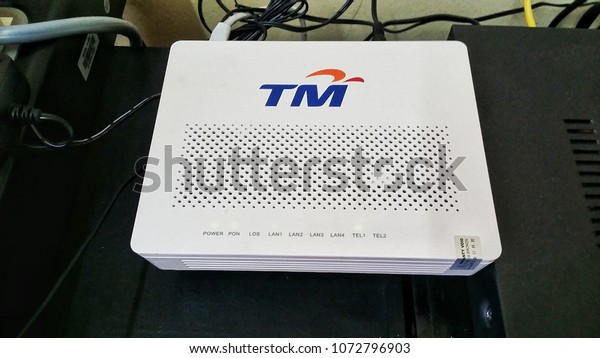
https://www.shutterstock.com/image-photo/ma...odem-1072796903
there is at least 2 case i have seen with my own eye, that unifi installation at different Shop Lot Biz Area, Black fibre cable was coming from front Entrance through wall, but before the fibre cable through the wall, there's 2 fibre cable Connector to connect both fibre cable, i would provide the photo later if i found it.
Photo Uploaded
[attachmentid=10343807]
QUOTE(thankyou @ Jul 21 2020, 02:13 PM)
I have a friend who are staying at SS1 (Sea Park) and during March, his Alcatel ONU was struck by lightning through power adapter...
TM replaced a Huawei HG ONU for him. I think you should request for Huawei replacement as well!
Good luck!
This post has been edited by Alpha_Tay: Jul 27 2020, 03:08 PMTM replaced a Huawei HG ONU for him. I think you should request for Huawei replacement as well!
Good luck!
 Quote
Quote


 0.0748sec
 0.40
0.40
 7 queries
 GZIP Disabled