

I recently purchased a SATA adapter and connected it to my current laptop.
I am getting the same error as the title ...
Once connected to the adapter, there is no motor sound at all
Is there any way to recover? HELP NEEDED!

Disk unknown-Recovery method (Not Initialized), Help help or recovery solutions??
|
|
 May 26 2020, 11:19 AM, updated 6y ago May 26 2020, 11:19 AM, updated 6y ago
Return to original view | Post
#1
|
 
Probation
7 posts Joined: May 2020 
|
My old PC is broken and there is a hard disk that has been left unused for several years.
I recently purchased a SATA adapter and connected it to my current laptop. I am getting the same error as the title ... Once connected to the adapter, there is no motor sound at all Is there any way to recover? HELP NEEDED! |
|
|
May 26 2020, 02:09 PM
Return to original view | Post
#2
|
|
Probation
7 posts Joined: May 2020
|
QUOTE(Jugher1 @ May 26 2020, 11:32 AM) You can fix the disk not initialized error by initializing the hard drive: Wow I will give this solution a try! Thanks for the source and help bro!Step1: Go to My Computer or This PC and right click on it. Step2: Select “Disk Management”, then right-click on your hard drive and click on “Initialize Disk” option. Step3: A dialogue box will appear, choose the disk to initiate followed by choosing MBR or GPT partition style. 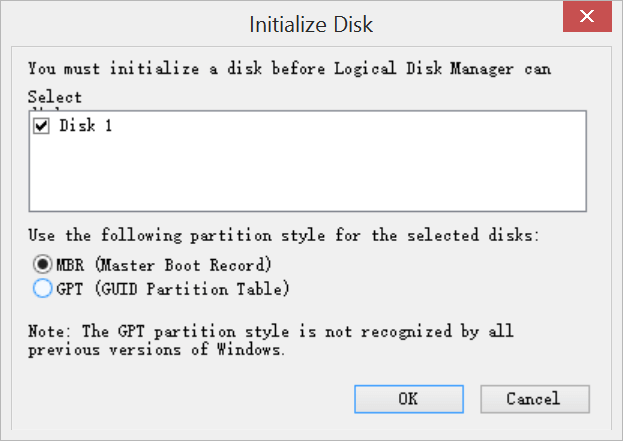 To be concerned that initializing the drive will lead to loss of data, hence, if you do have vital files on the hard drive, you can use a third-party data recovery tool to back up your data, you can try Bitwar Data Recovery, it offers a 30-day free trial and it's effective in data recovery, you can have a try.  |
| Change to: |  0.0136sec 0.0136sec
 0.54 0.54
 6 queries 6 queries
 GZIP Disabled GZIP Disabled
Time is now: 13th December 2025 - 12:48 PM |
 Quote
Quote