

I recently purchased a SATA adapter and connected it to my current laptop.
I am getting the same error as the title ...
Once connected to the adapter, there is no motor sound at all
Is there any way to recover? HELP NEEDED!

Disk unknown-Recovery method (Not Initialized), Help help or recovery solutions??
|
|
 May 26 2020, 11:19 AM, updated 6y ago May 26 2020, 11:19 AM, updated 6y ago
Show posts by this member only | Post
#1
|
 
Probation
7 posts Joined: May 2020 
|
My old PC is broken and there is a hard disk that has been left unused for several years.
I recently purchased a SATA adapter and connected it to my current laptop. I am getting the same error as the title ... Once connected to the adapter, there is no motor sound at all Is there any way to recover? HELP NEEDED! |
|
|
|
|
|
May 26 2020, 11:31 AM
Show posts by this member only | Post
#2
|
|
Probation
20 posts Joined: Dec 2019 
|
QUOTE(Magiet @ May 26 2020, 11:19 AM) My old PC is broken and there is a hard disk that has been left unused for several years. Hi, Sorry to hear that, maybe the hard is suddenly damaged.I recently purchased a SATA adapter and connected it to my current laptop. I am getting the same error as the title ... Once connected to the adapter, there is no motor sound at all Is there any way to recover? HELP NEEDED!  It is highly likely that it will not be read due to hard failure. In case of physical damage, there is a possibility of sufficient recovery, but it may vary depending on the hard condition. If it's a really important file, it might be a good idea to visit a data recovery center. Also, if you use an unauthorized recovery program, the recovery rate may decrease for various reasons. There is plenty of recovery potential, so wish you have good results !! |
|
|
May 26 2020, 11:32 AM
Show posts by this member only | Post
#3
|
|
Probation
18 posts Joined: Nov 2019
|
QUOTE(Magiet @ May 26 2020, 11:19 AM) My old PC is broken and there is a hard disk that has been left unused for several years. You can fix the disk not initialized error by initializing the hard drive:I recently purchased a SATA adapter and connected it to my current laptop. I am getting the same error as the title ... Once connected to the adapter, there is no motor sound at all Is there any way to recover? HELP NEEDED! Step1: Go to My Computer or This PC and right click on it. Step2: Select “Disk Management”, then right-click on your hard drive and click on “Initialize Disk” option. Step3: A dialogue box will appear, choose the disk to initiate followed by choosing MBR or GPT partition style. 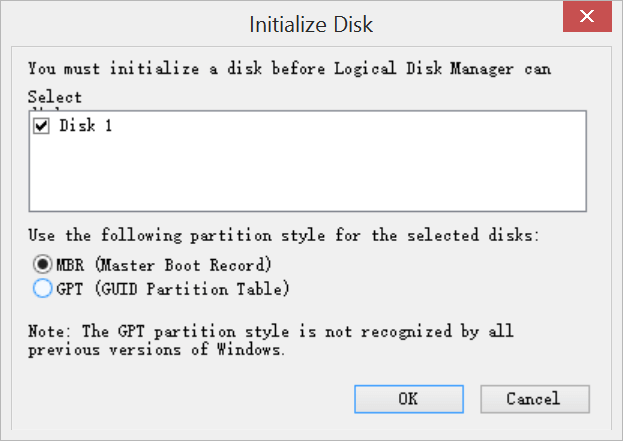 To be concerned that initializing the drive will lead to loss of data, hence, if you do have vital files on the hard drive, you can use a third-party data recovery tool to back up your data, you can try Bitwar Data Recovery, it offers a 30-day free trial and it's effective in data recovery, you can have a try. |
|
|
May 26 2020, 02:09 PM
Show posts by this member only | Post
#4
|
|
Probation
7 posts Joined: May 2020
|
QUOTE(Jugher1 @ May 26 2020, 11:32 AM) You can fix the disk not initialized error by initializing the hard drive: Wow I will give this solution a try! Thanks for the source and help bro!Step1: Go to My Computer or This PC and right click on it. Step2: Select “Disk Management”, then right-click on your hard drive and click on “Initialize Disk” option. Step3: A dialogue box will appear, choose the disk to initiate followed by choosing MBR or GPT partition style. To be concerned that initializing the drive will lead to loss of data, hence, if you do have vital files on the hard drive, you can use a third-party data recovery tool to back up your data, you can try Bitwar Data Recovery, it offers a 30-day free trial and it's effective in data recovery, you can have a try. |
|
|
Jul 5 2020, 06:39 PM
Show posts by this member only | Post
#5
|

Junior Member
82 posts Joined: Dec 2019 From: Florida 
|
QUOTE(Magiet @ May 26 2020, 02:09 PM) Wow I will give this solution a try! Thanks for the source and help bro! Did you try this solution? What's the update? |
|
|
Jul 10 2020, 07:14 AM
Show posts by this member only | Post
#6
|

Probation
5 posts Joined: Jul 2020
|
QUOTE(ChristopherFisher @ Jul 5 2020, 06:39 PM) Did you try this solution? What's the update? Quite not bad, but in terms of stability leaves much to be desired. |
|
|
Jul 16 2020, 11:29 AM
Show posts by this member only | Post
#7
|

Probation
26 posts Joined: Jul 2020
|
if not intialized with capacity volume showed in disk management (computer management > disk management)
> initializing the drive > you will see empty drive, don't do format yet* > use recovery tools, like easus data recovery for lost partition or file *if you click format, no hope to retry lost files... if not intialized and no capacity volume showed in disk management (computer management > disk management) > u can bring ur hdd to recovery center > or throw it... |
| Change to: |  0.0185sec 0.0185sec
 0.66 0.66
 5 queries 5 queries
 GZIP Disabled GZIP Disabled
Time is now: 11th December 2025 - 03:52 PM |
 Quote
Quote