Welcome Guest ( Log In | Register )

Outline · [ Standard ] · Linear+

Tech Support Unifi Router DS244WSGV, Advance setting mode

views
     
JuneResources
post May 25 2020, 11:17 AM

ONE Stop Resources
*******
Senior Member
4,167 posts

Joined: Mar 2012
From: Kuala Lumpur


QUOTE(s00nkit @ May 25 2020, 10:35 AM)
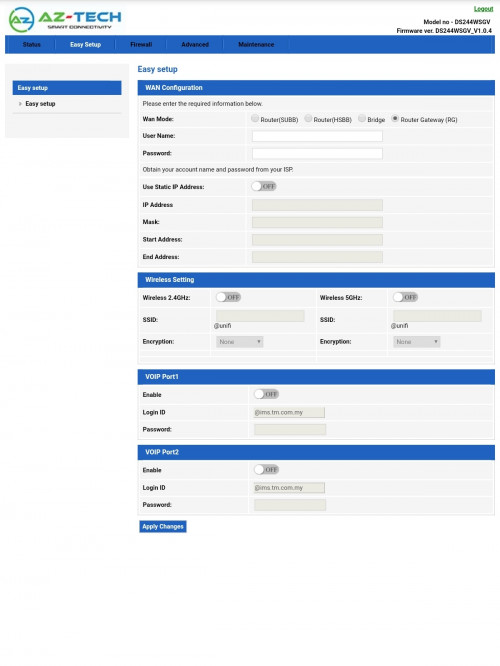
It 's new unifi router cannot setting router like got advance mode?

Aztech unifi router

user posted image
*
Woo~ Seems like they don't give crapped router brand Netis, or TPLink and DLink (Firmware by TM).
May I know how it's look like for the router physical?

Perhaps can share in here so that we have a big picture there. laugh.gif

This post has been edited by JuneResources: May 25 2020, 11:18 AM
JuneResources
post May 27 2020, 07:30 AM

ONE Stop Resources
*******
Senior Member
4,167 posts

Joined: Mar 2012
From: Kuala Lumpur


QUOTE(s00nkit @ May 25 2020, 01:33 PM)
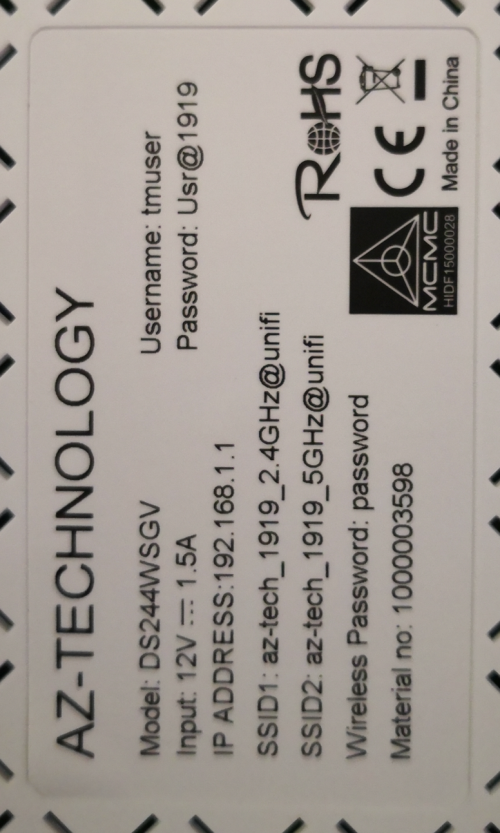
user posted image

THIS IS the new router Model & LOGIN INFO
*
Shit, I saw the wifi got suffix @unifi. Is it possible to remove @unifi? Lolzz..

QUOTE(Candy12 @ May 26 2020, 12:28 PM)
This router is definitely not from the official Aztech Singapore which is now into home consumer electrical products more than networking today. Their routers suck too anyway back in the DSL days when their WebGUI firmwares would often get stucked and bricked easily when tinkering with their settings and commit ROM writes.

This DS244WSGV is a cheap unbranded OEM model sourced from China which goes under many different brands around the world. China has been known to hide behind different country source when pushing their products to markets as recently Japan has found out that their face masks supply was not as claimed to be Taiwanese but was actually made in China sold to them under a Taiwanese proxy.

Same goes for this router, besides A-Z Technology, it is also sold under some other Taiwanese company proxy known as ATW Technology, Inc. (Loopcomm) with a Taiwanese address.
http://www.atw.com.tw/product/product-detail.php

The very same model of the router is also sold under another China brand named Comnect with the same model number DS244WSGV on Alibaba.

TM is probably getting this router below RM50 in bulk as I've also sources that Huawei GPON fibre modems(ONT) can be acquired below RM40 in small bulk sizes of 40-50units today.
*
Then can we say it is imitation product of Aztech?
Crapped sometimes this China rebrand causing they don't have proper firmware to update/upgrade the stable version.

JuneResources
post May 28 2020, 09:43 AM

ONE Stop Resources
*******
Senior Member
4,167 posts

Joined: Mar 2012
From: Kuala Lumpur


QUOTE(ndzri @ May 27 2020, 02:19 PM)
Can remove use SSH into the router with tmadmin and Adm@xxxx (last four digit of Mac address). Then do command "config wlan interface ssid wlan0 <Your 2.4Ghz SSID>"

And
"config wlan interface ssid wlan1 <Your 5Ghz SSID>"

Remove the bracket <>

You can use terminus for Android as SSH client. Remember to enable SSH under remote access in GUI webpage.
*
It's seems like a bit same method remove by using command (just like tplink unifi).

But if I'm not wrong once you restart the router, then again @unifi will pop out again. Am I right?
JuneResources
post Jul 12 2020, 06:58 PM

ONE Stop Resources
*******
Senior Member
4,167 posts

Joined: Mar 2012
From: Kuala Lumpur


QUOTE(bobkiit @ Jul 10 2020, 07:53 PM)
Aztech is not good brand either
*
Brand is not the important.
The important is reliable dan durable.
The most important is stability network.

If the router always give you DC connections or auto reboot itself frequently, you will just boost up ur anger n keep playing around ur switch off n on..


Change to:
| Lo-Fi Version
0.0194sec    0.51    7 queries    GZIP Disabled
Time is now: 4th December 2025 - 04:12 AM