

Aztech unifi router
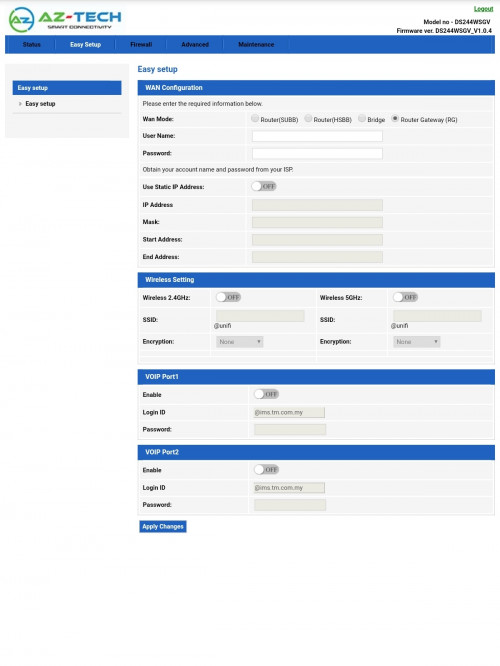
This post has been edited by s00nkit: May 25 2020, 10:36 AM
Tech Support Unifi Router DS244WSGV, Advance setting mode
|
|
 May 25 2020, 10:35 AM, updated 6y ago May 25 2020, 10:35 AM, updated 6y ago
Show posts by this member only | Post
#1
|
 
Newbie
14 posts Joined: Nov 2011 
|
It 's new unifi router cannot setting router like got advance mode?
Aztech unifi router This post has been edited by s00nkit: May 25 2020, 10:36 AM |
|
|
|
|
|
May 25 2020, 10:40 AM
Show posts by this member only | Post
#2
|

All Stars
21,962 posts Joined: Dec 2004 From: KL  
|
What do you mean by "advanced mode" ?
I see ADVANCED tab there. |
|
|
May 25 2020, 10:48 AM
Show posts by this member only | Post
#3
|

Junior Member
33 posts Joined: Sep 2013 From: Selangor 
|
mybe he mean operator mode like other unifi router ??
|
|
|
May 25 2020, 11:09 AM
Show posts by this member only | IPv6 | Post
#4
|
|
Newbie
14 posts Joined: Nov 2011
|
QUOTE(WaCKy-Angel @ May 25 2020, 11:40 AM) What do you mean by "advanced mode" ? But the advance tab not like advanve setting, cannot modify default ip address like before .I see ADVANCED tab there.  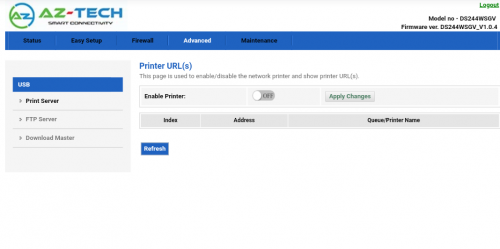 |
|
|
May 25 2020, 11:10 AM
Show posts by this member only | IPv6 | Post
#5
|
|
Newbie
14 posts Joined: Nov 2011
|
QUOTE(emirudin @ May 25 2020, 11:48 AM) mybe he mean operator mode like other unifi router ?? Cannot modify wifi RTS , CDM setting . And so simple for setting. I think maybe got advance mode, but i dont have the access code. |
|
|
May 25 2020, 11:17 AM
Show posts by this member only | IPv6 | Post
#6
|

Senior Member
4,167 posts Joined: Mar 2012 From: Kuala Lumpur  
|
QUOTE(s00nkit @ May 25 2020, 10:35 AM) It 's new unifi router cannot setting router like got advance mode? Woo~ Seems like they don't give crapped router brand Netis, or TPLink and DLink (Firmware by TM).Aztech unifi router May I know how it's look like for the router physical? Perhaps can share in here so that we have a big picture there.  This post has been edited by JuneResources: May 25 2020, 11:18 AM |
|
|
|
|
|
May 25 2020, 11:42 AM
Show posts by this member only | Post
#7
|
|
All Stars
21,962 posts Joined: Dec 2004 From: KL
|
QUOTE(s00nkit @ May 25 2020, 11:09 AM) But the advance tab not like advanve setting, cannot modify default ip address like before . QUOTE(s00nkit @ May 25 2020, 11:10 AM) Cannot modify wifi RTS , CDM setting . And so simple for setting. What ID u used to login the router? Most routers have 2 levels of ID ie normal user and Admin user.I think maybe got advance mode, but i dont have the access code. |
|
|
May 25 2020, 12:46 PM
Show posts by this member only | Post
#8
|
|
Senior Member
1,418 posts Joined: Jul 2015
|
QUOTE(s00nkit @ May 25 2020, 10:35 AM) It 's new unifi router cannot setting router like got advance mode? the oem aztech routers in sg usually hv a special hidden url to enter advanced mode. it is not dependent on the user account used to login. try asking the unifi tech?Aztech unifi router Edit: this looks like a rebranded taiwan router not using aztech usual broadcom fw. it might not need a special url This post has been edited by miloaisdino: May 25 2020, 12:52 PM |
|
|
May 25 2020, 01:33 PM
Show posts by this member only | IPv6 | Post
#9
|
|
Newbie
14 posts Joined: Nov 2011
|
QUOTE(WaCKy-Angel @ May 25 2020, 12:42 PM) What ID u used to login the router? Most routers have 2 levels of ID ie normal user and Admin user. 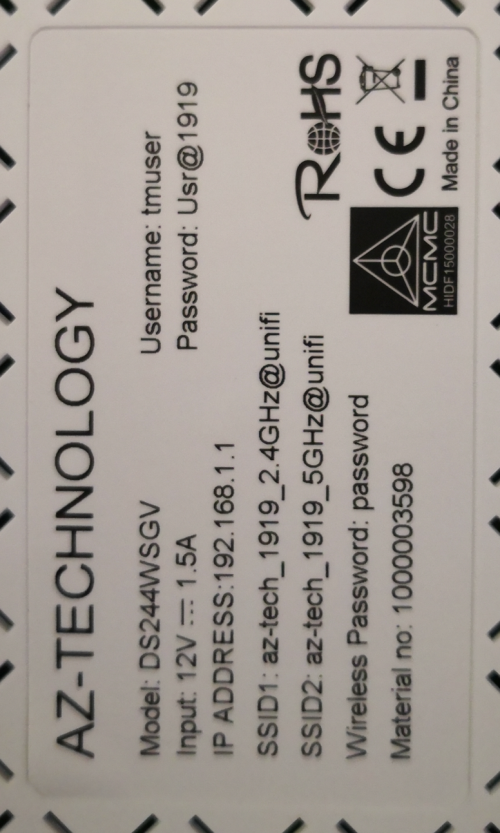 THIS IS the new router Model & LOGIN INFO |
|
|
May 25 2020, 01:37 PM
|
|
Newbie
14 posts Joined: Nov 2011
|
QUOTE(WaCKy-Angel @ May 25 2020, 12:42 PM) What ID u used to login the router? Most routers have 2 levels of ID ie normal user and Admin user. I think is it got 2 different ID to login the setting also. I don't have ask the technical support how to login to advance mode. So I hope can get this info at lowyat forum.  |
|
|
May 25 2020, 02:20 PM
Show posts by this member only | IPv6 | Post
#11
|

Junior Member
315 posts Joined: Mar 2014
|
Anyone knows how to port forward this router
|
|
|
May 25 2020, 05:32 PM
|
|
All Stars
21,962 posts Joined: Dec 2004 From: KL
|
QUOTE(s00nkit @ May 25 2020, 01:37 PM) I think is it got 2 different ID to login the setting also. I don't have ask the technical support how to login to advance mode. So I hope can get this info at lowyat forum. That is definitely not the admin passwordTry this but i suspect not correct. Id: admin Pwd: admin Id: admin Pwd: "leave it blank" I google this model no result at all. Must be new model i guess. Perhaps wait for someone else that knows the default password to come. Bananz liked this post
|
|
|
May 25 2020, 08:12 PM
|

Junior Member
397 posts Joined: Aug 2009 From: Yong Peng
|
Username tmadmin
Password Adm@(last 4 mac digit) I received this router too. It suck. |
|
|
|
|
|
May 25 2020, 08:50 PM
Show posts by this member only | IPv6 | Post
#14
|
|
Newbie
14 posts Joined: Nov 2011
|
QUOTE(MuhammadFird @ May 25 2020, 09:12 PM) Username tmadmin It's working. Thank you Password Adm@(last 4 mac digit) I received this router too. It suck. WaNaWe900 liked this post
|
|
|
May 26 2020, 12:28 PM
Show posts by this member only | IPv6 | Post
#15
|

Senior Member
1,878 posts Joined: Apr 2019
|
QUOTE(JuneResources @ May 25 2020, 11:17 AM) Woo~ Seems like they don't give crapped router brand Netis, or TPLink and DLink (Firmware by TM). This router is definitely not from the official Aztech Singapore which is now into home consumer electrical products more than networking today. Their routers suck too anyway back in the DSL days when their WebGUI firmwares would often get stucked and bricked easily when tinkering with their settings and commit ROM writes.May I know how it's look like for the router physical? Perhaps can share in here so that we have a big picture there. This DS244WSGV is a cheap unbranded OEM model sourced from China which goes under many different brands around the world. China has been known to hide behind different country source when pushing their products to markets as recently Japan has found out that their face masks supply was not as claimed to be Taiwanese but was actually made in China sold to them under a Taiwanese proxy. Same goes for this router, besides A-Z Technology, it is also sold under some other Taiwanese company proxy known as ATW Technology, Inc. (Loopcomm) with a Taiwanese address. http://www.atw.com.tw/product/product-detail.php The very same model of the router is also sold under another China brand named Comnect with the same model number DS244WSGV on Alibaba. TM is probably getting this router below RM50 in bulk as I've also sources that Huawei GPON fibre modems(ONT) can be acquired below RM40 in small bulk sizes of 40-50units today. |
|
|
May 27 2020, 07:30 AM
|
|
Senior Member
4,167 posts Joined: Mar 2012 From: Kuala Lumpur
|
QUOTE(s00nkit @ May 25 2020, 01:33 PM) THIS IS the new router Model & LOGIN INFO QUOTE(Candy12 @ May 26 2020, 12:28 PM) This router is definitely not from the official Aztech Singapore which is now into home consumer electrical products more than networking today. Their routers suck too anyway back in the DSL days when their WebGUI firmwares would often get stucked and bricked easily when tinkering with their settings and commit ROM writes. Then can we say it is imitation product of Aztech?This DS244WSGV is a cheap unbranded OEM model sourced from China which goes under many different brands around the world. China has been known to hide behind different country source when pushing their products to markets as recently Japan has found out that their face masks supply was not as claimed to be Taiwanese but was actually made in China sold to them under a Taiwanese proxy. Same goes for this router, besides A-Z Technology, it is also sold under some other Taiwanese company proxy known as ATW Technology, Inc. (Loopcomm) with a Taiwanese address. http://www.atw.com.tw/product/product-detail.php The very same model of the router is also sold under another China brand named Comnect with the same model number DS244WSGV on Alibaba. TM is probably getting this router below RM50 in bulk as I've also sources that Huawei GPON fibre modems(ONT) can be acquired below RM40 in small bulk sizes of 40-50units today. Crapped sometimes this China rebrand causing they don't have proper firmware to update/upgrade the stable version. |
|
|
May 27 2020, 02:19 PM
Show posts by this member only | IPv6 | Post
#17
|
|
Probation
2 posts Joined: May 2020
|
QUOTE(JuneResources @ May 27 2020, 07:30 AM) Shit, I saw the wifi got suffix @unifi. Is it possible to remove @unifi? Lolzz.. Can remove use SSH into the router with tmadmin and Adm@xxxx (last four digit of Mac address). Then do command "config wlan interface ssid wlan0 <Your 2.4Ghz SSID>"Then can we say it is imitation product of Aztech? Crapped sometimes this China rebrand causing they don't have proper firmware to update/upgrade the stable version. And "config wlan interface ssid wlan1 <Your 5Ghz SSID>" Remove the bracket <> You can use terminus for Android as SSH client. Remember to enable SSH under remote access in GUI webpage. DeadGoat666 liked this post
|
|
|
May 28 2020, 09:43 AM
Show posts by this member only | IPv6 | Post
#18
|
|
Senior Member
4,167 posts Joined: Mar 2012 From: Kuala Lumpur
|
QUOTE(ndzri @ May 27 2020, 02:19 PM) Can remove use SSH into the router with tmadmin and Adm@xxxx (last four digit of Mac address). Then do command "config wlan interface ssid wlan0 <Your 2.4Ghz SSID>" It's seems like a bit same method remove by using command (just like tplink unifi). And "config wlan interface ssid wlan1 <Your 5Ghz SSID>" Remove the bracket <> You can use terminus for Android as SSH client. Remember to enable SSH under remote access in GUI webpage. But if I'm not wrong once you restart the router, then again @unifi will pop out again. Am I right? |
|
|
May 29 2020, 12:49 AM
Show posts by this member only | IPv6 | Post
#19
|
|
Probation
2 posts Joined: May 2020
|
QUOTE(JuneResources @ May 28 2020, 09:43 AM) It's seems like a bit same method remove by using command (just like tplink unifi). It will show up if you use the web GUI to change any config regarding wlan like channel or password. You need override the ssid using ssh again.But if I'm not wrong once you restart the router, then again @unifi will pop out again. Am I right? As far as I'm using, It will not show up @unifi with reboot. It will retain the same ssid as configured using ssh. |
|
|
May 29 2020, 05:35 AM
|

Senior Member
1,341 posts Joined: Dec 2016
|
QUOTE(JuneResources @ May 25 2020, 11:17 AM) Woo~ Seems like they don't give crapped router brand Netis, or TPLink and DLink (Firmware by TM). Google is your friend. May I know how it's look like for the router physical? Perhaps can share in here so that we have a big picture there.  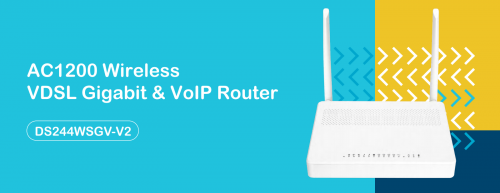 Source: Datasheet Nevertheless, I would advise TS to buy a newer router that gives you a better control of your home network. I don't really have a good experience with their ADSL router during streamyx era. This post has been edited by Jjuggler: May 29 2020, 05:41 AM |
|
|
May 29 2020, 11:06 AM
Show posts by this member only | IPv6 | Post
#21
|

Senior Member
2,734 posts Joined: Mar 2008
|
The real Aztech brand is Aztech with the following logos, not Az-tech...
  |
|
|
May 31 2020, 12:32 AM
Show posts by this member only | IPv6 | Post
#22
|

Senior Member
2,301 posts Joined: Oct 2008 From: android#[me@linuxbox me]$ my_location
|
i also get this modem router frm tm, but why i cant access it with 192.168.1.1?
|
|
|
May 31 2020, 10:05 AM
Show posts by this member only | IPv6 | Post
#23
|
|
Newbie
14 posts Joined: Nov 2011
|
QUOTE(napoli26 @ May 31 2020, 01:32 AM) i also get this modem router frm tm, but why i cant access it with 192.168.1.1? Check your ip , sometimes it will use 192.168.0.1 .....etc.. |
|
|
Jun 1 2020, 02:08 AM
Show posts by this member only | IPv6 | Post
#24
|

Junior Member
15 posts Joined: May 2010 From: Bukit Jalil
|
.
This post has been edited by Tiru92: Jun 9 2020, 03:35 AM |
|
|
Jun 1 2020, 06:35 PM
Show posts by this member only | IPv6 | Post
#25
|
|
Senior Member
1,878 posts Joined: Apr 2019
|
QUOTE(eclectice @ May 29 2020, 11:06 AM) The real Aztech brand is Aztech with the following logos, not Az-tech... I used to own Aztech modems during the ADSL era, damn lousy webgui interface and firmware.If you oftenly tinker with the settings, commit and save them the modems bricks very easily. Eventually moved to better brands such as the Singaporean Prolink brand, Zyxel and TP-Link. This brand eventually forgotten. Nowadays Aztech more into home consumer electrical products such as kitchen appliances and robot vacuum cleaners.  |
|
|
Jun 2 2020, 06:12 PM
|

Junior Member
18 posts Joined: Feb 2009
|
anybody know how to change dns in this router?
|
|
|
Jun 3 2020, 05:13 PM
|
|
Probation
1 posts Joined: Jun 2020
|
QUOTE(s00nkit @ May 25 2020, 11:35 AM) It 's new unifi router cannot setting router like got advance mode? Aztech unifi router https://pictr.com/images/2020/05/25/75UGTx.md.jpg Easy Setup > WAN Configuration > User Name : ********@unifi Password : PPoe (need to call TM 100 and ask the PPoe number) ------- Wireless Setting > SSID: (create the wifi name) @ unifi encryption: WPA2 Shared Key : (create your new wifi password) Apply Change (Done)  |
|
|
Jun 7 2020, 02:23 PM
Show posts by this member only | IPv6 | Post
#28
|
|
Probation
1 posts Joined: Jun 2020
|
QUOTE(s00nkit @ May 25 2020, 10:35 AM) It 's new unifi router cannot setting router like got advance mode? Aztech unifi router https://pictr.com/images/2020/05/25/75UGTx.md.jpg Use tmadmin as username and Admn@xxxx from your mac address for password |
|
|
Jun 9 2020, 11:48 PM
|

Senior Member
1,736 posts Joined: Dec 2006
|
today just move my nex.life to unifi and receive this piece of junk
WTH |
|
|
Jun 9 2020, 11:50 PM
|
|
Senior Member
3,389 posts Joined: Sep 2019
|
QUOTE(s00nkit @ May 25 2020, 10:35 AM) It 's new unifi router cannot setting router like got advance mode? Got, but need use command line sometimes to adjust, or reflash other firmware (beware may damage)Aztech unifi router |
|
|
Jun 10 2020, 08:00 PM
Show posts by this member only | IPv6 | Post
#31
|
|
Senior Member
1,736 posts Joined: Dec 2006
|
Anyone know how to bridge this router?
|
|
|
Jun 14 2020, 07:52 PM
Show posts by this member only | IPv6 | Post
#32
|
|
Newbie
4 posts Joined: Jan 2008
|
OMG GOT THIS SHITTY ROUTER TOO!
|
|
|
 Jun 18 2020, 05:56 PM Jun 18 2020, 05:56 PM
|
|
Probation
1 posts Joined: Jun 2020
|
QUOTE(s00nkit @ May 25 2020, 10:35 AM) It 's new unifi router cannot setting router like got advance mode? Can you please take a screenshot under firewall tab pleaseee....Aztech unifi router |
|
|
Jun 23 2020, 12:49 AM
|
|
Probation
1 posts Joined: Jun 2020
|
Got this router too! Has anyone tried to set up this router with VPN?
Also, if I were to replace this with another router, any suggestions on which one to go with? (I'm on the 30Mbps plan) Thanks! |
|
|
Jun 24 2020, 09:25 AM
|

Senior Member
2,347 posts Joined: Apr 2008
|
QUOTE(s00nkit @ May 25 2020, 10:35 AM) It 's new unifi router cannot setting router like got advance mode? TM usually will downgrade the login user ID, "admin" to user mode and create another admin level user ID as "operator". Aztech unifi router for example: Username: Management Password: TestingR2 Username : operator Password : h566UniFi Username : operator Password : telekom Some routers are using "tmadmin" as their username but password is according to the mac address of that router. for example, Username: tmadmin Password: Adm@XXXX XXXX is the last 4 digits of your router MAC address. |
|
|
Jun 24 2020, 09:31 AM
|
|
Senior Member
2,347 posts Joined: Apr 2008
|
QUOTE(s00nkit @ May 25 2020, 01:33 PM) THIS IS the new router Model & LOGIN INFO Do you know how to get Mac address? Login with your tmuser to check first, usually will showing something like this, example 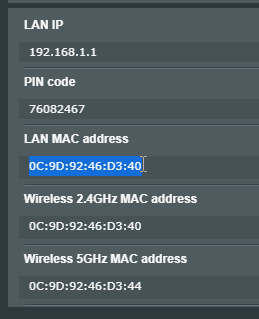 Assume your last 4 digits is 1919, same like the Usr@1919, just login as, username: tmadmin password: Adm@1919 This post has been edited by junclj: Jun 24 2020, 09:38 AM |
|
|
Jun 28 2020, 03:07 PM
Show posts by this member only | IPv6 | Post
#37
|

Junior Member
649 posts Joined: Jan 2003 From: KL
|
Been using this model for a week, the range seem less compared to previous D-Link AC1200 router, difficulty in getting connected downstairs, router is upstairs
|
|
|
Jun 28 2020, 04:55 PM
Show posts by this member only | IPv6 | Post
#38
|
|
Junior Member
19 posts Joined: May 2011
|
hi all,
this model how to check how many device connected? |
|
|
Jun 29 2020, 11:08 AM
|
|
Probation
1 posts Joined: Jun 2020
|
Maybe there's a administrator login
Try it out tmadmin Adm@xxxx (MAC address last 4 number) Usually tm will have such login credential normally on the past router Attached thumbnail(s) 
|
|
|
Jun 29 2020, 03:13 PM
|

Junior Member
239 posts Joined: Dec 2007
|
TM technician came and install this router to replace my DLink AC1200. Wifi strength improve alot compared to my DLink.
Funny thing is that he tested on his laptop the speed is around 500mbps but when i test on my PC using LAN showing connected at 1GBPS only able to reach 350 in speedtest. He said is my device problem. The END. alah. other problem is Now my network device (Yamaha network CD player) cant be seen in network drive. Anyone any advice? |
|
|
Jun 29 2020, 03:14 PM
|
|
Junior Member
239 posts Joined: Dec 2007
|
QUOTE(hedfi @ Jun 28 2020, 03:07 PM) Been using this model for a week, the range seem less compared to previous D-Link AC1200 router, difficulty in getting connected downstairs, router is upstairs My previous is also D Link AC1200. I actually got better wifi connection. Wow looks like they are pushing this router to user. |
|
|
Jul 6 2020, 02:01 AM
Show posts by this member only | IPv6 | Post
#42
|
|
Probation
1 posts Joined: Jul 2020
|
already use this router for 2 week now. so far got better signal/coverage than DLINK DIR850L. Manage to get 104MBps down stair (router is upstairs). Downside is - cannot configure the DNS/IP address. Now hav to use VPN or setting manual on the laptop
 . .Please guide me to bypass by setting the DNS in the router. |
|
|
Jul 8 2020, 10:37 PM
|
|
Junior Member
19 posts Joined: Jul 2006
|
QUOTE(mywii @ Jun 29 2020, 04:13 PM) TM technician came and install this router to replace my DLink AC1200. Wifi strength improve alot compared to my DLink. Go to Services->DNS Server to input manual DNS IP.Funny thing is that he tested on his laptop the speed is around 500mbps but when i test on my PC using LAN showing connected at 1GBPS only able to reach 350 in speedtest. He said is my device problem. The END. alah. other problem is Now my network device (Yamaha network CD player) cant be seen in network drive. Anyone any advice? |
|
|
Jul 8 2020, 10:38 PM
|
|
Junior Member
19 posts Joined: Jul 2006
|
Dear brothers and sisters. Is anyone here using this DS244WSGV to configure the firewall?
I am trying to use the URL Blocking but it doesn't work. I noticed something funny the router becomes unstable and slow after a period of time if I turned on URL blocking. Anyone has this encounter? Thanks! |
|
|
Jul 8 2020, 10:41 PM
|
|
Junior Member
19 posts Joined: Jul 2006
|
QUOTE(loon78a @ Jun 28 2020, 05:55 PM) hi all, WLAN->Basic Setting (under your wlan0 or wlan1)-> show active WLAN clients. But this couldn't see hostname and IP addresses.this model how to check how many device connected? |
|
|
Jul 9 2020, 01:01 PM
|

Junior Member
356 posts Joined: Nov 2013
|
QUOTE(sokei @ Jul 8 2020, 10:37 PM) Go to Services->DNS Server to input manual DNS IP. anyone manage to get it to work?i try key in google dns and cloudfare dns but it just couldn't work.... even turn off router and turn it on back but still couldn't work... any sifu can help  |
|
|
Jul 10 2020, 07:43 PM
Show posts by this member only | IPv6 | Post
#47
|

Junior Member
30 posts Joined: Nov 2006
|
look like this router is "mystery" for unifi user. Unfortunately, i also got this router for my unifi. not much info about this router. i'm curious if this router support mu-mimo.
|
|
|
Jul 10 2020, 07:53 PM
|
|
Junior Member
50 posts Joined: Nov 2017
|
QUOTE(JuneResources @ May 25 2020, 11:17 AM) Woo~ Seems like they don't give crapped router brand Netis, or TPLink and DLink (Firmware by TM). Aztech is not good brand eitherMay I know how it's look like for the router physical? Perhaps can share in here so that we have a big picture there. |
|
|
Jul 12 2020, 06:58 PM
|
|
Senior Member
4,167 posts Joined: Mar 2012 From: Kuala Lumpur
|
QUOTE(bobkiit @ Jul 10 2020, 07:53 PM) Aztech is not good brand either Brand is not the important. The important is reliable dan durable. The most important is stability network. If the router always give you DC connections or auto reboot itself frequently, you will just boost up ur anger n keep playing around ur switch off n on.. |
|
|
Jul 14 2020, 05:09 PM
|
|
Newbie
1 posts Joined: Jan 2014
|
it give me Rule has conflict in remote port!
when I port forward second time tcp or udp… any solution for this ? |
|
|
Jul 14 2020, 06:21 PM
Show posts by this member only | IPv6 | Post
#51
|

Probation
3 posts Joined: Nov 2019
|
This router sucks i just upgraded from my old router (keeps disconnecting problem) into this router, and although theres no more disconnection but instead it gave me no connection at all even though im connected to the wifi. Im speechless how am i going to survive with this? Downstair is fine but upstair suddenly have those problem..
|
|
|
Jul 26 2020, 11:13 AM
|
|
Junior Member
19 posts Joined: Jul 2006
|
Spotted another NTP issue on this router. My devices not able to update the time.
|
|
|
Aug 24 2020, 11:39 AM
|

Junior Member
410 posts Joined: Aug 2007
|
Hello,
Anyone know to setup this to bridge mode? My existing firewall will do the PPPoE dialer. |
|
|
Sep 14 2020, 09:50 AM
Show posts by this member only | IPv6 | Post
#54
|
|
Newbie
2 posts Joined: Apr 2012
|
after TM upgrade for customer this router, my old one is Dlink-dir842, now is DS244wsgv after check on website it is "connect company" router (http://comnect.com.cn/VDSL/207.html), the signal look like just horizontal spread, upstair or downstair signal become poor, everyone better consider wanted to change or not, of course in my view, need buy repeater to coordinate function only perfect, like i using 2 pcs tenda AC2100 as repeater for my wide house whereby has mu-mimo function(multiply user steady quality speed)/multiply antenna (so spread more far, wide and strong signal).......of course when talk with TM staff their said is wrong feeling when change router in beginning, after long time only know the real performance,latest product sure technology more good........just hope new router performance is better then old router if no can't change back already as techician take back old router already and not allow change back or without other router type already, just hope new router match theory of: more lastest product sure more improve the technology/functionality (of course also depend on function technology has)....
everyone can check the specification first before consider wanted to change or not ............... Dlink Dir-842 : https://www.dlink.com.my/product/ac1200-mu-...gigabit-router/ Connect DS244WGSV: http://comnect.com.cn/VDSL/207.html This post has been edited by lohkianchuang: Sep 14 2020, 11:26 AM |
|
|
Sep 14 2020, 10:05 AM
|
|
Senior Member
519 posts Joined: Jun 2011
|
Hi guys. Noob here.
I also got this router when upgrade to 300mbps last week. What I dun like is Technician warn me not to change the Wifi password, as I dun have the "full setting". If want to change password must call them to come again. True ah? I want to change password because the Tech know my current password while installing. |
|
|
Sep 14 2020, 11:12 AM
|
|
Newbie
2 posts Joined: Apr 2012
|
QUOTE(Fazab @ Sep 14 2020, 10:05 AM) Hi guys. Noob here. although they know your password, but must come near your house only can use internet, it no worry, how can someone so free time to park near your house to suft internet, very funnyI also got this router when upgrade to 300mbps last week. What I dun like is Technician warn me not to change the Wifi password, as I dun have the "full setting". If want to change password must call them to come again. True ah? I want to change password because the Tech know my current password while installing. |
|
|
Sep 14 2020, 11:20 AM
|

All Stars
14,908 posts Joined: Jul 2005
|
QUOTE(Fazab @ Sep 14 2020, 10:05 AM) Hi guys. Noob here. Report to MCMCI also got this router when upgrade to 300mbps last week. What I dun like is Technician warn me not to change the Wifi password, as I dun have the "full setting". If want to change password must call them to come again. True ah? I want to change password because the Tech know my current password while installing. |
|
|
Sep 14 2020, 04:42 PM
|
|
Junior Member
534 posts Joined: Nov 2007
|
Hi, does this router comes with restart scheduling feature? i.e. set daily time to restart the router unit? I can't seem to find this anywhere under the Admin account. Just confirming with all before giving up.
|
|
|
Sep 16 2020, 08:16 AM
Show posts by this member only | IPv6 | Post
#59
|
|
Senior Member
519 posts Joined: Jun 2011
|
QUOTE(lohkianchuang @ Sep 14 2020, 11:12 AM) although they know your password, but must come near your house only can use internet, it no worry, how can someone so free time to park near your house to suft internet, very funny A bit worried because from the comfort of my bedroom I can detect the SSID from 6 to 8 neighbours....The furthest is two houses away, I recognise his name on the SSID If someone sell me his password I can get in his network and do things that I won't do on my own network Means my neighbours can also do the same Update : Googled and found way to change SSID and password |
|
|
Oct 9 2020, 02:31 AM
Show posts by this member only | IPv6 | Post
#60
|
|
Probation
1 posts Joined: Oct 2020
|
QUOTE(MuhammadFird @ May 25 2020, 08:12 PM) Username tmadmin may i know where to find the mac? is it the router MAC ? because i tried every last 4 digit still didnt work.. im sorry for being stupid on this hehePassword Adm@(last 4 mac digit) I received this router too. It suck. |
|
|
Oct 9 2020, 02:56 AM
|

Senior Member
3,217 posts Joined: Dec 2006 From: City of Neko~~Nyaa~
|
Also got this router for my new home...
Inside the room, signal ok, Outside the room, just 1 tiny wall... Signal no more...or weak... Move 2~3 more step...signal gone... Damn useless router.... Anyone know can user replace the ONT that provide by tm? And which brand/model of router better? Unifi lite 100mbps |
|
|
Oct 16 2020, 02:25 PM
|
|
Junior Member
33 posts Joined: Dec 2010
|
Service->DHCP->DNS option: [Set Manualy]-> then you will get to fill in you preferred DNS addresses.
QUOTE(technoob2020 @ Jul 6 2020, 02:01 AM) already use this router for 2 week now. so far got better signal/coverage than DLINK DIR850L. Manage to get 104MBps down stair (router is upstairs). Downside is - cannot configure the DNS/IP address. Now hav to use VPN or setting manual on the laptop This post has been edited by cstan61: Oct 16 2020, 02:26 PM.Please guide me to bypass by setting the DNS in the router. |
|
|
Oct 17 2020, 06:30 PM
Show posts by this member only | IPv6 | Post
#63
|
|
Junior Member
100 posts Joined: Oct 2020
|
QUOTE(cstan61 @ Oct 16 2020, 02:25 PM) Service->DHCP->DNS option: [Set Manualy]-> then you will get to fill in you preferred DNS addresses. I don't see any service option... |
|
|
Oct 20 2020, 03:28 PM
|
|
Junior Member
33 posts Joined: Dec 2010
|
Did you login as tmadmin?
QUOTE(atrashcan @ Oct 17 2020, 06:30 PM) I don't see any service option... |
|
|
Nov 1 2020, 07:27 PM
Show posts by this member only | IPv6 | Post
#65
|
|
Probation
1 posts Joined: Nov 2020
|
try username:tmadmin
password:Adm@..............the last part of ur mac address. like mine is Adm@B759 |
|
|
Nov 6 2020, 04:42 PM
|

Junior Member
37 posts Joined: Apr 2006 From: PeeJay
|
You can check this dude's youtube page on how to log in to change wifi ID and password:
https://www.youtube.com/watch?v=jaCHBiN-jtY |
|
|
Dec 15 2020, 09:38 PM
Show posts by this member only | IPv6 | Post
#67
|

Junior Member
15 posts Joined: Nov 2006
|
QUOTE(mazranz @ Nov 6 2020, 04:42 PM) You can check this dude's youtube page on how to log in to change wifi ID and password: I also have the same router, I subscribe for 30Mbps, and unifi tech said dun hav 5G WiFi, please teach how to enable ithttps://www.youtube.com/watch?v=jaCHBiN-jtY The setting page is different from the YouTube page that u share. |
|
|
Dec 15 2020, 09:44 PM
Show posts by this member only | IPv6 | Post
#68
|
|
Junior Member
15 posts Joined: Nov 2006
|
QUOTE(s00nkit @ May 25 2020, 10:35 AM) It 's new unifi router cannot setting router like got advance mode? Can I just enable the 5G WiFi by enable it at WiFi setting?Aztech unifi router Do I need to log into WAN configuration? If I enable the 5G wifi |
|
|
Jan 5 2021, 08:45 PM
Show posts by this member only | IPv6 | Post
#69
|

Senior Member
1,595 posts Joined: Jan 2016
|
QUOTE(chtan470 @ Dec 15 2020, 09:44 PM) Can I just enable the 5G WiFi by enable it at WiFi setting? 1. NoDo I need to log into WAN configuration? If I enable the 5G wifi 2. Try login with these username: tmadmin pwd:Adm@(last 4 digits of the mac address) |
|
|
Jan 5 2021, 09:01 PM
|
|
Senior Member
1,595 posts Joined: Jan 2016
|
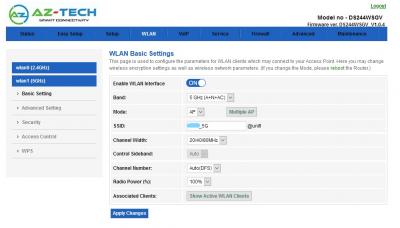
It is really dumb, most functions require you to log in as admin instead of the user
Attached thumbnail(s) 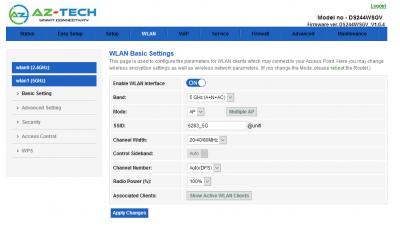
|
|
|
Jun 20 2021, 12:08 AM
Show posts by this member only | IPv6 | Post
#71
|
|
Junior Member
17 posts Joined: Jan 2007
|
Super bad signal router ..
|
|
|
Jun 20 2021, 02:59 PM
Show posts by this member only | IPv6 | Post
#72
|

Senior Member
2,807 posts Joined: Jun 2015
|
QUOTE(Fazab @ Sep 14 2020, 10:05 AM) Hi guys. Noob here. If you call then you'll get surprise charge in your bill. Just change the password if you feel like it.I also got this router when upgrade to 300mbps last week. What I dun like is Technician warn me not to change the Wifi password, as I dun have the "full setting". If want to change password must call them to come again. True ah? I want to change password because the Tech know my current password while installing. |
|
|
Jun 29 2021, 07:10 PM
|

Junior Member
454 posts Joined: Jan 2006 From: kuala lumpur
|
Hello, does anyone here know how to setup the voip part for this ds244wsgv?
|
|
|
Sep 22 2021, 06:45 PM
|

Senior Member
1,178 posts Joined: May 2007
|
Any sifu can help regarding this?
I tried tmadmin and password Adm@xxxx using my last 4 digit which is able to login as tmuser but not as admin.. Seem like this technician knew I would go in and chg dns thus he set it up using other password. Someone pls help |
|
|
Sep 22 2021, 10:03 PM
|
|
Senior Member
2,608 posts Joined: Nov 2020
|
QUOTE(bee993 @ Sep 22 2021, 06:45 PM) Any sifu can help regarding this? That's quite scummy of the tech to do such a thingI tried tmadmin and password Adm@xxxx using my last 4 digit which is able to login as tmuser but not as admin.. Seem like this technician knew I would go in and chg dns thus he set it up using other password. Someone pls help I don't know much about this router but looking at this thread, post #17 mentioned SSH, maybe hope that part isn't locked out and can change from there? Or post #35 mentioned some other password combinations Worse case just factory reset it and ask Unifi for PPPoE credentials to setup again Or just get a new router and don't bother with this AZTech. |
|
|
Sep 28 2021, 11:16 PM
Show posts by this member only | IPv6 | Post
#76
|
|
Senior Member
1,178 posts Joined: May 2007
|
QUOTE(PRSXFENG @ Sep 22 2021, 10:03 PM) That's quite scummy of the tech to do such a thing Thx for advice, I manage to 'guess' the Pw somehow... Some chg of CAPS combo..I don't know much about this router but looking at this thread, post #17 mentioned SSH, maybe hope that part isn't locked out and can change from there? Or post #35 mentioned some other password combinations Worse case just factory reset it and ask Unifi for PPPoE credentials to setup again Or just get a new router and don't bother with this AZTech. |
|
|
Nov 10 2022, 04:03 PM
|

Junior Member
404 posts Joined: Jul 2006
|
could this router set as wifi REPEATER?
very wasted in box only |
|
|
Nov 29 2022, 11:25 PM
Show posts by this member only | IPv6 | Post
#78
|
|
Junior Member
34 posts Joined: Nov 2021
|
where to find firmware latest for this router? the Malaysian website official there is no firmware
|
|
|
Apr 22 2023, 04:41 PM
|
|
Junior Member
495 posts Joined: Apr 2019
|
My house got a 10 clients for smart home, but sometimes will disconnect when using this router, any idea how to fix it other than buy a new router?
|
|
|
Apr 23 2023, 11:48 PM
Show posts by this member only | IPv6 | Post
#80
|
|
Senior Member
1,873 posts Joined: Nov 2010
|
QUOTE(dest9116 @ Apr 22 2023, 04:41 PM) My house got a 10 clients for smart home, but sometimes will disconnect when using this router, any idea how to fix it other than buy a new router? Use your old router as wifi AP for IoT only, simple.This post has been edited by BenYeeHua: Apr 23 2023, 11:48 PM |
|
|
Jun 3 2023, 01:53 PM
Show posts by this member only | IPv6 | Post
#81
|

Junior Member
46 posts Joined: Apr 2009
|
I can't log in with 192.068.1.1? Used to be able to do that. What should I do?
|
| Change to: |  0.0479sec 0.0479sec
 0.39 0.39
 6 queries 6 queries
 GZIP Disabled GZIP Disabled
Time is now: 3rd December 2025 - 04:32 PM |
 Quote
Quote