Outline ·
[ Standard ] ·
Linear+
Enable ipv6 for 2nd router, DHCP enabled & Different subnet
|
soonwai
|
 Apr 15 2020, 03:02 AM Apr 15 2020, 03:02 AM
|

|
QUOTE(kc9988 @ Apr 15 2020, 01:08 AM) Hi all, Does anyone know what's unifi IPv6 setting? Currently I have this network setup as following:- ISP - TMBox/1st router (tplink, IPV4+IPV6) ----LAN----> 2nd router (asus mesh, IPV4 only) <-- pair with mesh wifi ---> 3rd router (asus mesh, IPV4 only) Can someone help on this? What kind of IPV6 setting should I configure on my 2nd asus mesh router? 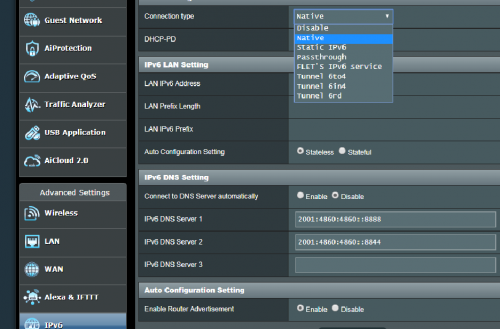 No need to set anything IPv6 related for the 2nd and 3rd router. Not unless you're doing something funky. |
|
|
|
|
|
soonwai
|
Apr 15 2020, 02:01 PM
|
|
|
QUOTE(tcwan @ Apr 15 2020, 12:45 PM) Is your second router configured as a bridge or a separate subnet? If it is a separate subnet I don’t think there is any way to properly support IPv6 for the devices connected to the second/third router. Reason being that AFAIK, you only get a /64 IPv6 subnet Prefix from the ISP for your 1st router, which is not supposed to be subnetted any further. I don’t know if any of the ISPs will allocate something like a /56 IPv6 prefix to home fiber users. Actually I’m interested in the answer to this question myself. I planned to move to a new place soon, so I didn’t bother to check with my current home fiber provider. See https://serverfault.com/questions/714890/ip...-work-around-itOverseas got. UniFi no, well maybe for corporate customers. I emailed TM last year to see if they can give me a /56. Cannot they say. I wanted to use it for 2 vlans. One ipv4+v6 and one ipv6 only. Anyway it wasn't really important, just for fun. |
|
|
|
|
|
soonwai
|
Apr 17 2020, 05:33 PM
|
|
|
QUOTE(kc9988 @ Apr 17 2020, 05:24 PM) Yup.. it is separate subnet. I tried to disable DHCP on my mesh router (2nd/3rd), but the mesh feature will no longer function. That why I'm stucking here. /64 is the smallest subnet you can use with autoconf. TM only gives a /64. You can try asking them for more. Also routers will normally use link-local for LAN traffic. |
|
|
|
|



 Quote
Quote
 0.0178sec
 0.44
0.44
 6 queries
 GZIP Disabled