Outline ·
[ Standard ] ·
Linear+
Enable ipv6 for 2nd router, DHCP enabled & Different subnet
|
TSkc9988
|
 Apr 15 2020, 01:08 AM, updated 6y ago Apr 15 2020, 01:08 AM, updated 6y ago
|
Getting Started


|
Hi all, Does anyone know what's unifi IPv6 setting? Currently I have this network setup as following:- ISP - TMBox/1st router (tplink, IPV4+IPV6) ----LAN----> 2nd router (asus mesh, IPV4 only) <-- pair with mesh wifi ---> 3rd router (asus mesh, IPV4 only) Can someone help on this? What kind of IPV6 setting should I configure on my 2nd asus mesh router? 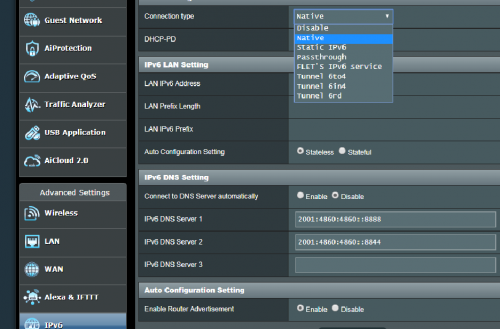 This post has been edited by kc9988: Apr 15 2020, 01:10 AM This post has been edited by kc9988: Apr 15 2020, 01:10 AM |
|
|
|
|
|
soonwai
|
Apr 15 2020, 03:02 AM
|
|
|
QUOTE(kc9988 @ Apr 15 2020, 01:08 AM) Hi all, Does anyone know what's unifi IPv6 setting? Currently I have this network setup as following:- ISP - TMBox/1st router (tplink, IPV4+IPV6) ----LAN----> 2nd router (asus mesh, IPV4 only) <-- pair with mesh wifi ---> 3rd router (asus mesh, IPV4 only) Can someone help on this? What kind of IPV6 setting should I configure on my 2nd asus mesh router? No need to set anything IPv6 related for the 2nd and 3rd router. Not unless you're doing something funky. |
|
|
|
|
|
yongtjunkit
|
Apr 15 2020, 07:24 AM
|
|
|
Mesh router don’t need... the main router will handle ipv6 for you....
|
|
|
|
|
|
tcwan
|
Apr 15 2020, 12:45 PM
|
Getting Started
|
QUOTE(kc9988 @ Apr 15 2020, 01:08 AM) Hi all, Does anyone know what's unifi IPv6 setting? Currently I have this network setup as following:- ISP - TMBox/1st router (tplink, IPV4+IPV6) ----LAN----> 2nd router (asus mesh, IPV4 only) <-- pair with mesh wifi ---> 3rd router (asus mesh, IPV4 only) Can someone help on this? What kind of IPV6 setting should I configure on my 2nd asus mesh router? Is your second router configured as a bridge or a separate subnet? If it is a separate subnet I don’t think there is any way to properly support IPv6 for the devices connected to the second/third router. Reason being that AFAIK, you only get a /64 IPv6 subnet Prefix from the ISP for your 1st router, which is not supposed to be subnetted any further. I don’t know if any of the ISPs will allocate something like a /56 IPv6 prefix to home fiber users. Actually I’m interested in the answer to this question myself. I planned to move to a new place soon, so I didn’t bother to check with my current home fiber provider. See https://serverfault.com/questions/714890/ip...-work-around-itThis post has been edited by tcwan: Apr 15 2020, 12:54 PM |
|
|
|
|
|
soonwai
|
Apr 15 2020, 02:01 PM
|
|
|
QUOTE(tcwan @ Apr 15 2020, 12:45 PM) Is your second router configured as a bridge or a separate subnet? If it is a separate subnet I don’t think there is any way to properly support IPv6 for the devices connected to the second/third router. Reason being that AFAIK, you only get a /64 IPv6 subnet Prefix from the ISP for your 1st router, which is not supposed to be subnetted any further. I don’t know if any of the ISPs will allocate something like a /56 IPv6 prefix to home fiber users. Actually I’m interested in the answer to this question myself. I planned to move to a new place soon, so I didn’t bother to check with my current home fiber provider. See https://serverfault.com/questions/714890/ip...-work-around-itOverseas got. UniFi no, well maybe for corporate customers. I emailed TM last year to see if they can give me a /56. Cannot they say. I wanted to use it for 2 vlans. One ipv4+v6 and one ipv6 only. Anyway it wasn't really important, just for fun. |
|
|
|
|
|
SUSnonamer
|
Apr 15 2020, 04:05 PM
|
Getting Started
|
i don't know enough about ipv6 but from my high level understanding u should try like this
connection type : passthrough
dhcp-pd : disable
connect to dns server automatically : enable
router advertisement : disable
This post has been edited by nonamer: Apr 15 2020, 04:06 PM
|
|
|
|
|
|
TSkc9988
|
Apr 17 2020, 05:24 PM
|
Getting Started
|
QUOTE(tcwan @ Apr 15 2020, 12:45 PM) Is your second router configured as a bridge or a separate subnet? If it is a separate subnet I don’t think there is any way to properly support IPv6 for the devices connected to the second/third router. Reason being that AFAIK, you only get a /64 IPv6 subnet Prefix from the ISP for your 1st router, which is not supposed to be subnetted any further. I don’t know if any of the ISPs will allocate something like a /56 IPv6 prefix to home fiber users. Actually I’m interested in the answer to this question myself. I planned to move to a new place soon, so I didn’t bother to check with my current home fiber provider. See https://serverfault.com/questions/714890/ip...-work-around-itYup.. it is separate subnet. I tried to disable DHCP on my mesh router (2nd/3rd), but the mesh feature will no longer function. That why I'm stucking here. |
|
|
|
|
|
TSkc9988
|
Apr 17 2020, 05:24 PM
|
Getting Started
|
QUOTE(nonamer @ Apr 15 2020, 04:05 PM) i don't know enough about ipv6 but from my high level understanding u should try like this connection type : passthrough dhcp-pd : disable connect to dns server automatically : enable router advertisement : disable Thx for reply. I will give a try~ |
|
|
|
|
|
soonwai
|
Apr 17 2020, 05:33 PM
|
|
|
QUOTE(kc9988 @ Apr 17 2020, 05:24 PM) Yup.. it is separate subnet. I tried to disable DHCP on my mesh router (2nd/3rd), but the mesh feature will no longer function. That why I'm stucking here. /64 is the smallest subnet you can use with autoconf. TM only gives a /64. You can try asking them for more. Also routers will normally use link-local for LAN traffic. |
|
|
|
|
|
SUSnonamer
|
Apr 17 2020, 06:46 PM
|
Getting Started
|
QUOTE(kc9988 @ Apr 17 2020, 05:24 PM) Thx for reply. I will give a try~ that if it works only get same subnet as main router This post has been edited by nonamer: Apr 17 2020, 06:47 PM |
|
|
|
|
|
tcwan
|
Apr 18 2020, 05:38 PM
|
Getting Started
|
QUOTE(kc9988 @ Apr 17 2020, 05:24 PM) Yup.. it is separate subnet. I tried to disable DHCP on my mesh router (2nd/3rd), but the mesh feature will no longer function. That why I'm stucking here. Sorry I have no experience with mesh routers, to know what is their network configuration. If it can be set to bridge mode, then it is possible to have everything as one big subnet. Otherwise you will need to get a /56 or something similar (other than using static IPv6 addresses and subnetting the /64 but as mentioned in the article I linked, it is not advisable). |
|
|
|
|
|
Moogle Stiltzkin
|
Nov 5 2022, 02:56 AM
|
|
|
QUOTE(soonwai @ Apr 15 2020, 02:01 PM) Overseas got. UniFi no, well maybe for corporate customers. I emailed TM last year to see if they can give me a /56. Cannot they say. I wanted to use it for 2 vlans. One ipv4+v6 and one ipv6 only. Anyway it wasn't really important, just for fun. any updates on this? based on my own findings (setting ipv6 up using latest pfsense), you get ipv6 to work on WAN/gateway using dhcpv6 + ra assist, and using track interface wan with prefix id 0 then if you have other vlans....welll... they are out of luck  but i noticed a work around, when i use mullvad vpn client with ipv6 enabled, it can get ipv6 to work reliable even on devices that are using your other vlans. i don't know the technical details how that works, just that it does. |
|
|
|
|



 Quote
Quote




 0.0198sec
 0.30
0.30
 5 queries
 GZIP Disabled