Welcome Guest ( Log In | Register )

133 Pages « < 46 47 48 49 50 > » Bottom

Outline · [ Standard ] · Linear+

 2020 Apple iPad Pro Discussion Thread | V1

views
     
Susuwatari
post Apr 30 2020, 08:44 AM

Regular
******
Senior Member
1,260 posts

Joined: Jan 2003
From: Puchong


My quick take after using Magic Keyboard for 2 days is that, if you are not using keyboard that much, then it’s probably not for you as it’s more like a iPad stand with keyboard, albeit a very expensive one.

For those who rely on iPad to work like myself, it’s a godsend. Really good keyboard feel and key travel. I like it more than my 1st gen magic keyboard for Mac. The trackpad is not as good as those on MacBook, mainly because of its size. The responsiveness is fine, like any Apple made trackpad.
TSasamalikum
post Apr 30 2020, 09:19 AM

Regular
******
Senior Member
1,221 posts

Joined: Mar 2005


QUOTE(Susuwatari @ Apr 30 2020, 08:44 AM)
My quick take after using Magic Keyboard for 2 days is that, if you are not using keyboard that much, then it’s probably not for you as it’s more like a iPad stand with keyboard, albeit a very expensive one.

For those who rely on iPad to work like myself, it’s a godsend. Really good keyboard feel and key travel. I like it more than my 1st gen magic keyboard for Mac. The trackpad is not as good as those on MacBook, mainly because of its size. The responsiveness is fine, like any Apple made trackpad.
*
Does the weight bother you? Unless it’s in stationary mode most of the time.
TSasamalikum
post Apr 30 2020, 09:21 AM

Regular
******
Senior Member
1,221 posts

Joined: Mar 2005


QUOTE(eggplants @ Apr 29 2020, 10:05 PM)
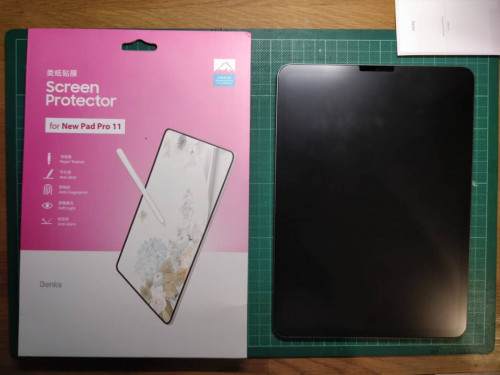
My china brand paper-like screen protector finally came and just installed it. This is the Benks brand that seems most popular on Lazada compared to others.

Haven't fully tested it out with actual use, but just some initial impressions of it:

- this definitely isn't just a normal matte finish protector branded as paperlike. its a lot rougher. Some people have said some are like sandpaper - which is not too wrong, because sandpaper have different grades. i would say this is like the most finest sandpaper (ones used for finishing). or another comparison, it feels rougher than normal paper; and is more like the thick art paper feeling.

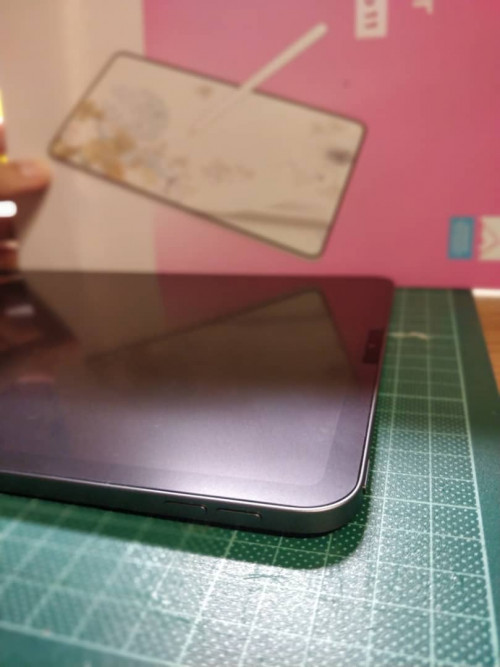
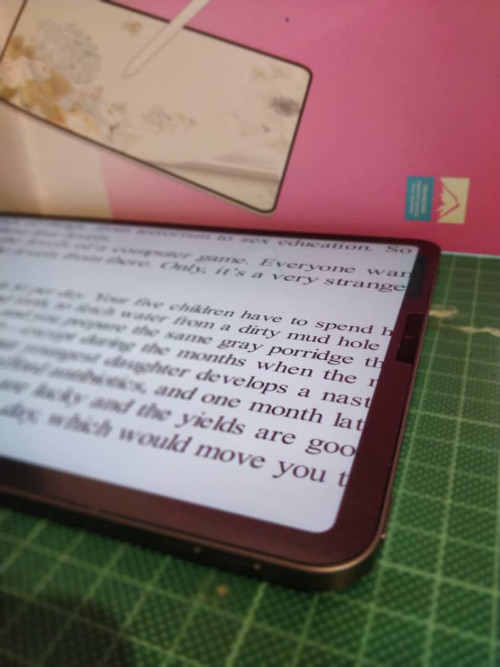
- don't notice any drastic loss in screen brightness or quality, similar to any matte screen protector in this case.

- when using with the apple pencil. It definitely improves the drawing feel with the added friction. it does have a nice 'sketchy' sound when in contact if you know what i mean. although at the back of my mind i do cringe because i know it wears out the pencil faster than on the bare glass.

- using with fingers is strange and of course not as nice compared to a smooth one. but should get use to it over time.

Will use it more and see how it feels after a few weeks, but generally no complaints. I bought the iPad mainly for doing drawings and art applications so this helps a lot. But for those who don't plan to draw or write often with the pencil, I would skip it as better to have a smooth one using finger swiping.

user posted image

user posted image

user posted image
*
How was the installation process?
lilredridinghood
post Apr 30 2020, 09:38 AM

Not so google expert
*******
Senior Member
2,111 posts

Joined: Mar 2007
From: Malaysia
Update

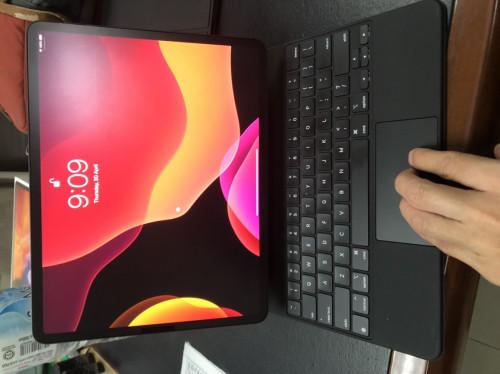
After 3 days of using the Apple Keyboard, here are my very premature thoughts about it, both good and bad. Also I will be comparing a lot with the MacBook Air because it is the most portable laptop I have in hand.

I think I can consider this an unequivocal point, which is that even prior to anyone deciding if they should make the iPad Pro 2020 their purchase, the announcement of the new Magic Keyboard stoked excitement but tempered after finding out about the potential price point in MYR(USD300-USD350). BAD
user posted image

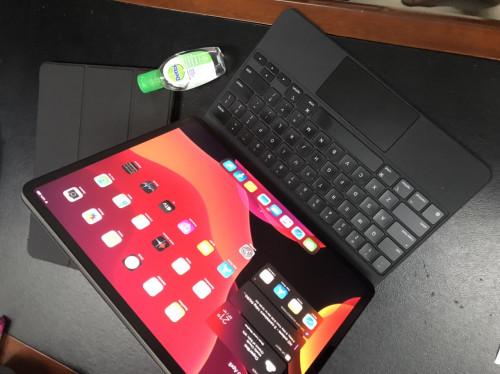
In spite of that, I thought about the accumulated cost for both the Smart Folio Keyboard and a Magic Trackpad 2 or a Magic Mouse 2 to experience the iPad Pro as a potential laptop replacement but losing out on the backlit keyboard, the scissors switch mechanism, it is in my own personal opinion more cost effective to just get the expensive Magic Keyboard. GOOD? NOT REALLY
user posted image

I did consider the option of waiting for a potential 3rd party keyboard however I recalled fumbling with a Logitech Bluetooth mouse back in my early days of owning a white MacBook, which I ditched after a couple of months because it was not as intuitive as there were plenty of glitches with its connection as well as its hardware, also it is never simple when it comes to claiming warranty for a product that is widely available in the market, Apple however would be more accountable and more receptive even if you do bring it to one of the retailers such as Machines. GOOD some might disagree because of their own past experiences
user posted image

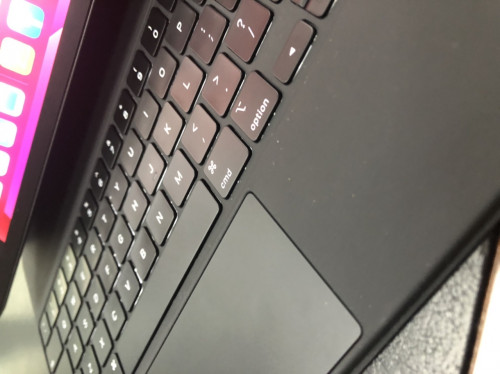
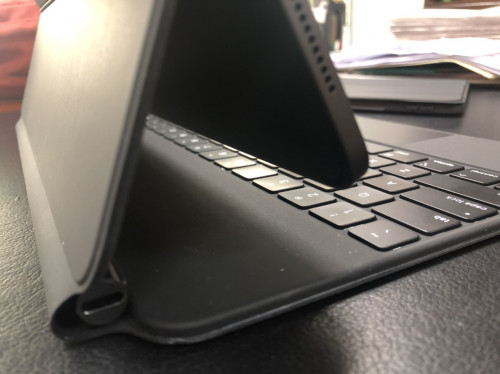
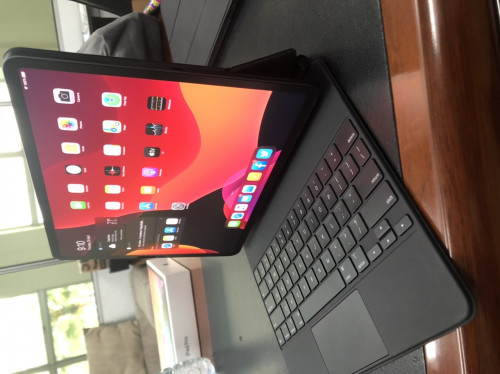
The built is SOLID along with its magnets, this Magic Keyboard definitely feels like a premium product! The magnet makes it feels sturdier than a proper laptop on your lap because of the smaller carbon footprint, a 13" MacBook Air may wobble on the lap because of the larger platform GOOD but due to the top heavy nature of the combination, one perhaps should not do it too often as it might fall off your lap the moment one loses concentration and lifts or moves his or her legs. BAD
user posted image
user posted image

Portability is not really an issue as it is a little smaller and the weight penalty is just a dash heavier than the 13 inch MacBook Air GOOD BUT because there is no bumper protection and it having a square-ish shape(Sorry I need to find a better word for this) on its 4 sides, the exposed metal along the sides of the iPad Pro might attract lots of scratches and it is not as easy to lift up to carry around not because of the weight but the shape of the iPad Pro. BAD
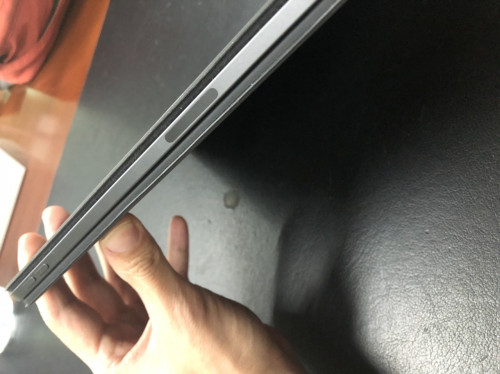
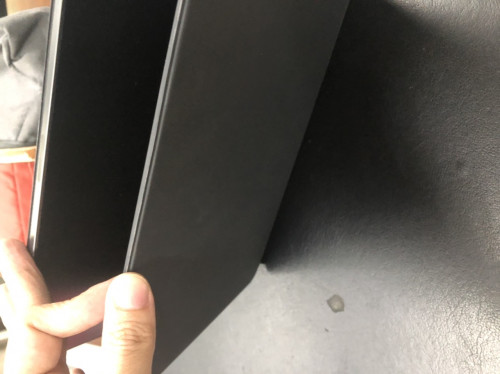
user posted image
user posted image

The camera at the back of the iPad Pro, I do not think, is as useless as many tech bloggers make it out to be because it can come in handy for work and perhaps some use when travelling since many bought it for its portability and versatility. That changes unfortunately with the presence of the Magic Keyboard, unless one is only utilising it in the office or at home where one can detach the iPad Pro away from the Magic Keyboard safely placed on a table or the side of a couch, it is unlikely to be the case when one is moving about. BAD
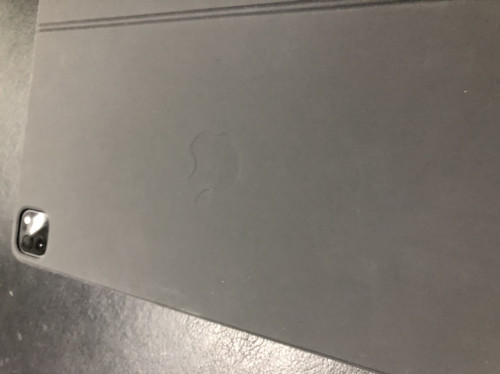
user posted image

This post has been edited by lilredridinghood: Apr 30 2020, 09:41 AM

akaneikegami
post Apr 30 2020, 11:21 AM

cookie munching monsta
******
Senior Member
1,049 posts

Joined: Apr 2008
From: cookie jar

QUOTE(lilredridinghood @ Apr 30 2020, 09:38 AM)
Update

After 3 days of using the Apple Keyboard, here are my very premature thoughts about it, both good and bad. Also I will be comparing a lot with the MacBook Air because it is the most portable laptop I have in hand.
seems like the magic keyboard can be a hellavu dust magnet...
lilredridinghood
post Apr 30 2020, 12:23 PM

Not so google expert
*******
Senior Member
2,111 posts

Joined: Mar 2007
From: Malaysia
QUOTE(akaneikegami @ Apr 30 2020, 11:21 AM)
seems like the magic keyboard can be a hellavu dust magnet...
*
I didn't think so but yes the photo did magnify it haha, I guess the colour did not help too haha
J.alexander
post Apr 30 2020, 01:38 PM

Getting Started
**
Junior Member
178 posts

Joined: Mar 2011
QUOTE(lilredridinghood @ Apr 30 2020, 09:38 AM)
Update

After 3 days of using the Apple Keyboard, here are my very premature thoughts about it, both good and bad. Also I will be comparing a lot with the MacBook Air because it is the most portable laptop I have in hand.

I think I can consider this an unequivocal point, which is that even prior to anyone deciding if they should make the iPad Pro 2020 their purchase, the announcement of the new Magic Keyboard stoked excitement but tempered after finding out about the potential price point in MYR(USD300-USD350). BAD

user posted image

In spite of that, I thought about the accumulated cost for both the Smart Folio Keyboard and a Magic Trackpad 2 or a Magic Mouse 2 to experience the iPad Pro as a potential laptop replacement but losing out on the backlit keyboard, the scissors switch mechanism, it is in my own personal opinion more cost effective to just get the expensive Magic Keyboard. GOOD? NOT REALLY

user posted image

I did consider the option of waiting for a potential 3rd party keyboard however I recalled fumbling with a Logitech Bluetooth mouse back in my early days of owning a white MacBook, which I ditched after a couple of months because it was not as intuitive as there were plenty of glitches with its connection as well as its hardware, also it is never simple when it comes to claiming warranty for a product that is widely available in the market, Apple however would be more accountable and more receptive even if you do bring it to one of the retailers such as Machines. GOOD some might disagree because of their own past experiences

user posted image

The built is SOLID along with its magnets, this Magic Keyboard definitely feels like a premium product! The magnet makes it feels sturdier than a proper laptop on your lap because of the smaller carbon footprint, a 13" MacBook Air may wobble on the lap because of the larger platform GOOD but due to the top heavy nature of the combination, one perhaps should not do it too often as it might fall off your lap the moment one loses concentration and lifts or moves his or her legs. BAD

user posted image
user posted image

Portability is not really an issue as it is a little smaller and the weight penalty is just a dash heavier than the 13 inch MacBook Air GOOD BUT because there is no bumper protection and it having a square-ish shape(Sorry I need to find a better word for this) on its 4 sides, the exposed metal along the sides of the iPad Pro might attract lots of scratches and it is not as easy to lift up to carry around not because of the weight but the shape of the iPad Pro. BAD

user posted image
user posted image

The camera at the back of the iPad Pro, I do not think, is as useless as many tech bloggers make it out to be because it can come in handy for work and perhaps some use when travelling since many bought it for its portability and versatility. That changes unfortunately with the presence of the Magic Keyboard, unless one is only utilising it in the office or at home where one can detach the iPad Pro away from the Magic Keyboard safely placed on a table or the side of a couch, it is unlikely to be the case when one is moving about. BAD

user posted image
*
Good review, thanks!
ultra_nyamuk
post Apr 30 2020, 02:28 PM

Regular
******
Senior Member
1,833 posts

Joined: Dec 2008
Anyone here using the iPad Pro as full time laptop replacement ? Can share your experiences ?
Seng_Kiat
post Apr 30 2020, 02:41 PM

Look at all my stars!!
*******
Senior Member
5,580 posts

Joined: Jan 2005
QUOTE(ultra_nyamuk @ Apr 30 2020, 02:28 PM)
Anyone here using the iPad Pro as full time laptop replacement ? Can share your experiences ?
*
I did but my workload is probably light use as I just use mainly for email, browsing and excel. Excel is just simple excel as I have setup my excel formula on desktop. If I have to do it from scratch on ipad, it will be almost impossible.

Full time laptop replacement? For my usage, I would say yes. For others probably not.
lilredridinghood
post Apr 30 2020, 02:43 PM

Not so google expert
*******
Senior Member
2,111 posts

Joined: Mar 2007
From: Malaysia
QUOTE(ultra_nyamuk @ Apr 30 2020, 02:28 PM)
Anyone here using the iPad Pro as full time laptop replacement ? Can share your experiences ?
*
Me but I still have my MacBook Air so I'm using both, transition between both is pretty seamless, just need to get used to the gestures.

I use numbers and notes a lot so multitasking is no issue, my only problem so far is getting used to the new forward del shortcut
Susuwatari
post Apr 30 2020, 05:15 PM

Regular
******
Senior Member
1,260 posts

Joined: Jan 2003
From: Puchong


QUOTE(asamalikum @ Apr 30 2020, 09:19 AM)
Does the weight bother you? Unless it’s in stationary mode most of the time.
*
Only on the first day. Since I am working from home like most of you, I only move it in between bed room and study room or dining hall, so it’s too early to tell.

QUOTE(ultra_nyamuk @ Apr 30 2020, 02:28 PM)
Anyone here using the iPad Pro as full time laptop replacement ? Can share your experiences ?
*
I use it almost full time too except when I need to work on a few documents side by side which I tend to switch to my Macbook (connected to a 24” monitor), 12.9” is too small for that, age is catching up.
fmpak
post Apr 30 2020, 07:42 PM

New Member
*
Newbie
26 posts

Joined: Feb 2009
From: KL, Malaysia


Anyone ordering/using the UAG Scout series iPad Pro case?
J.alexander
post May 1 2020, 01:01 PM

Getting Started
**
Junior Member
178 posts

Joined: Mar 2011
QUOTE(ultra_nyamuk @ Apr 30 2020, 02:28 PM)
Anyone here using the iPad Pro as full time laptop replacement ? Can share your experiences ?
*
I am trying. The split screen function is wonderful. I’m happy it can be near as laptop replacement for the last one week. But still a lot of areas are not fully functional - heard from one YouTube you can’t format ext HDD for certain format to be recognized by ipadOS.

I have problem moving files directly in Files App between Google Drive, ICloud, Device etc.

Ipad flaw #5 - Using watsapp web, the auto Capitalize on second word and there’s no way to make it small capital again in the middle of sentence is annoying .
Flaw #6 - starting to find it sore on my neck sometimes w folio keyboard. Need adjustments or external monitor?

Anyone tried connecting to external monitor already?!

This post has been edited by J.alexander: May 2 2020, 09:12 AM
jianwei87
post May 1 2020, 03:59 PM

Casual
***
Junior Member
481 posts

Joined: Jan 2007
Anyone notice battery drain very fast. Screen on time 2.5 hour already drain 50% of my battery.
TSasamalikum
post May 1 2020, 04:24 PM

Regular
******
Senior Member
1,221 posts

Joined: Mar 2005


QUOTE(jianwei87 @ May 1 2020, 03:59 PM)
Anyone notice battery drain very fast. Screen on time 2.5 hour already drain 50% of my battery.
*
On cellular ?
jianwei87
post May 1 2020, 04:26 PM

Casual
***
Junior Member
481 posts

Joined: Jan 2007
QUOTE(asamalikum @ May 1 2020, 04:24 PM)
On cellular ?
*
Nope, wifi version only
lilredridinghood
post May 2 2020, 10:40 AM

Not so google expert
*******
Senior Member
2,111 posts

Joined: Mar 2007
From: Malaysia
QUOTE(J.alexander @ May 1 2020, 01:01 PM)
I am trying. The split screen function is wonderful. I’m happy it can be near as laptop replacement for the last one week. But still a lot of areas are not fully functional - heard from one YouTube you can’t format ext HDD for certain format to be recognized by ipadOS.

I have problem moving files directly in Files App between Google Drive, ICloud, Device etc.

Ipad flaw #5 - Using watsapp web, the auto Capitalize on second word and there’s no way to make it small capital again in the middle of sentence is annoying .
Flaw #6 - starting to find it sore on my neck sometimes w folio keyboard. Need adjustments or external monitor?


Anyone tried connecting to external monitor already?!
*
Off the autocorrect should help?

Also split screen is a lot more organised but the limitation and the cumbersomeness made it hard, not as intuitive but it’s not a huge deal, I’ve been using the iPad Pro as my main computer the past couple of days, the transition isn’t 100% smooth but it’s doable like how I first changed from Windows to Mac OS

QUOTE(jianwei87 @ May 1 2020, 03:59 PM)
Anyone notice battery drain very fast. Screen on time 2.5 hour already drain 50% of my battery.
*
Not really, not for me, for my usage I’ve only had to charge once a day if I use it for other applications like YouTube watching and Podcasts, other than that, I’ve been charging my iPad Pro once every other day
Seng_Kiat
post May 2 2020, 06:40 PM

Look at all my stars!!
*******
Senior Member
5,580 posts

Joined: Jan 2005
Today I saw my sister macbook air, damn, it is alot slimmer than this ipad pro .. haha ..
J.alexander
post May 2 2020, 08:53 PM

Getting Started
**
Junior Member
178 posts

Joined: Mar 2011
QUOTE(lilredridinghood @ May 2 2020, 10:40 AM)
Off the autocorrect should help?

Also split screen is a lot more organised but the limitation and the cumbersomeness made it hard, not as intuitive but it’s not a huge deal, I’ve been using the iPad Pro as my main computer the past couple of days, the transition isn’t 100% smooth but it’s doable like how I first changed from Windows to Mac OS
*
There’s autorrect in watsapp (web)? Can’t find it though.
Yeah I will agree with you that it’s doable for the laptop replacement. A lot of learning but that’s the only way.
J.alexander
post May 2 2020, 11:04 PM

Getting Started
**
Junior Member
178 posts

Joined: Mar 2011
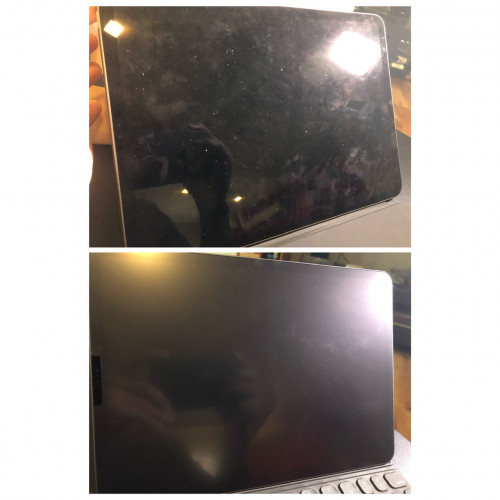
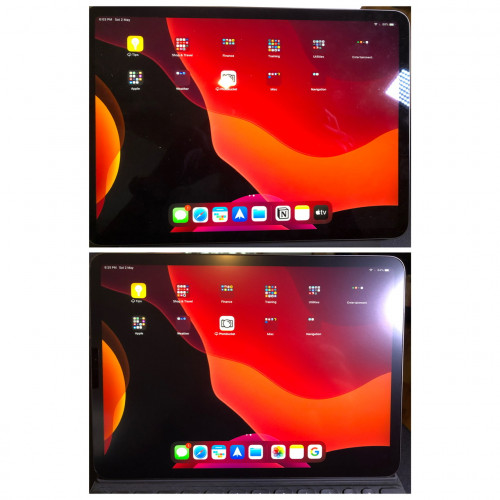
My review of Benk screen protector. Finally it arrived after a long long time. Came together with my small purchase to make my ipad “float” haha.

General impression: It’s my first time touching matte film. Very rough feeling even touching it using fingers. Totally unexpected as compared to my matte sp on my phone but one’s a film and one’s matte glass. Very good reviews on lazada though by other ipad users who used it for writing purposes.

Installation: Easy and straight forward, comes with necessary wet wipes, stickers, and stickers. It’s a U - cut out at the camera section, its easier than those hole cut out like iPhones. Semi rigid film so alignment is easy.

Writing experience : after reading reviews of how it might eats at the Apple Pencil nibs, can’t stop feeling painful haha, I think the “loud” scratching sound makes it worse. But think its very psychology. It does make writing very paper like and somehow makes the writing looks nicer than on glass which is very easily “watery” if it makes sense. Really have to compare w the real Paperlike version soon.

Screen quality: Below are some comparisons. Don’t think it’s very much degraded but happy with the lessen finger smudges.

user posted image

user posted image

user posted image


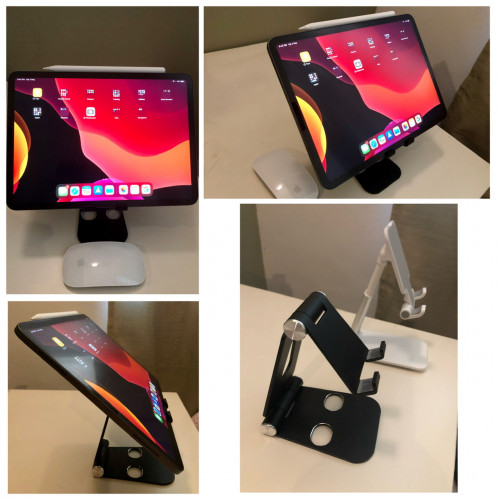
My metal desktop stand has arrived. Holds up well and could help with a much more better viewing angle when typing.
user posted image

133 Pages « < 46 47 48 49 50 > » Top
 

Change to:
| Lo-Fi Version
0.0264sec    0.55    6 queries    GZIP Disabled
Time is now: 20th December 2025 - 10:49 AM