

Uptime: 7d19hr+
CPU: still 100%
Temp: more or less stable at 64°C
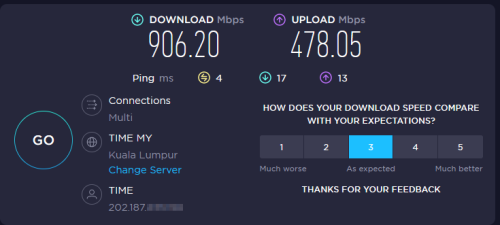
Internet is stable and up/download as it should be:
Home Networking Ditch ONU, use GPON SFP on Business Grade Router, 2.5G ONU for Unifi & Maxis, NO NEED VLAN
|
|
 Jul 15 2022, 12:28 PM Jul 15 2022, 12:28 PM
Return to original view | Post
#21
|
 
Junior Member
98 posts Joined: Nov 2021 
|
Status update on my ODI DFP-34X-2C2 with Firmware V1.0-220414:
Uptime: 7d19hr+ CPU: still 100% Temp: more or less stable at 64°C Internet is stable and up/download as it should be: |
|
|
|
|
|
Jul 18 2022, 10:01 AM
Return to original view | Post
#22
|
|
Junior Member
98 posts Joined: Nov 2021
|
QUOTE(Anime4000 @ Jul 15 2022, 10:36 PM) you have 1Gbps subscription, not try to use 2.5Gb SFP router to get more speed?? Hmmm... how?   |
|
|
Jul 18 2022, 07:58 PM
Return to original view | Post
#23
|
|
Junior Member
98 posts Joined: Nov 2021
|
QUOTE(Anime4000 @ Jul 18 2022, 04:44 PM) Hmm not sure what you mean... my ODI Stick is plugged directly into my RB5009: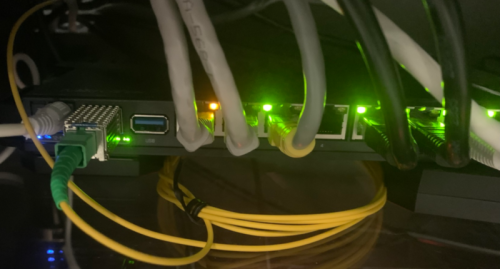 (messy cable-management... I know... will be fixed soon when I have time to print a proper stand for the router) So the router could do 2.5Gbs at the SFP <=> Router connection; But the Ethernet is 1GB only... the Speedtest will show 1Gbs only... no? So Download is at ~920..930 depending on server; how to tweak especially the upload further? Any suggestions? |
|
|
Jul 22 2022, 12:12 PM
Return to original view | Post
#24
|
|
Junior Member
98 posts Joined: Nov 2021
|
QUOTE(Anime4000 @ Jul 18 2022, 09:09 PM) I am at the moment happy that all is working and worried that if I play around more it will not work anymore  Anyway, I will try it out this weekend.. current setting is OMCI_TM_OPT=2 Looking at the table there are: 0 = Priority controlled 1 = Rate controlled 2 = Priority and Rate controlled Any idea on what "Priority" and/or "Rate" are based on? As download is more or less at 1Gbs already, the only thing that's basically improvable would be the upload speed. This post has been edited by rezzorix: Jul 22 2022, 01:27 PM |
|
|
Jul 22 2022, 02:02 PM
Return to original view | Post
#25
|
|
Junior Member
98 posts Joined: Nov 2021
|
Ah what the heck... I just made my weekend start now.
 So here my findings for the OMCI_TM_OPT settings: I tried it in this order 2 -> 1 -> 0. Speed: 2 = ~900-950 down / ~450-500 up 1 = not working 0 = ~900-950 down / ~450-500 up So 0 & 2 are resulting in the same speeds and 1 not working at all. After testing I switched it back to 2 - which was running stable for the past 2 weeks. Interesting side effect of trying out the different options: The CPU usage finally went down.  As I reported here it was always at 100% for the past 2 weeks. Now after changing the values and rebooting, the CPU usage is now as follows: CPU: 2 = 15-25% 1 = not tested 0 = 10-20% The temperature however is still high at 63-64°C despite having much lower CPU usage.  This post has been edited by rezzorix: Jul 22 2022, 02:03 PM |
|
|
May 3 2024, 07:51 PM
Return to original view | IPv6 | Post
#26
|
|
Junior Member
98 posts Joined: Nov 2021
|
Just wanted to say a public "Thank you" to Anime4000 who really helped me out with my SFP stick and getting things fixed.
If it was still Covid times I would have loved to tinker and get things running by myself, but well... we are back to normal; so not much time for hobbies anymore.  So I was happy that he was free and willing to help, so I sent him my Odi DFP-34X-2C2 which for whatever reason stopped working. Anime4000 updated the stick to his latest firmware and I also bought an additional one from him as a backup. Again, he is a super knowledgable and helpful person - I appreciate this very much and wanted to let you all know (if you dont know already) Thanks a lot! This post has been edited by rezzorix: May 3 2024, 08:20 PM |
|
|
May 18 2024, 07:26 PM
Return to original view | Post
#27
|
|
Junior Member
98 posts Joined: Nov 2021
|
Absolute nuts
 good job! good job! Keep up the good work |
| Change to: |  0.1620sec 0.1620sec
 0.55 0.55
 7 queries 7 queries
 GZIP Disabled GZIP Disabled
Time is now: 11th December 2025 - 10:07 AM |
 Quote
Quote