Welcome Guest ( Log In | Register )

31 Pages < 1 2 3 4 > » Bottom

Outline · [ Standard ] · Linear+

Home Networking Ditch ONU, use GPON SFP on Business Grade Router, 2.5G ONU for Unifi & Maxis, NO NEED VLAN

views
     
TSAnime4000
post Sep 6 2020, 09:11 PM

Look at all my stars!!
*******
Senior Member
2,399 posts

Joined: Jul 2009
From: /dev/null


QUOTE(asellus @ Sep 6 2020, 08:42 PM)
As a curiosity, I have bought an ONT SFP module like this one for experimenting. After putting in the 10-digit OLT password, the ONT stick authenticated successfully with the OLT, but the PPPoE client in my Mikrotik RB4011IGS+RM refused to connect to the Unifi service. But when I shoved the ONT stick into my older Mikrotik Routerboard RB2011UiAS-2HnD-IN router, the PPPoE client works successfully. After some consideration, the Huawei GPON ONT box stays with the RB4011, while I chucked away the GPON stick and the RB2011 returned to its function as a wireless access point.
*
are VLAN properly bridged and forwarded?
TSAnime4000
post Sep 7 2020, 01:54 PM

Look at all my stars!!
*******
Senior Member
2,399 posts

Joined: Jul 2009
From: /dev/null


QUOTE(aneip @ Sep 7 2020, 06:26 AM)
Mcm lagi mahal ni.. Need cheaper option.. hehe
*
I didn't bought it, my friend from Japan wanted me have better equipment, since his server at my home, 2.5" 1TB x 3 Samsung QVO + M.2 NVMe 500GB WD Black
Japan Internet are being monitored, so, Malaysia Internet is Neutral Ground
TSAnime4000
post Sep 7 2020, 02:49 PM

Look at all my stars!!
*******
Senior Member
2,399 posts

Joined: Jul 2009
From: /dev/null


QUOTE(aneip @ Sep 7 2020, 02:06 PM)
What they do need server in malaysia?
*
I not sure, having Hyper-V running, don't know what inside, maybe put Anime & Hentai stuff here since having 1TB x 3 Samsung SSD
for my part, I have game server running inside

This post has been edited by Anime4000: Sep 7 2020, 02:51 PM
TSAnime4000
post Sep 14 2020, 05:20 PM

Look at all my stars!!
*******
Senior Member
2,399 posts

Joined: Jul 2009
From: /dev/null


thankyou aneip asellus

My friend told me the seller didn't ship Mikrotik RB3011UIAS-RM in time, asked me to choose differet router

between Ubiquiti EdgeRouter 12 and MikroTik RB4011iGS+RM

I thinking MikroTik RB4011iGS+RM, losing USB port, so I can't use Maxis 4G Backup directly

Also Ubiquiti EdgeRouter 12 have issue with PON SFP, as thankyou experiencing.

MikroTik RB4011iGS+RM then?

edit:
QUOTE(asellus @ Sep 6 2020, 09:16 PM)
Both RB4011 and RB2011 has been configured exactly the same, but it only works with the latter. Probably has to do with the limitations of the RB4011 SFP cage.
*
ah damn, cry.gif

This post has been edited by Anime4000: Sep 14 2020, 05:45 PM
TSAnime4000
post Sep 14 2020, 11:30 PM

Look at all my stars!!
*******
Senior Member
2,399 posts

Joined: Jul 2009
From: /dev/null


QUOTE(asellus @ Sep 14 2020, 11:00 PM)
There's always Mikrotik hAP ac. Has SFP cage and USB port too. Buy second-hand cheap from https://shopee.com.my/Mikrotik-hAP-ac-Route...5796.1022231126
*
My Japanese friend tried to buy on Shopee and Lazada, none of them accept his visa card...
He had to buy from Amazon, same thing with IFME Donor, end up buy Ryzen 9 3950X from Amazon US to Malaysia.

Why Shopee, Lazada & Lelong cannot accept non-malaysia visa card? cry.gif

Now I have Amazon US and Japan shipping box.

SFP ONU on it's way, many rare item like this are not sold here

This post has been edited by Anime4000: Sep 14 2020, 11:33 PM
TSAnime4000
post Sep 16 2020, 04:13 PM

Look at all my stars!!
*******
Senior Member
2,399 posts

Joined: Jul 2009
From: /dev/null


QUOTE(aneip @ Sep 15 2020, 04:21 PM)
Later can sell ur SFP cheap2...
*
If I found a replacement biggrin.gif

Update:
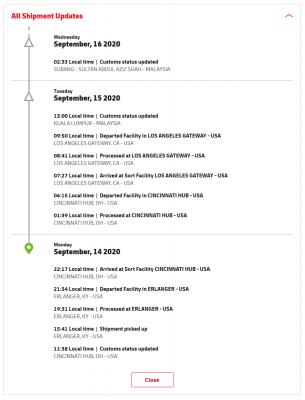
Man, MIKROTIK RB3011UIAS-RM beign held by customs ohmy.gif
Attached Image
Attached Image

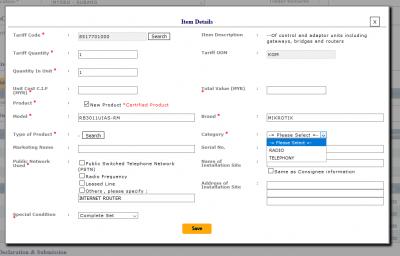
so, I follow instruction given, upload required documents and I stuck at "Item" section:
Attached Image

I thought only Radio Emission device (Wireless & Bluetooth) need to declare? This Router has no Wi-Fi cry.gif

List certified Mikrotik on Sirim:
https://drive.google.com/file/d/1SzZce0wohE...iew?usp=sharing *everything is Wireless device

This post has been edited by Anime4000: Sep 16 2020, 04:14 PM
TSAnime4000
post Sep 16 2020, 11:32 PM

Look at all my stars!!
*******
Senior Member
2,399 posts

Joined: Jul 2009
From: /dev/null


QUOTE(aneip @ Sep 16 2020, 04:57 PM)
Need to tell them is have no WiFi. Dunno can ask dhl or need to deal urself.
*
This new experience for me, I have fill and waiting for approval
Attached Image
TSAnime4000
post Sep 19 2020, 10:56 AM

Look at all my stars!!
*******
Senior Member
2,399 posts

Joined: Jul 2009
From: /dev/null


aneip asellus thankyou
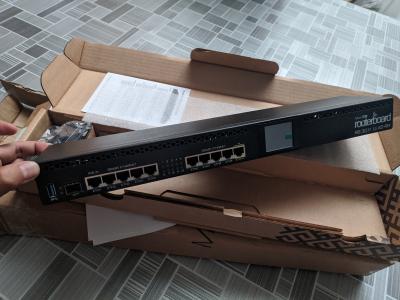
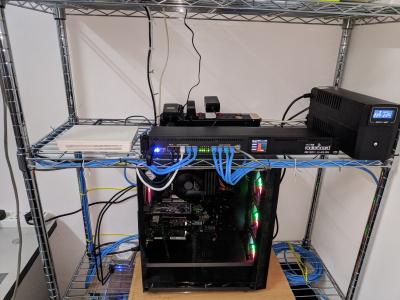
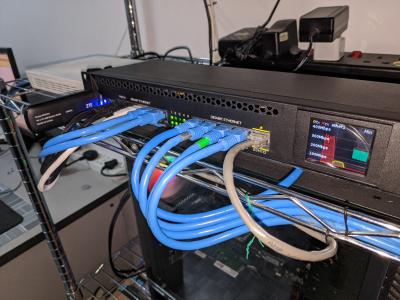
Mikrotik RB3011 UiAS-RM arrived!
Attached Image
quite long, and small. This is my first time to configure Mikrotik and having SFP port Router.

Waiting SFP ONT module to arrive next.
TSAnime4000
post Sep 20 2020, 11:44 AM

Look at all my stars!!
*******
Senior Member
2,399 posts

Joined: Jul 2009
From: /dev/null


QUOTE(aneip @ Sep 20 2020, 10:19 AM)
I saw RB4001 last friday.. Felt heavy and more robust than RB3011. RB3011/2011 just normal casing.. 4011  more solid like they use the case to dispensed the heat.
*
I got this for free beside paying SIRIM, and only this Mikrotik get passed.

this is my first time setup, simple task to change default LAN IP address, need configure many than in one page blush.gif

from this:
Attached Image

to this:
Attached Image
Attached Image

and I have enable IPv6, using PD instead of DHCPv6, because android hate DHCPv6

This post has been edited by Anime4000: Sep 20 2020, 11:49 AM
TSAnime4000
post Sep 20 2020, 05:02 PM

Look at all my stars!!
*******
Senior Member
2,399 posts

Joined: Jul 2009
From: /dev/null


QUOTE(aneip @ Sep 20 2020, 10:19 AM)
I saw RB4001 last friday.. Felt heavy and more robust than RB3011. RB3011/2011 just normal casing.. 4011  more solid like they use the case to dispensed the heat.
*
In previous post, RB4011 have issue with ONT SFP Stick

QUOTE(Gregar Forte @ Sep 20 2020, 01:10 PM)
Neat and tidy setup there
*
yea, later easy to troubleshoot~

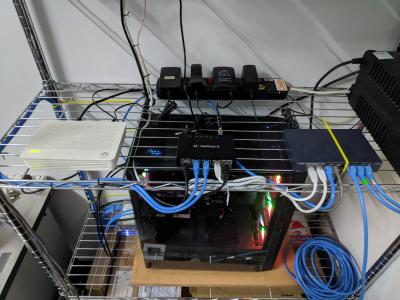
the 4G Backup not working, only works with Stock Maxis TP-Link,
If I can't trick RB3011 is TP-Link, I may use Router + 4G backup and put at roof for optimal, then can do fail over stuff
TSAnime4000
post Sep 21 2020, 11:37 AM

Look at all my stars!!
*******
Senior Member
2,399 posts

Joined: Jul 2009
From: /dev/null


QUOTE(aneip @ Sep 21 2020, 07:33 AM)
Can work on PC? maybe not compatible with mikrotik.. I believe mikrotik got limited support for usb dongle.
*
LTE Dongle detected, can view dongle WebUI, I think Maxis limit, I try put SIM to my phone, straight no line!

I guess, put dongle at Maxis Router serve via LAN
TSAnime4000
post Sep 21 2020, 12:25 PM

Look at all my stars!!
*******
Senior Member
2,399 posts

Joined: Jul 2009
From: /dev/null


QUOTE(miloaisdino @ Sep 21 2020, 12:07 PM)
is the dongle even receiving an ip address from maxis? if no maybe it could be an apn issue, or might need to clone the imei of the maxis router onto the dongle. if ip address received but still cant access internet, might need to mangle the TTL setting for requests through the dongle on the mikrotik
*
Dongle I use is from Maxis, ZTE brand.

Mikrotik got dongle IP from "lte" Interface, 192.168.0.199
I can access dongle WebUI via 192.168.0.1
Dongle have IP 100.64.0.0/10
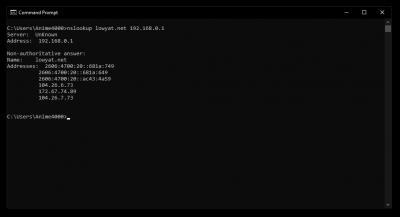
APN is fine, since can do nslookup through 192.168.0.1, other traffic is blocked.

Mangle TTL?

This post has been edited by Anime4000: Sep 21 2020, 12:27 PM
TSAnime4000
post Sep 21 2020, 11:00 PM

Look at all my stars!!
*******
Senior Member
2,399 posts

Joined: Jul 2009
From: /dev/null


QUOTE(thankyou @ Sep 21 2020, 12:29 PM)
It has been quite awhile since I last worked on GPON ONU... I've basically "given up" trying to use GPON ONU on ER-12. So far it has been stored in cold storage for sometime.

A little regret getting ER-12 as my heart still with Mikrotik... Maybe my next project is to build a pfsense with SFP slot...
*
need find pfSense box with SFP~ x86 can handle gigabit easily biggrin.gif

QUOTE(miloaisdino @ Sep 21 2020, 12:32 PM)
i suspect this is a TTL issue! its similar to how people used TTL changers to bypass tethering caps. try incrementing/decrementing the ttl of traffic destined to the dongle under "mangle" in mikrotik until it works
*
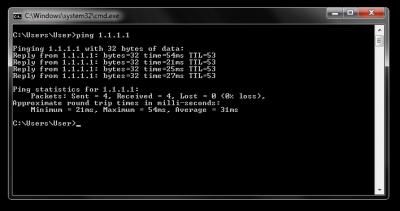
I have test ping ttl under Maxis TP-Link - ZTE Dongle

CODE
TTL:
Address         PC          TP-Link > ZTE Dongle
------------------------------------------------
1.1.1.1         53          54
google.com      112         113
facebook.com    49          50


PC:
Attached Image

TP-Link Router with ZTE Dongle Attached:
Attached Image

53 < 54 is decrease by 1,

So, I do test Firewall Mangle on pppoe-out1:
CODE
Chain: prerouting
In. Interface: pppoe-out1

Action: change TTL
TTL Action: decrement by 1

it's worked! so I change pppoe-out1 to lte1, not working!

I wonder why not work on lte1, maybe dongle detect by MAC Address?

TSAnime4000
post Sep 22 2020, 12:24 AM

Look at all my stars!!
*******
Senior Member
2,399 posts

Joined: Jul 2009
From: /dev/null


QUOTE(miloaisdino @ Sep 21 2020, 11:36 PM)
hmm so currently:
dongle +sim works when connected to pc --> maxis tplink
dongle doesnt work on mikrotik, sim doesnt work on phone
*
Yeah,
PC > Maxis TP-Link + 4G Dongle = Works
PC > Mikrotik + 4G Dongle = Not Working, only "nslookup" works

QUOTE(miloaisdino @ Sep 21 2020, 11:36 PM)
maxis detects ttl via Outgoing packets to their gateway, so Out Interface should be used instead of In Interface for mangle
https://forum.mikrotik.com/viewtopic.php?t=144140 (example of working for mikrotik dongle).

https://answers.microsoft.com/en-us/windows...3e-92fa5ca0bd16 the ttl from the ping is actually the "final" decremented ttl at the destination and is not what maxis receives! what i suspected was that the "original source" ttl value when dongle is connected to tplink is different from when dongle/sim is plugged anywhere else, so we need to "offset" the ttl somehow...
*
I been thinking the same, I want to know what TTL is set in Maxis TP-Link,
If have tool to crack USB Ethernet between Dongle and Router, inspect packet that way?

Or crack TP-Link router?

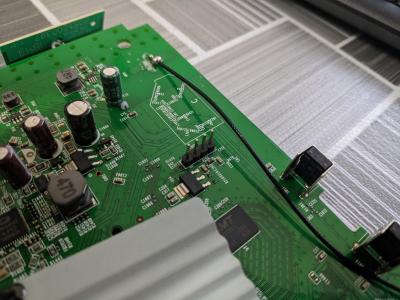
I managed to open since I have extra during PKP, put UART header and putty serial console, I stuck at Login, dont know what username and password doh.gif
» Click to show Spoiler - click again to hide... «


QUOTE(miloaisdino @ Sep 21 2020, 11:36 PM)
maybe can try connecting dongle by usb directly into pc instead then ping? that might rule out dongle detect mac address or other problems?
*
Plugging Maxis ZTE 4G Dongle into PC is same like plugging into Mikrotik, only "nslookup" works
Attached Image
Attached Image

I try follow that guide carefully, and do one by one finding, make Mikrotik ALL in One rclxm9.gif
TSAnime4000
post Sep 22 2020, 12:34 AM

Look at all my stars!!
*******
Senior Member
2,399 posts

Joined: Jul 2009
From: /dev/null


QUOTE(miloaisdino @ Sep 22 2020, 12:27 AM)
haha. maybe try static ttl first, easier than cracking tplink (there are only 255 combinations to try! (much fewer since ttl 1-35 will pretty much kill lots of websites)try near 64, 128, 255 +- or other common ttl maybe?)
*
Do I need to disable FastTrack Connection?
TSAnime4000
post Sep 22 2020, 01:57 AM

Look at all my stars!!
*******
Senior Member
2,399 posts

Joined: Jul 2009
From: /dev/null


QUOTE(miloaisdino @ Sep 22 2020, 12:35 AM)
for traffic destined to the dongle only, yes! anyway 4g isnt that fast shouldn't have any bottlenecks doh.gif
hmm could be mac address? maybe clone the tplink mac onto mikrotik too?!
https://wiki.mikrotik.com/wiki/Manual:Interface/LTE
confirm mac address!! not TTL!! mac address for maxis usb should be maxis router mac +- a few digits on the last octet!
*
No wonder, I type TTL value from 1 until 255 no luck doh.gif

some digging:
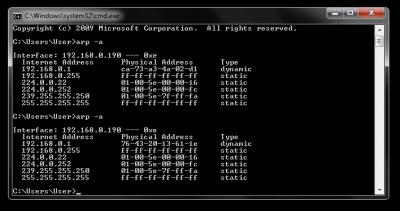
Attached Image
in maxis router show some list mac address

Attached Image
when 4G backup plug into PC, this mac address kind static across connect-disconnect

Attached Image
Attached Image
Attached Image
the Dongle MAC address will generate randomly every USB plugged

Question is, can Mikrotik act like TP-Link? fool ZTE Dongle, or TP-Router has "special" driver for dongle hmm.gif
TSAnime4000
post Sep 22 2020, 10:35 PM

Look at all my stars!!
*******
Senior Member
2,399 posts

Joined: Jul 2009
From: /dev/null


QUOTE(pacat @ Sep 22 2020, 04:00 PM)
Have you tried to disable the pppoe-out1 interface first then check whether internet works with lte?
*
Yes, I simply delete pppoe-out1

I can nslookup 192.168.0.1 on PC through Mikrotik > ZTE Dongle
However other traffic are not get through!

If Dongle looking for specific Device MAC Address, how to fool [data] > [dongle interface]

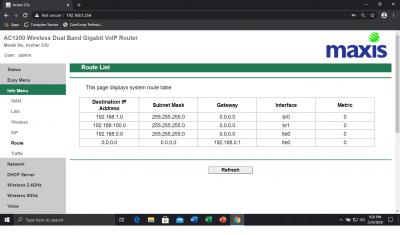
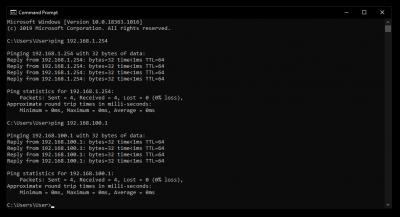
after some digging, I saw Maxis Router can be access via 192.168.100.1 (br1) under 192.168.1.0/24 (br0) network, I guess some NAT happening

Attached Image
Attached Image

cant get br1 MAC Address since 192.168.100.1 is behind 192.168.1.1
TSAnime4000
post Sep 23 2020, 02:36 AM

Look at all my stars!!
*******
Senior Member
2,399 posts

Joined: Jul 2009
From: /dev/null


QUOTE(pacat @ Sep 23 2020, 12:15 AM)
I believe mac address seen by the dongle in the maxis router was at dhcp_USB_4G. Try put that mac address into lte interface in Mikrotik.
*
I tried to change in "Interface" > LTE. it revert back to original MAC.

What if bridge > dummy interface > lte1.

the dummy interface is using maxis router mac address, some kind change mac address
TSAnime4000
post Sep 23 2020, 04:28 PM

Look at all my stars!!
*******
Senior Member
2,399 posts

Joined: Jul 2009
From: /dev/null


QUOTE(pacat @ Sep 23 2020, 09:36 AM)
Maybe. Try putting the mac address into that bridge and dhcp client interface point to that bridge.
*
I have tried this, and not working. bridge > lte1

QUOTE(pacat @ Sep 23 2020, 09:36 AM)
I think lte interface can be added as port into the bridge. Just create a new bridge then add the lte interface as port. No need of dummy interface in between.
*
You mean: bridge > bridgeLTE---lte1 ?
I create bridgeLTE and add a port, the lte1 interface are not exist sad.gif
TSAnime4000
post Sep 24 2020, 02:49 AM

Look at all my stars!!
*******
Senior Member
2,399 posts

Joined: Jul 2009
From: /dev/null


QUOTE(miloaisdino @ Sep 23 2020, 04:49 PM)
QUOTE(pacat @ Sep 23 2020, 05:31 PM)
Yup maybe can try set passthrough to bridgeLTE interface.
https://help.mikrotik.com/docs/display/ROS/...sthroughExample
*
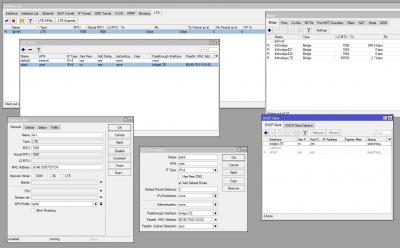
tried, lte1 passthrough to bridge adapter not work:
Attached Image

I guess, time to UART console for some iptables:
Attached Image
WebGUI login not work in UART console, I dont know what is the valid login
UART log here: https://gist.github.com/Anime4000/4dd729dc4...7eec36121184992

This post has been edited by Anime4000: Sep 24 2020, 03:30 AM

31 Pages < 1 2 3 4 > » Top
 

Change to:
| Lo-Fi Version
0.0846sec    0.60    7 queries    GZIP Disabled
Time is now: 13th December 2025 - 07:37 PM