Welcome Guest ( Log In | Register )

Outline · [ Standard ] · Linear+

 Anything else I could do to increase performance?

views
     
TSCurrent Events guy
post Mar 4 2020, 01:10 PM, updated 6y ago

Enthusiast
*****
Junior Member
966 posts

Joined: Nov 2009
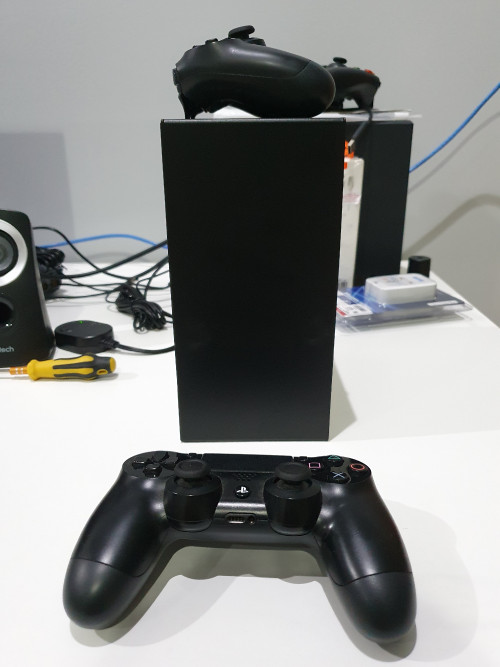
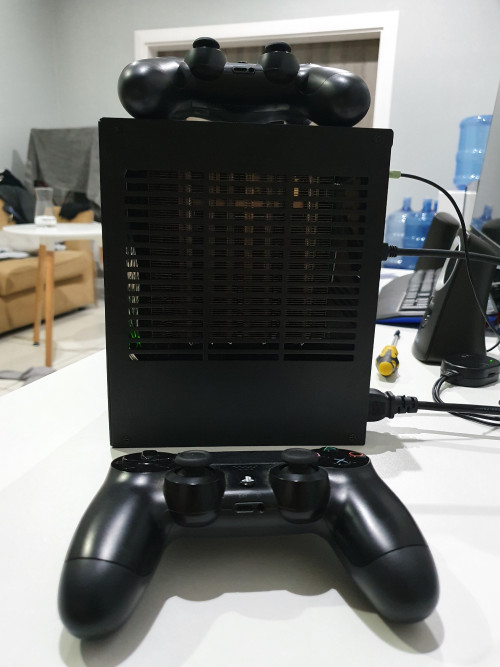
I just put this together, looking for feedback on things to add/take out to improve overall performance/functionality of the build. I was thinking of including a bluetooth dongle using the internal free USB 3 port but then I realized my mobo has that embedded.

Specs:
CPU: AMD R7 3700X
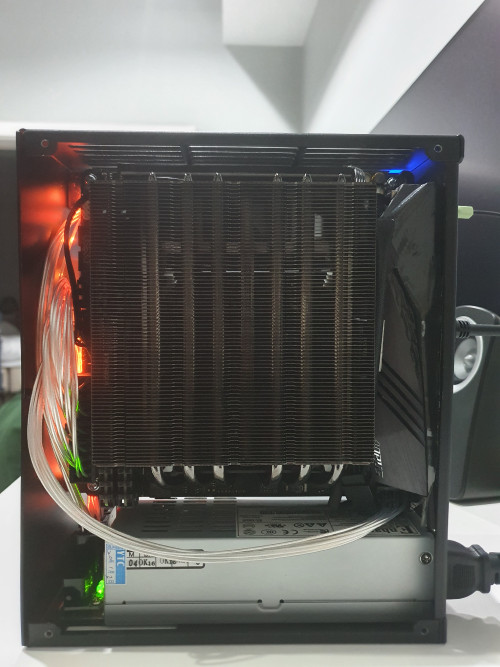
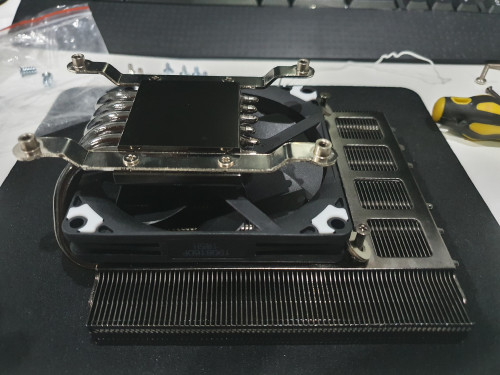
CPU Cooler: Alpenfohn Black Ridge V2
MOBO: Aorus X570i
RAM: Corsair LPX 32GB 3600MHZ
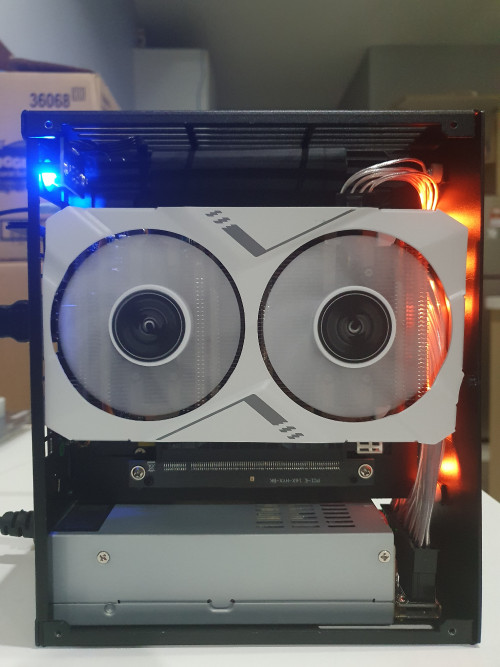
GPU: Galax Mini RTX 2070
Storage: ADATA XPG SX8200 256GB
Storage: ADATA XPG SX8200 1TB
PSU: Enhance ENP-7660 600W
Case: K39V2

Thermals:
CPU: Idle - 45°C, load - 70°C (undervolted PPT 75W)
GPU: Idle - 35°C, load - 70°C (not yet undervolted)

Pictures:
» Click to show Spoiler - click again to hide... «

1mr3tard3d
post Mar 4 2020, 02:41 PM

Regular
******
Senior Member
1,137 posts

Joined: Oct 2018


when size matters, performance will not be maximised
unable to comment on improvement when the usage has not been defined
if you don't have issue now, you probably won't notice the difference after improvement anyway
TSCurrent Events guy
post Mar 4 2020, 02:44 PM

Enthusiast
*****
Junior Member
966 posts

Joined: Nov 2009
QUOTE(1mr3tard3d @ Mar 4 2020, 02:41 PM)
when size matters, performance will not be maximised
unable to comment on improvement when the usage has not been defined
if you don't have issue now, you probably won't notice the difference after improvement anyway
*
Gaming.
iZuDeeN
post Mar 4 2020, 03:53 PM

Look at all my stars!!
*******
Senior Member
3,466 posts

Joined: Jan 2003
From: PJ, Malaysia
perhaps change Thermal Paste ; overclock the CPU & GPU ; run Prime95 ; as long its not thermal throttle..

you need to share what game you play at what resolution... and what FPS you expect.. and what your current monitor refresh rate?

2070 is already a capable card for 2k gaming (1440)
lawliet88
post Mar 4 2020, 04:08 PM

Enthusiast
*****
Junior Member
993 posts

Joined: May 2010
From: Cheras For PPL to Live 1


put fan on the heatsink if it can fit , then thermal paste like kryonaut or thermalright tf8.

btw ur psu cable is it from taobao also? those "silver-ish" sleeve , i forgot wat name they call it. i read reviews its kinda hard to bend compare to traditional sleeved.
TSCurrent Events guy
post Mar 4 2020, 04:15 PM

Enthusiast
*****
Junior Member
966 posts

Joined: Nov 2009
QUOTE(iZuDeeN @ Mar 4 2020, 03:53 PM)
perhaps change Thermal Paste ; overclock the CPU & GPU ; run Prime95 ; as long its not thermal throttle..

you need to share what game you play at what resolution... and what FPS you expect.. and what your current monitor refresh rate?

2070 is already a capable card for 2k gaming (1440)
*
Yeah maybe I'll consider the expensive thermal paste. I'm using the RM30 cooler master one now.

Games played are Civ 6, DMC 5, Hitman at 1440p and 144HZ. I'm using the LG 27GL850 so I think the max FPS is 165Hz.

QUOTE(lawliet88 @ Mar 4 2020, 04:08 PM)
put fan on the heatsink if it can fit , then thermal paste like kryonaut or thermalright tf8.

btw ur psu cable is it from taobao also? those "silver-ish" sleeve , i forgot wat name they call it. i read reviews its kinda hard to bend compare to traditional sleeved.
*
Yeah the PSU cable came with the PSU.

Not hard to bend at all. In fact it's one of the things I like with this build. It's much easier to cable manage than the usual builds I've done where decent cable management took a long while.

Oh I forgot there already is a fan under the heatsink.
I cant put it above because of the side panel.

Here is a pic
» Click to show Spoiler - click again to hide... «


This post has been edited by Current Events guy: Mar 4 2020, 04:16 PM

iZuDeeN
post Mar 4 2020, 04:34 PM

Look at all my stars!!
*******
Senior Member
3,466 posts

Joined: Jan 2003
From: PJ, Malaysia
QUOTE(Current Events guy @ Mar 4 2020, 04:15 PM)

Games played are Civ 6, DMC 5, Hitman at 1440p and 144HZ. I'm using the LG 27GL850 so I think the max FPS is 165Hz.
Yeah the PSU cable came with the PSU.
Are you not getting the the FPS with current setup?

What is the CPU% and GPU% during gaming?
wtm0325
post Mar 4 2020, 05:09 PM


******
Senior Member
1,796 posts

Joined: Jan 2005

smell this is show off tered rather than asking advice smh hahaha
TSCurrent Events guy
post Mar 4 2020, 05:14 PM

Enthusiast
*****
Junior Member
966 posts

Joined: Nov 2009
QUOTE(iZuDeeN @ Mar 4 2020, 04:34 PM)
Are you not getting the the FPS with current setup?

What is the CPU% and GPU% during gaming?
*
GPU 100%
CPU about 50%

FPS reaches about 136 FPS

I have an empty USB 3.0 slot on mobo. Any ideas what I could do to make use of it?
1mr3tard3d
post Mar 4 2020, 05:37 PM

Regular
******
Senior Member
1,137 posts

Joined: Oct 2018


QUOTE(wtm0325 @ Mar 4 2020, 05:09 PM)
smell this is show off tered rather than asking advice smh hahaha
*
you could suggest him 2080ti, lol

QUOTE(Current Events guy @ Mar 4 2020, 05:14 PM)
GPU 100%
CPU about 50%

FPS reaches about 136 FPS

I have an empty USB 3.0 slot on mobo. Any ideas what I could do to make use of it?
*
I would not worry about thermal paste if your gpu only reached 70 degrees under full load, cause my 1060 is around 80 as the default msi settings
and yeah, upgrade to 2080ti if that is the improvement you are wondering

don't quite understand about the USB 3.0
it's whether you need it or you don't
you may not utilise all sata ports for instance
TSCurrent Events guy
post Mar 4 2020, 05:53 PM

Enthusiast
*****
Junior Member
966 posts

Joined: Nov 2009
QUOTE(1mr3tard3d @ Mar 4 2020, 05:37 PM)
you could suggest him 2080ti, lol
I would not worry about thermal paste if your gpu only reached 70 degrees under full load, cause my 1060 is around 80 as the default msi settings
and yeah, upgrade to 2080ti if that is the improvement you are wondering

don't quite understand about the USB 3.0
it's whether you need it or you don't
you may not utilise all sata ports for instance
*
I can't use another GPU due to space limitations.

Should I deshroud my GPU and replace that with noctua fans? Do you think that would help with thermals
iZuDeeN
post Mar 5 2020, 09:06 AM

Look at all my stars!!
*******
Senior Member
3,466 posts

Joined: Jan 2003
From: PJ, Malaysia
QUOTE(wtm0325 @ Mar 4 2020, 05:09 PM)
smell this is show off tered rather than asking advice smh hahaha
*
yeah i thought so....
krayden
post Mar 7 2020, 04:47 AM

On my way
****
Junior Member
578 posts

Joined: Jun 2006


I think you kesyokan. Now looking for things to buy.
1. Kryonaut thermal paste the cpu.
2. Noctua fan the flex psu. (not noisy kah?)
3. Mechanical keyboard
4. Vesa arm your monitor
5. Upgrade to audiophile headset/ speakers
6. Logitech pro wireless

iamme97
post Mar 7 2020, 04:54 AM

Getting Started
**
Junior Member
61 posts

Joined: Jan 2011
From: Alor Setar


park
TSCurrent Events guy
post Mar 7 2020, 09:14 AM

Enthusiast
*****
Junior Member
966 posts

Joined: Nov 2009
QUOTE(krayden @ Mar 7 2020, 04:47 AM)
I think you kesyokan. Now looking for things to buy.
1. Kryonaut thermal paste the cpu.
2. Noctua fan the flex psu. (not noisy kah?)
3. Mechanical keyboard
4. Vesa arm your monitor
5. Upgrade to audiophile headset/ speakers
6. Logitech pro wireless
*
1. Ok.
2. Already have but I didnt change. Some said the noise is due to coil whine and changing the fan wont anything. Also, under load the CPU/GPU fan is louder.
3. Maybe later.
4. Got a good recommendation? My monitor is an LG 27GL850 and S2719DGF. Is there a minimum desk thickness?
5 and 6. Maybe later


Lil^CK
post Mar 9 2020, 02:08 AM

Getting Started
**
Junior Member
74 posts

Joined: Nov 2004
From: Klang, Selangor
Hi, I plan to get the K39V2 casing for my ITX build.
Your setup using CPU Cooler: Alpenfohn Black Ridge V2; Is that the maximum, tallest cooler height the casing is able to handle? TIA
TSCurrent Events guy
post Mar 9 2020, 10:44 AM

Enthusiast
*****
Junior Member
966 posts

Joined: Nov 2009
QUOTE(Lil^CK @ Mar 9 2020, 02:08 AM)
Hi, I plan to get the K39V2 casing for my ITX build.
Your setup using CPU Cooler: Alpenfohn Black Ridge V2; Is that the maximum, tallest cooler height the casing is able to handle? TIA
*

The cpu cooler clearance is 47mm and this black ridge is also 47mm but it is not the only one that is that tall.

The other ones are cryorig c7 and axp-90.
xxboxx
post Mar 9 2020, 11:25 AM

The mind is for having ideas, not holding them
*******
Senior Member
5,261 posts

Joined: Oct 2004
From: J@Y B33


Change CPU to 3950X
lawliet88
post Mar 9 2020, 12:04 PM

Enthusiast
*****
Junior Member
993 posts

Joined: May 2010
From: Cheras For PPL to Live 1


QUOTE(Current Events guy @ Mar 9 2020, 10:44 AM)
The cpu cooler clearance is 47mm and this black ridge is also 47mm but it is not the only one that is that tall.

The other ones are cryorig c7 and axp-90.
*
yeah just get thermalright axp-90 (non copper ver will do) if order from taobao, its slightly worst compare to blackridge but better than cyrorig and noctua sff cooler
TSCurrent Events guy
post Mar 9 2020, 12:08 PM

Enthusiast
*****
Junior Member
966 posts

Joined: Nov 2009
Edit double post

This post has been edited by Current Events guy: Mar 9 2020, 12:08 PM

2 Pages  1 2 >Top
 

Change to:
| Lo-Fi Version
0.0207sec    0.10    5 queries    GZIP Disabled
Time is now: 7th December 2025 - 04:09 AM