Welcome Guest ( Log In | Register )

Outline · [ Standard ] · Linear+

 Just upgraded to 300mbps unifi, Need sifus advise on best router to get

views
     
misspinky
post Feb 19 2020, 04:22 PM

Casual
***
Junior Member
309 posts

Joined: Jul 2012


QUOTE(Grayson @ Feb 19 2020, 01:43 PM)
Besides this 2 modem any other good modem you recommended? I saw in the market keep advertising this Asus rog gt- ax11000 but too expensive for me...
*
If you are running out of budget right now and still collecting the money, you can use that tp-link, all of us suggest not recommended you to use that router for permanent or long terms usage. Bare in mind if that router not come with tm logo, you can directly upgrade the firmware. First, just make sure check your router version, if V1 just upgrade with V1 only. If come with tm logo, you can try to upgrade directly, if failed you need to make recovery mode first then you can upgrade the firmware. Indeed, Asus are the best so far when it's come for consumer router, even though it's expensive but its come many features given and long term support especially firmware whether you use back dated router or latest model of router. if you not considering warranty one, you can get asus router from someone that don't want use that router anymore with good price given because some of them really like upgrading to latest router.

C1200 firmware V1-V3 Malaysia
tp-link recovery mode
misspinky
post Feb 20 2020, 03:17 PM

Casual
***
Junior Member
309 posts

Joined: Jul 2012


QUOTE(Grayson @ Feb 19 2020, 08:24 PM)
Budget around 600-900.. don’t mind stretching if the router is good!  Using handphone but desktop coming soon.. the router is beside my room, but somehow I’m only able to receive 60-70mbps, if standing beside my router I can’t even get 300mbps... do I need to call tm to check my speed?
*
Your budget already passed if want to buy asus router. Just make sure choose wifi mode for 2.4GHz 802.11n only with wifi channel static whether 1/6/11, for 5GHz choose wifi mode 802.11n/ac only or 802.11ac only any wifi channel static as long not interference with your neighbour.
misspinky
post Feb 21 2020, 11:16 AM

Casual
***
Junior Member
309 posts

Joined: Jul 2012


QUOTE(Grayson @ Feb 21 2020, 12:21 AM)
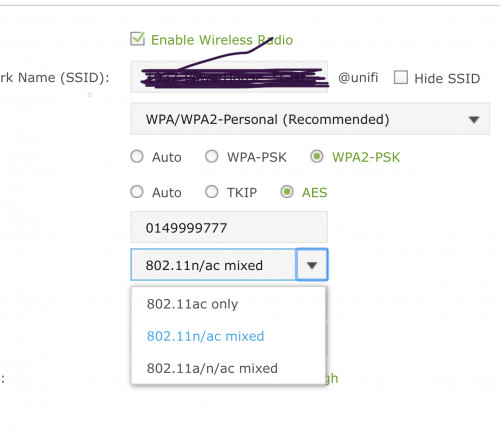
Am I correct? Wifi mode as in this;

user posted image

And channel static as in this;

user posted image

Correct? Thanks..
*
Indeed, you can pick 802.11ac only for 5GHz for starting. If you face hardly connected or frequently disconnected, just stick back to 802.11n/ac only. From what i can see, you are using tm stock default router because wifi name come with @unifi, you may refer from my past replied how to upgrade the firmware by using recovery mode, for temporary usage before you find the best deal router soon. i know this can make it confuse a bit for you. Just make sure make strong a password, not using a number only. Old timer tp-link router, 5GHz, usually support channel 36 until 48 only. DFS channel you need to try and error, if your place too much helicopter and aeroplane playing around in your area - flight live view , you very hardly to use these channel. So, you need try one by one channel if want to use DFS channel, not all router support DFS channel. Some of router that support these channel cannot use it properly, not functioning very well. Only certain of its got stable by using these channel, depend on what hardware specs of that router too. Nowadays, many router support 5GHz channel from 36 until 161/165 with channel width 80MHz. Only certain router that support channel width 160MHz.
misspinky
post Feb 21 2020, 11:23 AM

Casual
***
Junior Member
309 posts

Joined: Jul 2012


QUOTE(Grayson @ Feb 21 2020, 11:28 AM)
I have adjusted the bandwidth just now, and from 50-70mbps now I got around 100mbps which is still quite Low I think.  Hm  hmm.gif
*
That is standard speed usually for wifi 2.4GHz especially if you're using tplink router, depend on specs of your devices too. Bare in mind just connecting direct Lan cable only if you're using desktop, if using laptop at same place better using direct Lan cable. Just use wifi when need moving to other place and there is no way for wired.


Change to:
| Lo-Fi Version
0.0173sec    0.82    6 queries    GZIP Disabled
Time is now: 10th December 2025 - 01:02 AM