Outline ·
[ Standard ] ·
Linear+
Just upgraded to 300mbps unifi, Need sifus advise on best router to get
|
TSGrayson
|
 Feb 20 2020, 09:16 PM Feb 20 2020, 09:16 PM
|

|
QUOTE(Zot @ Feb 20 2020, 10:40 AM) No need to go AX. Last time the GT-AC5300 was near to 2k now cheaper already. That's for gamer. RT-AC5300 is sufficient. Budget? Budget around 600-900, let’s just say I just buy the lan cable to connect to my desktop, is tplink sufficient? Or does rog excel in that too? |
|
|
|
|
|
TSGrayson
|
Feb 20 2020, 09:17 PM
|
|
|
QUOTE(1mr3tard3d @ Feb 20 2020, 10:43 AM) If your router is beside your room, using lan cable will get you 300Mbps almost guaranteed, and you can save the money Emm...did the TM employees configure the AC1200 for you? sometimes restart will work do you store the router in a cabinet? I assume you connected to 5GHz while doing the speed test but 100Mbps is enough for 1080p streaming type 192.168.0.1 in your browser default password: admin/blank go to advance, wireless settings, 5GHz  Thanks bro, finish work later I try |
|
|
|
|
|
TSGrayson
|
Feb 20 2020, 09:18 PM
|
|
|
QUOTE(Zot @ Feb 20 2020, 10:56 AM) The 802.11ax is designed to operate in all ISM bands between 1 and 6 GHz when they become available for 802.11 use, in addition to the 2.4 and 5 GHz bands already allocated. Now to make thing simple, it is called WiFi6. Now most devices support 802.11ac. So, I'd say just stick to 802.11ac. Yes, people might say, buy now and you can use for long time when more and more devices out there support. However, you are paying for high price for nothing when the modem price will quickly drop when more and more in market, in my opinion. You’re right, the price does fluctuates a lot so a bit dizzy what to buy, scare buy then later price drop.. |
|
|
|
|
|
TSGrayson
|
Feb 20 2020, 09:20 PM
|
|
|
QUOTE(Zot @ Feb 20 2020, 11:05 AM) If your modem can provide 300Mbps, it does not mean that you will get 300Mbps. It depends on your devices/phone also. Your phone probably only can do 1 spatial stream (single antenna). So, the max speed is around that on 20MHz bandwidth. You will get around 300Mbps with 80MHz channel, but you will also exposed to interference from neighbor since your channel if you are on 2.4GHz band So to be safe, 20mhz for 2.4ghz, and 80mhz for 5ghz? I tried standing beside connecting to 5ghz with phone supporting 300mbps but manage to get below than 100mbps, called tm service they say I’m suppose to get above 50% of the applied 300mbps.. |
|
|
|
|
|
TSGrayson
|
Feb 20 2020, 09:22 PM
|
|
|
QUOTE(nonamer @ Feb 20 2020, 12:40 PM) 100mbps is more than enough to run any kind of game (as long as u can fix the router's QoS in environment with multiple user) but still some games like csgo unless u go for wired u will be at competitive disadvantage even with the highest end wireless router Understood.. planning to get a good stable line for wifi, if no choice need to think how to connect the wifi to my desktop.. |
|
|
|
|
|
TSGrayson
|
Feb 20 2020, 09:22 PM
|
|
|
QUOTE(pokchik @ Feb 20 2020, 11:48 AM) Will take note on that brother |
|
|
|
|
|
TSGrayson
|
Feb 20 2020, 09:24 PM
|
|
|
QUOTE(misspinky @ Feb 20 2020, 03:17 PM) Your budget already passed if want to buy asus router. Just make sure choose wifi mode for 2.4GHz 802.11n only with wifi channel static whether 1/6/11, for 5GHz choose wifi mode 802.11n/ac only or 802.11ac only any wifi channel static as long not interference with your neighbour. Dint quite get what you meant.. too much code haha, still new in this game.. |
|
|
|
|
|
TSGrayson
|
Feb 20 2020, 09:24 PM
|
|
|
QUOTE(Jjuggler @ Feb 20 2020, 07:58 PM) Brother 1mr3tard3d has showed you dae way..  . If you want to buy an ASUS router (just incase you don't care about budget at all), I can suggest a few models for you ranging from AC86U (Wi-Fi 5 router) or if you want to futureproof your home-network, give AX56U a try. It is an entry level Wi-Fi 6 router. All right brother, will take note on these few model for research. |
|
|
|
|
|
TSGrayson
|
Feb 20 2020, 11:00 PM
|
|
|
QUOTE(Jjuggler @ Feb 20 2020, 09:46 PM) Always read on the reviews before buying. It is for your own satisfaction so that, you know, you've invested on a right gear. Right on! I’ve always been like that.. want all my money well spent  |
|
|
|
|
|
TSGrayson
|
Feb 20 2020, 11:13 PM
|
|
|
QUOTE(Jjuggler @ Feb 20 2020, 11:05 PM) ASUS is the only 'premium' consumer networking gear, that worth to spent money on. Just bought desktop with rog mobo and gpu  |
|
|
|
|
|
TSGrayson
|
Feb 20 2020, 11:21 PM
|
|
|
QUOTE(misspinky @ Feb 20 2020, 03:17 PM) Your budget already passed if want to buy asus router. Just make sure choose wifi mode for 2.4GHz 802.11n only with wifi channel static whether 1/6/11, for 5GHz choose wifi mode 802.11n/ac only or 802.11ac only any wifi channel static as long not interference with your neighbour. Am I correct? Wifi mode as in this; 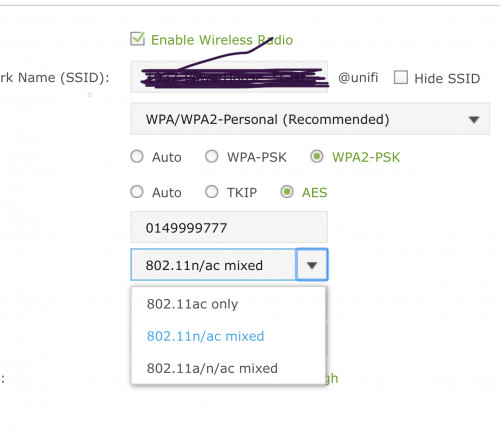 And channel static as in this;  Correct? Thanks.. |
|
|
|
|
|
TSGrayson
|
Feb 21 2020, 10:22 AM
|
|
|
QUOTE(Zot @ Feb 21 2020, 08:11 AM) LAN cable will definitely takes the load of the WiFi and mush faster. The main reason is the LAN cable is full-duplex but the WiFi is simplex communication. The WIFI is like walkie-talkie, when someone talk you can only listen  . If you have many devices on WiFi, each one have to wait for their turn  The ROG is designed specifically for gamer since it will provide something like QoS (Quality of Service) to your game data packets. The packets will get priority. So, no delay. I bought ROD too but I don't play game  I'd say for normal use, TPLink is sufficient enough. Nice, very good example and very easy to understand. Thanks. |
|
|
|
|
|
TSGrayson
|
Feb 21 2020, 10:26 AM
|
|
|
QUOTE(Jjuggler @ Feb 21 2020, 08:11 AM) Nice. Hope you enjoy your pick. Yes. You are correct. Try to use the channel in between 36, 40, 44, and 48, but bear in the mind, these channels often congested ya. If your router supports DFS and TPC, then you can use these channels 52, 56, 60, and 64, indeed. Sorry for asking, why use 36, 40, 44 and 48? Why not use others and what’s the difference between these channels? And I’m using tplink right now how do I know if it’s support dfs nd tpc? Thank you for your time.  |
|
|
|
|
|
TSGrayson
|
Feb 21 2020, 10:28 AM
|
|
|
QUOTE(Zot @ Feb 21 2020, 08:22 AM) Yes, I'd just do that 20MHz for 2.4GHz band. Less than 100Mbps is low. Something is not right. I think you have fixed the bandwidth to 80Mhz, right? I get around 470Mbps on my 500Mbps service with both laptop and my phone. I forget what my setting was anyway. Since wireless is half-duplex, I guess that is why the cs said you should get above 50%, generally around 60% I believe due to protocol overhead, etc. I have adjusted the bandwidth just now, and from 50-70mbps now I got around 100mbps which is still quite Low I think. Hm  |
|
|
|
|
|
TSGrayson
|
Feb 21 2020, 06:35 PM
|
|
|
QUOTE(Jjuggler @ Feb 21 2020, 10:44 AM) Because channel 36 to 48 is the recommended channels for 5GHz. If you hover over the channel drop down menu, you can see the available channels there. If you can't see channels in between 52 up until 140, then your router don't support DFS channel. To make you understand a bit further, the DFS channel often regarded as the WLANs utilizes 5GHz frequencies that made available only for radars. The 5GHz frequencies often operates in between 5250 – 5330 MHz and 5490 – 5710 MHz. Ahh so technically the dfs is better for 5ghz but only for newer router. |
|
|
|
|
|
TSGrayson
|
Feb 21 2020, 09:44 PM
|
|
|
QUOTE(Zot @ Feb 21 2020, 10:40 AM) Dynamic Frequency SelectionDynamic Frequency Selection is a channel allocation schemes specified for wireless LAN, commonly Wi-Fi. It is designed to prevent interference with other usages of the C band frequency band that had predated Wi-Fi, such as military radar, satellite communication, and weather radar. It was standardized in 2003 as part of IEEE 802.11h. In the US and other countries, some of the Unlicensed National Information Infrastructure (U-NII) bands are used by radar systems. Wi-Fi networks operating in those bands are required to employ a radar detection and avoidance capability. I think this is not applicable here in Malaysia. We are still on standard ISM bands. The Transmit Power Control (TPC) goes together with DFS to avoid interfering the radar by reducing the power. I think you can have both disabled if there is such feature in setting Wow, it gets complicated as it goes, compare to when I previously thought is all about connect and disconnect own wifi |
|
|
|
|
|
TSGrayson
|
Feb 21 2020, 09:45 PM
|
|
|
QUOTE(Zot @ Feb 21 2020, 10:41 AM) Have you ever installed any apps to check if there is other signal within your operating WiFi channel? Nope, can you recommend me the app so I can check? |
|
|
|
|
|
TSGrayson
|
Feb 21 2020, 09:48 PM
|
|
|
QUOTE(misspinky @ Feb 21 2020, 11:16 AM) Indeed, you can pick 802.11ac only for 5GHz for starting. If you face hardly connected or frequently disconnected, just stick back to 802.11n/ac only. From what i can see, you are using tm stock default router because wifi name come with @unifi, you may refer from my past replied how to upgrade the firmware by using recovery mode, for temporary usage before you find the best deal router soon. i know this can make it confuse a bit for you. Just make sure make strong a password, not using a number only. Old timer tp-link router, 5GHz, usually support channel 36 until 48 only. DFS channel you need to try and error, if your place too much helicopter and aeroplane playing around in your area - flight live view , you very hardly to use these channel. So, you need try one by one channel if want to use DFS channel, not all router support DFS channel. Some of router that support these channel cannot use it properly, not functioning very well. Only certain of its got stable by using these channel, depend on what hardware specs of that router too. Nowadays, many router support 5GHz channel from 36 until 161/165 with channel width 80MHz. Only certain router that support channel width 160MHz. So for my old tp-link ac1200 is safe to go for 36 until 48.. cuz I live nearby airport actually haha.. and why do I need to create a strong password? To prevent from hackers? Thanks. |
|
|
|
|
|
TSGrayson
|
Feb 21 2020, 09:49 PM
|
|
|
QUOTE(misspinky @ Feb 21 2020, 11:23 AM) That is standard speed usually for wifi 2.4GHz especially if you're using tplink router, depend on specs of your devices too. Bare in mind just connecting direct Lan cable only if you're using desktop, if using laptop at same place better using direct Lan cable. Just use wifi when need moving to other place and there is no way for wired. Understood, I guess that’s the better choice. |
|
|
|
|
|
TSGrayson
|
Feb 22 2020, 02:06 PM
|
|
|
QUOTE(Zot @ Feb 22 2020, 12:37 PM) Thanks brother |
|
|
|
|



 Quote
Quote
 0.1701sec
 0.35
0.35
 6 queries
 GZIP Disabled