QUOTE(soonwai @ Jan 24 2020, 02:52 AM)
Mikrotik IPv6 Server only supports ipv6 prefix delegation so we don't use that. Instead use RADVD (Router Advertisement) to hand out the IPv6 addresses to your clients.
You'll see in my config that there is no ipv6 DHCP server.
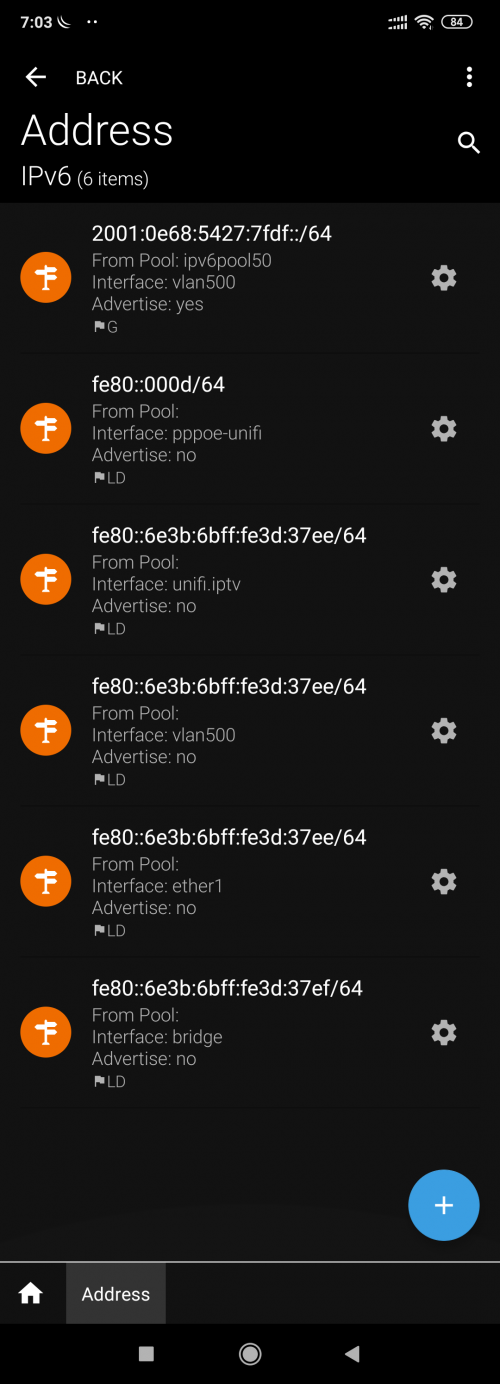
Not sure why yours all unreachable. What happened to all your IPv6 link local addresses?
The ipv6 address in my pc is like this:
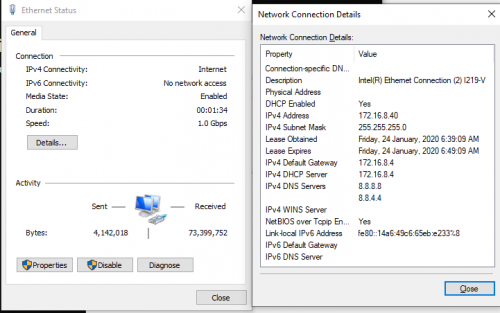
my ipv4 export
» Click to show Spoiler - click again to hide... «
/ip ipsec proposal
set [ find default=yes ] enc-algorithms=3des
/ip pool
add name=dhcp ranges=172.16.8.5-172.16.8.200
/ip dhcp-server
add address-pool=dhcp disabled=no interface=bridge name=defconf
/ip address
add address=172.16.8.4/24 comment=defconf interface=ether2 network=172.16.8.0
/ip cloud
set ddns-enabled=yes ddns-update-interval=1m
/ip dhcp-client
add comment=defconf interface=ether1
/ip dhcp-server lease
add address=172.16.8.40 client-id=1:9c:5c:8e:7b:c1:23 mac-address=9C:5C:8E:7B:C1:23 \
server=defconf
add address=172.16.8.41 client-id=1:90:fb:a6:4d:63:26 mac-address=90:FB:A6:4D:63:26 \
server=defconf
/ip dhcp-server network
add address=172.16.8.0/24 comment=defconf gateway=172.16.8.4 netmask=24
/ip dns
set servers=2001:4860:4860::8888,2001:4860:4860::8844,8.8.8.8,8.8.4.4
/ip dns static
add address=172.16.8.4 comment=defconf name=router.lan
/ip firewall address-list
add address=xxxxxxxxxxxx.sn.mynetname.net list=WAN-IP
/ip neighbor discovery-settings
set discover-interface-list=LAN
/ip firewall filter
add action=accept chain=input comment=WBremote dst-port=8291 protocol=tcp
add action=accept chain=input comment="defconf: accept established,related,untracked" \
connection-state=established,related,untracked
add action=drop chain=input comment="defconf: drop invalid" connection-state=invalid
add action=accept chain=input comment="defconf: accept ICMP" protocol=icmp
add action=accept chain=input comment=\
"defconf: accept to local loopback (for CAPsMAN)" dst-address=127.0.0.1
add action=drop chain=input comment="defconf: drop all not coming from LAN" \
in-interface-list=!LAN
add action=accept chain=forward comment="defconf: accept in ipsec policy" \
ipsec-policy=in,ipsec
add action=accept chain=forward comment="defconf: accept out ipsec policy" \
ipsec-policy=out,ipsec
add action=fasttrack-connection chain=forward comment="defconf: fasttrack" \
connection-state=established,related
add action=accept chain=forward comment=\
"defconf: accept established,related, untracked" connection-state=\
established,related,untracked
add action=drop chain=forward comment="defconf: drop invalid" connection-state=invalid
add action=drop chain=forward comment="defconf: drop all from WAN not DSTNATed" \
connection-nat-state=!dstnat connection-state=new in-interface-list=WAN
/ip firewall nat
add action=masquerade chain=srcnat comment="Hairpin NAT" dst-address=172.16.8.0/24 \
src-address=172.16.8.0/24
add action=masquerade chain=srcnat comment="defconf: masquerade" ipsec-policy=out,none \
out-interface-list=WAN
add action=dst-nat chain=dstnat comment="Minecraft Server port from 172.16.8.40" \
dst-address-list=WAN-IP dst-port=25565 in-interface=pppoe-unifi protocol=tcp \
to-addresses=172.16.8.40 to-ports=25565
/ip ipsec policy
set 0 dst-address=0.0.0.0/0 src-address=0.0.0.0/0
/ip ssh
set strong-crypto=yes
IPV6 EXPORT» Click to show Spoiler - click again to hide... «
/ipv6 address
add from-pool=ipv6pool50 interface=vlan500
/ipv6 dhcp-client
add interface=pppoe-unifi pool-name=ipv6pool50 request=prefix use-peer-dns=no
/ipv6 firewall address-list
add address=::/128 comment="defconf: unspecified address" list=bad_ipv6
add address=::1/128 comment="defconf: lo" list=bad_ipv6
add address=fec0::/10 comment="defconf: site-local" list=bad_ipv6
add address=::ffff:0.0.0.0/96 comment="defconf: ipv4-mapped" list=bad_ipv6
add address=::/96 comment="defconf: ipv4 compat" list=bad_ipv6
add address=100::/64 comment="defconf: discard only " list=bad_ipv6
add address=2001:db8::/32 comment="defconf: documentation" list=bad_ipv6
add address=2001:10::/28 comment="defconf: ORCHID" list=bad_ipv6
add address=3ffe::/16 comment="defconf: 6bone" list=bad_ipv6
add address=::224.0.0.0/100 comment="defconf: other" list=bad_ipv6
add address=::127.0.0.0/104 comment="defconf: other" list=bad_ipv6
add address=::/104 comment="defconf: other" list=bad_ipv6
add address=::255.0.0.0/104 comment="defconf: other" list=bad_ipv6
/ipv6 firewall filter
add action=accept chain=input comment="defconf: accept established,related,untracked" \
connection-state=established,related,untracked
add action=drop chain=input comment="defconf: drop invalid" connection-state=invalid
add action=accept chain=input comment="defconf: accept ICMPv6" protocol=icmpv6
add action=accept chain=input comment="defconf: accept UDP traceroute" port=\
33434-33534 protocol=udp
add action=accept chain=input comment=\
"defconf: accept DHCPv6-Client prefix delegation." dst-port=546 protocol=udp \
src-address=fe80::/10
add action=accept chain=input comment="defconf: accept IKE" dst-port=500,4500 \
protocol=udp
add action=accept chain=input comment="defconf: accept ipsec AH" protocol=ipsec-ah
add action=accept chain=input comment="defconf: accept ipsec ESP" protocol=ipsec-esp
add action=accept chain=input comment="defconf: accept all that matches ipsec policy" \
ipsec-policy=in,ipsec
add action=drop chain=input comment=\
"defconf: drop everything else not coming from LAN" in-interface-list=!LAN
add action=accept chain=forward comment=\
"defconf: accept established,related,untracked" connection-state=\
established,related,untracked
add action=drop chain=forward comment="defconf: drop invalid" connection-state=invalid
add action=drop chain=forward comment="defconf: drop packets with bad src ipv6" \
src-address-list=bad_ipv6
add action=drop chain=forward comment="defconf: drop packets with bad dst ipv6" \
dst-address-list=bad_ipv6
add action=drop chain=forward comment="defconf: rfc4890 drop hop-limit=1" hop-limit=\
equal:1 protocol=icmpv6
add action=accept chain=forward comment="defconf: accept ICMPv6" protocol=icmpv6
add action=accept chain=forward comment="defconf: accept HIP" protocol=139
add action=accept chain=forward comment="defconf: accept IKE" dst-port=500,4500 \
protocol=udp
add action=accept chain=forward comment="defconf: accept ipsec AH" protocol=ipsec-ah
add action=accept chain=forward comment="defconf: accept ipsec ESP" protocol=ipsec-esp
add action=accept chain=forward comment=\
"defconf: accept all that matches ipsec policy" ipsec-policy=in,ipsec
add action=drop chain=forward comment=\
"defconf: drop everything else not coming from LAN" in-interface-list=!LAN
 This post has been edited by PC_CHEAH: Jan 24 2020, 07:05 AM

 Jan 23 2020, 10:33 PM, updated 6y ago


 Quote
Quote


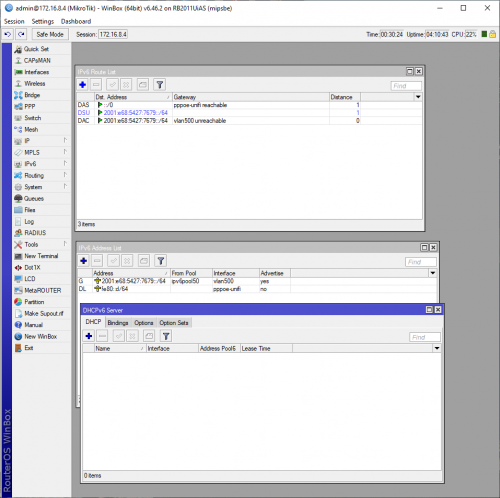


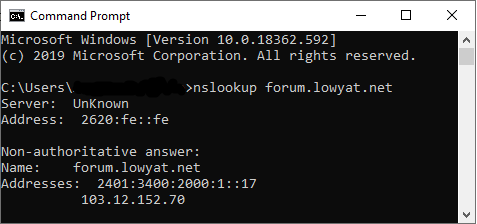


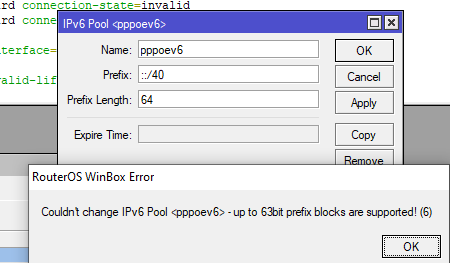
 as shown in the image, tried both "bridge" and "ether1WAN" result is same

 0.0258sec
 0.74
0.74
 6 queries
 GZIP Disabled