Welcome Guest ( Log In | Register )

Outline · [ Standard ] · Linear+

 TM unifi ipv6 and Mikrotik not working

views
     
soonwai
post Mar 25 2020, 06:48 PM


********
All Stars
11,460 posts

Joined: Oct 2007
From: KL


QUOTE(squall0833 @ Mar 25 2020, 05:00 PM)
i did blink.gif as shown in the image, tried both "bridge" and "ether1WAN" result is same

confused.gif

my current settings in ipv6

CODE

/ipv6 pool
add name=IPv6 prefix-length=63
/ipv6 address
add from-pool=IPv6 interface=bridge
/ipv6 dhcp-client
add add-default-route=yes interface=UniFi pool-name=IPv6 request=prefix use-peer-dns=no
/ipv6 firewall filter
add action=accept chain=input connection-state=established in-interface=UniFi
add action=accept chain=forward connection-state=established in-interface=UniFi
add action=accept chain=input connection-state=related in-interface=UniFi
add action=accept chain=forward connection-state=related in-interface=UniFi
add action=accept chain=input in-interface=UniFi src-address=fe80::/16
add action=drop chain=input in-interface=UniFi
add action=drop chain=forward in-interface=UniFi
/ipv6 nd
set [ find default=yes ] advertise-dns=no mtu=1480
/ipv6 nd prefix default


*
Delete the IPv6 pool that you created. No need to create this yourself. The v6 dhcp-client will create it.
/ipv6 pool add name=IPv6 prefix-length=63
squall0833
post Mar 26 2020, 01:40 AM

Regular
******
Senior Member
1,473 posts

Joined: Oct 2006
From: Jupiter


QUOTE(soonwai @ Mar 25 2020, 06:48 PM)
Delete the IPv6 pool that you created. No need to create this yourself. The v6 dhcp-client will create it.
/ipv6 pool add name=IPv6 prefix-length=63
*
so thats the cause

now it works

biggrin.gif thanks bro
soonwai
post Mar 26 2020, 02:06 AM


********
All Stars
11,460 posts

Joined: Oct 2007
From: KL


QUOTE(squall0833 @ Mar 26 2020, 01:40 AM)
so thats the cause

now it works

biggrin.gif  thanks bro
*
No worries. glad it's working now. But you itchy hand ar. The initial config that you posted also dun have that line adding the pool.

This post has been edited by soonwai: Mar 26 2020, 02:07 AM
squall0833
post Mar 26 2020, 03:02 AM

Regular
******
Senior Member
1,473 posts

Joined: Oct 2006
From: Jupiter


QUOTE(soonwai @ Mar 26 2020, 02:06 AM)
No worries. glad it's working now. But you itchy hand ar. The initial config that you posted also dun have that line adding the pool.
*
biggrin.gif

the very first code i post, I already removed the pool,

the pool named "IPv6" was already there after i installed the ipv6 package,

cos I saw u mentioned to other user dont need the pool, so i removed it, but still doesnt work (just before i set the request address&prefix to only request prefix) then make a new post to ask for help from you biggrin.gif


and then i set it back in place since non of those work. (habit biggrin.gif )

in the end

need to set both correctly to make it work rolleyes.gif

This post has been edited by squall0833: Mar 26 2020, 03:13 AM
heidarren
post Mar 31 2020, 10:29 AM

Getting Started
**
Junior Member
248 posts

Joined: Aug 2018
Hi, after turning on the ipv6, I'm having a hard time to connect to mikrotik forums and netflix on iPhone, do you guys experience the same?
SUStotokreturn
post Mar 31 2020, 08:57 PM

New Member
*
Junior Member
45 posts

Joined: Mar 2020


Hancurrrr
soonwai
post Mar 31 2020, 10:22 PM


********
All Stars
11,460 posts

Joined: Oct 2007
From: KL


QUOTE(heidarren @ Mar 31 2020, 10:29 AM)
Hi, after turning on the ipv6, I'm having a hard time to connect to mikrotik forums and netflix on iPhone, do you guys experience the same?
*
Testing on my MacBook with Safari. Not sure about Mikrotik forums. I just tested and it's using ipv4. Loads up fine. But Netflix yes, with ipv6 turned on, the home page takes ages to load or just plain hangs. With ipv6 off, it loads just fine.
heidarren
post Mar 31 2020, 11:31 PM

Getting Started
**
Junior Member
248 posts

Joined: Aug 2018
QUOTE(soonwai @ Mar 31 2020, 10:22 PM)
Testing on my MacBook with Safari. Not sure about Mikrotik forums. I just tested and it's using ipv4. Loads up fine. But Netflix yes, with ipv6 turned on, the home page takes ages to load or just plain hangs. With ipv6 off, it loads just fine.
*
Solved by adding this
/ipv6 firewall mangle
add action=change-mss chain=forward new-mss=clamp-to-pmtu passthrough=no protocol=tcp tcp-flags=syn

It causes by PPP Header makes packages larger than our MTU, the mangle rule above is to let MikroTik decide to resize it or not
rioven
post Apr 1 2020, 11:42 PM

Enthusiast
*****
Senior Member
975 posts

Joined: Sep 2004
From: Setapak


Im solved problem at IPv6 ND, set mtu at 1480 (or 1492 depend on ur PPPoE).
aztech
post Apr 8 2020, 09:04 PM

Getting Started
**
Junior Member
134 posts

Joined: Jan 2003
From: Miri <-> KL <-> Penang
QUOTE(heidarren @ Mar 31 2020, 11:31 PM)
Solved by adding this
/ipv6 firewall mangle
add action=change-mss chain=forward new-mss=clamp-to-pmtu passthrough=no protocol=tcp tcp-flags=syn

It causes by PPP Header makes packages larger than our MTU, the mangle rule above is to let MikroTik decide to resize it or not
*
Hello - just checking, is this really required? I've tested browing netflix and mikrotik forums with and without the above, seems to be fine. or maybe it was cached on my system.
heidarren
post Apr 9 2020, 01:35 PM

Getting Started
**
Junior Member
248 posts

Joined: Aug 2018
QUOTE(aztech @ Apr 8 2020, 09:04 PM)
Hello - just checking, is this really required? I've tested browing netflix and mikrotik forums with and without the above, seems to be fine. or maybe it was cached on my system.
*
I did flush dns cache in router, PC and chrome after IPv6 was enabled, to make sure dns respond in IPv6, also I did add an extension in chrome called IPvFoo to monitor the website is running at IPv4/6. Without the mangle rule, they won't load, after adding the mangle rule everything running fine, so I will leave it on.
haturaya
post Aug 18 2021, 06:49 PM

Look at all my stars!!
Group Icon
Elite
2,559 posts

Joined: Jan 2003
QUOTE(heidarren @ Mar 31 2020, 10:29 AM)
Hi, after turning on the ipv6, I'm having a hard time to connect to mikrotik forums and netflix on iPhone, do you guys experience the same?
*
QUOTE(heidarren @ Mar 31 2020, 11:31 PM)
Solved by adding this
/ipv6 firewall mangle
add action=change-mss chain=forward new-mss=clamp-to-pmtu passthrough=no protocol=tcp tcp-flags=syn

It causes by PPP Header makes packages larger than our MTU, the mangle rule above is to let MikroTik decide to resize it or not
*
Facing similar problem. Thanks for the solution. It works. thumbup.gif
benson208
post Sep 3 2021, 07:18 PM

New Member
*
Newbie
12 posts

Joined: Feb 2009
I wan to ask if turn on ipv6 can get better for internet?

I am newbie, if turn on ipv6 is better, how can i setting it on my mikrotik hap ac2.

my internet is maxis fibre. Anyone have a guide to setting ipv6 for maxis fibre?

This post has been edited by benson208: Sep 3 2021, 07:18 PM
Anime4000
post Sep 3 2021, 10:45 PM

Look at all my stars!!
*******
Senior Member
2,400 posts

Joined: Jul 2009
From: /dev/null


QUOTE(benson208 @ Sep 3 2021, 07:18 PM)
I wan to ask if turn on ipv6 can get better for internet?

I am newbie, if turn on ipv6 is better, how can i setting it on my mikrotik hap ac2.

my internet is maxis fibre. Anyone have a guide to setting  ipv6 for maxis fibre?
*
IPv6 is Peer 2 Peer, no more Port Forward (NAT)

If you allow IPv6 Incoming in Router Firewall, device on the internet can connect to your device directly!

Usually IPv6 give lower ping

IPv6 give less hop compared to IPv6
IPv4:
Attached Image
IPv6:
Attached Image

Modern Console like XBOX PlayStation require IPv6 for Multiplayer, easier to connect compared to IPv4 with NAT (Open, Moderate, Strict)

I make GUI method here for Maxis IPv6, it should be same with Unifi: https://www.hitoha.ga/mikrotik-ipv6-over-pppoe/


benson208
post Sep 4 2021, 11:13 AM

New Member
*
Newbie
12 posts

Joined: Feb 2009
QUOTE(Anime4000 @ Sep 3 2021, 10:45 PM)
IPv6 is Peer 2 Peer, no more Port Forward (NAT)

If you allow IPv6 Incoming in Router Firewall, device on the internet can connect to your device directly!

Usually IPv6 give lower ping

IPv6 give less hop compared to IPv6
IPv4:
Attached Image
IPv6:
Attached Image

Modern Console like XBOX PlayStation require IPv6 for Multiplayer, easier to connect compared to IPv4 with NAT (Open, Moderate, Strict)

I make GUI method here for Maxis IPv6, it should be same with Unifi: https://www.hitoha.ga/mikrotik-ipv6-over-pppoe/
*
okay thank u bro. I try setting tonight.

Shall we need to add google ipv6 dns?

This post has been edited by benson208: Sep 4 2021, 12:01 PM
Anime4000
post Sep 4 2021, 04:12 PM

Look at all my stars!!
*******
Senior Member
2,400 posts

Joined: Jul 2009
From: /dev/null


QUOTE(benson208 @ Sep 4 2021, 11:13 AM)
okay thank u bro. I try setting tonight.

Shall we need to add google ipv6 dns?
*
no need,
IPv4 DNS can request IPv6 Address (AAAA)
benson208
post Sep 5 2021, 03:24 AM

New Member
*
Newbie
12 posts

Joined: Feb 2009
QUOTE(Anime4000 @ Sep 3 2021, 10:45 PM)
IPv6 is Peer 2 Peer, no more Port Forward (NAT)

If you allow IPv6 Incoming in Router Firewall, device on the internet can connect to your device directly!

Usually IPv6 give lower ping

IPv6 give less hop compared to IPv6
IPv4:
Attached Image
IPv6:
Attached Image

Modern Console like XBOX PlayStation require IPv6 for Multiplayer, easier to connect compared to IPv4 with NAT (Open, Moderate, Strict)

I make GUI method here for Maxis IPv6, it should be same with Unifi: https://www.hitoha.ga/mikrotik-ipv6-over-pppoe/
*
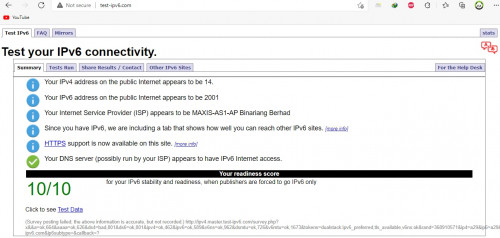
Thank you brother. Your guide is very usefull. Now i already done setting enable ipv6 at my router.

user posted image

This post has been edited by benson208: Sep 5 2021, 06:50 AM
aztech
post Dec 21 2021, 12:57 PM

Getting Started
**
Junior Member
134 posts

Joined: Jan 2003
From: Miri <-> KL <-> Penang
All - notice something weird. I can't browse https://www.maxis.com.my and https://www.hotlink.com.my when ipv6 enabled.

Anyone exp this and found a solution? Thanks

Solved it by adding solutions above

/ipv6 firewall mangle
add action=change-mss chain=forward new-mss=clamp-to-pmtu passthrough=no protocol=tcp tcp-flags=syn


This post has been edited by aztech: Dec 21 2021, 01:03 PM


Change to:
| Lo-Fi Version
0.0351sec    0.76    6 queries    GZIP Disabled
Time is now: 24th December 2025 - 07:42 PM