

 Jan 9 2020, 03:58 PM


QUOTE(Ah_Huat @ Jan 9 2020, 03:26 PM)
Hi ,
i was playing an online game "Blade and Soul" for 4 year and since Nov 2019, i sudden have problem playing the game.
this is the game website https://www.bladeandsoul.com/en/ , and you need the game launcher to log in and play the game , Launcher download page : https://www.bladeandsoul.com/en/download/
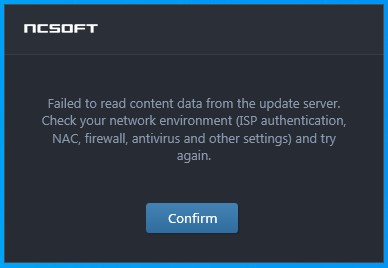
my problem is when i launch the launcher program, it give me this error "Launcher Failed to read content data from the update server."
so i make a ticket to the game support and they ask me to use some software to ping the game server ip and turn out i have "problem" connect to game server. and game server didn't "Block" any IP range from Telekom Malaysia.
so i make a report to streamyx support, and they ask me send them the result of PingPlotter to the server. and i did. over a month now and they still cant' fix the problem.
If i use my PC wifi connect to my mobile phone data (i am using Redone) Everything is fine , no more problem.
so here is some PingPlotter result and i hope any network expert can help me understand which part is the problem, because "Second Level Technical Team" at Telekom Malaysia cleary incapable of fixing this problem.
when i get 175.xx.xx.xx IP address.
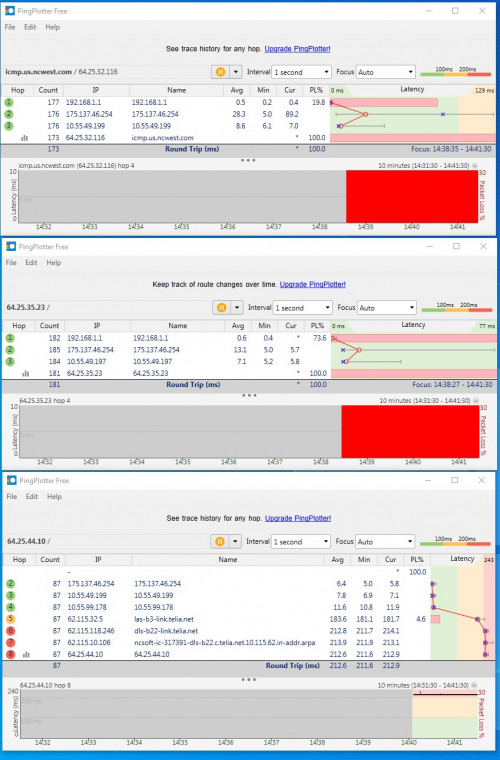
you can see it's 100% Packet loss when ping to game server "icmp.us.ncwest.com" and "64.25.35.23" , but have no problem connect to 64.25.44.10"
i no know what is 64.25.35.23 and "64.25.44.10" for , but when i check with Comodo firewall program, i can see the Launcher is trying to connect to this IP address.
when i get 60.xx.xx.xx IP address.
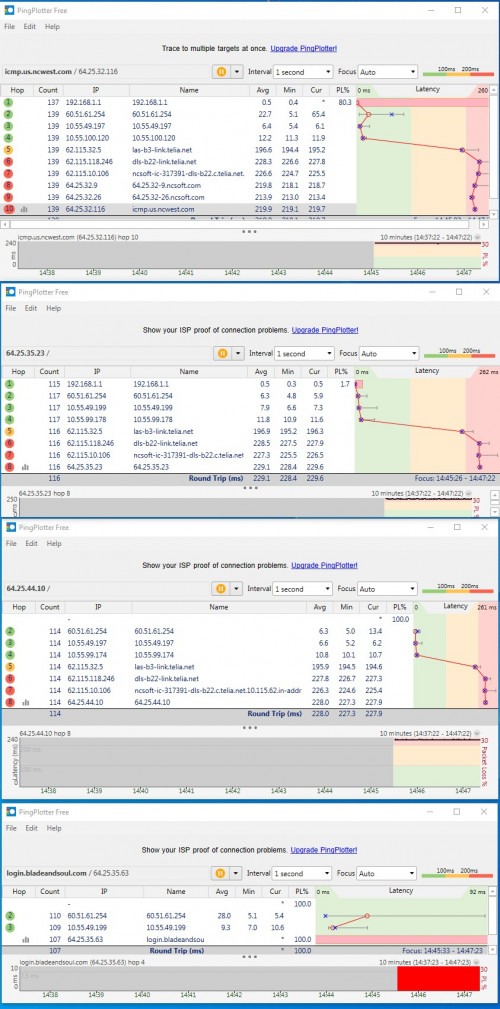
now i have no problem ping to Game server and 64.25.35.23 and 64.25.44.10 , but 100% packet loss to Game log in server 64.25.35.63. and the launcher still show the same error.
Telekom had send someone come to my house to check the modem and connection and find no problem at my site. untill now they still can't fix the problem.
so any network expert know what is the problem ? haha.
thank .

I assume u were able to play it with the same ISP before NOV 2019?i was playing an online game "Blade and Soul" for 4 year and since Nov 2019, i sudden have problem playing the game.
this is the game website https://www.bladeandsoul.com/en/ , and you need the game launcher to log in and play the game , Launcher download page : https://www.bladeandsoul.com/en/download/
my problem is when i launch the launcher program, it give me this error "Launcher Failed to read content data from the update server."
so i make a ticket to the game support and they ask me to use some software to ping the game server ip and turn out i have "problem" connect to game server. and game server didn't "Block" any IP range from Telekom Malaysia.
so i make a report to streamyx support, and they ask me send them the result of PingPlotter to the server. and i did. over a month now and they still cant' fix the problem.
If i use my PC wifi connect to my mobile phone data (i am using Redone) Everything is fine , no more problem.
so here is some PingPlotter result and i hope any network expert can help me understand which part is the problem, because "Second Level Technical Team" at Telekom Malaysia cleary incapable of fixing this problem.
when i get 175.xx.xx.xx IP address.
you can see it's 100% Packet loss when ping to game server "icmp.us.ncwest.com" and "64.25.35.23" , but have no problem connect to 64.25.44.10"
i no know what is 64.25.35.23 and "64.25.44.10" for , but when i check with Comodo firewall program, i can see the Launcher is trying to connect to this IP address.
when i get 60.xx.xx.xx IP address.
now i have no problem ping to Game server and 64.25.35.23 and 64.25.44.10 , but 100% packet loss to Game log in server 64.25.35.63. and the launcher still show the same error.
Telekom had send someone come to my house to check the modem and connection and find no problem at my site. untill now they still can't fix the problem.
so any network expert know what is the problem ? haha.
thank .
Did u installed anything before this happened?
If I were you I will try dns method
(209.244.0.3)
(209.244.0.4)
then
(This one most probably is the cause in my experience) Uninstall all antivirus, turn off all firewall
if false still
go into Network safe mode and launch the game. If cannot still I think it's the ISP blocking and you need to use VPN to connect.
 Quote
Quote

 0.0158sec
 0.44
0.44
 6 queries
 GZIP Disabled