
Welcome Guest ( Log In | Register )

Outline · [ Standard ] · Linear+

 Online Game problem. Network Expert Needed!, Can't play an Online game.

views
     
TSAh_Huat
post Jan 9 2020, 03:26 PM, updated 6y ago

Getting Started
**
Junior Member
249 posts

Joined: Jan 2003
From: SG. Jarom


Hi ,
i was playing an online game "Blade and Soul" for 4 year and since Nov 2019, i sudden have problem playing the game.

this is the game website https://www.bladeandsoul.com/en/ , and you need the game launcher to log in and play the game , Launcher download page : https://www.bladeandsoul.com/en/download/

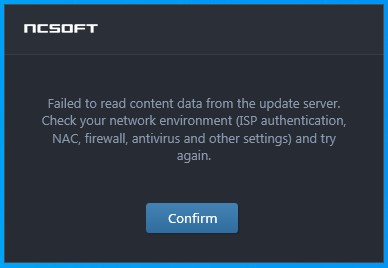
my problem is when i launch the launcher program, it give me this error "Launcher Failed to read content data from the update server."
user posted image

so i make a ticket to the game support and they ask me to use some software to ping the game server ip and turn out i have "problem" connect to game server. and game server didn't "Block" any IP range from Telekom Malaysia.

so i make a report to streamyx support, and they ask me send them the result of PingPlotter to the server. and i did. over a month now and they still cant' fix the problem.

If i use my PC wifi connect to my mobile phone data (i am using Redone) Everything is fine , no more problem.

so here is some PingPlotter result and i hope any network expert can help me understand which part is the problem, because "Second Level Technical Team" at Telekom Malaysia cleary incapable of fixing this problem.

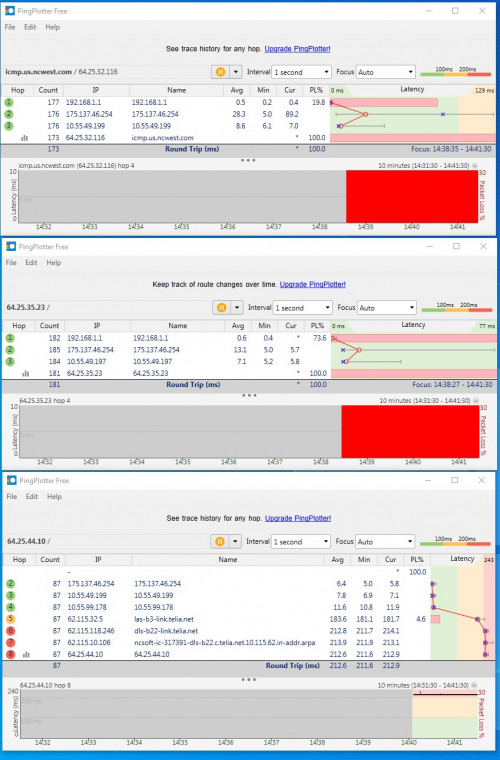
when i get 175.xx.xx.xx IP address.
user posted image

you can see it's 100% Packet loss when ping to game server "icmp.us.ncwest.com" and "64.25.35.23" , but have no problem connect to 64.25.44.10"

i no know what is 64.25.35.23 and "64.25.44.10" for , but when i check with Comodo firewall program, i can see the Launcher is trying to connect to this IP address.

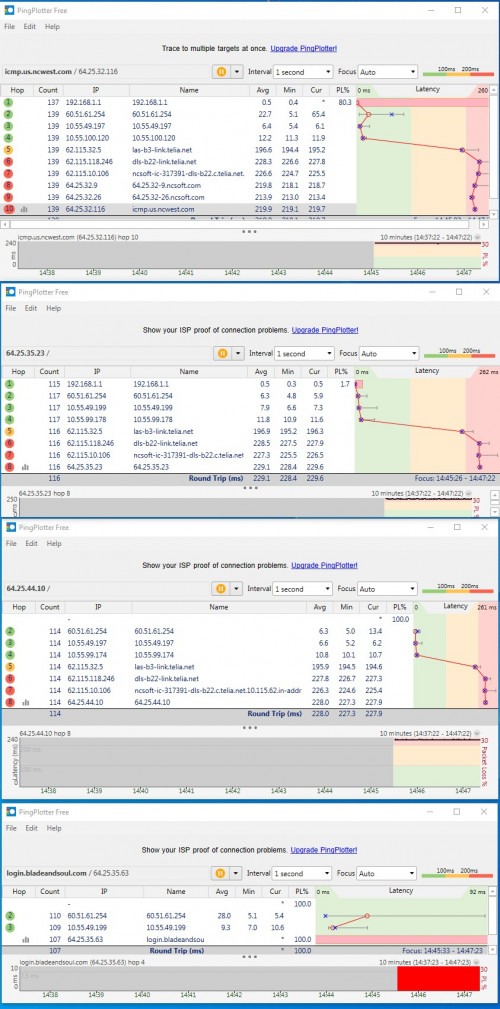
when i get 60.xx.xx.xx IP address.
user posted image

now i have no problem ping to Game server and 64.25.35.23 and 64.25.44.10 , but 100% packet loss to Game log in server 64.25.35.63. and the launcher still show the same error.

Telekom had send someone come to my house to check the modem and connection and find no problem at my site. untill now they still can't fix the problem.

so any network expert know what is the problem ? haha.

thank .


SUSAgsx
post Jan 9 2020, 03:58 PM

Getting Started
**
Junior Member
224 posts

Joined: Nov 2019
QUOTE(Ah_Huat @ Jan 9 2020, 03:26 PM)
Hi ,
i was playing an online game "Blade and Soul" for 4 year and since Nov 2019, i sudden have problem playing the game.

this is the game website https://www.bladeandsoul.com/en/ , and you need the game launcher to log in and play the game , Launcher download page : https://www.bladeandsoul.com/en/download/

my problem is when i launch the launcher program, it give me this error "Launcher Failed to read content data from the update server."

user posted image

so i make a ticket to the game support and they ask me to use some software to ping the game server ip and turn out i have "problem" connect to game server. and game server didn't "Block" any IP range from Telekom Malaysia.

so i make a report to streamyx support, and they ask me send them the result of PingPlotter to the server. and i did. over a month now and they still cant' fix the problem.

If i use my PC wifi connect to my mobile phone data (i am using Redone) Everything is fine , no more problem.

so here is some PingPlotter result and i hope any network expert can help me understand which part is the problem, because "Second Level Technical Team" at Telekom Malaysia cleary incapable of fixing this problem.

when i get 175.xx.xx.xx IP address.
user posted image

you can see it's 100% Packet loss when ping to game server "icmp.us.ncwest.com" and "64.25.35.23" , but have no problem connect to 64.25.44.10"

i no know what is 64.25.35.23 and "64.25.44.10" for , but when i check with Comodo firewall program, i can see the Launcher is trying to connect to this IP address.

when i get 60.xx.xx.xx IP address.
user posted image

now i have no problem ping to Game server and 64.25.35.23 and 64.25.44.10 , but 100% packet loss to Game log in server 64.25.35.63. and the launcher still show the same error.

Telekom had send someone come to my house to check the modem and connection and find no problem at my site. untill now they still can't fix the problem.

so any network expert know what is the problem ? haha.

thank .
*
I assume u were able to play it with the same ISP before NOV 2019?
Did u installed anything before this happened?

If I were you I will try dns method
(209.244.0.3)
(209.244.0.4)
then
(This one most probably is the cause in my experience) Uninstall all antivirus, turn off all firewall


if false still
go into Network safe mode and launch the game. If cannot still I think it's the ISP blocking and you need to use VPN to connect.


TSAh_Huat
post Jan 9 2020, 04:39 PM

Getting Started
**
Junior Member
249 posts

Joined: Jan 2003
From: SG. Jarom


QUOTE(Agsx @ Jan 9 2020, 03:58 PM)
I assume u were able to play it with the same ISP before NOV 2019?
Did u installed anything before this happened?

yes, play it 4 year withou problem and after nov 2019 this problem..

If I were you I will try dns method
(209.244.0.3)
(209.244.0.4)

i try 1.1.1.1 and 1.0.0.1  and 8.8.8.8 and 8.8.4.4 .. same problem

then
(This one most probably is the cause in my experience) Uninstall all antivirus, turn off all firewall
if false still
try disable firewall and antivirus .. sa,e problem..


go into Network safe mode and launch the game. If cannot still I think it's the ISP blocking and you need to use VPN to connect.
*
didn't try network safe mode.... but i can connect to game just switch to mobile data line ...
and i also try 2 friend's house same as streamyx 8mbps also same problem. i ask other friends with Maxis fibre and he can launch the game just fine.... Only when using Streamyx the launcher won't open...zz


SUSAgsx
post Jan 9 2020, 04:55 PM

Getting Started
**
Junior Member
224 posts

Joined: Nov 2019
then it's clearly ISP blocking it

just use a vpn but ur connection speed gonna be crap

best solution is change ISP if possible
TSAh_Huat
post Jan 9 2020, 05:07 PM

Getting Started
**
Junior Member
249 posts

Joined: Jan 2003
From: SG. Jarom


QUOTE(Agsx @ Jan 9 2020, 04:55 PM)
then it's clearly ISP blocking it

just use a vpn but ur connection speed gonna be crap

best solution is change ISP if possible
*
but TM live chat say that they didn't block the game ..zz

and my place didn't have unifi .. only option is streamyx 8mbps... doh.gif
SUSAgsx
post Jan 9 2020, 05:40 PM

Getting Started
**
Junior Member
224 posts

Joined: Nov 2019
QUOTE(Ah_Huat @ Jan 9 2020, 05:07 PM)
but TM live chat say that they didn't block the game ..zz

and my place didn't have unifi .. only option is streamyx 8mbps...  doh.gif
*
TM staff words cannot be trust one lah
since your (redtune) isn't blocked, the issues is the ISP

try sim card data plan for ur internet source then (there are unlimited one digi infiniti 150 or yes4g konfem unlimited 30)

mztang52
post Jan 10 2020, 08:31 AM

Before you quit, TRY
*******
Senior Member
2,807 posts

Joined: Jun 2015


QUOTE(Ah_Huat @ Jan 9 2020, 03:26 PM)
Hi ,
i was playing an online game "Blade and Soul" for 4 year and since Nov 2019, i sudden have problem playing the game.

this is the game website https://www.bladeandsoul.com/en/ , and you need the game launcher to log in and play the game , Launcher download page : https://www.bladeandsoul.com/en/download/

my problem is when i launch the launcher program, it give me this error "Launcher Failed to read content data from the update server."

user posted image

so i make a ticket to the game support and they ask me to use some software to ping the game server ip and turn out i have "problem" connect to game server. and game server didn't "Block" any IP range from Telekom Malaysia.

so i make a report to streamyx support, and they ask me send them the result of PingPlotter to the server. and i did. over a month now and they still cant' fix the problem.

If i use my PC wifi connect to my mobile phone data (i am using Redone) Everything is fine , no more problem.

so here is some PingPlotter result and i hope any network expert can help me understand which part is the problem, because "Second Level Technical Team" at Telekom Malaysia cleary incapable of fixing this problem.

when i get 175.xx.xx.xx IP address.
user posted image

you can see it's 100% Packet loss when ping to game server "icmp.us.ncwest.com" and "64.25.35.23" , but have no problem connect to 64.25.44.10"

i no know what is 64.25.35.23 and "64.25.44.10" for , but when i check with Comodo firewall program, i can see the Launcher is trying to connect to this IP address.

when i get 60.xx.xx.xx IP address.
user posted image

now i have no problem ping to Game server and 64.25.35.23 and 64.25.44.10 , but 100% packet loss to Game log in server 64.25.35.63. and the launcher still show the same error.

Telekom had send someone come to my house to check the modem and connection and find no problem at my site. untill now they still can't fix the problem.

so any network expert know what is the problem ? haha.

thank .
*
Why so mafan. Buy vpn and everything settle. Search in Shopee for those shared account like Nordvpn. Quite consistent for me. Install in your computer and play. Kaotim.
Anime4000
post Jan 14 2020, 06:57 PM

Look at all my stars!!
*******
Senior Member
2,399 posts

Joined: Jul 2009
From: /dev/null


You are not alone,

Yesterday I configure and setup Microsoft SQL Server for some one company.

Microsoft give only online installer, I guess no problem and get job done fast since company using 800Mbps Unifi.

So I proceed to download, and online install,

Until I been waiting too long, see progress not moving, open Task Manager saw Network activity like a dead people.

I told the management to report about this slow downloading from Microsoft Server. TM said "Have Internet = Nothing to fix".

I just... What the crap?
Just to get job done fast, use 4G Data, and download as fast as 4G speed.
SUSpakji
post Jan 15 2020, 10:45 PM

Regular
******
Senior Member
1,386 posts

Joined: Nov 2012


QUOTE(Ah_Huat @ Jan 9 2020, 04:39 PM)
didn't try network safe mode.... but i can connect to game just switch to mobile data line ...
and i also try 2 friend's house same as streamyx 8mbps also same problem. i ask other friends with Maxis fibre and he can launch the game just fine.... Only when using Streamyx the launcher won't open...zz
*
streamyx can't fix
you need fiber
i think unifi will be work then streamyx

last time i was use streamyx 4mbps very slow 10 year++ now final my area project complete now fiber so installed unifi 100mbps now faster no problem smooth
a_capybara
post Feb 12 2020, 01:22 PM

New Member
*
Junior Member
29 posts

Joined: Jun 2012
Not the first or the last time crap like this happens. TM won't fix their network level problems unless they happen to work on a major change and they'll keep sending technicians to you until you close the report and go away. Be prepared to wait it out (years) for them to accidentally fix it.

mztang52 has the right idea but avoid using shared VPN services which are more suitable for anonymized browsing. If someone on it gets handed an IP ban, your accounts might end up as collateral damage. (Been there done that.) Ideally, get the smallest VPS money can buy (try Amazon EC2's free tier) located close to or inbetween hops to the game server and set up a VPN. Use the PPTP (install pptpd) protocol for lowest latency, overhead and hassle since all you need for it to do is simply push packets.

There's a possibility the problem lies with the game. Game companies don't openly admit to IP range blocks (or more likely have zero knowledge of what the sysadmins were doing), but they do it all the time and it's pretty telling when it's just the login server ignoring packets like a certain Sega online game.

An alternative is to connect just to the login server with your wifi connection. It worked with that Sega game mentioned above and it might do the trick for you:
CODE
route add <login server IP> mask 255.255.255.255 <VPN/wifi gateway IP> METRIC 1


Change to:
| Lo-Fi Version
0.0178sec    0.39    5 queries    GZIP Disabled
Time is now: 3rd December 2025 - 02:32 AM
