Welcome Guest ( Log In | Register )

Outline · [ Standard ] · Linear+

 Celcom Home Fibre - 30Mbps @ RM80. Yay or Nay?, Anything on Celcom Home Fibre

views
     
kentltp
post Feb 24 2023, 02:30 PM

Getting Started
**
Junior Member
62 posts

Joined: Mar 2018


Just want to say thanks to the LYN Networking/Deals/etc. Sifus here. Am here to just share my experience for jumping ship from Maxis to Celcom Home Fibre.
Been browsing through LYN on Public Dynamic IP stuff as I received some RM10 charges on Maxis Public IP thing. Then all of sudden I saw some RM100/mth for 300mb/s deal for Celcom Home Fibre on the threads. Then I quickly browsed through Celcom's Website and walla, such thing exists wow. Thinking it's kinda good deal as I am an existing Celcom Postpaid user since the 90s, it would be easier management.

So basically, we just walked in to a Celcom blueCube store yesterday and requested for Celcom Home Fibre.

Things needed:
-Broadband Statement (PDF will do, they will provide you an email to send the Bill Statement to)
-IC of Celcom Principal Line

Then the staff will check on your Maxis Fibre account number to see what package you're subscribing to (with Maxis. Yes, TM backbone) and offered the Celcom Home Fibre plan. They told me since my Celcom Postpaid Plan meets the requirement for 300mpbs for RM100/mth, it is recommended to take that deal, there is a 24mths contract, though.

After a moment they generated a Transfer ID thing for us. We are required to visit Maxis Centres to request transfer. Do get the Transfer ID handy, keep a copy at least.

We thought everything's done. The Maxperts asked us to call Maxis Fibre Hotline at 1800-82-1230 and to mention "Transfer from Maxis Fibre to Celcom Fibre". Then we know this is the boss fight where they will counter-offer you. And yep, the personnel picked up the call and we mentioned everything to him. They did ask for the reason on what attracted us to jump ship though. And here comes the keyword, they replied: "As I can see from here, you have been using Maxis Home Fibre since 2013, it's been a decade. Thus, we would like to offer you 300mbps for RM100/mth, No-Contract to stay with us. Are you interested with our offer?"

In my mind was like wth if I don't ditch Maxis Fibre then you are going to charge me RM149 for another few decades right? innocent.gif .

And yep, at the end the guy from the other end said "It's sad to see you go, I have APPROVED the Transfer Request. And there is a one last thing needed to be done from your end. Kindly pay an Advance Payment (excl 6% Tax), it is pro-rated and will be refunded once the transition has been done."

TAKE NOTE, very fishy. Since we are quite not sure how do we take back the refunds, we went back to Maxis Centre to get some info on this. Their Maxperts told me this:
"Once the transition has been done, the Maxis Account Number will be deleted. In order to receive the refund, customers are required to visit Maxis Centres and provide them IC to track back any Overpaid Amounts."


And today I have called 1111 (Hotline for Celcom Mobile users) to ask them check on the Service Transfer (get your Transfer ID handy). They replied:
[CELCOM]:From here I can see that your Transfer from Maxis to Celcom Fibre has been APPROVED. May I know which Celcom branch you visited yesterday?
[Me]: Celcom blueCube XXXX.
[CELCOM]: Did anyone from that branch called you?
[Me]: Nope.
[CELCOM]: Okay I have escalated this ticket to that branch. Their staff will contact you for Installation Matters and other stuff within 24 hours (minimum) time.

And yep, end of story for now. Will update soon on Installation stuff.

Update [26 Feb]:
(24 Feb)
Since our bill statement is 24th of every month, and the direct debit is always the 25th, I have logged into Maxis App and disabled direct debit. And paid for my previous month's broadband bill and the Advance Payment (RM149+Tax plus RM149).

On the same day around 5-ish in the evening, the blueCube staff contacted us to schedule an installation appointment. Quite lucky though as we managed to secure Morning slot on 1 March although they told us there's a 4-day "cooldown period"(?).

Update [28 Feb]:
Tomorrow is the Installation Day. And I called 1111 to request to change to Public IP. The call centre personnel told me "It cannot be done due to a System Issue"... headache though my IoT Remote Devices going to have a period of downtime already... cry.gif

Update [1 March @ 10:15am]
Appointment time is 9:30am however not even a shadow of technicians appeared... They reached at 11am, installation was fast as just change Router and Modem Port from 2 to 3 (according to TechXpert, Port 3 & 4 are reserved for ship jumpers, configured by TM... lol). And some configurations on the TechXpert side, took about 10 minutes.

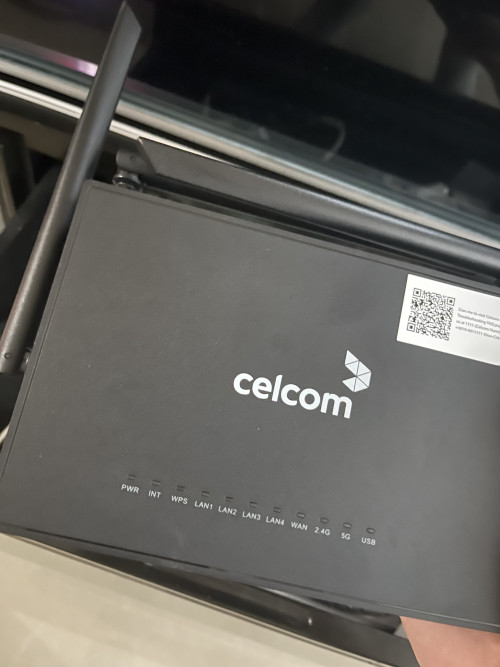
The router provided by Celcom is Skyworth RN685 (According to TechXpert, Skyworth is subsidiary of TP-Link). Powered on for 10 minutes then I changed it back to my TP-Link Deco Mesh. Just changed my PPPoE credentials from Maxis to Celcom.
user posted image


Update [2 March]
Went to Maxis as there's some extra time to spend. At Maxis Centre, we told the Maxpert in charge where "we have changed from Maxis to Celcom Fibre, our installation was done yesterday, and now we would like to ask how do we get our Advance Payment's Refund back."

And indeed the Maxpert in charge requested for our IC and checked on our corresponding account. He told us our account has been terminated as Celcom Fibre has been activated. And now we need to do is to wait for our March Maxis Bill. Once received, we can head to the Maxis Refund Portal to request for refunds. There are TWO (2) ways to get back our refunds (BANK TRANSFER OR CHEQUE).

**Will update on 24th March onwards on Advance Payment Refunds**


This post has been edited by kentltp: Mar 2 2023, 06:45 PM
kentltp
post Feb 26 2023, 01:06 AM

Getting Started
**
Junior Member
62 posts

Joined: Mar 2018


QUOTE(YoungMan @ Feb 24 2023, 09:26 PM)
TM at least will refund through cheque to your address, how come Maxis refund so lousy. Advance 1 month payment I think is to cover the interim period while waiting for Celcom Fibre to install and maxis account termination.
Anyway congrats and hope to here your update soon. Your Maxis fibre should still run for a while after installation of Celcom Fibre. In my case, my Unifi only terminate 1 week after Digi fibre installation.
*
Wow kudos for TM man at least they're doing something that's trackable. Ikr when that Maxpert guy told me about that I was like wth... Yep that's literally the same as what that Maxis Hotline guy told me, they will deduct the unused amount. Will try to update on 1 March if there's still plenty of time to visit Maxis Centres after the installation.
kentltp
post Feb 26 2023, 01:18 AM

Getting Started
**
Junior Member
62 posts

Joined: Mar 2018


QUOTE(un.deux.trois @ Feb 24 2023, 10:15 PM)
Maxis counter offered me RM129/month only for 300mbps so I jumped to Celcom. I would have stayed with them if it was the same price as Celcom with no contract.

Anyway I have just checked my email and indeed there is a refund from Maxis for the overpaid amount.
*
Yikes that's kind of sad sad.gif ... Yeah though RM100 without contract is actually a good deal. But why though when people want to jump only they offer such attractive price... yawn.gif but at the end still, get to use Public IP without additional charges (dang that CCTV...). I bet CelcomDigi is going to follow the additional charges shxt but we dunno when they're going to implement... innocent.gif

Thanks for sharing with us that they are going to email the ex-Maxis users about the refunds. May I know what are the actual ways to get back the refunds? Do we really need to walk-in Maxis Centres with our ICs?

This post has been edited by kentltp: Feb 26 2023, 01:21 AM
kentltp
post Feb 28 2023, 02:08 PM

Getting Started
**
Junior Member
62 posts

Joined: Mar 2018


QUOTE(YoungMan @ Feb 26 2023, 12:07 PM)
Only thing with TM refund is if you move house or the cheque gone missing while on the way to your house.
Ehh must visit lah, claim back some unused money. laugh.gif
*
Seems like it's nearly impossible for the cheques to not arrive HAHA. Definitely, gonna visit Maxis Centres tomorrow. The Celcom... seems like 1111 cannot change my IP to Public yet due to their "System Issue"... yikes.
kentltp
post Mar 2 2023, 06:42 PM

Getting Started
**
Junior Member
62 posts

Joined: Mar 2018


QUOTE(kentltp @ Feb 24 2023, 02:30 PM)
Just want to say thanks to the LYN Networking/Deals/etc. Sifus here. Am here to just share my experience for jumping ship from Maxis to Celcom Home Fibre.
Been browsing through LYN on Public Dynamic IP stuff as I received some RM10 charges on Maxis Public IP thing. Then all of sudden I saw some RM100/mth for 300mb/s deal for Celcom Home Fibre on the threads. Then I quickly browsed through Celcom's Website and walla, such thing exists wow. Thinking it's kinda good deal as I am an existing Celcom Postpaid user since the 90s, it would be easier management.

So basically, we just walked in to a Celcom blueCube store yesterday and requested for Celcom Home Fibre.

Things needed:
-Broadband Statement (PDF will do, they will provide you an email to send the Bill Statement to)
-IC of Celcom Principal Line

Then the staff will check on your Maxis Fibre account number to see what package you're subscribing to (with Maxis. Yes, TM backbone) and offered the Celcom Home Fibre plan. They told me since my Celcom Postpaid Plan meets the requirement for 300mpbs for RM100/mth, it is recommended to take that deal, there is a 24mths contract, though.

After a moment they generated a Transfer ID thing for us. We are required to visit Maxis Centres to request transfer. Do get the Transfer ID handy, keep a copy at least.

We thought everything's done. The Maxperts asked us to call Maxis Fibre Hotline at 1800-82-1230 and to mention "Transfer from Maxis Fibre to Celcom Fibre". Then we know this is the boss fight where they will counter-offer you. And yep, the personnel picked up the call and we mentioned everything to him. They did ask for the reason on what attracted us to jump ship though. And here comes the keyword, they replied: "As I can see from here, you have been using Maxis Home Fibre since 2013, it's been a decade. Thus, we would like to offer you 300mbps for RM100/mth, No-Contract to stay with us. Are you interested with our offer?"

In my mind was like wth if I don't ditch Maxis Fibre then you are going to charge me RM149 for another few decades right?  innocent.gif .

And yep, at the end the guy from the other end said "It's sad to see you go, I have APPROVED the Transfer Request. And there is a one last thing needed to be done from your end. Kindly pay an Advance Payment (excl 6% Tax), it is pro-rated and will be refunded once the transition has been done."

TAKE NOTE, very fishy. Since we are quite not sure how do we take back the refunds, we went back to Maxis Centre to get some info on this. Their Maxperts told me this:
"Once the transition has been done, the Maxis Account Number will be deleted. In order to receive the refund, customers are required to visit Maxis Centres and provide them IC to track back any Overpaid Amounts."
And today I have called 1111 (Hotline for Celcom Mobile users) to ask them check on the Service Transfer (get your Transfer ID handy). They replied:
[CELCOM]:From here I can see that your Transfer from Maxis to Celcom Fibre has been APPROVED. May I know which Celcom branch you visited yesterday?
[Me]: Celcom blueCube XXXX.
[CELCOM]: Did anyone from that branch called you?
[Me]: Nope.
[CELCOM]: Okay I have escalated this ticket to that branch. Their staff will contact you for Installation Matters and other stuff within 24 hours (minimum) time.

And yep, end of story for now. Will update soon on Installation stuff.

Update [26 Feb]:
(24 Feb)
Since our bill statement is 24th of every month, and the direct debit is always the 25th, I have logged into Maxis App and disabled direct debit. And paid for my previous month's broadband bill and the Advance Payment (RM149+Tax plus RM149).

On the same day around 5-ish in the evening, the blueCube staff contacted us to schedule an installation appointment. Quite lucky though as we managed to secure Morning slot on 1 March although they told us there's a 4-day "cooldown period"(?).

Update [28 Feb]:
Tomorrow is the Installation Day. And I called 1111 to request to change to Public IP. The call centre personnel told me "It cannot be done due to a System Issue"... headache though my IoT Remote Devices going to have a period of downtime already... cry.gif

Update [1 March @ 10:15am]
Appointment time is 9:30am however not even a shadow of technicians appeared... They reached at 11am, installation was fast as just change Router and Modem Port from 2 to 3 (according to TechXpert, Port 3 & 4 are reserved for ship jumpers, configured by TM... lol). And some configurations on the TechXpert side, took about 10 minutes.

The router provided by Celcom is Skyworth RN685 (According to TechXpert, Skyworth is subsidiary of TP-Link). Powered on for 10 minutes then I changed it back to my TP-Link Deco Mesh. Just changed my PPPoE credentials from Maxis to Celcom.

Update [2 March]
Went to Maxis as there's some extra time to spend. At Maxis Centre, we told the Maxpert in charge where "we have changed from Maxis to Celcom Fibre, our installation was done yesterday, and now we would like to ask how do we get our Advance Payment's Refund back."

And indeed the Maxpert in charge requested for our IC and checked on our corresponding account. He told us our account has been terminated as Celcom Fibre has been activated. And now we need to do is to wait for our March Maxis Bill. Once received, we can head to the Maxis Refund Portal to request for refunds. There are TWO (2) ways to get back our refunds (BANK TRANSFER OR CHEQUE).

**Will update on 24th March onwards on Advance Payment Refunds**
*
Post Updated*

kentltp
post Mar 3 2023, 09:24 AM

Getting Started
**
Junior Member
62 posts

Joined: Mar 2018


QUOTE(papyrous @ Mar 2 2023, 08:22 PM)
regarding the public IP request from Celcom, in my experience it cannot be done on the same day as installation. I think this is because your ID has not appeared on the system, so give it around 24 hours before requesting.
*
Ahhhh, okay will try to call 1111 again to request. Visited blueCube yesterday to request also, but no luck, need to call 1111 for Home Fibre stuff.
kentltp
post Mar 3 2023, 09:27 AM

Getting Started
**
Junior Member
62 posts

Joined: Mar 2018


QUOTE(failed.hashcheck @ Mar 2 2023, 08:29 PM)
Anyone of you got working ipv6 yet?
*
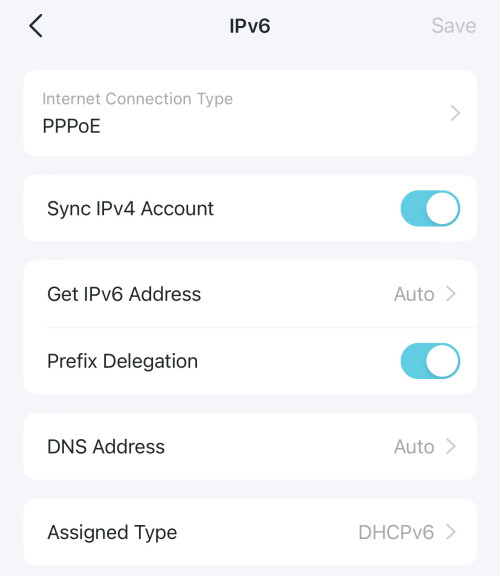
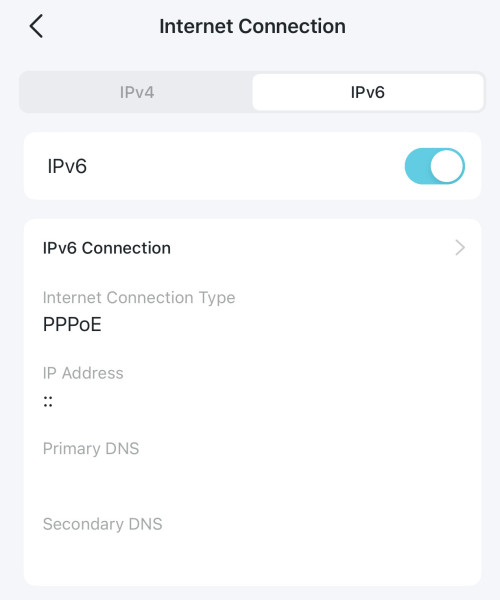
No luck...

user posted image
user posted image
kentltp
post Mar 3 2023, 01:19 PM

Getting Started
**
Junior Member
62 posts

Joined: Mar 2018


QUOTE(failed.hashcheck @ Mar 3 2023, 10:24 AM)
so still not ready. I thought it was just a problem with my router. haih.

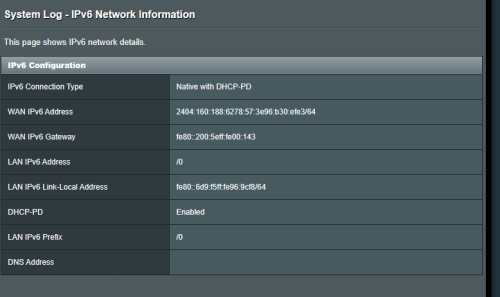
you actually get working ipv6, it is just not delegated to lan for some reason.
user posted image

such a waste. their ipv6 is already very good.
I get better performance with ipv6 for my servers in California and London when I connect directly from router.
*
I did called 111 and ask "where's my IPv6 addr?" while requesting for Public IPv4. however the one from the other end dunno what am I talking about and replied 'System Issue'... system issue my axse bangwall.gif whoops.

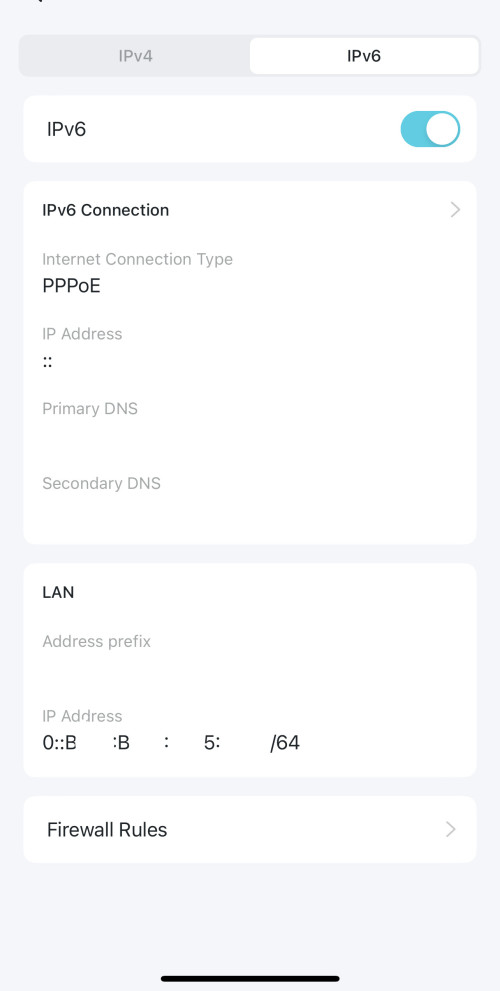
but is it safe to share your public ipv6 liddat? blink.gif

Today the Celcom HQ called me though as I sent feedback on mcmc lol... but signal quite shit bcos sometimes latched to 5g towers then unlatched (you know la DNB will forcefully drop your calls) while driving... then the HQ guy told me he will call afterwards...dang

Is it? I thought I wasn't assigned an IPv6 address by Celcom though... cos I thought Private IP users won't get one

Sheesh can't wait to use that already drool.gif

actually I never show full image so... yeah haha. censored for fun(?)...

user posted image

This post has been edited by kentltp: Mar 3 2023, 01:25 PM
kentltp
post Mar 3 2023, 01:58 PM

Getting Started
**
Junior Member
62 posts

Joined: Mar 2018


QUOTE(failed.hashcheck @ Mar 3 2023, 01:46 PM)
its dynamic ip. reconnect and get entirely new /64.
even if people get my ip what they going to do anyway? magically make my firewall accept a random connection? or Call celcom and ask them to reveal my private info?  laugh.gif

ipv6 should route to all of your devices regardless of your ipv4 type.
In fact, I have a worry that once celcom get their ipv6 working, there will be less reason for them to continue to conveniently offer public ipv4 for free.
*
that's true whoops. flex.gif

hope they better get those things up asap tho... damn annoying man cannot access my servers while im out mad.gif
kentltp
post Apr 27 2023, 04:09 PM

Getting Started
**
Junior Member
62 posts

Joined: Mar 2018


QUOTE(YoungMan @ Apr 12 2023, 07:55 PM)
That is not normal. You should lodge report to Celcom and if not solve, escalate the report to MCMC. Although TM is known for capping the speed of their competitors, you should still get near to 30mbps especially testing with lan cable.
Call their customer service to request.
*
QUOTE(Gaara92 @ Apr 12 2023, 06:36 PM)
I just subscribed to Celcom Fibre 300Mbps@RM100 per month. My question is, how do I request a public IP address? Sometime I got blocking because the CGNAT users are spamming. Please help
*
No luck to get Public IP Addr yet, called them since late-March... same response "our system still down due to Celcom and Digi merger". Reported MCMC, their PIC helped me to follow-up periodically. Called them today, same shxt. bangwall.gif

This post has been edited by kentltp: Apr 27 2023, 04:10 PM


Change to:
| Lo-Fi Version
0.0169sec    0.61    7 queries    GZIP Disabled
Time is now: 6th December 2025 - 01:37 PM