Welcome Guest ( Log In | Register )

Outline · [ Standard ] · Linear+

 Add RAM manually to 2019 iMac 27" 5K?, Really that easy? No side effect?

views
     
TSericwen
post Dec 25 2019, 10:45 PM, updated 6y ago

Casual
***
Junior Member
357 posts

Joined: Dec 2010


Hi all,

I watched this video
https://www.youtube.com/watch?v=PuXKiFyzRzs

It seems that I can save money if I choose to buy my own DDR4 and add into the 2019 iMac 27" 5k model.

I plan to buy this (though it could be 2020 model by Jan 2020)

27-inch iMac with Retina 5K display (latest as per Apple's website)
- 3.6GHz 8-core 9th-generation Intel Core i9 processor, Turbo Boost up to 5.0GHz
- 8 GB 2666MHz DDR4 memory
- Radeon Pro Vega 48 with 8GB of HBM2 memory
- 2TB SSD storage
- Magic Mouse 2

Really can add the memory manually? Plus can I buy any DDR4 memory or have to be compatible to Mac ones? Any recommended memory which I can buy in Klang valley or lowyat plaza?

Thanks.
gavingoh
post Dec 26 2019, 09:52 AM

On my way
****
Senior Member
699 posts

Joined: Mar 2012
From: Kuala Lumpur


Ya, only 5K model allowed to add-on ram at behind there
TSericwen
post Dec 27 2019, 10:45 AM

Casual
***
Junior Member
357 posts

Joined: Dec 2010


QUOTE(gavingoh @ Dec 26 2019, 09:52 AM)
Ya, only 5K model allowed to add-on ram at behind there
*
have you tried personally? no side effects adding own memory? do you have recommendations which memory brand to buy that's compatible?
cstkl1
post Dec 27 2019, 11:20 AM

Look at all my stars!!
Group Icon
Elite
6,799 posts

Joined: Jan 2003

QUOTE(ericwen @ Dec 27 2019, 10:45 AM)
have you tried personally? no side effects adding own memory? do you have recommendations which memory brand to buy that's compatible?
*
all rams has a base jdec ram timings/voltage/rated speed
regardless of ram chipset

best is change all to same chipset/density/rated speed.

if diff chipset/density.. just get the same timings/rated speed.

apple motherboard bios .. already confirmed doesnt use any other standard .. it uses jdec hence why it will work.

This post has been edited by cstkl1: Dec 27 2019, 11:27 AM
TSericwen
post Dec 27 2019, 01:43 PM

Casual
***
Junior Member
357 posts

Joined: Dec 2010


QUOTE(cstkl1 @ Dec 27 2019, 11:20 AM)
all rams has a base jdec ram timings/voltage/rated speed
regardless of ram chipset

best is change all to same chipset/density/rated speed.

if diff chipset/density.. just get the same timings/rated speed.

apple motherboard bios .. already confirmed doesnt use any other standard .. it uses jdec hence why it will work.
*
I see, so it makes sense I get only 8GB RAM for the iMac 2019. Then buy a new set of 64GB RAM separately with same chipset/density/rated speeds and manually plucked them in.. then it will work just fine? I presume so. Thanks in advance.

This post has been edited by ericwen: Dec 27 2019, 01:44 PM
zeroendless
post Dec 27 2019, 04:15 PM

Casual
***
Junior Member
352 posts

Joined: Jan 2016
QUOTE(ericwen @ Dec 25 2019, 10:45 PM)
Hi all,

I watched this video
https://www.youtube.com/watch?v=PuXKiFyzRzs

It seems that I can save money if I choose to buy my own DDR4 and add into the 2019 iMac 27" 5k model.

I plan to buy this (though it could be 2020 model by Jan 2020)

27-inch iMac with Retina 5K display (latest as per Apple's website)
- 3.6GHz 8-core 9th-generation Intel Core i9 processor, Turbo Boost up to 5.0GHz
- 8 GB 2666MHz DDR4 memory
- Radeon Pro Vega 48 with 8GB of HBM2 memory
- 2TB SSD storage
- Magic Mouse 2

Really can add the memory manually? Plus can I buy any DDR4 memory or have to be compatible to Mac ones? Any recommended memory which I can buy in Klang valley or lowyat plaza?

Thanks.
*
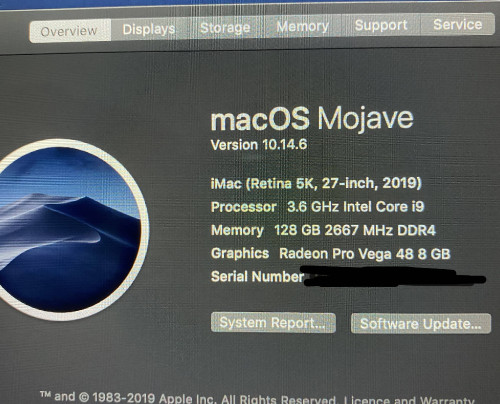
Yes you can and i did.

I got the 2019 27 inch model with 128GB Ram installed, MAX OUT! but you can only use the compatible models and tested by users or run the risk of crashes. I will save you the research time, this is what i got and with shipping + import, it's still cheapest than what you can find in Malaysia. In fact, i don't know anyone in Malaysia carried anything with large memory sizes for iMac. Even if they do, it's VERY EXPENSIVE. I asked one vendor with half the size and twice the price! Please note than there are few brands sell compatible memory for iMac, cheapest you can find still Amazon but not all can be shipped to Malaysia. Also, few vendors selling the same model as well with different pricing but not all will ship to Malaysia. You just need to fine one that does.

If you get it from amazon, it will arrive about the same time you order iMac from Apple online - fast!

This is what i got.
https://www.amazon.com/gp/product/B07N124XD...0?ie=UTF8&psc=1

user posted image
TSericwen
post Dec 27 2019, 09:04 PM

Casual
***
Junior Member
357 posts

Joined: Dec 2010


Thanks for sharing.

I guess I just need to buy 2 pieces of that from Amazon to get 64GB. I think 128GB is kinda over killed. What do you use for?

Also why didn't you upgrade to catalina OS? Kinda curious.

From the reviews (1 stars)
https://www.amazon.com/product-reviews/B07N...iews-filter-bar

It seems catalina has issues with this Samsung memory. Hmm...

This post has been edited by ericwen: Dec 27 2019, 09:07 PM
zeroendless
post Dec 27 2019, 09:48 PM

Casual
***
Junior Member
352 posts

Joined: Jan 2016
QUOTE(ericwen @ Dec 27 2019, 09:04 PM)
Thanks for sharing.

I guess I just need to buy 2 pieces of that from Amazon to get 64GB. I think 128GB is kinda over killed. What do you use for?

Also why didn't you upgrade to catalina OS? Kinda curious.

From the reviews (1 stars)
https://www.amazon.com/product-reviews/B07N...iews-filter-bar

It seems catalina has issues with this Samsung memory. Hmm...
*
The reviewer that has trouble with Mac Mini said it has updated to Catalina and still have trouble with booting. So it wasn't Catalina that has compatible issue with his unit. If that's the case, you can easily google Catalina and samsung memory on Imac, you would find plenty of complaints. His probably have a bad memory, that's not unusual, just bad luck. Memory compatibility has little to do with OS and more to do with hardware.

I don't usually upgrade OS. i used it for DB, programming and mobile developing apps so OS compatibility on my apps is very crucial. if it's working, don't be a smartass and upgrade OS that doesn't benefit your workflow - that's my thinking. I also have a MBP and it's still running High Sierra. I don't plan to update my iMac unless having issue with applications for a year or two. I used mine for work along with photos and video editing. 128Gb is just right, i have seen my memory usage peaked 90+GB, 128GB is not overkilled for me. you can try 2 sticks of 32GB then upgrade when needed.
TSericwen
post Dec 27 2019, 09:58 PM

Casual
***
Junior Member
357 posts

Joined: Dec 2010


Thanks, appreciate your feedback and recommendations smile.gif
rylim
post Jan 6 2020, 02:23 PM

Getting Started
**
Junior Member
148 posts

Joined: Sep 2019


QUOTE(zeroendless @ Dec 27 2019, 09:48 PM)
The reviewer that has trouble with Mac Mini said it has updated to Catalina and still have trouble with booting. So it wasn't Catalina that has compatible issue with his unit. If that's the case, you can easily google Catalina and samsung memory on Imac, you would find plenty of complaints. His probably have a bad memory, that's not unusual, just bad luck. Memory compatibility has little to do with OS and more to do with hardware.

I don't usually upgrade OS. i used it for DB, programming and mobile developing apps so OS compatibility on my apps is very crucial. if it's working, don't be a smartass and upgrade OS that doesn't benefit your workflow - that's my thinking. I also have a MBP and it's still running High Sierra. I don't plan to update my iMac unless having issue with applications for a year or two. I used mine for work along with photos and video editing.  128Gb is just right, i have seen my memory usage peaked 90+GB, 128GB is not overkilled for me. you can try 2 sticks of 32GB then upgrade when needed.
*
Have you tried to return or exchange defect item you received from Amazon? If yes, how's was the process?
zeroendless
post Jan 6 2020, 03:54 PM

Casual
***
Junior Member
352 posts

Joined: Jan 2016
Amazon is so successful not just because the price is competitive, the return is top notch as well. It's the BEST in the World! Ok, may be 2nd to Cruthfield. A case when i was in US ordered a next day purchase and the package came in a day late, called in to complain and they told me to keep the entire package for free, not just returning the difference in carrier fees but the product as well! Well, It wasn't a valuable product but $40 USD nevertheless.

Obviously, returning product oversea can be difficult, costly and a lengthy process but i believe Amazon international order return policy is they will bare an x-amount of return fees in case of defective product. $20 or $25, somewhere there. So if you need to return in express service, then you need to shelf out your own cash.

The process is easy, just go to your order, click on return and print out shipping label and check reason to return. I use both Amazon Japan and Amazon US. The processes are the same.

QUOTE(rylim @ Jan 6 2020, 02:23 PM)
Have you tried to return or exchange defect item you received from Amazon? If yes, how's was the process?
*
This post has been edited by zeroendless: Jan 6 2020, 03:56 PM
VinceCheong
post Jan 22 2020, 01:31 AM

On my way
****
Senior Member
680 posts

Joined: Aug 2008
From: Malaysia


Have you gotten your iMac 27" yet? I'm still waiting for mine after ordering from Machines, same specs just that I opt'ed for the 1TB rather than the 2TB (maybe I should've).

I've been watching closely on many youtube reviews, and other than OWC, there ain't another other brands that you can max out 256GB.
Corsairs like these "https://shopee.com.my/CORSAIR-Vengeance-SODIMM-DDR4-2400Mhz-2666Mhz-Notebook-Laptop-RAM-(4GB-8GB-16GB-32GB)-i.145078604.2585110051", should be compatible as watching LinusTechTips on his upgrading of their iMac27' review.

I'm planning on getting probably 32*2 plus the existing 4*2gb ram on my mac. and thinking of getting the 5k Ultrafine display(Not a prority, but thinking), and also potentially getting an external NVMEm2 enclosure as my scratch drive to edit videos.
zeroendless
post Jan 30 2020, 08:39 PM

Casual
***
Junior Member
352 posts

Joined: Jan 2016
I think 128Gb is the max for iMac 27. There's no vendors selling 64GB stick, OWC or not.

QUOTE(VinceCheong @ Jan 22 2020, 01:31 AM)
Have you gotten your iMac 27" yet? I'm still waiting for mine after ordering from Machines, same specs just that I opt'ed for the 1TB rather than the 2TB (maybe I should've).

I've been watching closely on many youtube reviews, and other than OWC, there ain't another other brands that you can max out 256GB.
Corsairs like these "https://shopee.com.my/CORSAIR-Vengeance-SODIMM-DDR4-2400Mhz-2666Mhz-Notebook-Laptop-RAM-(4GB-8GB-16GB-32GB)-i.145078604.2585110051", should be compatible as watching LinusTechTips on his upgrading of their iMac27' review.

I'm planning on getting probably 32*2 plus the existing 4*2gb ram on my mac. and thinking of getting the 5k Ultrafine display(Not a prority, but thinking), and also potentially getting an external NVMEm2 enclosure as my scratch drive to edit videos.
*
VinceCheong
post Feb 10 2020, 05:03 AM

On my way
****
Senior Member
680 posts

Joined: Aug 2008
From: Malaysia


QUOTE(zeroendless @ Jan 30 2020, 09:39 PM)
I think 128Gb is the max for iMac 27. There's no vendors selling 64GB stick, OWC or not.
*
Hahaha, apple's official site says that 27" iMac supports up to 64GB lol.
But yeah, that's what I meant, there's no other vendors making 64GB Sticks (yet). Though it is tempting to think whether can this iMac support up to 256GB lol.

I haven't pulled the trigger on getting 64/128GB Corsair rams yet, HECK i haven't even unboxed my iMAC yet sad.gif


Change to:
| Lo-Fi Version
0.0165sec    0.85    5 queries    GZIP Disabled
Time is now: 17th December 2025 - 11:51 PM