Welcome Guest ( Log In | Register )

Bump Topic Topic Closed RSS Feed

Outline · [ Standard ] · Linear+

Unifi Official TM UniFi High Speed Broadband Thread V38, READ 1ST PAGE FOR TURBO SPEED INFO!

views
     
solarmystic
post Mar 13 2020, 04:45 PM

Getting Started
**
Junior Member
271 posts

Joined: Jun 2009
EDIT:- Problem solved, Just had to wait an extra day for contact lol.


Anyone been through a fiber restoration process around these parts?

I'm on a landed property, 100M package.

I have a severe issue where the red link light on my fiber ONU is completely off, which possibly indicates a fiber break somewhere between my house and the node down the street.

I've already filed a report on Wednesday via 100. The report is still open.

A TM technician team got back to me on Thursday, and visited the premises.

He checked the line with his partner on the end at the fiber node box using a red laser emitting device (green mini box on the ground), and there was no response, and thus he said it was a cable fault for sure, and not a modem fault.

He then said that because my installation is a non standard one, it's not up to him to check the condition of the cable around my house, and that a contractor would be assigned to do it instead.
The assigned contractor would contact me using the same number within the same day I was told.

So I waited the entirety of yesterday and today, but no contact was forthcoming. I called up the TM helpline again today and used the unifi chat, and they both said that all I can do was wait to be contacted by the contractor.

Is there anything I can do to expedite the process? I just want a confirmed contact from the contractor to show that the process is moving along, and not being held up somewhere in the bureaucracy. How long does it usually take to be contacted by the contractor for a date and time to come?

Sorry for the wall of text, this has never happened to me before using UNIFI these past years and until the past few days I had been very satisfied with my connection.


This post has been edited by solarmystic: Mar 14 2020, 06:02 PM
solarmystic
post Mar 18 2020, 06:33 PM

Getting Started
**
Junior Member
271 posts

Joined: Jun 2009
QUOTE(biloxee @ Mar 18 2020, 06:09 PM)
Throttling going on recently?
FL torrent on PTP with 800+seeds, tons of seedboxes...

Speed ramps up in the beginning but gets brought down to a steady 20-30MBps until it completes.
School Holiday + MCO in progress, increased demand leads to throttling by Unifi.

Try a Linux distro torrent to verify

I can get near full speed on my 100M connection:-

Attached Image


Attached thumbnail(s)
Attached Image
solarmystic
post Mar 21 2020, 07:58 PM

Getting Started
**
Junior Member
271 posts

Joined: Jun 2009
QUOTE(Tirek @ Mar 21 2020, 04:01 PM)
Hi wanna ask something.

I just got a unifi recently.

What cable should I plug off to prevent lightning attacks from destroying the modem and the white box (huaweis optical network terminal) ?

Before this during streamyx time, whenever i hear a lightning sound I will plug off the cooper/telephone wire from the modem

Im scared because i did connect lan cable from my ps4 to the modem and from the ps4 there is hdmi that connect to the tv as well.

I dont want to lose all those modem, the white box, ps4 and my tv
*
Iirc, lightning doesn't affect fiber optics, because it's either glass or plastic used in the wiring.

Correct me if I'm wrong please sifus.
solarmystic
post Mar 26 2020, 08:36 PM

Getting Started
**
Junior Member
271 posts

Joined: Jun 2009
QUOTE(Hitman190 @ Mar 26 2020, 06:26 PM)
user posted image

What the hell is this?

Download speed is supposed to be 500Mbps  bangwall.gif  bangwall.gif  bangwall.gif  mad.gif  mad.gif
*
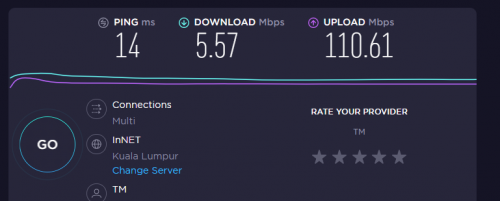
TTDI area testing to Webe PJ server all fine right now, on the standard 100/50 connection:-

user posted image

QUOTE(Orpheus1120 @ Mar 26 2020, 06:37 PM)
They throttle the connection. There is nothing any TM technicians can do. You can reset your ports all you want. It won't help.
*
Perhaps its on an IP basis or area basis, see where the congestion comes from.

This post has been edited by solarmystic: Mar 26 2020, 08:39 PM
solarmystic
post Mar 26 2020, 09:21 PM

Getting Started
**
Junior Member
271 posts

Joined: Jun 2009
QUOTE(YoungMan @ Mar 26 2020, 09:19 PM)
so where are the people who always claim Unifi never throttle connection?
*
You facing the same issue?

Afaik in my area (TTDI), as far back as i've subscribed to UNIFI the connection has never been throttled.
solarmystic
post Mar 27 2020, 08:27 PM

Getting Started
**
Junior Member
271 posts

Joined: Jun 2009
QUOTE(oro102 @ Mar 27 2020, 07:52 PM)
keep getting frequent disconnections. Area TTDI. Am I the only one with this issue?
*
PPPOE disconnections that reset your given IP?

I'm also in TTDI, still have an ongoing 9 day PPPOE connection with the same IP.

No disconnection issue detected.
solarmystic
post Mar 28 2020, 08:36 PM

Getting Started
**
Junior Member
271 posts

Joined: Jun 2009
QUOTE(jacktiew @ Mar 28 2020, 08:29 PM)
Are you using Unifi 500Mbps? I wonder what's the max speed through wifi.

I have Deco M4 as well but I'm using 100Mbps.
*
With a 176 Mbps Upload its more likely the Unifi 800 Mbps package, since the 500Mbps package only has a 100Mbps upload.
solarmystic
post Mar 30 2020, 07:58 PM

Getting Started
**
Junior Member
271 posts

Joined: Jun 2009
QUOTE(D.gRave @ Mar 30 2020, 07:23 PM)
Unifi is damn bad atm.

Not sure if lodge report would help, but i cant even load youtube at 720p.
keep getting high ping, and download speed >30mbps all day since MCO.

any advice? Using asus RT-N12
*
Yes, youtube is crap right now on Unifi for some reason. Not even 720p videos are loading smoothly.

This post has been edited by solarmystic: Mar 30 2020, 07:59 PM
solarmystic
post Apr 4 2020, 12:51 AM

Getting Started
**
Junior Member
271 posts

Joined: Jun 2009
It's time to reopen the old Extreme Screamyx Slowdown threads again, this time Edisi PKP for Unifi lol.

Whatever happened to all the users of Lowyat who used to post actively in those threads?

Networks and Broadband section is like a ghost town these days compared to those glorious Stimix days. Also YES 4G, and other new startups were all the rage back then lol.

This post has been edited by solarmystic: Apr 4 2020, 12:53 AM
solarmystic
post Apr 4 2020, 08:01 PM

Getting Started
**
Junior Member
271 posts

Joined: Jun 2009
QUOTE(Maxieos @ Apr 4 2020, 07:32 PM)
Ever since 2015 most user switch to unifi discussion compare to stmyx and now mobile where they care more on social network.So most of the website are less traffic and shift to social apps.Less people care on website but more on apps.
Even unifi or smyx down , they can use alternative mobile network provider.
With netflix and youtube and etc , less people will download and watch , switching to watch online.
Package like free youtube , fb data from mobile provider and etc , user doesn't care much on unifi and stmyx down.

summary , mobile replace unifi/smyx and because an alternative compare to previously all user relay on tm.
I can confirm most using unifi or smyx , heavy user traffic is just around 15% and 85% just light user watching 2-4 hours youtube or netflix , browse fb , whatsapps.

I am not sure now , the internet getting slow because of MCO all stay at home watch netflix 12 hours a day hogging the bandwith or TM throttling our bandwith or submarine cable fault.
*
Thanks for the interesting perspective. I guess when mobile 4G options superseded hardlined lower tier options like Stimyx DSL at a reasonable enough speed with cheap data, people aren't really chained to those options anymore, thus less complaining occurs.

Not like the old days when 3G/2G speeds were unbearable and everyone relied on the hardlined Stimyx connection via WIFI from the router to do things.

This post has been edited by solarmystic: Apr 4 2020, 08:01 PM
solarmystic
post Apr 8 2020, 12:55 AM

Getting Started
**
Junior Member
271 posts

Joined: Jun 2009
AWS routing seems to have been fixed for my IP block.

Downloading repos from Github is not as slow as it was since the MCO started. It used to be crawling in the 10kBs range and then failing during peak hours, but now it goes swimmingly at 1-2 MBs range which isn't fast but a huge improvement.

This post has been edited by solarmystic: Apr 8 2020, 12:56 AM
solarmystic
post Apr 8 2020, 03:21 PM

Getting Started
**
Junior Member
271 posts

Joined: Jun 2009
QUOTE(geep @ Apr 8 2020, 08:39 AM)
Compiling something on github overnight, reopen this morning just to find out it fail halfway  doh.gif
What ip range you got there?
*
My apologies, it seems like i spoke too soon. They did something that messed it up again, and now I can't download anything from Github anymore; it's moving at a piddly 37 bytes/s.

I am on the 175.139.xxx.xxx range.

This post has been edited by solarmystic: Apr 8 2020, 03:22 PM
solarmystic
post Apr 8 2020, 04:02 PM

Getting Started
**
Junior Member
271 posts

Joined: Jun 2009
QUOTE(solarmystic @ Apr 8 2020, 03:21 PM)
My apologies, it seems like i spoke too soon. They did something that messed it up again, and now I can't download anything from Github anymore; it's moving at a piddly 37 bytes/s.

I am on the 175.139.xxx.xxx range.
*
Seems like a UNIFI only problem, Maxis 4G works perfectly.
solarmystic
post Apr 8 2020, 11:57 PM

Getting Started
**
Junior Member
271 posts

Joined: Jun 2009
QUOTE(sHawTY @ Apr 8 2020, 11:18 PM)
Enable your IPv6. I can access Mangafox smoothly and with 0 lag
*
Is there a guide for this for the DIR 842?

I've tried enabling ipv6 on my router but it's not getting a public ipv6 ip address.
solarmystic
post Apr 9 2020, 12:06 AM

Getting Started
**
Junior Member
271 posts

Joined: Jun 2009
QUOTE(michaelkkl @ Apr 9 2020, 12:03 AM)
Here you go
*
Thank you kind sir, i did the same but in Windows it still says No Internet access for ipv6:-
Attached Image

Here are my settings window:-
Attached Image

Okay interestingly enough I can ping the ipv6 addresses of Google DNS no problem:-
Attached Image

But browsing still uses ipv4.

This post has been edited by solarmystic: Apr 9 2020, 12:15 AM
solarmystic
post Apr 9 2020, 01:56 AM

Getting Started
**
Junior Member
271 posts

Joined: Jun 2009
Wewt, got it to work with ipv6.

Attached Image

Problems resolved across the board.

Thanks for the help y'all.

EDIT:- No IPv6 tag on my posts though, strange.

EDIT2:- Ipv6 test result is Good

Attached Image

This post has been edited by solarmystic: Apr 9 2020, 02:03 AM
solarmystic
post Apr 16 2020, 02:14 PM

Getting Started
**
Junior Member
271 posts

Joined: Jun 2009
QUOTE(shaktiv8 @ Apr 16 2020, 01:14 PM)
I have IPV6 enabled but since yesterday Shopee and Twitter media not loading. Tried restarting everything still the same. In the PJ area

Anyone else notice this too ?
*
Loads just fine on my end. In TTDI area with 124.xxx IP.
solarmystic
post Apr 17 2020, 04:57 PM

Getting Started
**
Junior Member
271 posts

Joined: Jun 2009
QUOTE(soonwai @ Apr 17 2020, 04:38 PM)
Hmmm, friend's house in Damansara Heights, yesterday lightning strike, Huawei BTU rosak.

TM came and changed the BTU this afternoon.

I thought MCO cannot come? Or rich people exempted?
*
High Keras place exempted man don't you know?

Must be anak Datuk or got big cable.
solarmystic
post Apr 25 2020, 02:26 AM

Getting Started
**
Junior Member
271 posts

Joined: Jun 2009
QUOTE(JohnLai @ Apr 25 2020, 12:11 AM)
.......Did TM start to throttle torrent on unifi today?
*
Don't think so bro, i can download linux mint torrent close to full speed on my 100/50 connection:-

Attached Image

This post has been edited by solarmystic: Apr 25 2020, 02:28 AM
solarmystic
post Apr 25 2020, 09:26 PM

Getting Started
**
Junior Member
271 posts

Joined: Jun 2009
QUOTE(raquinz @ Apr 25 2020, 08:20 PM)
I believe since last 2, 3 days..All my torrent speed i getting is 10-20 kb per second..
*
QUOTE(JohnLai @ Apr 25 2020, 08:48 PM)
Based on my past speed graph on torrent, yeah, it happened 2-3 days ago, but it is getting worse.  hmm.gif
*
Where are you guys at, what IP block and what torrents are you going for?

Let me try download, see if i'm also affected?

Currently have Twin Peaks torrent running at 4-5 MB/s, not full speed but not throttled to kb per second either.

user posted image

This post has been edited by solarmystic: Apr 25 2020, 09:29 PM

2 Pages  1 2 >Top
Topic ClosedOptions
 

Change to:
| Lo-Fi Version
0.2120sec    0.31    7 queries    GZIP Disabled
Time is now: 7th December 2025 - 06:17 AM