Welcome Guest ( Log In | Register )

Bump Topic Topic Closed RSS Feed

Outline · [ Standard ] · Linear+

Unifi Official TM UniFi High Speed Broadband Thread V38, READ 1ST PAGE FOR TURBO SPEED INFO!

views
     
ckimsem
post Oct 22 2020, 10:40 AM

Regular
******
Senior Member
1,132 posts

Joined: Jun 2011
From: Perak.


QUOTE(sHawTY @ Oct 22 2020, 07:34 AM)
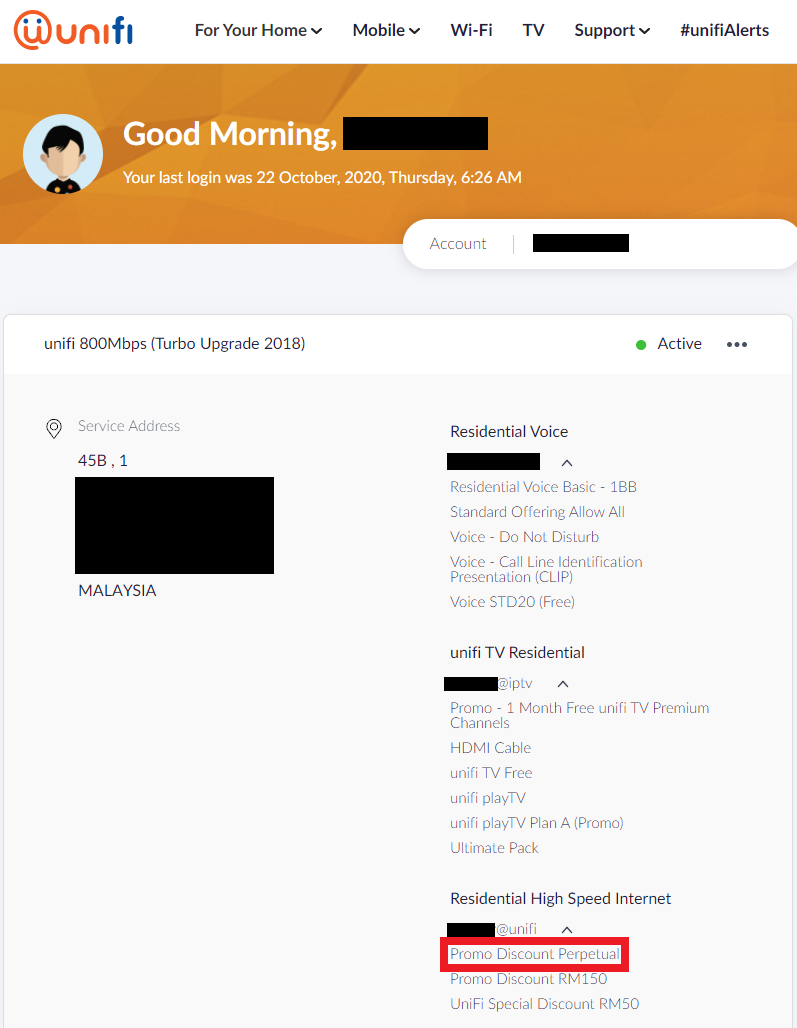
If you don't see the "Promo Discount Perpetual", then yes, the free upgrade for you will end

Everyone that has the Perpetual discount stated in their account will continue enjoying the discount forever
user posted image
*
QUOTE(neekun @ Oct 22 2020, 11:06 AM)
Aiya mine only RM140 discount instead of RM150. [attachmentid=10646517]
*
What's about Unifi Special Discount? Is that also perpetual or will end after a some time?
ckimsem
post Oct 22 2020, 05:57 PM

Regular
******
Senior Member
1,132 posts

Joined: Jun 2011
From: Perak.


QUOTE(leonlim619 @ Oct 22 2020, 02:08 PM)
what modem unifi provide for new user for 100mbps package?
*
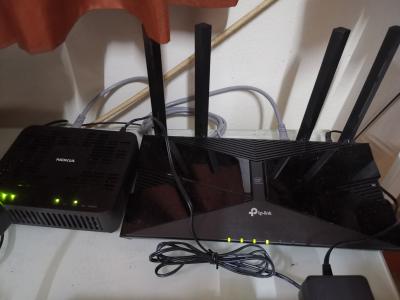
Today, just completed my Unifi Fibre 100mbps installation rclxm9.gif . I got Nokia BTU and Aztech router as shown in picture.
Attached Image Attached Image

This post has been edited by ckimsem: Oct 22 2020, 05:59 PM
ckimsem
post Oct 22 2020, 06:56 PM

Regular
******
Senior Member
1,132 posts

Joined: Jun 2011
From: Perak.


QUOTE(go626201 @ Oct 22 2020, 07:28 PM)
crap router,if you got budget for networking,please change it.
any more than rm200 router better than this crap.
*
QUOTE(blacktubi @ Oct 22 2020, 07:37 PM)
I agree, thie Az-Tech is probably the worst router TM ever given. It's not even the real Aztech.

I wonder how why they award the contract to this company.  icon_idea.gif
*
Well, it's my first day on Unifi Fibre internet. I don't know what's good or not ATM.
So, I read that it'll be hard to change the BTU unit since it required TM technician to configure it, and hence is this Nokia BTU good?
If I decided to change the router, which one do you recommend? And are Asus RT-AC1200G+ and Asus RT-AC58U good?

This post has been edited by ckimsem: Oct 22 2020, 07:18 PM
ckimsem
post Oct 22 2020, 07:45 PM

Regular
******
Senior Member
1,132 posts

Joined: Jun 2011
From: Perak.


QUOTE(blacktubi @ Oct 22 2020, 08:26 PM)
IMO Huawei modem is the best one. But truth to be said, modem are fine most of the time.
Those 2 models you mentioned are really low end and honestly, I do not recommend them as the improvement is not significant. You might as well save a little more and get something better.

If you're low on budget, TP-Link Archer AX20 is low price while perform really well.
*
Ok, thanks for your info... and might be going for Asus RT-AX56U later. https://www.lazada.com.my/products/asus-rt-...1.html?search=1
Still, would like to ask getting any good router won't boost the internet speed since my subscription is 100mbps, and therefore what's the difference for low end or better router? Hope you could explain a bit, thank you smile.gif
ckimsem
post Oct 23 2020, 07:08 AM

Regular
******
Senior Member
1,132 posts

Joined: Jun 2011
From: Perak.


QUOTE(blacktubi @ Oct 22 2020, 11:57 PM)
WiFi speed at longer distance

All WiFi 6 router can technically support 800Mbps when you are standing in front of them with a WiFi 6 device.

What's different is the speed, stability and consistency when you are 2 - 3 walls apart. This will depends on how the manufacturer design the RF circuitry and other optimizations.
*
I see, thank you for your explanation. I should save up a bit and get a better router later, I think my wireless adapter also need to change to 5Ghz supported too. laugh.gif

This post has been edited by ckimsem: Oct 23 2020, 07:09 AM
ckimsem
post Oct 23 2020, 09:20 PM

Regular
******
Senior Member
1,132 posts

Joined: Jun 2011
From: Perak.


Is it because of the crap Aztech router privided by TM that I sometimes feel like DC or wifi dropped? But all lights are on/green when checking the BTU and router. It happens on 5G wifi connection only whereas speed will be less than 25mbps when on 2.4G wifi connection. My current wifi adapter is Dlink DWA-171, think it may need to change as well.
Can someone enlighten please?
ckimsem
post Oct 26 2020, 09:03 AM

Regular
******
Senior Member
1,132 posts

Joined: Jun 2011
From: Perak.


QUOTE(achong09 @ Oct 26 2020, 09:30 AM)
Unifi give black color TPlink C1200 router std.. so is it good enough or have to go buy a new one?
*
According to the 1st page, it's written as below.

Just a disclaimer, the TP-Link C1200 v1 (Pic) have MANY issues, including firmware and hardware problems, so if there are any issues with the connection and if you have this router, try changing to another router and see if your problem can be resolved. If it is resolved, then it is this particular router's issue.

Just wondering if it's still the same as of now.
ckimsem
post Nov 5 2020, 09:18 PM

Regular
******
Senior Member
1,132 posts

Joined: Jun 2011
From: Perak.


QUOTE(bodyglove @ Nov 5 2020, 07:03 PM)
may i know your average speed test.. TM installer inform me although if i subscribe to 100Mbps and using same modem as you, the average speed is 80% only even using cable. (80Mbps)..
*
At the time of installation, I got around 90mbps with WiFi connection, and then the speed would be up and down at 30~90mbps, average at 55mbps, and also got WiFi dropping at times. I was using the Aztec router provided by TM.

Now, I have changed the router to TP Link AX50. The speed is at around 50~105mbps, average at 80mbps.
Until now, I've never tried connection using LAN cable cause I'm quite satisfied with the speed I get.
Attached Image

This post has been edited by ckimsem: Nov 5 2020, 09:33 PM
ckimsem
post Nov 5 2020, 09:31 PM

Regular
******
Senior Member
1,132 posts

Joined: Jun 2011
From: Perak.


QUOTE(JohnLai @ Nov 5 2020, 10:21 PM)
2.4Ghz or 5ghz?

If 5Ghz, please manually set the channel bandwidth to 80Mhz instead of auto.
Next, manually set a DFS channel to one of these channels (58, 106 or 138).

Report back here.
*
Sorry, I forgot to say that WiFi dropping problem was using the Aztec router (white colour with unifi wording) provided by TM.
Attached Image

So far, I have no issues with the TP Link AX50 router. I'm connected on 5ghz WiFi.

This post has been edited by ckimsem: Nov 5 2020, 09:37 PM
ckimsem
post Nov 18 2020, 08:15 PM

Regular
******
Senior Member
1,132 posts

Joined: Jun 2011
From: Perak.


QUOTE(ray8426 @ Nov 18 2020, 06:41 PM)
Haiz.... sad.gif  Sad
*
For my application through agent, it took 5 days for application pass through, checking whether my home in coverage or not.
3 days later, TM technicians came to check the "port", and they said my home need to "tanam tiang", and they also said that might take 1 weeks.
5 days later, received a call from TM to ask for my home location in order to "tanam tiang" in the correct places.
Then another 4 days, TM technician returned to complete installation of my Unifi Fiber 100mbps internet.
Conclusion, application till complete installation took 3 weeks time, very efficient to me.
ckimsem
post Nov 29 2020, 09:46 AM

Regular
******
Senior Member
1,132 posts

Joined: Jun 2011
From: Perak.


QUOTE(www.com.my @ Nov 29 2020, 01:14 AM)
i got this reading from my BTU (Nokia)...

not sure is it consider "ok" or "no good" ?

[attachmentid=10704817]
*
May I ask how did you get that reading from BTU? or how to log in to BTU web UI?
When I key in 192.168.1.1, it'll go to router WEB UI when using router provided by TM, or 'The connection has timed out' when using TP Link AX50 router.

This post has been edited by ckimsem: Nov 29 2020, 09:47 AM
ckimsem
post Nov 29 2020, 10:52 AM

Regular
******
Senior Member
1,132 posts

Joined: Jun 2011
From: Perak.


QUOTE(akhito @ Nov 29 2020, 11:32 AM)
My bad nvr considering 300Mbps and above package cuz kinda overkill for small family. I means I would always choose Maxis than Unifi due to contract and then they became the same, what 's the point maybe should look into digi fibre.
*
Celcom fibre internet is a bit cheaper, plus Celcom also provides TP Link AX10 router although for "new registration only". Well, if we are to switch, we are considered as new registration, right?
Check Celcom Home Fibre.
ckimsem
post Nov 29 2020, 11:16 PM

Regular
******
Senior Member
1,132 posts

Joined: Jun 2011
From: Perak.


QUOTE(man @ Nov 29 2020, 10:18 PM)
are you using celcom now? is it good? thinking of swithing to celcom and take the rm99 offer for 100mbps.
*
No, I'm using unifi now. My home just got coverage for unifi fiber in OCT 2020, and so just started my contract.
When I checked for Celcom/Maxis fiber coverage on their websites, it shows my home is not in coverage. Strange though, Maxis did call to me to offer their fiber internet.
ckimsem
post Nov 30 2020, 09:30 AM

Regular
******
Senior Member
1,132 posts

Joined: Jun 2011
From: Perak.


QUOTE(jcws87 @ Nov 30 2020, 03:20 AM)
My house area too have just started having unifi coverage, to be precise 20/11/2020. Thought Maxis website show not coverage but eventually u can get it via visiting Maxis centre (got info on 23/11/2020 can already register with Maxis for my area).
*
Unifi technicians said my home location required for "tanam tiang" when they came to check the "port" thing. Read Here
Maybe, that's the reason other fiber ISPs does not have coverage for my home because I think TM may not install poles for others except Unifi itself. When I check now, only DiGi shows availibility at my area, yet it's not confirmed whether or not my home included :confused: .

This post has been edited by ckimsem: Nov 30 2020, 06:20 PM
ckimsem
post Nov 30 2020, 03:11 PM

Regular
******
Senior Member
1,132 posts

Joined: Jun 2011
From: Perak.


QUOTE(Exeunt @ Nov 30 2020, 03:27 PM)
In my experience, tanam tiang is to connecting from DP box to your house
Its like your house got port but need extra tiang to support the fibre cable,
Double check with the installer again
*
It needed to install poles just to shorten the distance, straight to my home from the DP. Without install new poles, it would go a big round to my home which needs more than 350m fiber cable and I would be charged for the cable length. That was what the technicians told me.
The most important thing was that install 3 poles or below were free. Well, it needed to install 2 poles only, why not when it was free and it just took a little time only.
BTW, my fiber internet installation completed already. What’s the need to check with installer? confused.gif

Did you read what people posted earlier?

This post has been edited by ckimsem: Nov 30 2020, 03:19 PM
ckimsem
post Dec 3 2020, 08:24 PM

Regular
******
Senior Member
1,132 posts

Joined: Jun 2011
From: Perak.


QUOTE(OneXX @ Dec 3 2020, 09:11 PM)
sadly i ask unifi on twitter they said Rm129 100mbps only have access using facebook login...only 100mbps+box have access to unifi playtv via id @iptv login..so 100mbps RM129 now is pure internet for RM129...i thought internet RM99+unifi playtv RM30
*
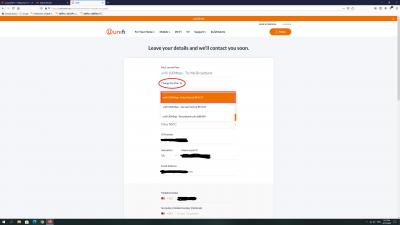
Login to your Unifi account via Unifi website, try to click the 3-dots and select 'change my plan' on the drop-down list next to your current plan. Then, on the next windows select the plan you wish to change, e.g. "Unifi 100mbps - Ruby Pack @ RM129".

I have enquired via 'live chat', they said this plan has UnifiTV but doesn't come with the "box". So, you could view the Unifi play tv with smartphones and tablets.
* I think we might be able to view the unifi play tv on big TV if we bought an Android TV box that could support UnifiTV. Well, that's my assumption, and hope someone else could confirm it.

This post has been edited by ckimsem: Dec 3 2020, 08:26 PM
ckimsem
post Dec 3 2020, 08:41 PM

Regular
******
Senior Member
1,132 posts

Joined: Jun 2011
From: Perak.


QUOTE(yongtjunkit @ Dec 3 2020, 09:26 PM)
That’s for existing 100mbps customer I believe, new customers don’t have unifi Tv pack already unless you pay for their ultimate pack
*
When I login to my Unifi account as mention on previous post - HERE. I could change to that plan although I've not changed it yet cause of the pandemic reason.
Attached Image
And, I have just started using Unifi Fiber on 22 Oct 2020. So, I believe once we get on Unifi Fiber, we'll be able to change to that stated plan. * Sorry, I was told changing of plan (selectable plans) could be done after 1 month.

This post has been edited by ckimsem: Dec 5 2020, 07:34 PM
ckimsem
post Dec 5 2020, 07:41 PM

Regular
******
Senior Member
1,132 posts

Joined: Jun 2011
From: Perak.


QUOTE(www.com.my @ Dec 3 2020, 09:22 AM)
don't thru router, direct lan to btu (lan 1)

user: tmadmin
p/w: Adm@xxxx (last 4 mac address)
*
I tried connect my desktop directly to BTU Lan1 using RJ-45 cable. It has no internet and also cannot login.
I tried keyed in 192.168.0.1 and 192.168.1.1, both didn’t respond.
Did I miss anything?
ckimsem
post Dec 5 2020, 10:29 PM

Regular
******
Senior Member
1,132 posts

Joined: Jun 2011
From: Perak.


QUOTE(jusbella @ Dec 5 2020, 08:57 PM)
Manual set static ip in your computer.
*
Static IP? Don't know how to do it.
Never mind, it's not very important to know the readings as long as my connection working fine, right? smile.gif
However, I wouldn't mind learning it if you care to explain and if it's not difficult. tongue.gif
Anyway, thanks.
ckimsem
post Dec 9 2020, 08:55 AM

Regular
******
Senior Member
1,132 posts

Joined: Jun 2011
From: Perak.


QUOTE(soonwai @ Dec 9 2020, 01:29 AM)
Mine is the same as Fruitie, STD20 not itemised in the bill. So maybe you can remove it to get a further RM20 discount. Try and see.
*
It doesn't show on the printed bill, but it shows on your unifi account through the web.
If everyone wish to remove it, then they might need to make a plan and also confused users. Do you think they are so diligent?

This post has been edited by ckimsem: Dec 9 2020, 09:00 AM

2 Pages  1 2 >Top
Topic ClosedOptions
 

Change to:
| Lo-Fi Version
0.2323sec    0.54    7 queries    GZIP Disabled
Time is now: 12th December 2025 - 01:00 PM