Welcome Guest ( Log In | Register )

Bump Topic Topic Closed RSS Feed

Outline · [ Standard ] · Linear+

 Brother Laser Printer MFC-1910W, Can I connect i to router via USB cable?

views
     
netmatrix
post Nov 1 2019, 09:21 AM

The machine... it sees everything.
*******
Senior Member
6,734 posts

Joined: Jan 2003
From: Zion


You bought a Wireless capable printer, but you want to connect it directly to USB via router to make it wireless........ dry.gif

So why did you buy a wireless capable printer in the first place? doh.gif doh.gif

Use the printer front panel to connect to Wi-Fi. After connected, when you install printer driver in PC it will find the printer so long you are connected to the same wifi network.

This post has been edited by netmatrix: Nov 1 2019, 09:25 AM
netmatrix
post Nov 1 2019, 02:45 PM

The machine... it sees everything.
*******
Senior Member
6,734 posts

Joined: Jan 2003
From: Zion


» Click to show Spoiler - click again to hide... «


Aiiiyyoooo.... That model of printer that you have IS NETWORK capable. That means if you connect it to your house Wifi, every PC in your house wifi or cable connected will be able to send printing to it. Once you run the installation it will find the printer in your network. Select it and it will install.

The prerequisite is that the printer has to join your wifi network first before all network capability will work. Use the god damn front panel on the printer to join Wifi. Press the wifi button to enable wifi and then press the menu to connect to wifi with visible SSID and then you can type in your wifi password. You do not need to use USB cable to host from PC or router with that printer model.

This post has been edited by netmatrix: Nov 1 2019, 02:46 PM
netmatrix
post Nov 1 2019, 02:52 PM

The machine... it sees everything.
*******
Senior Member
6,734 posts

Joined: Jan 2003
From: Zion


QUOTE(stopandroll @ Nov 1 2019, 02:49 PM)
TS. This is the answer you want.
Printer got wifi already, means it can handle wireless printing no need cucuk cable la. As long as connected within same WiFi network.
If your phone is on wifi, can direct print also.
*
He can literally put the printer next to the router and still not use cable and get printing if it was connected to wifi. dry.gif
netmatrix
post Nov 1 2019, 10:57 PM

The machine... it sees everything.
*******
Senior Member
6,734 posts

Joined: Jan 2003
From: Zion


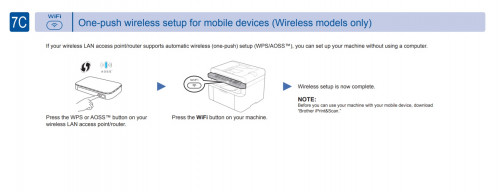
user posted image

Dude!!! The pix above i captured from the manual.

https://support.brother.com/g/b/manualtop.a...=mfc1910w_eu_as

Dude!!! WPS setup is even more easy and fast!. After you done that, install as usual finding through network and it will list the printer as NETWORK printer. Adoii... dude!!! You 5 years old is it?

Topic ClosedOptions
 

Change to:
| Lo-Fi Version
0.0155sec    1.02    7 queries    GZIP Disabled
Time is now: 20th December 2025 - 02:19 AM