Welcome Guest ( Log In | Register )

Outline · [ Standard ] · Linear+

Unifi Internet stop working then pop up paynothing promo, TM Unifi make DC every 3 hours show Ads

views
     
soonwai
post Oct 25 2019, 01:58 AM


********
All Stars
11,455 posts

Joined: Oct 2007
From: KL


QUOTE(PointOfSale @ Oct 25 2019, 12:17 AM)
Anyone facing this issue when suddenly you are browing your internet and playing games, your internet connection stop but IP stays the same, never dc and router never restart by its own

Opening chrome/IE/Firefox on PC and phone will bring and direct u to paynothing page

https://unifi.com.my/yearendpromoeligible

user posted image

damn shit...after keep call and complain TM 100 line for 8th time and livechat 12th time, and keep spamming unifi FB...this problem arise.
*
Never heard of this before. Check that you've paid your bill.
soonwai
post Oct 25 2019, 02:14 AM


********
All Stars
11,455 posts

Joined: Oct 2007
From: KL


QUOTE(acco2 @ Oct 25 2019, 02:08 AM)
im same problem with u , with connect my phone keeep promt this and need press only can continue wifi access
*
What router and what DNS are you using?
soonwai
post Oct 27 2019, 07:03 AM


********
All Stars
11,455 posts

Joined: Oct 2007
From: KL


QUOTE(klckm88 @ Oct 25 2019, 12:16 PM)
I also facing this issue since oct 22,everynight when i play LOL, confirmed will get disconnected for 15 seconds and then chrome will pop-up automatically and displays the advertisement. Taught my pc is infected, scan pc but get nothing
*
What router are you using?

QUOTE(blackbox14 @ Oct 27 2019, 01:23 AM)
Interesting issue. I've had weird disconnects in my router's log lately that come pretty much on-schedule every 2 or 3 hours like in this thread, but I've not seen this popup ad.

The disconnects started happening around the same time as the ads in this thread reported too.

EDIT: It's definitely not my router, because the system log list would be reset as well. After the disconnect, IP address changes. So it's either a BTU problem or I'm being affected by this ad.
*
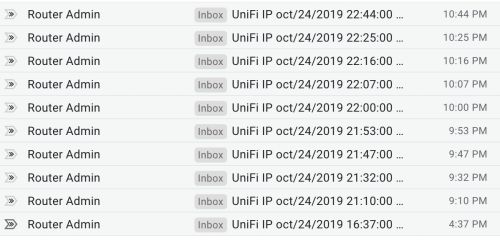
The disconnect/reconnect happens rarely. Not sure why. Sometime they're so frequent that the internet will be unusable. Here's an example from a few days ago.
user posted image
Each of the above is an IP address change cause by pppoe reconnecting. Why it is doing it, I don't know.

This post has been edited by soonwai: Oct 27 2019, 07:08 AM
soonwai
post Oct 27 2019, 09:31 AM


********
All Stars
11,455 posts

Joined: Oct 2007
From: KL


QUOTE(island @ Oct 27 2019, 09:11 AM)
TM router came with many hidden settings. also clear the cache ARP table
*
Why clear ARP? Are you sure you know what you are talking about?

And how do you that? For which TM router?

This post has been edited by soonwai: Oct 27 2019, 09:32 AM
soonwai
post Oct 27 2019, 11:46 AM


********
All Stars
11,455 posts

Joined: Oct 2007
From: KL


QUOTE(blackbox14 @ Oct 27 2019, 11:25 AM)
Mine has been going since the 25th. Still going on today and consistently every 3 hours. Here's bits of the log each time the IP address changes.

2019-10-27 04:06:42 nat[22292]: <6> 211501 Initialization succeeded
2019-10-27 04:06:41 nat[22292]: <6> 211501 Initialization succeeded
2019-10-27 07:06:50 nat[2477]: <6> 211501 Initialization succeeded
2019-10-27 07:06:49 nat[2477]: <6> 211501 Initialization succeeded
2019-10-27 10:06:59 nat[12578]: <6> 211501 Initialization succeeded
2019-10-27 10:06:58 nat[12578]: <6> 211501 Initialization succeeded

The addresses have also not switched from a certain range.

This might be a separate problem entirely though, so I'll open a new thread on it.
*
Better report to TM. Try your best to explain. For this type of problem, it's really difficult to get through to them. 2 years ago I had the same problem in my shop in Bangi for about 3 weeks. The router is Mikrotik. Off and on, its PPPoE would disconnect and reconnect, sometimes 4-5 times in a row, multiple times a day. It wasn't critical, I dillydallied and by the time I got the router logs to make a report to TM, it stopped.

Yeah, different problem altogether.

This post has been edited by soonwai: Oct 27 2019, 11:47 AM
soonwai
post Oct 28 2019, 12:59 PM


********
All Stars
11,455 posts

Joined: Oct 2007
From: KL


QUOTE(blackbox14 @ Oct 28 2019, 09:57 AM)
How do I go about doing this?
This issue started for me after I restarted my router some time last week, so that might be it. TM actually has a record of when the disconnecting started for every affected account, but it seems they're denying all responsibility or have no idea what their administration team did.

The support staff are quick to blame it on me and mention potential charges instead of thoroughly investigating their side first. I'm not sure what good sending technicians here is going to do at all.
*
Yeah, damn TM support is always like that. They always blame the customer first. Real stupid. I guess it works with laypeople.

But back to the 3hr DC issue, this is definitely a TM problem. It sounds like someone at TM accidentally configured 3hours for the pppoe session time. If you were connected before they configured it and you don't disconnect then you'll be fine but as soon as you disconnect and reconnect, the new session time comes into effect.

I haven't seen it myself yet and neither has my neighbours so it's limited to affected pppoe concentrators. Maybe post your location or, if possible, pppoe server id if it's happening to you.

For example, mine is ibse01.bgi which is Bangi. You may see this in your router logs. On Mikrotik routers, it's in PPPoE status.

This post has been edited by soonwai: Oct 28 2019, 04:29 PM
soonwai
post Oct 28 2019, 04:30 PM


********
All Stars
11,455 posts

Joined: Oct 2007
From: KL


QUOTE(alexleow81 @ Oct 28 2019, 02:33 PM)
PC Kena virus la ni
*
Also possible to cause the same symptoms. But not the same cause.
soonwai
post Oct 28 2019, 04:56 PM


********
All Stars
11,455 posts

Joined: Oct 2007
From: KL


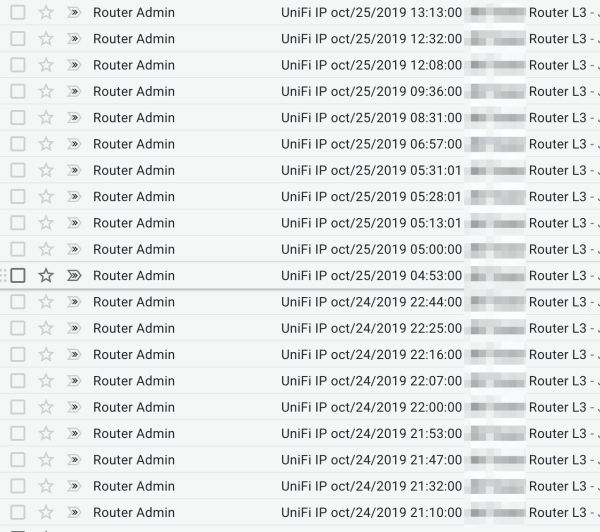
This router seems to be having recurring PPPoE disconnects for 2 days. But not 3 hr intervals. Shah Alam Sek 7. Concentrator: ibse02.klg
It has stopped for now.

user posted image

This post has been edited by soonwai: Oct 28 2019, 04:58 PM
soonwai
post Oct 28 2019, 10:23 PM


********
All Stars
11,455 posts

Joined: Oct 2007
From: KL


Regarding the 3hr disconnect problem, I bet it's because TM installed a new PPPoE Concentrator and its defaults for PPP Session Time is 10800 secs.

Or some intern at TM thought it would be a good idea to change it to that.

QUOTE(neogeocdz @ Oct 28 2019, 09:27 PM)
I am on Cloudfare DNS, it didn't help at all.
*
The paynothing ad problem is not due to DNS. I'm quite sure of that but I can't check further as my area is not affected by it. If it happens, it'll happen with any router.
soonwai
post Oct 28 2019, 10:35 PM


********
All Stars
11,455 posts

Joined: Oct 2007
From: KL


QUOTE(altuser @ Oct 28 2019, 07:31 AM)
What's funny is I'm on the 500Mbps Turbo Upgrade, so my package doesn't even qualify for their promo since it's only for packages up to 300Mbps, yet I'm getting spammed by this stupid ad.
*
Should be no problem for Turbo500 to get it.

1. Sign-in to unifi.com.my
2. Click the paynothing banner (the small one above "Billing")
3. Scroll down to "How to enjoy promotion?"
4. Under "Existing Customer" ,click "via self-care"
5. Hopefully under "Select any of the eligible plans below for redemption", you'll see your Turbo 500 package.
soonwai
post Oct 29 2019, 03:29 AM


********
All Stars
11,455 posts

Joined: Oct 2007
From: KL


QUOTE(LeCpt_Nex @ Oct 28 2019, 11:59 PM)
I registered LYN just for this thread.

WTF Man. I thought i was the only one. Me and my housemates are both working from home , both IT in Network Engineering.

We got so frustrated last 2 days we ran troubleshooting.

And i can assist to confirm this is on TM side.

We ran 2 benchmark pc and 1 benchmark phone to help diagnose.
We ran cont-ping to our router gw , to the int-GW , to the WAN IP and 8.8.8.8

The moment the ping enter losses ( at least 3 ticks ) , our int-GW and WAN IP changes , and either 2 things will happen , our ping spikes or totally disconnected.

The Benchmark PCs one of them will receive "Log In Authentication" while the benchmark phone receives the login notification.

I have reported to TM , yet they are asking an Engineer to come over to my house when it has nothing to do with our router.
*
Which area? Also Kelana Jaya? What's the ID for the pppoe concentrator?

Just to clarify, which problem are you facing??

This post has been edited by soonwai: Oct 29 2019, 03:37 AM
soonwai
post Oct 29 2019, 01:57 PM


********
All Stars
11,455 posts

Joined: Oct 2007
From: KL


QUOTE(altuser @ Oct 29 2019, 05:57 AM)
Which is weird, because it's not in their T&C https://unifi.com.my/lsds/assets/documents/...gn_Consumer.pdf

Oh well.
*
Don't worry about the TnC, it doesn't include Turbo users but it doesn't exclude them either. TM would be a fool not to allow all their Turbo users to renew to a 2-yr contract.


Change to:
| Lo-Fi Version
0.0244sec    0.80    7 queries    GZIP Disabled
Time is now: 1st December 2025 - 04:47 PM