

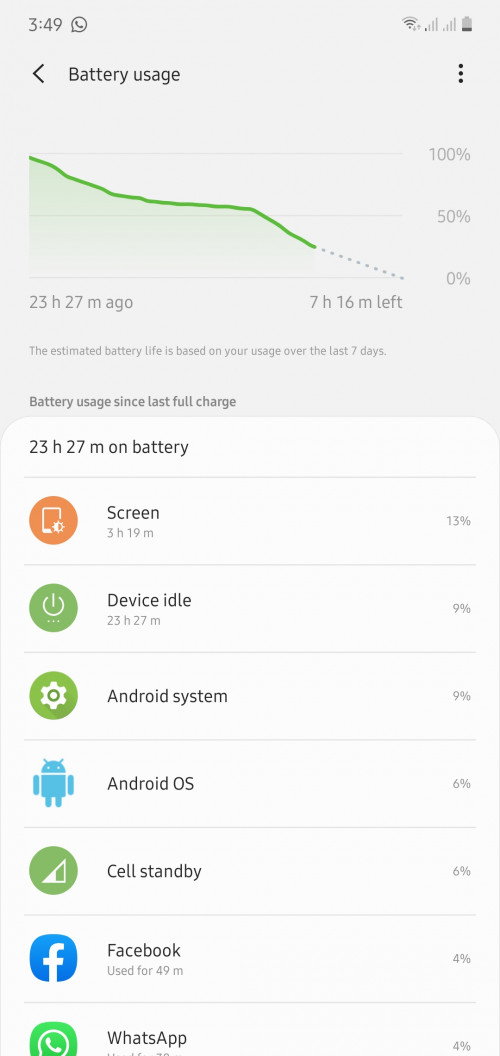
is this battery SOT normal almost 24 of usage ?
» Click to show Spoiler - click again to hide... «
This post has been edited by zoixc: Aug 31 2019, 04:01 PM
Samsung Galaxy Note 10 Discussion Thread V2, The 10th Series Note
|
|
 Aug 31 2019, 03:09 PM Aug 31 2019, 03:09 PM
Return to original view | IPv6 | Post
#1
|
 
Senior Member
1,406 posts Joined: Aug 2018 
|
anyone having this issue where phone is fully charge then unplug become 99 within 2 minute ?
is this battery SOT normal almost 24 of usage ? » Click to show Spoiler - click again to hide... « This post has been edited by zoixc: Aug 31 2019, 04:01 PM |
|
|
|
|
|
Aug 31 2019, 05:51 PM
Return to original view | IPv6 | Post
#2
|
|
Senior Member
1,406 posts Joined: Aug 2018
|
QUOTE(imaxhee @ Aug 31 2019, 04:17 PM) duo simcard insert though...its consider quite good i think? i mean i can use it the whole day no problem, it is just when i unplug it the battery instanstly become 99 to 95 in no time. kinda paranoid about it |
|
|
Aug 31 2019, 05:51 PM
Return to original view | IPv6 | Post
#3
|
|
Senior Member
1,406 posts Joined: Aug 2018
|
QUOTE(sakuraboo @ Aug 31 2019, 05:40 PM) Yeah i think the over charge protection is very strict to prevent "note 7" does your do the same thing, within 10 minutes the battery drops to around 97 alreadyCun2 at 100, no invisible 110% |
|
|
Aug 31 2019, 06:36 PM
Return to original view | IPv6 | Post
#4
|
|
Senior Member
1,406 posts Joined: Aug 2018
|
QUOTE(sakuraboo @ Aug 31 2019, 05:55 PM) Depends if using it then maybe Not using, just put on table for around 10 minutes or so then when check for message already 97. But if not using then not really But i get what you mean the first few percent seems to run down faster than the other percentages. This never really bothered me tho because i still end my work day with 50+ Just average user Only for the first few percentage only This post has been edited by zoixc: Aug 31 2019, 06:37 PM |
|
|
Aug 31 2019, 07:06 PM
Return to original view | IPv6 | Post
#5
|
|
Senior Member
1,406 posts Joined: Aug 2018
|
QUOTE(attw @ Aug 31 2019, 06:49 PM) If you have two SIM cards and poor cellular reception on either or both of them, then yes, that will definitely affect your battery life. even that i shouldn't have drop down to 97 within 10 minutes or so, i believe it's abit too fast. or maybe im just paranoid |
|
|
Aug 31 2019, 07:07 PM
Return to original view | IPv6 | Post
#6
|
|
Senior Member
1,406 posts Joined: Aug 2018
|
QUOTE(bennedict82 @ Aug 31 2019, 06:59 PM) Guys, I need your advise again. I asked this before but no answer. When you charge your phone with adapter, did you notice got buzz sound from adapter? I heard this when it charged the phone up to certain level with screen off. Without unplug, I touch screen to make screen on, then buzz sound gone. Then when screen off, the charger adapter buzz sound came back. how much is that certain level ? my old mate 10 supercharger when not charging but plug in also make buzzing sound. |
|
|
|
|
|
Aug 31 2019, 07:18 PM
Return to original view | IPv6 | Post
#7
|
|
Senior Member
1,406 posts Joined: Aug 2018
|
QUOTE(fuzzy007 @ Aug 31 2019, 07:08 PM) same here, will drop to 99% within few minutes but overall the SOT i get still acceptable ye same, i can use the phone for almost the whole day which is more than enought from me at least. btw, do you keep AOD always on or tap to wake ? is their any big difference in terms of battery life ? |
|
|
Aug 31 2019, 07:33 PM
Return to original view | IPv6 | Post
#8
|
|
Senior Member
1,406 posts Joined: Aug 2018
|
QUOTE(meltan @ Aug 31 2019, 07:19 PM) Battery drain is still prevalent in current Samsung flagships but not as bad as before. background app seems clear, nothing really runing that can drain that much in 10 minute. this battery drop is only after charging but not after using it for a bitMaybe some background apps are draining your battery as well. |
|
|
Aug 31 2019, 11:20 PM
Return to original view | IPv6 | Post
#9
|
|
Senior Member
1,406 posts Joined: Aug 2018
|
QUOTE(jimmylim85 @ Aug 31 2019, 09:20 PM) Yeah I had the same problem. Fully charged 100% and about a minute later it drops to 99%. Not a big deal I assume. i did go Samsung sevice center and ask them to check for me, what they said is just nonsense, say wechat and insta is using most battery total out of topic haha. and they told me to monitor another week, if still same bring back they will do indept checking for the phone. |
|
|
Aug 31 2019, 11:43 PM
Return to original view | IPv6 | Post
#10
|
|
Senior Member
1,406 posts Joined: Aug 2018
|
QUOTE(PJng @ Aug 31 2019, 11:26 PM) For me is normal, 100% few moment later 99% My old mate 10 also same, if unused for half an hour also can still 100%But not on samsung tablet, if left idle even after half hour, still 100% Btw how's your phone signal reception ? This post has been edited by zoixc: Aug 31 2019, 11:46 PM |
|
|
Aug 31 2019, 11:45 PM
Return to original view | IPv6 | Post
#11
|
|
Senior Member
1,406 posts Joined: Aug 2018
|
QUOTE(fuzzy007 @ Aug 31 2019, 08:05 PM) i keep aod on from 8am to 1am all the time, found it troublesome if need tap to wake I don't get that much sot maybe cause i mix use with data and wifi. for me, if i keep using wifi all the day i can get 5-6 hours SOT, if mixed up with mobile data will be lesser How is your mobile reception on your phone, my maxis always seems to have only 1 bar in door while umobile have 3 to 4 |
|
|
Sep 1 2019, 12:32 AM
Return to original view | IPv6 | Post
#12
|
|
Senior Member
1,406 posts Joined: Aug 2018
|
QUOTE(PJng @ Aug 31 2019, 11:56 PM) Sorry, i just using both A series, samsung phone and tab Overnight only 4% used ?? Wah damn good sia. I usually end up with 8 to 10 percent gone. But i have 2 sim card laPhone left overnight 96%, tab 98% Signal 3 or 4 bar |
|
|
Sep 1 2019, 12:34 AM
Return to original view | IPv6 | Post
#13
|
|
Senior Member
1,406 posts Joined: Aug 2018
|
QUOTE(tropik @ Sep 1 2019, 12:24 AM) I noted down the signal reading on my Mate9 before switching. At my office desk, it is generally -10 dBm weaker on the N10+. I'm also seeing a weaker signal on note compared to mate 10. Weird sia Compared with my colleague's Mate20p, his is also about -11 dBm stronger. Both comparisons with the same operator. This could be the difference between being able to make a call or surf when the signal is already weak  On the charging side, I noticed Sammy does not differentiate the name when it comes to charging speed. Charged with my power bank of 5V/2A; 9V/2A output ratings, it said fast charging. But it is definitely not taking 18W, 'cos my power bank will show a different color LED if it does. Switching to my car charger, it also said fast charging, but the time to full charge is shorter... I suspect it is running at 15W. So, if Sammy do differentiate the charging names, perhaps they can encourage users to better utilize their phones  Anyone know of power bank supporting both 15 and 18W output  I haven't tried using power bank to charge it yet so far haha. But i remember the first time i charge it i took more than 2 hour, but the next time i charge again all back to normal already |
|
|
|
|
|
Sep 2 2019, 01:15 AM
Return to original view | IPv6 | Post
#14
|
|
Senior Member
1,406 posts Joined: Aug 2018
|
QUOTE(noobandroid @ Sep 1 2019, 07:49 PM) with today's update, the fingerprint sensor now is sooo much faster, from a 2sec press to now just upon touch for less than 1 sec it scans and unlocks really ah ? cant wait to update now siaaa. That day i saw one s10 user can unlock so fast using finderprint i also shock sia |
|
|
Sep 2 2019, 08:04 PM
Return to original view | IPv6 | Post
#15
|
|
Senior Member
1,406 posts Joined: Aug 2018
|
QUOTE(ordinaryguy96 @ Sep 2 2019, 06:24 PM) Anyone experience the same issue with me? Phone don't heat up at all for me sia, almost 2 hour of gaming and touch still normal. My note 10+ does heat up very fast, even on the first day itself during the system update. Not a heavy user, but it does heat up on the area near the top middle even if I was watching some YouTube videos and switching between chrome and Messenger. Saw a few comments on the battery draining issue. It does happen to mine as well. Feel kinda disappointing as compared to my previous Mi phone which gives better experience on the stand-by time. But the battery used up around 20% la when gaming |
|
|
Sep 3 2019, 12:33 AM
Return to original view | IPv6 | Post
#16
|
|
Senior Member
1,406 posts Joined: Aug 2018
|
QUOTE(afad @ Sep 2 2019, 11:48 PM) For those that are afraid of screen burn in... For me because screen burn in is covered under warranty, if it really happens, later just go get the screen changed... And u get a brand new screen again Under warranty meh, i tot i heard one youtuber said its not covered under warranty o |
|
|
Sep 3 2019, 01:20 AM
Return to original view | IPv6 | Post
#17
|
|
Senior Member
1,406 posts Joined: Aug 2018
|
QUOTE(WaNaWe900 @ Sep 3 2019, 12:40 AM) Not covered? which YouTuber said that 🤔 Just spoke to samsung live chat and this is what they told me QUOTE For LCD screen will not covered under warranty if its caused by mishandle or wear and tear. However if its caused by manufacturing defect, technician will check with the device first. so yea, i don't know anymore |
|
|
Sep 3 2019, 10:10 AM
Return to original view | IPv6 | Post
#18
|
|
Senior Member
1,406 posts Joined: Aug 2018
|
QUOTE(riddy @ Sep 3 2019, 08:38 AM) Does anyone notice note 10 plus network reception bit bad? Same, compare to mate 10 slightly worstI just swap sim to Mate 10..and the network received a lot better.. |
|
|
Sep 3 2019, 10:13 AM
Return to original view | IPv6 | Post
#19
|
|
Senior Member
1,406 posts Joined: Aug 2018
|
QUOTE(mafioso @ Sep 3 2019, 06:27 AM) Lol guys Means normal brightness won't cause burn in that easily right ? Only on high brightness. Just wanted to confirm hahaNo worries on the screen burn it AOD won't burn it at all because amoled screens will only get burn in if its used for a long period of time with high brightness And AOD also uses proximity sensors to detect your surroundings If it feels that its in the dark. The AOD goes way dimmer than it usually is (as long as AOD brightness is set to auto) And when its in your pocket.. its a blank screen Reason why you still see AOD once you took it out of your pocket is because of the proximity sensor as well One thing to note. If you're so concern about overnight charging AOD burn in.. what about your morning-night fingerprint sensor indicator on the AOD? As it displays longer during the day 8 hour average charging indicator vs 16 hours of fingerprint indicator on the screen True that, i worried more about the finger print indicator more than charging icon. |
|
|
Sep 3 2019, 11:47 AM
Return to original view | IPv6 | Post
#20
|
|
Senior Member
1,406 posts Joined: Aug 2018
|
QUOTE(mafioso @ Sep 3 2019, 10:30 AM) yeap haha, i do the same thing as you. thanks for the tips anywayjust need to have good practise of usage of the beautiful AMOLED screen  my practises are: 1. never use full 100% max brightness all the time (once in awhile is fine if you really need it) 2. just leave brightness at around 50% is fine, its bright enough for most use  3. set schedule to your AOD (i set mine to display from 6am to 2am daily, with 4 hours of display rest since i dont even need it when im sleeping) 4. basically just dont use it at max brightness for long period of time 5. if you have to use waze/gps for navigation for long distance drive, and you know you are on the N-S highway, just keep the screen off and take note of your exit number since every exit has a number here is a good video explaination by Gary btw, do you notice a big difference in battery life with AOD always on and tap to wake ? i can't really tell cause not using the phone that much this few day. |
|
Topic ClosedOptions
|
| Change to: |  0.0202sec 0.0202sec
 0.54 0.54
 7 queries 7 queries
 GZIP Disabled GZIP Disabled
Time is now: 11th December 2025 - 11:36 AM |
 Quote
Quote