Welcome Guest ( Log In | Register )

Outline · [ Standard ] · Linear+

 Win 7 to 10 upgrade

views
     
TSKenYoung
post Jul 18 2019, 01:39 AM, updated 7y ago

Enthusiast
*****
Junior Member
700 posts

Joined: Sep 2008


Attached Image

This spec ok to go to win10?

If yea, what's the best way to move to it considering the My NON-LEGIT win 7 copy is having issues d. After months never touch, vmad.gif Relative grand uncle reformat it wiping all my data clean and now still having issues vmad.gif vmad.gif vmad.gif

I read on forums something like install frm image file? Should I use my laptop to dl that file then only install it on PC?


weissPC
post Jul 18 2019, 02:06 AM

Casual
***
Junior Member
316 posts

Joined: May 2015
Dunno what you use that desktop for, but it should be more than adequate to handle Win10 since newer Atom processors and old Core 2 Duo laptops can run Win10 mostly issue free.

You can install Win10 (better 64bit version, since you have 8GB RAM) from ISO and don't activate it, a nag message at bottom right of screen.

This post has been edited by weissPC: Jul 18 2019, 02:06 AM
Dark_Knight90
post Jul 18 2019, 02:12 AM

Getting Started
**
Junior Member
77 posts

Joined: May 2014


Hey , if you facing issues with the PC BSOD , its best let us know what wrong with it , it might just be a hardware issue , then changing to wins 10 wont have any effect. If you plan to upgrade to windows 10 please consider a 64 bit edition , there almost 3.4 gb of unused ram
TSKenYoung
post Jul 18 2019, 04:58 AM

Enthusiast
*****
Junior Member
700 posts

Joined: Sep 2008


QUOTE(weissPC @ Jul 18 2019, 02:06 AM)
Dunno what you use that desktop for, but it should be more than adequate to handle Win10 since newer Atom processors and old Core 2 Duo laptops can run Win10 mostly issue free.

You can install Win10 (better 64bit version, since you have 8GB RAM) from ISO and don't activate it, a nag message at bottom right of screen.
*
Very light uses only like browsing and some work.

Question is the win10 dl using my laptop then run installation on desktop? Or doesn't matter?

QUOTE(Dark_Knight90 @ Jul 18 2019, 02:12 AM)
Hey , if you facing issues with the PC BSOD , its best let us know what wrong with it , it might just be a hardware issue , then changing to wins 10 wont have any effect. If you plan to upgrade to windows 10 please consider a 64 bit edition , there almost 3.4 gb of unused ram
*
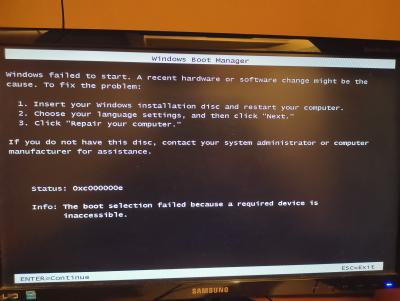
B4 was monitor flickering just stuck at wallpaper screen can't move on to log on....
Then left many months there - No1 touch it didn't bother... Just few weeks ago my damn relative came and tried to repair it without my knowledge and suppose didn't across his mind, he just reformat it.
I don't even know how and what he did but despite it a clean piece of PC it's always come up to this screen

Attached Image

And sometimes try to boot it will come to this


This post has been edited by KenYoung: Jul 18 2019, 05:05 AM


Attached thumbnail(s)

Attached Image
soultaker
post Jul 18 2019, 05:17 AM

Regular
******
Senior Member
1,323 posts

Joined: Jan 2003
From: Unknown


try to run check disk to see if your hard disk is free from error.

you may download Windows 10 to your laptop/desktop and then make a bootable USB drive (min 8GB usb disk). from there, do a fresh Windows 10 installation from the usb.
TSKenYoung
post Jul 18 2019, 05:33 AM

Enthusiast
*****
Junior Member
700 posts

Joined: Sep 2008


QUOTE(soultaker @ Jul 18 2019, 05:17 AM)
try to run check disk to see if your hard disk is free from error.

you may download Windows 10 to your laptop/desktop and then make a bootable USB drive (min 8GB usb disk). from there, do a fresh Windows 10 installation from the usb.
*
Now I suspect is my ssd fail on me.... Or I need bring my PC to in to shop to check the wiring...

What uncle did was installed windows on SATA..
Bcoz on bios only detected my SATA and disk drive. Not my ssd. It's a Kingston bought in 2016 October.... Kingston warranty quite long 1 right should b still in warranty? Any idea?
soultaker
post Jul 18 2019, 06:33 AM

Regular
******
Senior Member
1,323 posts

Joined: Jan 2003
From: Unknown


Kingston SSD has 3/5 years warranty depend on the model. Try to check the warranty first.

QUOTE(sHawTY @ Jan 11 2018, 09:33 PM)
PM Kingston in Facebook & provide them the serial number of your SSD
https://www.facebook.com/KingstonBlogFansClub.en/

They'll notify you where to send your SSD for RMA purposes
*
weissPC
post Jul 18 2019, 10:31 AM

Casual
***
Junior Member
316 posts

Joined: May 2015
The SSD is m2 type? Sometimes, it's better to unplug/remove the ssd to make sure that it's not causing the PC not able to boot up due to bios no detect.

Try to remove extra peripheral devices and just have the basic PC to test whether you can boot/install OS.

It helps in troubleshooting by reducing the number of possible causes.

Good luck!
TSKenYoung
post Jul 18 2019, 01:37 PM

Enthusiast
*****
Junior Member
700 posts

Joined: Sep 2008


QUOTE(soultaker @ Jul 18 2019, 06:33 AM)
Kingston SSD has 3/5 years warranty depend on the model. Try to check the warranty first.
*
Ya mine should b 3 years. Contacted the shop d..Will bringing it in to let them test

QUOTE(weissPC @ Jul 18 2019, 10:31 AM)
The SSD is m2 type? Sometimes, it's better to unplug/remove the ssd to make sure that it's not causing the PC not able to boot up due to bios no detect.

Try to remove extra peripheral devices and just have the basic PC to test whether you can boot/install OS.

It helps in troubleshooting by reducing the number of possible causes.

Good luck!
*
I'm not sure what type is it. Lol.
I get what ure saying but I guess anyhow if the ssd is not working, I still need go for warranty claim..
Now it's installed on sata I think it shouldn't be the case right....

Additional Q pls: just spoke to shop and they said 1 month if warranty claim... Am thinking got ppl actually similar scenario as me, and just install OS on SATA? Lazy wait ssd to come back then switch up again.... Don't really use much of the PC actually....

This post has been edited by KenYoung: Jul 18 2019, 02:12 PM
PJng
post Jul 18 2019, 02:51 PM

10k Club
********
All Stars
12,045 posts

Joined: Oct 2017


Weird, 32 bit windows install 8GB RAM
TSKenYoung
post Jul 18 2019, 03:12 PM

Enthusiast
*****
Junior Member
700 posts

Joined: Sep 2008


QUOTE(PJng @ Jul 18 2019, 02:51 PM)
Weird, 32 bit windows install 8GB RAM
*
if you had read the 1st post properly, you would've noticed i mentioned my uncle who came over frm SG stay a few nights main hentam reformat....

causing me to lose all my data also. wtf manners.....
abu.shofwan
post Jul 18 2019, 04:57 PM

Regular
******
Senior Member
1,455 posts

Joined: Jan 2015
From: Qatar


Light use only? Maybe try Linux. You can have a usb with linux (boot and run from USB) and see if the problem is still there.
sHawTY
post Jul 18 2019, 05:00 PM

Frequent Reporter
********
All Stars
14,909 posts

Joined: Jul 2005

Your system can run Windows 10 just fine. But you may want to do a clean installation instead of a dirty upgrade because your current OS is 32 bit
If you do a dirty upgrade, your Windows 10 will stay at 32 bit as well
junclj
post Jul 19 2019, 03:50 PM

Look at all my stars!!
*******
Senior Member
2,348 posts

Joined: Apr 2008


4 years ago, I can upgrade the old Core2Duo and Core2Quad machines to Windows 10, I was installed SSD on them. Both of them can run Windows 10 smoothly, start Windows 10 within 20 seconds. Fast on loading Office Word, Excel, Photoshop.
TSKenYoung
post Jul 20 2019, 11:08 AM

Enthusiast
*****
Junior Member
700 posts

Joined: Sep 2008


QUOTE(abu.shofwan @ Jul 18 2019, 04:57 PM)
Light use only? Maybe try Linux. You can have a usb with linux (boot and run from USB) and see if the problem is still there.
*
OK will consider.

QUOTE(sHawTY @ Jul 18 2019, 05:00 PM)
Your system can run Windows 10 just fine. But you may want to do a clean installation instead of a dirty upgrade because your current OS is 32 bit
If you do a dirty upgrade, your Windows 10 will stay at 32 bit as well
*
Best way to do clean install is to boot PC on USB with win10 installation is it? Or how? Care to advise?

Thanks all thus far for the replies!! So helpful as always!
soultaker
post Jul 20 2019, 12:56 PM

Regular
******
Senior Member
1,323 posts

Joined: Jan 2003
From: Unknown


QUOTE(KenYoung @ Jul 20 2019, 11:08 AM)
OK will consider.
Best way to do clean install is to boot PC on USB with win10 installation is it? Or how? Care to advise?

Thanks all thus far for the replies!! So helpful as always!
*
Yes, download the Media Creation Tool from the download link below. Prepare at least 8GB pendrive to make bootable disk. Also, make sure you have the license key for your Windows 10.

https://www.microsoft.com/en-us/software-download/windows10


Once downloaded, run the "MediaCreationTool1903.exe" file. After you agree to the T&C, you can choose the "Create installation media (USB flash drive, DVD, or ISO file) for another PC". Then choose USB flash drive.
junclj
post Jul 20 2019, 03:59 PM

Look at all my stars!!
*******
Senior Member
2,348 posts

Joined: Apr 2008


QUOTE(KenYoung @ Jul 20 2019, 11:08 AM)
OK will consider.
Best way to do clean install is to boot PC on USB with win10 installation is it? Or how? Care to advise?

Thanks all thus far for the replies!! So helpful as always!
*
You need to prepare a minimum 8GB usb pendrive, download Rufus
then download Windows 10 ISO

Then write the whole ISO into your pendrive with Rufus. Then clean install your PC.

TSKenYoung
post Jul 23 2019, 08:00 AM

Enthusiast
*****
Junior Member
700 posts

Joined: Sep 2008


QUOTE(soultaker @ Jul 20 2019, 12:56 PM)
Yes, download the Media Creation Tool from the download link below. Prepare at least 8GB pendrive to make bootable disk. Also, make sure you have the license key for your Windows 10.

https://www.microsoft.com/en-us/software-download/windows10
Once downloaded, run the "MediaCreationTool1903.exe" file. After you agree to the T&C, you can choose the "Create installation media (USB flash drive, DVD, or ISO file) for another PC". Then choose USB flash drive.
*
Thanks! Just installed!


QUOTE(junclj @ Jul 20 2019, 03:59 PM)
You need to prepare a minimum 8GB usb pendrive, download Rufus
then download Windows 10 ISO

Then write the whole ISO into your pendrive with Rufus. Then clean install your PC.

*
HI thanks for advise but I skipped the Rufus part. Managed to install it successfully anyway! Tq!


Change to:
| Lo-Fi Version
0.0254sec    0.42    6 queries    GZIP Disabled
Time is now: 13th December 2025 - 04:10 AM