QUOTE(weissPC @ Jul 18 2019, 02:06 AM)
Dunno what you use that desktop for, but it should be more than adequate to handle Win10 since newer Atom processors and old Core 2 Duo laptops can run Win10 mostly issue free.
You can install Win10 (better 64bit version, since you have 8GB RAM) from ISO and don't activate it, a nag message at bottom right of screen.
Very light uses only like browsing and some work.
Question is the win10 dl using my laptop then run installation on desktop? Or doesn't matter?
QUOTE(Dark_Knight90 @ Jul 18 2019, 02:12 AM)
Hey , if you facing issues with the PC BSOD , its best let us know what wrong with it , it might just be a hardware issue , then changing to wins 10 wont have any effect. If you plan to upgrade to windows 10 please consider a 64 bit edition , there almost 3.4 gb of unused ram
B4 was monitor flickering just stuck at wallpaper screen can't move on to log on....
Then left many months there - No1 touch it didn't bother... Just few weeks ago my damn relative came and tried to repair it without my knowledge and suppose didn't across his mind, he just reformat it.
I don't even know how and what he did but despite it a clean piece of PC it's always come up to this screen

And sometimes try to boot it will come to this
This post has been edited by KenYoung: Jul 18 2019, 05:05 AM Attached thumbnail(s)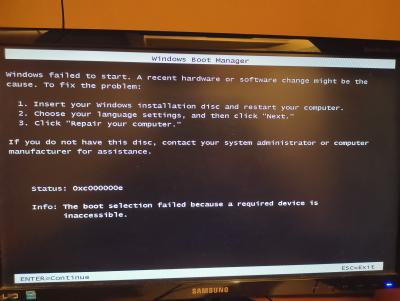


 Jul 18 2019, 01:39 AM, updated 7y ago


 Relative grand uncle reformat it wiping all my data clean and now still having issues
  Quote
Quote

 0.0143sec
 0.66
0.66
 7 queries
 GZIP Disabled