Outline ·
[ Standard ] ·
Linear+
Hardware 1 Malaysia NetBook IDOLA, repairing and upgrading 1M Netbook
|
junclj
|
 Jul 3 2019, 02:12 PM Jul 3 2019, 02:12 PM
|

|
dunno what is your spec? how many ram slots available? actually my recommendation is upgrade to ssd too in the same time but I not sure how is the content inside. How do you dissemble it? send to pc shop ask for the technician upgrade sure very expensive. That's why I recommend for check by yourself first with AIDA64. License key can be searched in google too. keyboard replacement can be bought at here https://www.lelong.com.my/idola1-1-malaysia...7-01-Sale-I.htm |
|
|
|
|
|
junclj
|
Jul 4 2019, 10:51 AM
|
|
|
QUOTE(Xanelyne @ Jul 4 2019, 09:16 AM) I don't know how to check from the outside, the bios and everything is kinda weird punya. that AIDA64 can check what ah? and is it possible for the motherboard limit the ram to 2gb only? because i see alot of people said netbook cannot go beyond 2gb. and inside confirm have HDD plug only.. so im not sure if ssd is same plug? Just replace your current harddisk to a SSD will improve your netbook performance. Believe to me, last time I got an Acer Aspire Revo mini PC running on Intel Atom. The performance is really sucks, when booting Windows tooks me around 5-10 minutes. After I replace to a 80GB Intel SSD, the PC just straight boot into Windows in 30~40secs. When I just switch on that Mini PC, then I follow by switch on the TV. Then the Windows already booted and ready to use. Just replace to new SSD its definitely same plug with your current HDD. You just need to download Windows 10 ISO and prepare a pendrive to install new Windows on the new SSD. |
|
|
|
|
|
junclj
|
Jul 5 2019, 12:12 PM
|
|
|
QUOTE(Xanelyne @ Jul 5 2019, 09:27 AM) nope, it still the same i think what i really need is the ram, the window dont have enough space to store data, so the lag is still there. Im just want to know if the ram in this pc really cannot support 4gb or not because i see some said 1M netbook dont support 4gb ram. Or maybe ill be selling this thing la if not jadi upgrade it. xD dont know how much can sell since hdd and everything still fine. My best recommendation is replace to a new SSD first. Since using SSD to do virtual memory paging is better than using HDD. For RAM, you may need to check with AIDA64 or CPU-Z to see how many slots available. Then check for your motherboard model and chipset type by searching in Google. Also check your motherboard RAM slot maximum supported clock speed. If you replaced to SSD, just manually increase the paging size to higher such as 16GB - 32GB. SSD can use memory caching at 500MB/s+, at least is better than harddisk 80/s~100MB/s So this can temporary reduce your netbook lagging issue. 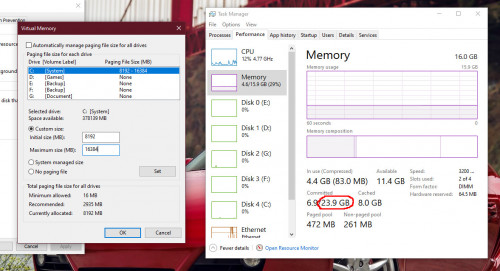 For memory supporting issue, you need tools such as AIDA64 or CPU-z 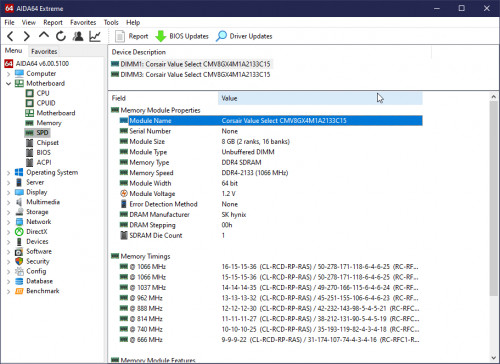 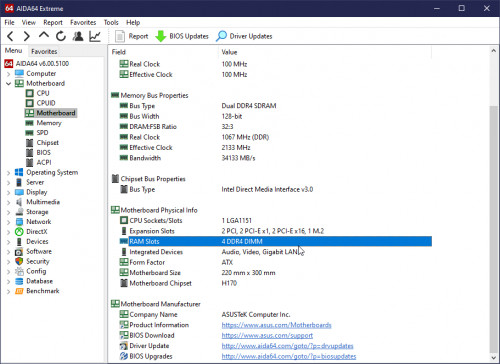 |
|
|
|
|



 Quote
Quote

 0.0159sec
 0.41
0.41
 6 queries
 GZIP Disabled