Outline ·
[ Standard ] ·
Linear+
Samsung Samsung Galaxy S10e / S10 / S10+ discussion V3, the 10th Anniversary Galaxy
|
Assclown
|
 Mar 7 2019, 12:32 PM Mar 7 2019, 12:32 PM
|

|
QUOTE(ivanchingkl @ Mar 7 2019, 11:49 AM) anyone received any update from SenHeng on batch 2? when will they send out and r they going to notify us via email? Supposed to be ready for collection/shipping tomorrow. But so far, have not receive any email or calls from them. Hope it does not get delayed. |
|
|
|
|
|
Assclown
|
Mar 8 2019, 03:46 PM
|
|
|
Is Smart Switch able to transfer app data/settings from old phone to new? Mine managed to transfer the app only. Seems like all apps have to start fresh
|
|
|
|
|
|
Assclown
|
Mar 9 2019, 08:45 AM
|
|
|
You guys should get the bxaction pro app. So much more you can customize the bixby button to do.
It is a paid app but definitely worth the price.
|
|
|
|
|
|
Assclown
|
Mar 9 2019, 06:15 PM
|
|
|
QUOTE(Krv23490 @ Mar 9 2019, 05:29 PM) Is it normal to feel vibration behind your phone when there is audio playing ? Does anyone else find it annoying or is just me ? I feel the vibration too. Volume around 40-50% enough to feel the whole back vibrating. |
|
|
|
|
|
Assclown
|
Mar 9 2019, 06:24 PM
|
|
|
QUOTE(ZeneticX @ Mar 9 2019, 06:17 PM) do you have casing on? a casing should be able to minimise it if anything, it just proves the speakers are quite powerful I have a casing on but it does not help. The speakers on other phones such as the oneplus 6t are just as powerful but they don't vibrate like this. This post has been edited by Assclown: Mar 9 2019, 06:25 PM |
|
|
|
|
|
Assclown
|
Mar 10 2019, 12:09 AM
|
|
|
if you enable the "Touch Sensitivity" option under Display Settings, FP unlock will be much faster and accurate. I don't know if this causes additional battery usage or cause any other issues.
|
|
|
|
|
|
Assclown
|
Mar 10 2019, 11:04 PM
|
|
|
Those who are getting good battery life (6-7 hours SOT), I think your "Adaptive power saving" is enabled? This will limit the CPU speed at times.
|
|
|
|
|
|
Assclown
|
Mar 10 2019, 11:46 PM
|
|
|
QUOTE(triple02 @ Mar 10 2019, 11:31 PM) Adaptive power setting only limits certain functions of the phone once it reach 15% or below by turning down the brightness, changing display from WQHD to Lower etc ..exacltly like what IOS has you sure it only limit certain functions once it reach 15%? From my experience, I saw it changed to Medium Power Saving Mode even though i have 60% battery left. And no wonder this afternoon I experienced some laggy scrolling and notifications for gmail coming in only when I turn on the display. |
|
|
|
|
|
Assclown
|
Mar 11 2019, 02:28 PM
|
|
|
QUOTE(TOMEI-R @ Mar 11 2019, 02:06 PM) That's the thing. Am on the S10+ now after migrating from the OP5T few days ago. Sad to say still cant get used to One Ui after so long on Oxygen. Thinking of going back to the OP6/OP6T now.  same. totally miss the dash charge, alert slider and screen-off gestures. |
|
|
|
|
|
Assclown
|
Mar 11 2019, 02:50 PM
|
|
|
I think there's a bug with the AOD. It still turns on the screen when the phone is in your pocket, even though "Accidental touch protection" is enabled.
|
|
|
|
|
|
Assclown
|
Mar 11 2019, 02:55 PM
|
|
|
QUOTE(ohman @ Mar 11 2019, 02:53 PM) You choose AOD = always on? No, only "Tap to show". I tested it by covering the proximity sensor and tapping on the screen. It still turns on the display. |
|
|
|
|
|
Assclown
|
Mar 11 2019, 03:15 PM
|
|
|
QUOTE(crayzee @ Mar 11 2019, 03:01 PM) There's definitely something wrong on with it. I cover top part of the phone with thick cardboard to simulate close proximity, and the phone still can double tap to wake. If i enable this feature and put in my pocket with the screen facing my leg, definitely going to trigger a wake up festival. yes, definitely cause unnecessary battery drain as well. |
|
|
|
|
|
Assclown
|
Mar 11 2019, 11:11 PM
|
|
|
Wanna let go my Galaxy A 8.0 Tab (2017) too. New and unused from SenHeng.
Do PM to deal if anybody's interested.
|
|
|
|
|
|
Assclown
|
Mar 12 2019, 04:45 PM
|
|
|
for those coming from Oneplus, you can make use of the Bixby button to act as the alert slider. Just get the bxactions app and configure the "Action on lockscreen" to "Sound mode (Sound, vibrate, silent). Now you can toggle between sound modes without turning on the screen.
|
|
|
|
|
|
Assclown
|
Mar 12 2019, 05:13 PM
|
|
|
QUOTE(mhter.ji @ Mar 12 2019, 05:05 PM) i try this but the screen turn on when i press the bixby button mine does not though. I purchased the pro version as I needed more features. I also followed the steps at the bottom of the app to unlock all the features. |
|
|
|
|
|
Assclown
|
Mar 12 2019, 06:17 PM
|
|
|
QUOTE(devinz @ Mar 12 2019, 06:06 PM) mine work but only when screen is unlocked. have you purchased the pro version? |
|
|
|
|
|
Assclown
|
Mar 13 2019, 06:46 PM
|
|
|
QUOTE(beckham07 @ Mar 13 2019, 06:43 PM) i only able to get around 6.5 hour sot with wifi or data on ,they told me usually can get around 9 hour sot ,should i take to samsung service to check my phone battery? Who is 'they'? |
|
|
|
|
|
Assclown
|
Mar 14 2019, 10:54 AM
|
|
|
QUOTE(earthdome @ Mar 14 2019, 09:58 AM) Anyone knows how to disable or remove this function? In 25% , it has alreasy use 3% of juice. Background activity is already restricted since yesterday but still draining the battery 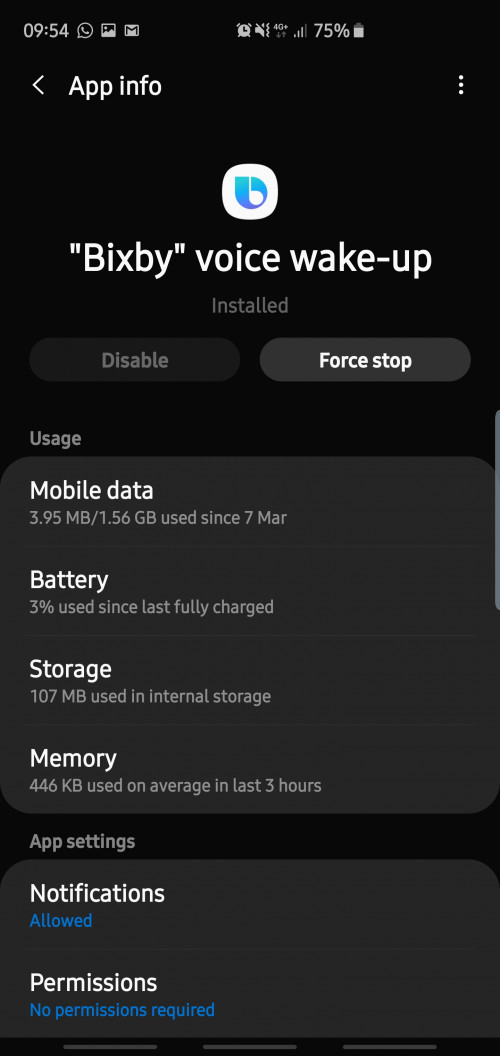 That 3% battery used you see is not consumed by Bixby voice wakeup alone. It is actually the usage of whole "Android System". Try going into other Android System apps such as "Device Care". It will show you the same percentage of battery used. |
|
|
|
|



 Quote
Quote
 0.0871sec
 0.51
0.51
 7 queries
 GZIP Disabled