

QUOTE(Prince J @ Jun 4 2020, 07:41 PM)
FAE told me there is a new EC / BIOS for alexnvidia ID-S machine to fix the power draw. Can you pm me your SN to see if yours is the same as alexnvidia??

PM sent!ILLEGEAR Selenite Discussion Thread V1, world’s first 17.3” bezel-less laptop
|
|
 Jun 4 2020, 08:13 PM Jun 4 2020, 08:13 PM
Return to original view | Post
#61
|
 
Newbie
2 posts Joined: Aug 2015 
|
QUOTE(Prince J @ Jun 4 2020, 07:41 PM) FAE told me there is a new EC / BIOS for alexnvidia ID-S machine to fix the power draw. Can you pm me your SN to see if yours is the same as alexnvidia?? PM sent! |
|
|
|
|
|
Jun 4 2020, 10:42 PM
Return to original view | Post
#62
|
|
Newbie
2 posts Joined: Aug 2015
|
QUOTE(SaiyanGoku @ Jun 4 2020, 10:35 PM) Leave the screws, what about physical dimension? Does 92 Wh battery fits inside the chassis and charges? Also, is there any bios/ec update for Selenite? From what i've read elsewhere, its too tall for it to fit inside the chassis and uses different voltage (i think) |
|
|
Jul 9 2020, 05:45 PM
Return to original view | Post
#63
|
|
Newbie
2 posts Joined: Aug 2015
|
XMG and Eluktronics command centers work perfectly fine on the Selenite though there is no fan control unlike what i saw on the Ownordisown video on the same chassis (Mech G1R)
Power limits and everything else are mostly the same as Illegear's but XMG's has this little tid bit under their turbo mode. It is also version 2.0.3.1 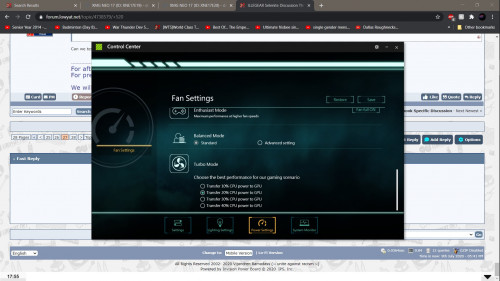 This post has been edited by Jared21: Jul 9 2020, 05:45 PM |
|
|
Aug 13 2020, 06:06 PM
Return to original view | Post
#64
|
|
Newbie
2 posts Joined: Aug 2015
|
QUOTE(Prince J @ Aug 13 2020, 05:16 PM) Hi kevin2128, Playing intensive game, sounds like an amazing job 100% usage issue still persisted the 2nd day after we swapped a new Seagate 1TB SSHD. We found the issue is caused by the Intel Rapid Storage driver, after we uninstalled the software, the issue is resolved for now. The JB tech support team has been playing intensive games and monitoring your disk usage since few days ago.  |
|
|
Aug 31 2020, 12:06 AM
Return to original view | Post
#65
|
|
Newbie
2 posts Joined: Aug 2015
|
QUOTE(oyama @ Aug 30 2020, 12:39 PM) Has anyone open up the bottom cover to clean up the dust collected on your fan? I do it every couple of months. Repaste maybe once every 6 or so depending on how uneven the paste has spread on my cpu |
|
|
Sep 2 2020, 01:14 PM
Return to original view | Post
#66
|
|
Newbie
2 posts Joined: Aug 2015
|
QUOTE(oyama @ Sep 2 2020, 08:04 AM) thanks.. i've done the clean up.. but not dare to do the repaste yet.. any tips? Best videos i've seen are from Bob of All trades on youtube. He may be repasting a different laptop but the process is still the same. Get a thick high quality paste like TG Hydronaut and maybe some Arcticlean if you wanna do this more in the future and take your time with it |
|
|
|
|
|
Sep 27 2020, 12:24 AM
Return to original view | Post
#67
|
|
Newbie
2 posts Joined: Aug 2015
|
QUOTE(GisixEX @ Sep 26 2020, 09:43 PM) Hi guys, I want to take a quick survey here. Nope completely gone after i got rid of the sound blaster crap and used the oem realtek driverIs anyone here with 8/9gen selenite still suffer the crackling sound ?? |
|
|
Oct 4 2020, 11:55 PM
Return to original view | Post
#68
|
|
Newbie
2 posts Joined: Aug 2015
|
QUOTE(amir.asyraf @ Oct 4 2020, 08:33 PM) what do you mean? If plugged in, of course it's going to keep charging (by that I mean kept at 100%). Selenite doesn't have battery charge capping. Apparently this is a thing with this laptop. After every shut down it will always boot up with 99% battery and the system will charge it. So far having this laptop for more than half a year, no sign of battery wear on HWinfo and i'm still getting decent hours of work when not plugged inDoubt that this is good for the battery so i really hope we can get like maybe a bios/EC update to prevent this |
|
|
Oct 5 2020, 06:08 PM
Return to original view | Post
#69
|
|
Newbie
2 posts Joined: Aug 2015
|
QUOTE(SaiyanGoku @ Oct 5 2020, 04:40 AM) Mine got swollen in 10 months. I am hoping that is just bad luck. Could you try gaming without battery to see if there is GPU PL throttling? Without battery? Sure can do but give me a few days. Quite busy with Uni atm. Also do you have any specific conditions you want me to run the test under? I was planning on using the AC Odyssey benchmark on turbo mode |
|
|
Oct 11 2020, 11:34 PM
Return to original view | Post
#70
|
|
Newbie
2 posts Joined: Aug 2015
|
QUOTE(oyama @ Oct 10 2020, 09:13 AM) my kid accidentally spill plain water on the keyboard not that much.. Oof. Glad that its okay. My gf spilled a milkshake on my keyboard and its still fine hahahbut my middle line keyboard does not light up.. can it be fixed? all this function press is okay, no issue..typing from this laptop.. just the lighting.. 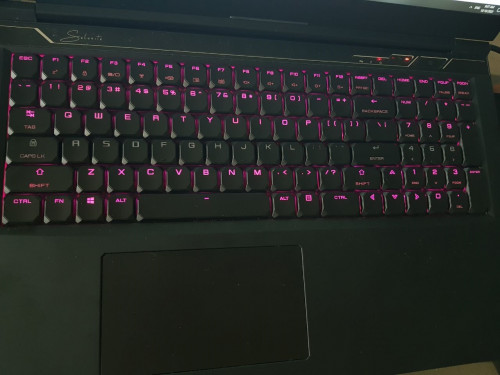 UPDATE: The light is now okayy.. |
|
|
Oct 14 2020, 12:53 AM
Return to original view | Post
#71
|
|
Newbie
2 posts Joined: Aug 2015
|
QUOTE(amir.asyraf @ Oct 7 2020, 05:00 PM) Reading back from previous pages, seems they're saying the 230W power brick alone can't supply enough to the laptop under full workload demand. But if that's the case I haven't seen my battery level drop after a prolonged gaming session. No way a 230w power brick cant power the machine under load. Even at full power draw there is at least 20 to 30w left in reserve coming from the brickAbout the GPU PL throttling thing, what's that about? |
|
|
Oct 21 2020, 02:29 AM
Return to original view | Post
#72
|
|
Newbie
2 posts Joined: Aug 2015
|
QUOTE(Gentleman_League @ Oct 20 2020, 10:01 PM) hey guys im looking for laptop 17inch, i need bigger screen for my editing and excel work daily.I need to carry back and forth from home to office ( which is not a problem). Was considering Alienware 17x or Macbook 17inch. Can't speak with regards to the Pro but i use the 9th gen Selenite which is now the Selenite G with newer chips and some parts changed here and there. If you're open to other options then i would honestly say that the Ryzen Rogue maxed out specs wise would be the better choice. Any other recommendation ? Previous own Alienware M14x 5-6years ago, usually are battery problems no major problems so far. Budget will be around 9k. Not going back for alienware, the 17inch after configuration are around 15k. Im eyeing one Illegear Selenite G and the Selenite Pro, after some basic configuration i get around 8.8k for the Pro and the 8.5k for the G series. Any tips? Im more on documentation work (excel, words,PDF) but will go for some light gaming and netflix during my free time. However if you're gonna choose between the G and Pro (Using Eluktronics MAX 17 as a guide for the Selenite Pro via JarrodsTech on youtube), I would pick the Selenite G. Strictly speaking from a performance stand point, you're gonna get almost the same since they use the same base components. But whats gonna set them apart is the thermals. The G is thicker so it has more room for larger heatpipes and larger fins. Depending on how you use your machine it can equal to lower temps and less noise coming from the cooling system. 10 times outta 10 i would pick the G over the Pro anytime purely for this reason. I'm incredibly fixated on the lowest temps possible for my machines. I also feel that the keyboard on the Pro is way too cramped. There is still some room on either side to space out the keys more. Take the MSI GE75 for example. Its of comparable size but the spacing between the keys is much larger. Coming from a proper desktop keyboard and an extremely cramped RS15 keyboard, spacing between the keys is personally something that i think should be present. Of course its completely personal preference. However, the G's keyboard is going to be quite loud especially if you're a heavy handed typer like me who's used to heavy mechanical switches. I also find that the tactility of the G's board to be lacking and there is a ton of keycap wobble. In any case, i personally think that even with its flaws of being a low profile mech board on a laptop, its still a much better typing experience than your usual membrane or scissor switch laptop keyboard. Its just that i've been spoiled pretty hard with regards to proper keyboards. Only other differences with them would be webcam placement, (seriously Tongfang wtf is with the hinge cam. The normal Selenite has perfectly acceptable bezels and a webcam in the right position. Quality of the mics and camera itself are still absolute trash though), battery capacity, portability and construction material. Battery wise my Selenite with the 62wh battery can easily get me through about 5 hours at uni with my undervolt applied and it does still have a bit left in the tank when i get home. I do have my screen set to about 30% brightness and the least amount of apps open as possible so your millage will vary with what you intend to do with the device when its unplugged but obviously the Pro will net you much longer run times. With regards to portability, i cant complain tbh. My trip to and from uni takes about 40mins each way via train and bus with a good amount of walking to and from stations. If you're used to carrying the older bulky ass 3 plus kilo laptops of years past then both of these devices will be absolutely no sweat. You will notice def it with the charger though. Its getting much hotter here in Aus and i've started to leave my charger at home more often. Can't speak with regards to what the build quality of the Pro is like as i've never tried one in person before. What i can say is that my Selenite and by extension the Selenite G, did surprise me with its solid build. I was expecting it to be like your typical Clevo barebones where its mostly thick plastic to cut down on the costs but it turned out to be quite solid in hand. Barely any keyboard deck flex as apparently theres a metal plate thats used for support and the palm rest didnt give way in normal use. Screen is quite thin so expect some flex on the panel. Overall quite impressive for a barebones honestly. Here are a couple of videos of their respective chassis, just rebranded and with different internals. Highly recommend you watch them MAX17: https://www.youtube.com/watch?v=8ps7pR1Q0ag&t=571s Infinity S7: https://www.youtube.com/watch?v=O2fYxAkzYP0 |
|
|
Oct 21 2020, 04:32 PM
Return to original view | Post
#73
|
|
Newbie
2 posts Joined: Aug 2015
|
QUOTE(Gentleman_League @ Oct 21 2020, 10:55 AM) Hey Jerald, thank you for your prompt reply, its my first time purchasing illegear and u made your point there. I did some research for the pass weeks, unfortunately doesn't have much review on selenite G, instead of selenite Pro (Maybe its new). On the side note, as you said they are several complains about Selenite Pro keyboard they are quite packed for a 17inch laptop and they switches to membrane key which its a turn off to me, despite the loud noise of mechanical are always my first choice. For the weight issue, should be not a problem for me cos my workplace frm my house are 5min apart (by car) and i will be carrying in a backpack with some documents and i had a desegnated parking spot for me able to access to my office room. You're all set hahaha. Don't pay extra for the Killer bullshit. Its literally an Intel AX200. Rivet Networking was bought over by Intel and their software is absolute garbage. Windows 10 can get through other methods and same with Office (i see home and student edition so i assume can get through your education provider)I'm not planning to maxed out my rig anyway, i just need a decent one should be good to go. I've made my decision and i might go for the Selenite G and i will be placing order by 30/10. They are offering some Halloween bundle. here is my basics configuration, anything i should subtract or adding in? am i missing something? Selenite G -17.3″ 144Hz FHD Anti-glare IPS NTSC 72% INFINIVISION Display (300 nitts) - Professional Color Calibration (FREE) - Intel 10th Gen i7 10875H (8 Cores, 16 Threads, 16M Cache, 2.3Ghz to 5.1Ghz) -Nvidia RTX 2060 115W 6GB GDDR6 with Optimus (Max-Performance) -Liquid Metal & Burn In Test- CPU & GPU -16GB Dual Channel DDR4 RAM 2933MHz - 2 X 8GB -1TB Samsung PM981a M.2 PCIe NVMe Solid State Drive (3500r|3000w mbps) (FREE) -2nd M.2 Solid State Drive (None) -1st 2.5" SATA Drive (None) -Killer-Wifi 6AX 1650 2x2 M.2- WLAN and Bluetooth -Window 10 Home 64bit OEM -2 Year Carry-in Warranty & Lifetime Technical Support -Microsoft Office 2019 Home and Student ESD Edition Microsoft Office 2019 Home and Student ESD Edition Total =RM 8,215 Gentleman_League liked this post
|
|
|
|
|
|
Oct 22 2020, 10:54 PM
Return to original view | Post
#74
|
|
Newbie
2 posts Joined: Aug 2015
|
QUOTE(Gentleman_League @ Oct 22 2020, 09:49 AM) i wont be plugging unless im gaming or battery are running low. For work use (documentation) i might not plugging in as well. Shouldn't be a problem right? Not too sure if its a problem specifically related to the smaller battery. I'm running the 62whr one and so far there has been no problems with it. No wear on it according to HwInfo64 but i have no idea how accurate it is |
|
|
Dec 29 2020, 04:53 PM
Return to original view | Post
#75
|
|
Newbie
2 posts Joined: Aug 2015
|
QUOTE(SaiyanGoku @ Dec 12 2020, 12:47 AM) Sucks to be in this situation TBH. If I knew Illegear has such poor QC on batteries I wouldn't have bought from them. Not defending them here or anything but i dont think Illegear does QC for batteries. Usually it should be done at the factory by Tongfang or Clevo before being sent out to their partners or at least by the manufacturer of the batteries themselves |
|
|
Dec 31 2020, 10:32 PM
Return to original view | Post
#76
|
|
Newbie
2 posts Joined: Aug 2015
|
QUOTE(SaiyanGoku @ Dec 29 2020, 11:24 PM) Then it would be a bigger problem than I imagined. Doubt any OEM is safe from battery issues. I see plenty of posts on the Dell and MSI subreddits for example complaining about battery issues. Its basically a lottery at this point. My dad's XPS 15 9550 also had a couple of bloated batteries in its short life time. My old RS-15's battery also gave up after one year or so |
|
|
Jan 2 2021, 05:45 PM
Return to original view | Post
#77
|
|
Newbie
2 posts Joined: Aug 2015
|
I really want to try to break down my Selenite's keyboard and try to lube it or at least tune it so that the rattle from the keys is less annoying.
|
|
|
Jan 2 2021, 11:13 PM
Return to original view | Post
#78
|
|
Newbie
2 posts Joined: Aug 2015
|
QUOTE(Vannus @ Jan 2 2021, 09:03 PM) Is this the selenite G mechanical keyboard? Yea its been the same keyboard since this chassis came out from TF. I believe they made a couple of changes to the keycaps or smtg but nothing directly at the mechanism of the board itselfI never choose the mecha keyboard but went for that pro keyboard cause it's more firm and I love the magnesium case material. For battery so far ok, after 4 months owning it. So far my battery is fine after about a year or so of moderate use. Its been seeing less use thanks to work/study from home so everything for me is done on my desktop This post has been edited by Jared21: Jan 2 2021, 11:14 PM |
|
|
Jan 5 2021, 06:48 PM
Return to original view | Post
#79
|
|
Newbie
2 posts Joined: Aug 2015
|
QUOTE(amir.asyraf @ Jan 4 2021, 11:37 AM) Battery looks ok for me so far. Just checked it last week. well im currently whacking out some crypto on my laptop and everything seems to be fine. temps well under control as well.Laptop is 1 year already. Laptop is plugged in 99% of the time since I use it as my main workstation at home. |
|
|
Jan 25 2021, 02:46 PM
Return to original view | Post
#80
|
|
Newbie
2 posts Joined: Aug 2015
|
Got some Kingpin Cooling Kpx thermal paste on the way. Time to see which is the best paste for these tongfang barebones amir.asyraf and SaiyanGoku liked this post
|
| Change to: |  0.0478sec 0.0478sec
 0.47 0.47
 7 queries 7 queries
 GZIP Disabled GZIP Disabled
Time is now: 4th December 2025 - 05:29 AM |
 Quote
Quote