Outline ·
[ Standard ] ·
Linear+
Unifi Official TM UniFi High Speed Broadband Thread V37, READ 1ST PAGE FOR TURBO SPEED INFO!
|
IcyDarling
|
 Feb 8 2019, 03:38 PM Feb 8 2019, 03:38 PM
|

|
Hey guys,
Currently, my modem and wifi is downstairs, but the reception of wifi doesnt seem to be good upstairs. What is the best way to extend the range to upstairs? I dont mind buying extra equipments with wires that connect to the modem or router, but I am not very certain what kind of equipment I should be looking for, and which device to connect.
Thank you.
|
|
|
|
|
|
IcyDarling
|
Feb 8 2019, 03:42 PM
|
|
|
Also, since the Turbo, unifi notify me that my current router doesnt support up to the 500mbps upgrade that I have, so they gave me an option to buy from them.
But they dont say which model is it? Is there anyways to ask them before the technician come to install?
It doesnt really matter to me what brand or model really, jz that I want to make sure they can support the 5.0 ghz bandwidth.
|
|
|
|
|
|
IcyDarling
|
Feb 11 2019, 04:01 PM
|
|
|
Anyone know if DIR-615 router support gigabit ethernet or not
I currently have this model, but I was recently turbo-ed to 500mbps. If wired connection can utilize it, then i wont be bothered to change.
This post has been edited by IcyDarling: Feb 11 2019, 04:02 PM
|
|
|
|
|
|
IcyDarling
|
Feb 11 2019, 04:37 PM
|
|
|
QUOTE(weikee @ Feb 11 2019, 04:15 PM) From the spec is only 10/100. Unless TM have special version. http://global.dlink.com.sg/site_pdtpdfs/DI.../DIR-615_ds.pdfI read that too, I believe I have the 10/100, but never really knew what it meant. I guess it means 100mbps max transfer speed? |
|
|
|
|
|
IcyDarling
|
Feb 23 2019, 03:41 PM
|
|
|
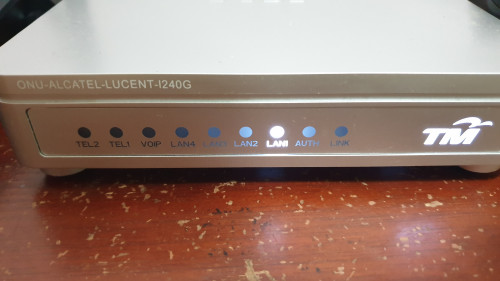 Hi all. This morning abt 830am suddenly my internet disconnected ( in klang ) and i notice my BTU light like this. Anyone know what it means? Does this mean no internet coming in from outside line? |
|
|
|
|



 Quote
Quote

 0.0255sec
 0.24
0.24
 7 queries
 GZIP Disabled