Welcome Guest ( Log In | Register )

Outline · [ Standard ] · Linear+

 Some basic OS X questions

views
     
TSINFeRNO
post Jun 15 2007, 05:14 AM, updated 19y ago

Lord and Master
******
Senior Member
1,754 posts

Joined: Jan 2003
From: Balham, London


As a mac newbie, there is a sort of learning curve that I have to go through to get used to OS X. So I have a few questions, a few of many I think in the months to come tongue.gif

So anyways, I hope some of you will take some time to answer my stupid questions...

1) Where do you install stuff? Anything I d/l ends up on the desktop, and what I do is just double click on the thing and it usually works fine. It does however leave some sort of HDD icon on the desktop whenever I launch an application. Should I just drag the *.dmg file somewhere else first before clicking on it?

2) It really annoys me that "X"-ing a program doesn't really close it, it merely hides it. Is there a setting somewhere that I change to force it to shut down instead of just hiding?

3) How do I delete stuff? There isn't an uninstall icon anywhere. Do I just bin it?

There was something else I wanted to ask, but I just plain forgot. Anyways, thanks for reading, and thanks in advance for answering my questions.
ed0gawa
post Jun 15 2007, 05:21 AM

coconut
*******
Senior Member
4,398 posts

Joined: Jan 2003


1) You will download .dmg file. Double click to "Extract" it. Then another "icon" will appear. Open that, Either there is a installer-like thing running, or a window pop up and ask you to drag the application icon to your "Application Folder".
With the application installed, you can delete the dmg file and also the "icon" it created after you extract it.

(sort of like zip file in Windows where you dl, extract. New folders created and the stuff you want are in the new folder. Then take those stuff and delete the zip you downloaded)

2. I have no idea, i use the shortcut "Apple + Q". Well, it seems keyboard works better than mouse in MAC OS

3. Drag to the Thrash bin and thats it. (oh.. there is a empty bin function too if i remember correctly)

4. I am a n00b with MAC OS too ...


atrash
post Jun 15 2007, 05:35 AM

Casual
***
Junior Member
351 posts

Joined: Nov 2005
1)
when u download some programs, they will be either *.dmg or zip(or something u need to expend, then u'll get dmg too).When, u double click *.dmg, there will be images mounted.U just need to drag the programs' icon from the mounted images/drives to the folder u're gonna install them to ie Application Folder. Then eject the mounted drives. Next time u wann run the program, run from the folder that u install the programs.

2)
some programs will immediately quit when you press 'x' button. But some will just hiding themselves on dock.Just ctrl + click on the icon and choose quit

3)
U can just drag icon to trash.But keep in ur mind that most of the from will have hidden folder in system.To completely uninstall one program, use program like "AppDelete" etc. This will remove the program completely from ur com

p/s : someone please correct me if i got them wrong somewhere..thanks
TSINFeRNO
post Jun 22 2007, 04:06 AM

Lord and Master
******
Senior Member
1,754 posts

Joined: Jan 2003
From: Balham, London


I'm back with more simple questions... tongue.gif

1) How do I add separators to the dock?

2) How do I get/change icons/arrows on my mac?

3) Where is the best place to go for 1440x900 res wallpaper? Google has been kind so far, but is there like a specific site that has them all grouped and categorized to make life simple?

I've been using my mbp for little over a week now, and I have to say, it's almost the same as using a pc. Things still hang and lock up, but at least you can kill them gracefully without having to slaughter a chicken etc... And everything runs smooth and efficient, don't notice any slowdown at any time. Then again we can attribute that to the high spec of the mbp.

Some software/widgets that have made my life easier are smcFanControl, iStatPro, coconutBattery, and a few more that I can't remember right now.
fyire
post Jun 22 2007, 02:58 PM

Look at all my stars!!
Group Icon
VIP
9,270 posts

Joined: Jan 2003
From: Somewhere out there
QUOTE(INFeRNO @ Jun 22 2007, 04:06 AM)
I've been using my mbp for little over a week now, and I have to say, it's almost the same as using a pc. Things still hang and lock up, but at least you can kill them gracefully without having to slaughter a chicken etc... And everything runs smooth and efficient, don't notice any slowdown at any time. Then again we can attribute that to the high spec of the mbp.
*
Well, even on my 2 year old 1.67ghz PPC Powerbook, things still pretty run rather smoothly, just probly not as fast as on a newer machine. The multitasking capabilities r fantastic (Oracle importing a huge database schema that takes 30 minutes to complete running in the background, while I'm playing Neverwinternights in the foreground without lag).
sugarboi
post Jun 22 2007, 04:18 PM

Casual
***
Junior Member
350 posts

Joined: Jan 2003


QUOTE(INFeRNO @ Jun 22 2007, 04:06 AM)
Some software/widgets that have made my life easier are smcFanControl, iStatPro, coconutBattery, and a few more that I can't remember right now.
*
If you remember, mind posting it here. I could use more widgets. smile.gif
TSINFeRNO
post Jun 23 2007, 09:29 PM

Lord and Master
******
Senior Member
1,754 posts

Joined: Jan 2003
From: Balham, London


QUOTE(sugarboi @ Jun 22 2007, 08:18 AM)
If you remember, mind posting it here. I could use more widgets.  smile.gif
*
Yeah, flappie. tongue.gif
danfaiz
post Jun 25 2007, 04:41 AM

New Member
*
Junior Member
12 posts

Joined: Nov 2006


to quit, you can also click on the icon in the dock and hold until a menu pops up. then u can click "quit". cmd-Q is definitely the quickest.

changing icons can be done in a few ways as well. i know 2 ways:
1. find an icon you like and copy it. highlight the thing you want to change the icon and type cmd-I to Get Info (or ctrl-click). in the Info window, click on the icon on the top left, making sure you can see it highlighted, then type cmd-V to copy. voila!
2. use apps. i use pixadex and candybar, imho the best apps to manage your icons.
sometimes, you have to log out / restart for the change to completely take place.

wallpaper? deviantart.com has loads. there's a special section for widescreen.

deleting / uninstalling apps is as easy as binning it. the pref files are still in the library. so, if you're anal (like me) use AppZapper. it won't clear up a lot of space though, as the pref files are not big.
TSINFeRNO
post Jun 27 2007, 06:12 AM

Lord and Master
******
Senior Member
1,754 posts

Joined: Jan 2003
From: Balham, London


danfaiz, you da man! cheers mate.
danfaiz
post Jun 28 2007, 09:13 AM

New Member
*
Junior Member
12 posts

Joined: Nov 2006


^^ lol.. glad u found it useful. u can also do all sorts of stuff when ur friends start harrassing u abt owning a mac.

- hold the shift button while minimizing / maximising windows. prepare yourself to go "ooooooooooooooooooooooooohhhhh".. i know i did. haha, yes, i'm easily amused.

- try the shift button with dashboard as well.

- try ctrl-option-cmd-8. don't forget this combination!

- r u using a MB / MBP? if so, try holding ctrl while scrolling up with 2 fingers on the trackpad. it'll zoom in. if cannot, then you have to enable this feature first.
TSINFeRNO
post Jun 30 2007, 04:00 AM

Lord and Master
******
Senior Member
1,754 posts

Joined: Jan 2003
From: Balham, London


QUOTE(danfaiz @ Jun 28 2007, 01:13 AM)
^^ lol.. glad u found it useful. u can also do all sorts of stuff when ur friends start harrassing u abt owning a mac.

- hold the shift button while minimizing / maximising windows. prepare yourself to go "ooooooooooooooooooooooooohhhhh".. i know i did. haha, yes, i'm easily amused.

- try the shift button with dashboard as well.

- try ctrl-option-cmd-8. don't forget this combination!

- r u using a MB / MBP? if so, try holding ctrl while scrolling up with 2 fingers on the trackpad. it'll zoom in. if cannot, then you have to enable this feature first.
*
LOL! I had to turn on my mbp just to try them out. They were fun, especially the "ctrl-option-cmd-8" one. tongue.gif

Also, there seems to be a software update just for the 2.2/2.4 ghz version of mbp's... Wonder what's that all about.

Edited to add that most people speculate the update it to be a graphics driver tweak.

This post has been edited by INFeRNO: Jun 30 2007, 04:06 AM
trd088
post Jul 4 2007, 05:10 PM

Getting Started
**
Junior Member
169 posts

Joined: Jun 2006
when you can't close the application completely, still you can click "apple + tab" then you will see the application icon which is not completely closed. Look for the icon that you wish to close it, then hold the "apple" button and click "Q".it works also.

anyway, you can always open your preference and go into keyboard and learn the short cut key...such "expose" function,F9,F10,F11 and F12 (for dashboard).Since you are using MBP, go to preference and choose keyboard setting. Then, you can go into the short cut key function and choose "short cut key for all application"...btw, if i'm not mistaken, should b in this way...hope u will enjoy your apple macbook pro...
jensen_tidus
post Jul 7 2007, 09:38 AM

Casual
***
Junior Member
360 posts

Joined: Mar 2006
From: PJ


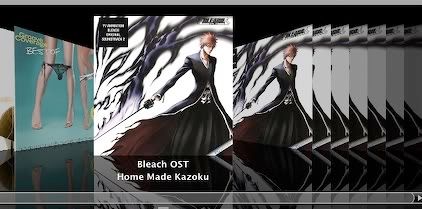
heres a question bout itunes...

i added songs to my itunes playlist...
so.. basically, i sort my songlist according to my album name. and i have all the album art in cover flow.

heres the problem, the way itunes show the album art is according to the album name as well as the artist.

heres a pic of it...
user posted image

so my cover flow ended up showing a lot of the same album art.

its there any settings tat i missed?
i hope itunes to juz stick on the album rather than the album name as well as the artist.

thax all. ^^
danfaiz
post Jul 8 2007, 08:07 AM

New Member
*
Junior Member
12 posts

Joined: Nov 2006


^^ try making that albm a compilation. select all the songs in that album, and then in the 'look info' window, change to 'compilation' option to 'yes'. make sure the checkbox is ticked, then click ok.
civic98
post Jul 8 2007, 09:28 AM

Regular
******
Senior Member
1,255 posts

Joined: Aug 2006
From: Langkawi


QUOTE(danfaiz @ Jul 8 2007, 08:07 AM)
^^ try making that albm a compilation. select all the songs in that album, and then in the 'look info' window, change to 'compilation' option to 'yes'. make sure the checkbox is ticked, then click ok.
*
I had the same problem, iTunes will only recognize those with exactly same Album and Artist name to display one single Artwork. And thanks to danfaiz, his tip worked.
jensen_tidus
post Jul 8 2007, 10:04 AM

Casual
***
Junior Member
360 posts

Joined: Mar 2006
From: PJ


QUOTE(danfaiz @ Jul 8 2007, 08:07 AM)
^^ try making that albm a compilation. select all the songs in that album, and then in the 'look info' window, change to 'compilation' option to 'yes'. make sure the checkbox is ticked, then click ok.
*

Thax for the reply... it works biggrin.gif
yey!! rclxms.gif


thax a lot for danfaiz.... rclxm9.gif


Change to:
| Lo-Fi Version
0.0172sec    0.65    5 queries    GZIP Disabled
Time is now: 18th December 2025 - 07:46 AM