Welcome Guest ( Log In | Register )

Outline · [ Standard ] · Linear+

 Unifi TV Ver 2, Formerly known as HyppTV

views
     
willsiva
post Oct 5 2021, 07:23 PM

New Member
*
Newbie
16 posts

Joined: Nov 2012


QUOTE(geekfiredog @ Oct 4 2021, 11:04 PM)
Hi all,  I'm still using the original HyppTV STB from > 8 years ago (similar to the one shown below) which is slow & lags badly (eg to switch channel - need to press the channel number slowly and success rate is like < 50%).  I'm on 500 Mbps with Ultimate package.

With the latest changes in Unifi TV offering, not much to watch on the channels available with current STB.  What are the options and/or recommendations if I wish to be able to enjoy the new streaming contents?

1) Get 3rd party TV Box to install those streaming apps (likely to go for iQiyi)
2) Add-on the Unifi Plus Box to my plan - at the cost of RM508.8 (RM20 x 24 months x 6% SST) with additional 24 months contract  unsure.gif

user posted image
*
My same silver HyppTV box spoilt last year and TM replaced it with a white STB. However after a year (around May this year) there was a problem with the HDMI slot on the white STB. I called TM and they told me that they will still replace existing customers' faulty white and silver STB with the white STB (however, it has to be verified to be faulty by the TM staff who comes to the house).


As it was lockdown at the time, they told me I had to wait till the lockdown was lifted and TM staff are allowed house visits again. Instead, I bought a 2nd hand white STB and then called cs and requested them to tag the mac address of the 2nd hand stb to my account and it works now. The white STB is just much easier to navigate compared to the Unifi ATV app on the android boxes and UPB Box and as other sifus mentioned the picture quality on the white STB is always better.


One thing to note though, last year May when I was using my old silver STB, I could not login to the new playTV app at the time on the phone. After getting the white STB, only then I could login to the new playTV app and subsequently the Unifi ATV app on my mi box s.

So my advise would be to ask TM to replace your silver box to the white box and then get the Mi Box or Mi Stick or latest Google TV Chromecast to install the streaming apps and Unifi ATV app.

Paying RM500 in the long run for the UPB compared to paying around RM250 for a higher end Android Box doesn't make economic sense. I would always go for the MiBox or Google TV
willsiva
post Oct 6 2021, 08:57 AM

New Member
*
Newbie
16 posts

Joined: Nov 2012


QUOTE(gedebe @ Oct 6 2021, 12:21 AM)
how did you get TM to replace you the white box when they already stop supplying it long ago
*
My Silver STB (which I got when I signed up to Unifi in 2010) stopped working in May 2020. I called 100 and informed Unifi. They said they will come and check. When the technicians came to my house to check the box, they said the Silver box was faulty and they will replace with a new box which was the White box. That was all.
willsiva
post Nov 20 2021, 05:03 PM

New Member
*
Newbie
16 posts

Joined: Nov 2012


QUOTE(linkinstreet @ Oct 27 2021, 11:53 AM)
No need. as long as you are on your home network, it should detect that automatically and just works
*
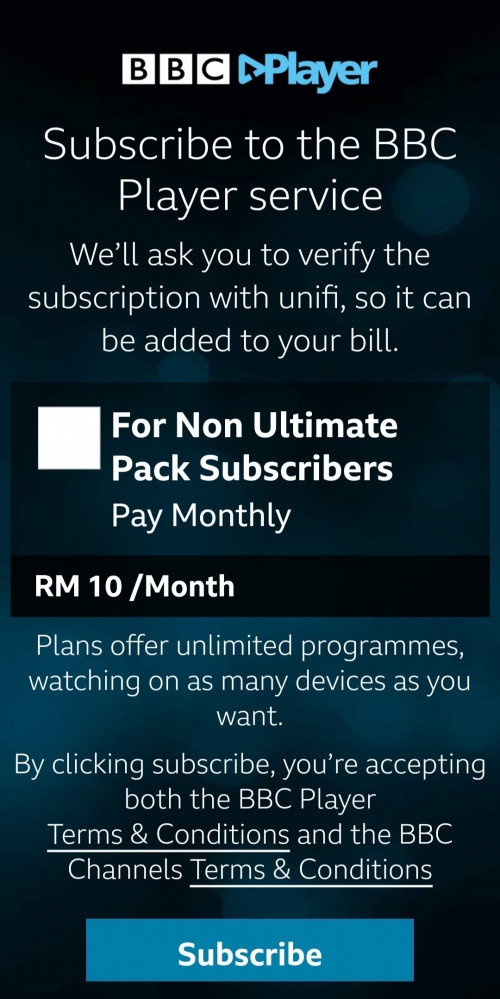
Is anyone else facing the same problem with BBC Player after the last update?

I cannot watch using BBC Player  from today. Whenever I click a program to watch, the page is asking me to press the Subscribe Button. But there is only one option for Non Ultimate Subsciber who must pay RM10/month to use BBC Player

I am on Ultimate Pack also. I had no issue previously where the app could detect the Unifi network automatically. I worry if I tick the box and press Subscribe, I might get billed RM10 monthly.

user posted image
willsiva
post Nov 20 2021, 11:09 PM

New Member
*
Newbie
16 posts

Joined: Nov 2012


QUOTE(AVFAN @ Nov 20 2021, 07:11 PM)
maybe others can comment if u tell what device u use.

no problem on ATV tv.
*
Sorry, forgot to mention the devices. The app is showing the same messages on my Android phone, Mi Box S and Mi Stick.

I have emailed BBC Player and am waiting for their reply. I called Unifi but they couldn't pinpoint the reason and said they will get back to me.
willsiva
post Nov 21 2021, 02:45 PM

New Member
*
Newbie
16 posts

Joined: Nov 2012


QUOTE(amirul hafizz @ Nov 21 2021, 10:57 AM)
email unifi with ur username unifi id, ss ur ip address on ur unifi plus box or device you use.
last week, i can't access my bbc player. i ultimate too since 2 years already.
i email unifi with my ss ip address on my unifi plus box, username unifi id and my phone number.
after i email, unifi call me and they open my id for watching bbc player. now i can access my bbc player.
*
I can watch again using the BBC Player app. On both my phone and ATV ( Mi Box S), I cleared the cache and data. After that I clicked on the BBC Player app, it gave the option of sign-in with Unifi. I tapped on that option and it signed in. After that I can play the series and videos again like usual. 

The only downside to this way is that all the previously watched history has gone.


willsiva
post Dec 5 2021, 02:33 PM

New Member
*
Newbie
16 posts

Joined: Nov 2012


QUOTE(linkinstreet @ Dec 5 2021, 02:05 PM)
You got the Singapore version of the BBC app. Get the Malaysian one. Betyer yet, try going to https://player.bbc.co.uk and click on login on the top to confirm you can use BBC player in your home network.

For Lionsgate (and any other apps like Viu/iQui/etc) you need to register first which one you like to use at Unifi's site
*
When you search for BBC Player in the Google Play Store of your Android TV player, there will be 2 BBC Players that show up. One is the Singapore version and the other is the Malaysian version. Read the description of the app before installing to know which version was meant for Unifi users. After installing, when you open the BBC Player app, it should recognise Unifi's network. There might be some issues (if it hasn't been resolved already by Unifi and BBC). You might want to read earlier post on the issues and possible solutions.
willsiva
post Dec 13 2021, 11:48 AM

New Member
*
Newbie
16 posts

Joined: Nov 2012


QUOTE(AVFAN @ Dec 13 2021, 09:38 AM)
Ya, some shit has hit Lionsgate... maybe unifi didn't pay! laugh.gif

i could still watch some shows on smart TV.

but many are blocked due to "parental control" which i never touched.

tried log in wesbite to change, all rejected.

sent email/inquiry, see if they will respond.
*
Same here. Using ATV, everytime I click on on certain shows, it's saying parental control and go and check the Lionsgate Android phone app. I checked the parental control settings on the phone app and allowed all but the problem still persists.

This only happens on certain shows or movies.
willsiva
post Dec 24 2021, 12:58 PM

New Member
*
Newbie
16 posts

Joined: Nov 2012


QUOTE(AVFAN @ Dec 13 2021, 03:43 PM)
ya, some bug on their side.

i managed to log in, locked all parental controls and released them - same.

seems to me, those locked ones/newer titles are in a category not paid by unifi... blocked.
*
All the movies and series that I have been trying to watch are working now. Thanks for sending that email bro.
willsiva
post Jan 3 2022, 10:24 AM

New Member
*
Newbie
16 posts

Joined: Nov 2012


QUOTE(jutamind @ Jan 2 2022, 05:34 PM)
My subscription end date shown as 2022-02-01. I guess we'll find out next year
*
Simply South's next billing date is on 2022-12-31.

Unifi has taken 1 year subscription for Simply South.

willsiva
post Jan 6 2022, 05:33 AM

New Member
*
Newbie
16 posts

Joined: Nov 2012


QUOTE(AVFAN @ Jan 6 2022, 12:01 AM)
Dunno when it came back but now it is good.

Both stb and atv.
*
Yep, both white stb and atv now working
willsiva
post Apr 22 2022, 10:03 PM

New Member
*
Newbie
16 posts

Joined: Nov 2012


QUOTE(devilmaysmile @ Apr 22 2022, 04:47 PM)
user posted image

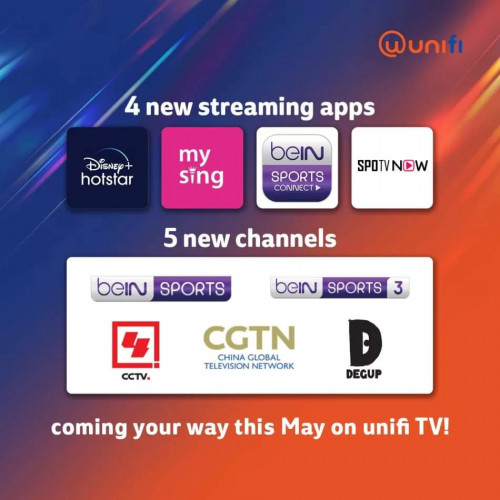
More channel coming
*
Anyone knows what mysing app is?

Could it a rebranded mewatch app?
willsiva
post Apr 23 2022, 12:41 PM

New Member
*
Newbie
16 posts

Joined: Nov 2012


QUOTE(keithyan @ Apr 22 2022, 10:06 PM)
Karaoke app
*
Thanks bro

QUOTE(amirul hafizz @ Apr 23 2022, 08:17 AM)
user posted image

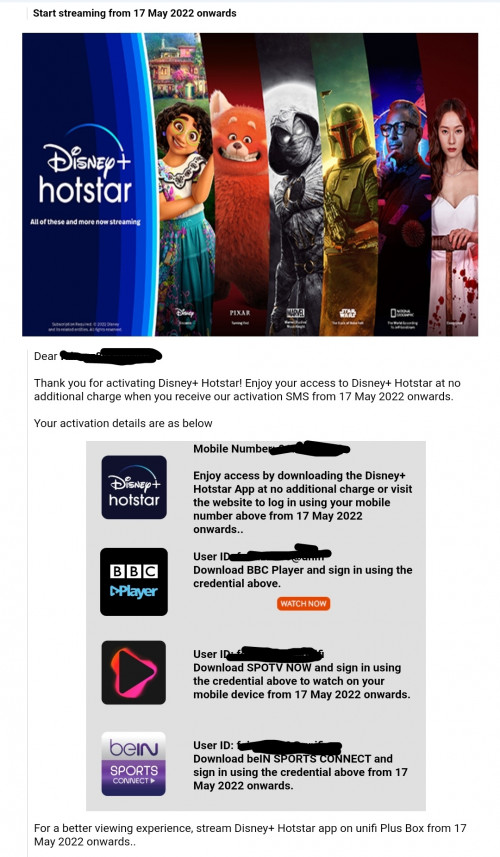
Disney+ Hotstar, Bein Sport Connect, Spot TV NOW free for all Ultimate Pack subscribers..
*
Looks like if you agree to switch the apps, then you get access to d+h , BeIn Sport Connect and Spot TV Now. However, I want to keep Lionsgate and Zee5 but would like to add beIN Sports Connect and Spot TV Now.

I suppose need to wait for Unifi to show how to activate the sports apps later.
willsiva
post Apr 23 2022, 05:59 PM

New Member
*
Newbie
16 posts

Joined: Nov 2012


QUOTE(linkinstreet @ Apr 23 2022, 01:44 PM)
I don't think so. BBC is listed there, even tho you don't need to be a Disney+ subscriber. So I oresume Bein and Spotv is automatic if you are an ultimate pack user
*
QUOTE(keithyan @ Apr 23 2022, 02:54 PM)
If I not mistaken , t&c says there is 2 bundle

1st bundle is lionsgate with 1 optional app and bbc

2nd is d+h with sports app and bbc

So if u choose the 2nd one , you will lose the 1st

But I believe we will able switch both of them at 1 time , soon enough
*
QUOTE(hsunl @ Apr 23 2022, 03:58 PM)
From their website.

===============

I am an existing Ultimate Pack subscriber and I have activated my bundled BBC Player, Lionsgate Play and 1 app of my choice. How does this new Ultimate Pack offering affect my current subscription?
Starting 22nd April 2022, you will be given an option to switch your current activated bundled streaming app offering as below:

BBC Player
Lionsgate Play
1 other OTT app of your choice


to the new Ultimate Pack streaming app bundle offering consisting of the following streaming apps at no additional cost.

Disney+ Hotstar
beIN SPORTS CONNECT
SPOTV NOW
BBC Player


You will receive an email to register your interest starting 22nd  April 2022 onwards. Upon registration of interest, you will still be able to enjoy your current activated bundled streaming app offering until the new Ultimate Pack bundled streaming app offering kicks in from 17th May 2022 onwards.


If you wish to maintain the current activated bundle, you may ignore the email. You will be able to enjoy the activated apps as long as you are still an Ultimate Pack subscriber.
*
Thanks bros

This post has been edited by willsiva: Apr 23 2022, 06:24 PM
willsiva
post Apr 25 2022, 06:48 PM

New Member
*
Newbie
16 posts

Joined: Nov 2012


QUOTE(VeeJay @ Apr 25 2022, 10:06 AM)
To Indian subscribers, is "simply south" or "zee5" would be a better choice?

In terms of choice of movie, streaming quality and availability?
*
Zee5 has a big variety of Indian language movies and serials that the Zee channels carry whereas Simply South has Tamil, Malayalam and Telugu language movies only.

Zee5 new movies premier for Tamil, Malayalam and Telegu for example is not as frequent as Simply South which premiers a new Tamil or Malayalam or Telugu (either one of those languages) movie every Friday.

Simply South seems to premier the same Indian movies as Prime India premiers at the same time also. From my observation, Simply South also has a bigger library of South Indian movies from the 90s, noughties etc. Zee5's library of South Indian movies are not as extensive due to them needing to carry all the other Indian language movies and serials as well.

So if you only want to watch those 3 south Indian language movies, then I would say Simply South.

If its something that the whole family would be watching, the Zee5 would be a better choice for the older ladies who tend to gravitate to the serials.

Both zee5 and SS carry movies in 4k quality where they can and their streaming quality is steady.
willsiva
post May 10 2022, 11:15 AM

New Member
*
Newbie
16 posts

Joined: Nov 2012


QUOTE(VeeJay @ May 9 2022, 03:34 PM)
Thanks Nanba, I went with SS.

But do you or anyone know if SS apk can be installed on unifitv box? I tried searching for it at the Store, but not able to find it. I could find it on my android phone, though! hmmmmm

Whereas on my Sony TV and PC it works fine, although the loading is a little slow.
*
Welcome bro.

I use Mi Stick and MiBox for my SS.


Looking at the UPB website, it says SS should be there already. Take a look at these links, it gives the steps to use SS on the UPB.

https://home.unifi.com.my/plus-box/simplysouth

https://unifi.com.my/tv/tv-apps/simply-south

willsiva
post May 10 2022, 11:23 AM

New Member
*
Newbie
16 posts

Joined: Nov 2012


QUOTE(scoupe @ May 10 2022, 10:00 AM)
guys anyone know how do i change my device from the old silver huawei to the white colour hypp tv box? the old device is very laggy and the remote is ded, i see alot of people selling the newer white colour box. Long time ago when i plugged in my moms white device box it was based on her account and not my own. how to i put my account into the white box
*
Call 100 and tell them your Silver box is problematic. The CS might give you option of switching to Hybrid box. Make sure you mention that you are not paying any monthly fee for the Silver box and hence don't want to pay a monthly fee for the Hybrid box also. CS might need to update your account to be to use the Hybrid box.

If you prefer the white box over the Hybrid box, then you need to make a decision before the TM Technician comes over. When the TM technician comes over, mention that you have a white box and ask if they can tag your mum's white box to your Unifi account. Please remember that TM needs to update your account first so that you can use the white box or hybrid box.
willsiva
post Sep 22 2022, 06:08 PM

New Member
*
Newbie
16 posts

Joined: Nov 2012


QUOTE(writesimply @ Sep 22 2022, 02:26 PM)
Yes. You can run 2 Unifi TV simultaneously. So one box for the main room next to the router and the other one at another room via wifi.

Yep. My first BTU is gathering dust.
*
With the new UPB and if old white box still working, then can watch on 4 TVs at the same time. They are
1 - vlan with old white box
1 - UPB
2 - Unfi TV Android TV apps (TV or Android Boxes)
willsiva
post Oct 28 2022, 04:49 PM

New Member
*
Newbie
16 posts

Joined: Nov 2012


QUOTE(Lurker @ Oct 15 2022, 10:18 AM)
do you get to keep the white box?
if yes, is there the possibility to revert to using back the white box if unable to get used to the UPB?
*
Works for me. I can run the white box on vlan and the UPB on wifi at the same time.
willsiva
post Feb 18 2023, 07:41 AM

New Member
*
Newbie
16 posts

Joined: Nov 2012


QUOTE(gastacopz @ Feb 17 2023, 09:05 PM)
same here..also when login by signup also mentioned not available in this country
*
Same here. Got email and sms from Unifi saying Lionsgate subscription is activated but no email from Lionsgate.


Last time I used the forgot password method and reset a password to login but when I try the same method, it said no username exist 😅
willsiva
post Feb 18 2023, 10:04 PM

New Member
*
Newbie
16 posts

Joined: Nov 2012


QUOTE(linkinstreet @ Feb 18 2023, 11:46 AM)
Yes. I did that. But it says I am not subscribed
*
Still the same..... no email from Lionsgate for the login

2 Pages  1 2 >Top
 

Change to:
| Lo-Fi Version
0.0368sec    0.24    7 queries    GZIP Disabled
Time is now: 8th December 2025 - 08:21 AM