Welcome Guest ( Log In | Register )

Outline · [ Standard ] · Linear+

Unifi D-Link DIR-842 - Remove @unifi SSID

views
     
TSldragon
post Dec 19 2018, 09:45 PM, updated 6y ago

Regular
******
Senior Member
1,026 posts

Joined: Jan 2003
From: Kuala Lumpur, Malaysia
It is annoying that the Unifi supplied "D-Link DIR-842 Revision C" can't use our own SSID & stuck with xxxx@unifi

This guide is to remove that SSID restriction. ** USB Port are missing after the upgrade **
Disclaimer, do it on your own risk, your device's configuration will be lost after upgrade this firmware

Getting ready:
Download latest firmware from D-Link Malaysia (if failed this is the backup plan)
https://www.dlink.com.sg/dir-842/#firmware

Download latest firmware from D-Link.com
ftp://ftp2.dlink.com/PRODUCTS/DIR-842/REV...RE_v3.10B05.zip

Extract this file: DIR-842_REVC_FIRMWARE_v3.10B05.zip


Procedure for DIR series routers
1, Store a copy of the router firmware (.BIN) on the HDD of a local PC. Download the FW file ahead of time.
2, Connect an Ethernet cable between one of the LAN ports on the rear of the router and the network port on the local PC
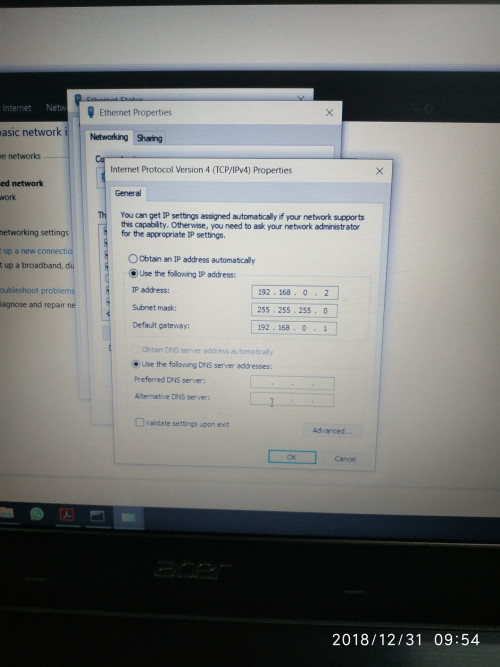
3, Configure the PC with a static IP address other than 192.168.0.1 (e.g. 192.168.0.5)
Attached Image
4, Power down the router and unplug the power cord
5, Press and hold the reset button on the rear of the router for 3 to 5 seconds and re-plug the power cord without releasing the reset button
6, Continue to hold the reset button until the power light keeps blinking on and off. NOTE: For some DIR series, continue holding the reset button up to 10 seconds.
7, Open a web browser and enter the following address: http://192.168.0.1/
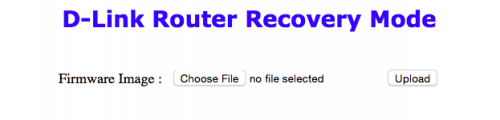
8, Wait for the D-Link Router Recovery Mode page to load (See below)
user posted image

9, Using the Choose File button, select the router firmware stored on the local PC (DIR842C1_FW302b03_middle.bin) and then press Upload
10, After the firmware successfully loads, a Success page will display
11, If the Success page fails to display, then repeat steps 3 through 9

After the flash completed, login to 192.168.0.1 (admin & no password)
Click management , upgrade, select file "DIR842C1_FW310b05.bin". Press Upload sweat.gif


Good Luck thumbup.gif

Latest firmware is available in this FTP server
ftp://ftp2.dlink.com/PRODUCTS/DIR-842/REVC/

updated 26 Sept 2020
Original TM Firmware (thanks to @laksamana)
https://www.dlink.com.sg/dir-842/#firmware
https://dlink.com.sg/wp-content/uploads/201...01b05beta01.zip

This post has been edited by ldragon: Sep 26 2020, 08:26 PM
SilentVampire
post Dec 19 2018, 10:35 PM

Networking Enthusiast
*******
Senior Member
5,714 posts

Joined: Mar 2007


Best way is to just get your own router! whistling.gif
imalmighty
post Dec 19 2018, 10:59 PM

mic test
*****
Senior Member
732 posts

Joined: Dec 2017
Usb functionality?
imalmighty
post Dec 19 2018, 11:20 PM

mic test
*****
Senior Member
732 posts

Joined: Dec 2017
JohnLai saviour has come.
JohnLai
post Dec 19 2018, 11:38 PM

Skeptical Cat
*******
Senior Member
3,669 posts

Joined: Apr 2006
QUOTE(imalmighty @ Dec 19 2018, 11:20 PM)
JohnLai saviour has come.
*
Too bad the cheap 842 at the pc shop had been sold when I went to buy it last Sunday. sad.gif


TSldragon
post Dec 19 2018, 11:41 PM

Regular
******
Senior Member
1,026 posts

Joined: Jan 2003
From: Kuala Lumpur, Malaysia
QUOTE(imalmighty @ Dec 19 2018, 10:59 PM)
Usb functionality?
*
can use the USB HDD as usual. Basically it convert the Unifi D-link to stock firmware.

This post has been edited by ldragon: Dec 19 2018, 11:43 PM
imalmighty
post Dec 19 2018, 11:59 PM

mic test
*****
Senior Member
732 posts

Joined: Dec 2017
QUOTE(ldragon @ Dec 19 2018, 11:41 PM)
can use the USB HDD as usual. Basically it convert the Unifi D-link to stock firmware.
*
Sweet. You da man. Thanks.
TSldragon
post Dec 20 2018, 12:57 AM

Regular
******
Senior Member
1,026 posts

Joined: Jan 2003
From: Kuala Lumpur, Malaysia
QUOTE(imalmighty @ Dec 19 2018, 11:59 PM)
Sweet. You da man. Thanks.
*
Sorry I mixed up with TP-Link AC1200. The USB function is missing on D-Link 842 after the firmware upgrade... mega_shok.gif
imalmighty
post Dec 20 2018, 01:58 AM

mic test
*****
Senior Member
732 posts

Joined: Dec 2017
QUOTE(ldragon @ Dec 20 2018, 12:57 AM)
Sorry I mixed up with TP-Link AC1200. The USB function is missing on D-Link 842 after the firmware  upgrade...  mega_shok.gif
*
It's okay... That sounds logical since hardware c1 doesnt have usb port. Ive similar experience flashing custom android roms on my samsung note. S pen no longer works when new firmware is flashed of course.
MrSpeedy
post Dec 20 2018, 07:59 AM

Casual
***
Junior Member
460 posts

Joined: Jun 2012


So confirm it's working @unifi is removed?
Maybe I can buy 2nd hand unit from others to set up as AP mode.

QUOTE(imalmighty @ Dec 20 2018, 01:58 AM)
It's okay... That sounds logical since hardware c1 doesnt have usb port. Ive similar experience flashing custom android roms on my samsung note. S pen no longer works when new firmware is flashed of course.
*
I Googled DIR842, since when there's a USB port?
junclj
post Dec 20 2018, 08:09 AM

Look at all my stars!!
*******
Senior Member
2,348 posts

Joined: Apr 2008


My office is using TP-Link Archer C1200 and my hand is itchy and go to upgrade it to the latest Unifi version. The SSID comes with @unifi too. Fortunately, I was follow the link below and flash to global firmware.

Archer C1200(EU)_V1_180124
https://forum.lowyat.net/topic/4497511/all


Global version don't have @unifi behind the SSID. The web-UI interface is totally different compare to Unifi version. Unifi version don't has option to change to AP mode. So I was flashed to global version to change the TM router to AP mode because my office recently was installed a firewall router - Fortigate 60E. I have to replace the TM router as AP mode because this firewall router don't have wifi.

This post has been edited by junclj: Dec 20 2018, 08:14 AM
TSldragon
post Dec 20 2018, 10:58 AM

Regular
******
Senior Member
1,026 posts

Joined: Jan 2003
From: Kuala Lumpur, Malaysia
QUOTE(MrSpeedy @ Dec 20 2018, 07:59 AM)
So confirm it's working @unifi is removed?
Maybe I can buy 2nd hand unit from others to set up as AP mode.
I Googled DIR842, since when there's a USB port?
*
Revision C1 = no USB
Revision C2 = have USB support for HDD file sharing
Revision C3 = available in USA. No idea what are the changes.
misspinky
post Dec 21 2018, 12:21 PM

Casual
***
Junior Member
309 posts

Joined: Jul 2012


QUOTE(ldragon @ Dec 20 2018, 11:58 AM)
Revision C1 = no USB
Revision C2 = have USB support for HDD file sharing
Revision C3 = available in USA. No idea what are the changes.
*
So, after change the firmware, cannot using the usb port at all? my cousin using it to charge his old smartphone..lolz..
TSldragon
post Dec 21 2018, 12:56 PM

Regular
******
Senior Member
1,026 posts

Joined: Jan 2003
From: Kuala Lumpur, Malaysia
QUOTE(misspinky @ Dec 21 2018, 12:21 PM)
So, after change the firmware, cannot using the usb port at all? my cousin using it to charge his old smartphone..lolz..
*
Lost this function after change the firmware. The USB port can use for phone charging at 450mA.
Attached Image

This post has been edited by ldragon: Dec 21 2018, 01:04 PM
TSldragon
post Dec 21 2018, 01:02 PM

Regular
******
Senior Member
1,026 posts

Joined: Jan 2003
From: Kuala Lumpur, Malaysia
double post

This post has been edited by ldragon: Dec 21 2018, 01:04 PM
misspinky
post Dec 21 2018, 02:09 PM

Casual
***
Junior Member
309 posts

Joined: Jul 2012


QUOTE(ldragon @ Dec 21 2018, 01:56 PM)
Lost this function after change the firmware. The USB port can use for phone charging at 450mA.
Attached Image
*
I see, thanks for the info will let him know about this one..Any improvement after the firmware changed?
imalmighty
post Dec 21 2018, 11:12 PM

mic test
*****
Senior Member
732 posts

Joined: Dec 2017
QUOTE(ldragon @ Dec 21 2018, 01:02 PM)
double post
*
Your own thread, u can just delete it, haha. Delete this post too.
misspinky
post Dec 24 2018, 10:21 AM

Casual
***
Junior Member
309 posts

Joined: Jul 2012


Alright, my friend already changed the firmware, to this firmware. About the reset one, the reset button at below of the router(C2). He already tried at wps button a few times, that is for model C1. Lolz..so, he saw at the bottom of its. After he successful update it, rebooting a bit faster than before. The wifi setting can permanently save it without need to save it many times if router reboot. Before this, he need to check the wifi setting for 2.4Ghz, sometimes default, sometimes look good. After update to this one, the wifi settings permanently save. So, for wifi stability of speed 5Ghz consistent, 2.4Ghz a bit stable in term of speed, before this the speed below 10 percent of speed package. by the way, he still using this default router for a moment before he changed the better one soon. What can expect tm router can do more biggrin.gif . SilentVampire already said, changed the default router one.

Just for sharing, a few setting gone:
NAT
USB File Sharing
Failover
island0806
post Dec 27 2018, 08:56 AM

Getting Started
**
Junior Member
79 posts

Joined: Feb 2010
From: Autocity, Penang


very useful guide, tested working fine....

and the important thing is has removed the annoying "@unifi" wording
imalmighty
post Dec 29 2018, 11:23 AM

mic test
*****
Senior Member
732 posts

Joined: Dec 2017
Hi, wat seem to go wrong? I cant login to 192.168.0.1 i failed at step 7.....
TSldragon
post Dec 29 2018, 01:46 PM

Regular
******
Senior Member
1,026 posts

Joined: Jan 2003
From: Kuala Lumpur, Malaysia
QUOTE(imalmighty @ Dec 29 2018, 11:23 AM)
Hi, wat seem to go wrong? I cant login to 192.168.0.1 i failed at step 7.....
*
The reset button is at the bottom
xjoshualaw29
post Dec 29 2018, 02:52 PM

Casual
***
Junior Member
304 posts

Joined: Aug 2018


Hi,

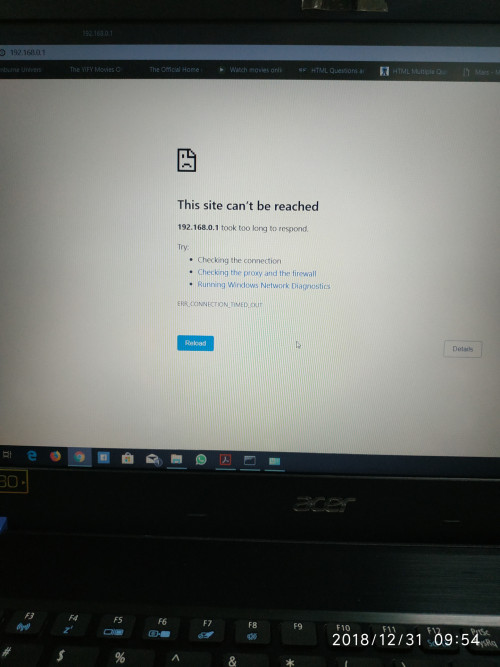
I tried to do it yesterday but then the recovery page didnt seems to load eventhough followed the instructions carefully and i did the static IP address correctly as well. The router power light was already blinking after holding the reset button for more than 5 seconds. Then I let go and somewhat the page didnt load.

This post has been edited by xjoshualaw29: Dec 29 2018, 02:54 PM
xjoshualaw29
post Dec 31 2018, 09:55 AM

Casual
***
Junior Member
304 posts

Joined: Aug 2018


Hello,

I still have the same issue as yesterday. I don't know what seems to be the problem.

user posted image

user posted image
imalmighty
post Dec 31 2018, 01:17 PM

mic test
*****
Senior Member
732 posts

Joined: Dec 2017
QUOTE(xjoshualaw29 @ Dec 31 2018, 09:55 AM)
Hello,

I still have the same issue as yesterday. I don't know what seems to be the problem.

user posted image

user posted image
*
Same here, used different laptop, different LAN cable and ports, duno wat problem could it be...

Either antivirus/firewall BS kacau, or router firmware issue. Btw, your firmware name and date last updated, wat is it? Mine 2018 april make.

Date last updated:2018-05-23 19:59:00
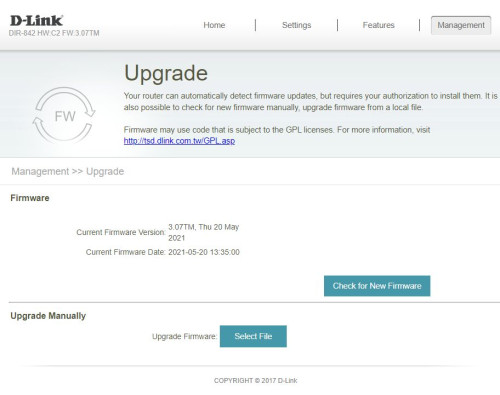
DIR-842 HW:C2 FW:3.01TM

Edit: I suspect the firmware version is the culprit. Those who were successful, Idragon,misspinky and island0806, is your original TM firmware v3.00? I suspect TM has removed recovery mode.

This post has been edited by imalmighty: Dec 31 2018, 02:35 PM
misspinky
post Dec 31 2018, 04:03 PM

Casual
***
Junior Member
309 posts

Joined: Jul 2012


QUOTE(imalmighty @ Dec 31 2018, 02:17 PM)
Same here, used different laptop, different LAN cable and ports, duno wat problem could it be...

Either antivirus/firewall BS kacau, or router firmware issue. Btw, your firmware name and date last updated, wat is it? Mine 2018 april make.

Date last updated:2018-05-23 19:59:00
DIR-842 HW:C2 FW:3.01TM

Edit: I suspect the firmware version is the culprit. Those who were successful, Idragon,misspinky and island0806, is your original TM firmware v3.00? I suspect TM has removed recovery mode.
*
My friend told..his firmware DIR-842 HW:C2 FW:3.01TM. It's not broken version, maybe you had miss something..

just make sure, during reset only use lan 1 connect to your pc or laptop, unplug the wire connect to other ports. The reset button below your router, not behind its..at first time, my friend thought the wps button for reset because c1 is using wps button for reset but for our region c2 reset button at below of router..

for ip address just follow like island said or can use any ip address like 192.168.0.2 or 3..default gateway just fill 192.168.0.1..the reset way a bit tricky, unplug wire power, reset it and hold its a few second..then plug in again power cord, bare in mind just hold the reset button until you connect again the power cord..then enter 192.168.0.1 with still holding the reset button until you see the recovery mode..when you see the recovery mode, then you may release the reset button..do as island said in the steps..after successful the first file firmware, just straight update the second file firmware and lastly reset again your router..normal reset..before you make setup for unifi or maxis thingy..bare in mind, nat options doesn't show after that so cannot disabled or enabled..my friend said, before this his wireless not consistent stable of speed..a bit lag when streaming video..after done this firmware..a bit improve for a moment..well you know tm router..plus dlink..yucks..my friend use its for temporary before have budget soon to change different router..he will sell it soon..
TSldragon
post Dec 31 2018, 04:59 PM

Regular
******
Senior Member
1,026 posts

Joined: Jan 2003
From: Kuala Lumpur, Malaysia
imalmighty There is only 1 firmware release by TM FW:3.01TM . Take note this "FW:3.01TM" firmware are no where to be found & there are no U-turn after the "upgrade"
xjoshualaw29
post Dec 31 2018, 08:41 PM

Casual
***
Junior Member
304 posts

Joined: Aug 2018


QUOTE(imalmighty @ Dec 31 2018, 01:17 PM)
Same here, used different laptop, different LAN cable and ports, duno wat problem could it be...

Either antivirus/firewall BS kacau, or router firmware issue. Btw, your firmware name and date last updated, wat is it? Mine 2018 april make.

Date last updated:2018-05-23 19:59:00
DIR-842 HW:C2 FW:3.01TM

Edit: I suspect the firmware version is the culprit. Those who were successful, Idragon,misspinky and island0806, is your original TM firmware v3.00? I suspect TM has removed recovery mode.
*
It's the same.
xjoshualaw29
post Dec 31 2018, 08:43 PM

Casual
***
Junior Member
304 posts

Joined: Aug 2018


QUOTE(misspinky @ Dec 31 2018, 04:03 PM)
My friend told..his firmware DIR-842 HW:C2 FW:3.01TM. It's not broken version, maybe you had miss something..

just make sure, during reset only use lan 1 connect to your pc or laptop, unplug the wire connect to other ports. The reset button below your router, not behind its..at first time, my friend thought the wps button for reset because c1 is using wps button for reset but for our region c2 reset button at below of router..

for ip address just follow like island said or can use any ip address like 192.168.0.2 or 3..default gateway just fill 192.168.0.1..the reset way a bit tricky, unplug wire power, reset it and hold its a few second..then plug in again power cord, bare in mind just hold the reset button until you connect again the power cord..then enter 192.168.0.1 with still holding the reset button until you see the recovery mode..when you see the recovery mode, then you may release the reset button..do as island said in the steps..after successful the first file firmware, just straight update the second file firmware and lastly reset again your router..normal reset..before you make setup for unifi or maxis thingy..bare in mind, nat options doesn't show after that so cannot disabled or enabled..my friend said, before this his wireless not consistent stable of speed..a bit lag when streaming video..after done this firmware..a bit improve for a moment..well you know tm router..plus dlink..yucks..my friend use its for temporary before have budget soon to change different router..he will sell it soon..
*
I see... I just want to play with it since it's just a spare haha. I'm currently using a Tenda AC10U so it's not an issue as it doesn't support IPv6 unless Tenda make a software update for it then most likely i won't need to reuse the TM router just to use IPv6.
misspinky
post Jan 1 2019, 08:11 AM

Casual
***
Junior Member
309 posts

Joined: Jul 2012


QUOTE(xjoshualaw29 @ Dec 31 2018, 09:43 PM)
I see... I just want to play with it since it's just a spare haha. I'm currently using a Tenda AC10U so it's not an issue as it doesn't support IPv6 unless Tenda make a software update for it then most likely i won't need to reuse the TM router just to use IPv6.
*
if wanna stick IPv6 for a moment can. later on, we are back to basic IPv4 as usual because uncertainty connection. This router suite for an extra ap if house that have another floor. For permanent main router usage, better skip or change to this one that not given by tm. This is just basic one with basic setting not much more can do and not very interesting, about coverage area my friend told his old tplink much better than this router his router have 3 aerial..put same location..plus the settings much more can get than than this dlink..dlink just good for high end or gaming one..if want basic to medium better your tenda and tplink..even, high end and gaming one the owner sell cheaper.. biggrin.gif
imalmighty
post Jan 1 2019, 11:18 PM

mic test
*****
Senior Member
732 posts

Joined: Dec 2017
Duno why, i still cant get the 192.168.0.1 to load. I tried different scenarios, pull out the power cable, off and on the switch still fail...

Probably broadcom link chip is the culprit. All 3 of my laptops use that
pretty23
post Jan 2 2019, 11:47 AM

Regular
******
Senior Member
1,791 posts

Joined: Jul 2011
Is it worth to remove the so call "@unifi" SSID name as a result to get USB share port disable?

I rather to maintain the USB share port function and ignore the change of the SSID name.
TSldragon
post Jan 2 2019, 01:36 PM

Regular
******
Senior Member
1,026 posts

Joined: Jan 2003
From: Kuala Lumpur, Malaysia
QUOTE(imalmighty @ Jan 1 2019, 11:18 PM)
Duno why, i still cant get the 192.168.0.1 to load. I tried different scenarios, pull out the power cable, off and on the switch still fail...

Probably broadcom link chip is the culprit. All 3 of my laptops use that
*
try 10 sec reset
ping 192.168.0.1 (once got reply directly load the recovery page)
imalmighty
post Jan 12 2019, 01:43 PM

mic test
*****
Senior Member
732 posts

Joined: Dec 2017
Out of nowhere it works suddenly
JayceOoi
post Jan 12 2019, 02:29 PM

Pro Blogger
*******
Senior Member
2,741 posts

Joined: Jan 2007
No USB port to remove @unifi? No for me. tongue.gif
TSldragon
post Jan 12 2019, 11:13 PM

Regular
******
Senior Member
1,026 posts

Joined: Jan 2003
From: Kuala Lumpur, Malaysia
QUOTE(JayceOoi @ Jan 12 2019, 02:29 PM)
No USB port to remove @unifi? No for me. tongue.gif
*
No u-turn , didn't manage to get the original firmware from TM Unifi / D-Link rclxms.gif

SUShioniq
post Jan 13 2019, 11:20 AM

Getting Started
**
Junior Member
132 posts

Joined: Jun 2017
Anyone know this dlink dir842 can do port bridge from lan4 to ssid? I set the 2.4ghz wifi to iptv however hypptv superb laggy and unable to watch. The older huawei router can bind lan4 to another ssid which is very stable to me. Else can anyone pls suggest what router can bind lan port to ssid? Thanks in adv
imalmighty
post Jan 14 2019, 06:54 AM

mic test
*****
Senior Member
732 posts

Joined: Dec 2017
QUOTE(hioniq @ Jan 13 2019, 11:20 AM)
Anyone know this dlink dir842 can do port bridge from lan4 to ssid? I set the 2.4ghz wifi to iptv however hypptv superb laggy and unable to watch. The older huawei router can bind lan4 to another ssid which is very stable to me. Else can anyone pls suggest what router can bind lan port to ssid? Thanks in adv
*
If can avoid wireless, do so, unless no choice. Wireless is not a good way of transmiting real time data, unless u can make make hypptv delay by say, 5 minutes, more room and time for your stb to buffer data, your stb can download streaming data b4hand this way.
Pica888
post Jan 16 2019, 07:09 PM

On my way
****
Junior Member
513 posts

Joined: Jan 2019
QUOTE(JayceOoi @ Jan 12 2019, 02:29 PM)
No USB port to remove @unifi? No for me. tongue.gif
*
@unifi can be easily removed with postman & interceptor method on chrome extension...

https://forum.lowyat.net/index.php?showtopi...post&p=89567231

This post has been edited by Pica888: Jan 16 2019, 07:23 PM
MHaffiezMNazri
post Jan 20 2019, 10:12 PM

New Member
*
Junior Member
10 posts

Joined: Jul 2012
From: Kuala Lumpur, MALAYSIA


Wow this seems new!

I wanted to try, but it's not working.

ONE WAY works, but this is easily overridden if you login using web!

APPARENTLY if you login using phone, it will redirect to mobile page:
http://192.168.0.1/MobileWiFi.html

On this page, you can delete it manually.

LIKE I SAID, if you login using web, it will override that back.

In the mean time, if anyone can really remove the @unifi, do share info. I hate it!
JayceOoi
post Jan 21 2019, 08:52 AM

Pro Blogger
*******
Senior Member
2,741 posts

Joined: Jan 2007
QUOTE(MHaffiezMNazri @ Jan 20 2019, 10:12 PM)
Wow this seems new!

I wanted to try, but it's not working.

ONE WAY works, but this is easily overridden if you login using web!

APPARENTLY if you login using phone, it will redirect to mobile page:
http://192.168.0.1/MobileWiFi.html

On this page, you can delete it manually.

LIKE I SAID, if you login using web, it will override that back.

In the mean time, if anyone can really remove the @unifi, do share info. I hate it!
*
Will it comes back after reboot router?
eclectice
post Jan 22 2019, 10:48 AM

Look at all my stars!!
*******
Senior Member
2,734 posts

Joined: Mar 2008
QUOTE(xjoshualaw29 @ Dec 31 2018, 09:55 AM)
Hello,

I still have the same issue as yesterday. I don't know what seems to be the problem.

user posted image

user posted image
*
To verify the DNS is working or not to resolve the name address from the Internet into its IP address correctly, on the DOS command prompt, type: nslookup w.google.com

You should get DNS resolution, at least like this output:

Server: google-public-dns-a.google.com
Address: 8.8.8.8

Non-authoritative answer:
Name: www3.l.google.com
Addresses: 2404:6800:4001:80d::200e
172.217.31.110
Aliases: w.google.com


So, if the automatic DNS resolution is not working, use the manual DNS setup instead on the TCP/IP properties (you can use Google DNS). Probably, the default DNS from the router side could not resolve it when you use the automatic DNS setup.

This post has been edited by eclectice: Jan 22 2019, 10:48 AM
Pica888
post Jan 22 2019, 09:32 PM

On my way
****
Junior Member
513 posts

Joined: Jan 2019
QUOTE(MHaffiezMNazri @ Jan 20 2019, 10:12 PM)
In the mean time, if anyone can really remove the @unifi, do share info. I hate it!
*
Try the postman method, i successfully removed@unifi suffix on both ZTE and TPLink VR1200v using this method.

QUOTE(JayceOoi @ Jan 21 2019, 08:52 AM)
Will it comes back after reboot router?
*
and the @unifi suffix is gone even after router rebooted..

This post has been edited by Pica888: Jan 22 2019, 09:55 PM
cheenon
post Feb 1 2019, 01:05 AM

New Member
*
Junior Member
42 posts

Joined: Nov 2007


QUOTE(Pica888 @ Jan 22 2019, 09:32 PM)
Try the postman method, i successfully removed@unifi suffix on both ZTE and TPLink VR1200v using this method.
and the @unifi suffix is gone even after router rebooted..
*
Can You give a guide on how? I hve installed everything. but couldn't get like the post suggest. cant find SSID or ESSID name on postman with interceptor
Pica888
post Feb 1 2019, 07:07 PM

On my way
****
Junior Member
513 posts

Joined: Jan 2019
QUOTE(cheenon @ Feb 1 2019, 01:05 AM)
Can You give a guide on how? I hve installed everything. but couldn't get like the post suggest. cant find SSID or ESSID name on postman with interceptor
*
The guidance provided by KKS21199 is very detailed...try to search for "@unifi" on postman and delete it..

The interface might be different depending on the modem brand, mine is VR1200v

Attached Image

This post has been edited by Pica888: Feb 1 2019, 10:14 PM
davidw89
post Jul 20 2019, 01:59 AM

Getting Started
**
Junior Member
103 posts

Joined: Jun 2008
Anyone using V 3.10? I would like to "upgrade" but the problem is I'm not sure how to configure it to work properly with Unifi afterwards. Also, is this version stable?

This post has been edited by davidw89: Jul 20 2019, 01:59 AM
davidw89
post Jul 21 2019, 12:24 AM

Getting Started
**
Junior Member
103 posts

Joined: Jun 2008
DIR842-C2 UNIFI firmware
Just completed flashing today rclxm9.gif . DIR842C1_FW310b05.bi did not work for me, it shows up with an error message. So I had to use the latest version 3.11B05, which you can get from here:
https://support.dlink.com/productinfo.aspx?m=DIR-842

Follow set to put router into recovery mode, flash this firmware (DIR842C1_FW302b03_middle.bin), reboot, change IP address to automatically detect and then flash with the latest version.

Works great!
RetroMayday
post Jul 23 2019, 10:09 AM

Getting Started
**
Junior Member
106 posts

Joined: Jul 2010
From: Bumi Kenyalang
QUOTE(davidw89 @ Jul 21 2019, 12:24 AM)
DIR842-C2 UNIFI firmware
Just completed flashing today  rclxm9.gif . DIR842C1_FW310b05.bi did not work for me, it shows up with an error message. So I had to use the latest version 3.11B05, which you can get from here:
https://support.dlink.com/productinfo.aspx?m=DIR-842

Follow set to put router into recovery mode, flash this firmware (DIR842C1_FW302b03_middle.bin), reboot, change IP address to automatically detect and then flash with the latest version.

Works great!
*
Someone is working on OpenWrt support for DIR-842 C2. rclxms.gif
https://github.com/openwrt/openwrt/pull/2259
davidw89
post Jul 23 2019, 11:57 PM

Getting Started
**
Junior Member
103 posts

Joined: Jun 2008
QUOTE(RetroMayday @ Jul 23 2019, 12:09 PM)
Someone is working on OpenWrt support for DIR-842 C2.  rclxms.gif
https://github.com/openwrt/openwrt/pull/2259
*
Interesting! Cool!! How much better is OpenWrt compared to the firmware provided by TP-Link?
RetroMayday
post Jul 24 2019, 08:38 AM

Getting Started
**
Junior Member
106 posts

Joined: Jul 2010
From: Bumi Kenyalang
QUOTE(davidw89 @ Jul 23 2019, 11:57 PM)
Interesting! Cool!! How much better is OpenWrt compared to the firmware provided by TP-Link?
*
1. Latest security and performance improvements on much newer Linux LTS kernels.
2. Upcoming OpenWrt 19.07 has network "flow offloading" which improves routing performance by ~2x.
3. Smart Queue Management that fights Buffer Bloat and lowers routing latency.

This post has been edited by RetroMayday: Jul 24 2019, 11:17 AM
taqu
post Jul 24 2019, 10:57 AM

Enthusiast
*****
Junior Member
864 posts

Joined: May 2005
QUOTE(RetroMayday @ Jul 24 2019, 08:38 AM)
1. Latest security and performance improvesments on much newer Linux LTS kernels.
2. Upcoming OpenWrt 19.07 has network "flow offloading" which improves routing performance by ~2x.
3. Smart Queue Management that fights Buffer Bloat and lowers routing latency.
*
Finally OpenWRT supports "flow offload" which TP-Link calls "NAT Boost", others call "CTF" (Cut-through forwarding) etc rclxms.gif

I really hope the port would be a success. Many DIR-842 users can benefit biggrin.gif
filage
post Jul 27 2019, 06:00 PM

Regular
******
Senior Member
1,205 posts

Joined: Aug 2014
Hi guys, may I know whats the default password for this router? With firmware 3.01TM

This post has been edited by filage: Jul 27 2019, 06:00 PM
jackcolentern P
post Jul 31 2019, 10:04 PM

New Member
*
Probation
4 posts

Joined: Jul 2019
QUOTE(RetroMayday @ Jul 23 2019, 10:09 AM)
Someone is working on OpenWrt support for DIR-842 C2.  rclxms.gif
https://github.com/openwrt/openwrt/pull/2259
*
Hi, changes has been merged. Feel free to test it out
Unfortunately, seems like Dlink does not provide firmware download for for C2, so you cant go back to C2 firmware after flashing (you can go back to C1 stock firmware but you will lose the USB functionality)

Current Openwrt snapshot based on 4.19 kernel has a broken Flow offload (HWNAT) which limit your lan-wan speed to around 350Mbps max, you can build a 4.14 firmware and everything will works fine.
RetroMayday
post Jul 31 2019, 10:28 PM

Getting Started
**
Junior Member
106 posts

Joined: Jul 2010
From: Bumi Kenyalang
QUOTE(jackcolentern @ Jul 31 2019, 10:04 PM)
Hi, changes has been merged. Feel free to test it out
Unfortunately, seems like Dlink does not provide firmware download for for C2, so you cant go back to C2 firmware after flashing (you can go back to C1 stock firmware but you will lose the USB functionality)

Current Openwrt snapshot based on 4.19 kernel has a broken Flow offload (HWNAT) which limit your lan-wan speed to around 350Mbps max, you can build a 4.14 firmware and everything will works fine.
*
Thanks for all the hard work. notworthy.gif notworthy.gif
It was much more difficult than I hoped. bangwall.gif

They've located the commit that caused the problem. Should be fixed soon.
https://bugs.openwrt.org/index.php?do=detai...mary&sort2=desc
jackcolentern P
post Jul 31 2019, 10:43 PM

New Member
*
Probation
4 posts

Joined: Jul 2019
QUOTE(RetroMayday @ Jul 31 2019, 10:28 PM)
Thanks for all the hard work.  notworthy.gif  notworthy.gif
It was much more difficult than I hoped.  bangwall.gif

They've located the commit that caused the problem. Should be fixed soon.
https://bugs.openwrt.org/index.php?do=detai...mary&sort2=desc
*
If you want to test, I can give you a 4.14 based firmware to try out, but please remember that you cant go back to C2 firmware afterwards.
and please remember that there is a (small) chance to brick your device if you are not careful ya tongue.gif
RetroMayday
post Aug 1 2019, 09:21 AM

Getting Started
**
Junior Member
106 posts

Joined: Jul 2010
From: Bumi Kenyalang
QUOTE(jackcolentern @ Jul 31 2019, 10:43 PM)
If you want to test, I can give you a 4.14 based firmware to try out, but please remember that you cant go back to C2 firmware afterwards.
and please remember that there is a (small) chance to brick your device if you are not careful ya  tongue.gif
*
Thanks but I'll wait for release version, seeing that the OpenWrt repo is still in full churning mode.
jackcolentern P
post Aug 1 2019, 02:33 PM

New Member
*
Probation
4 posts

Joined: Jul 2019
QUOTE(RetroMayday @ Aug 1 2019, 09:21 AM)
Thanks but I'll wait for release version, seeing that the OpenWrt repo is still in full churning mode.
*
Ok no problem!
thumbsup.gif
fainonline
post Aug 28 2019, 05:03 PM

New Member
*
Junior Member
12 posts

Joined: Nov 2009
QUOTE(davidw89 @ Jul 21 2019, 12:24 AM)
DIR842-C2 UNIFI firmware
Just completed flashing today  rclxm9.gif . DIR842C1_FW310b05.bi did not work for me, it shows up with an error message. So I had to use the latest version 3.11B05, which you can get from here:
https://support.dlink.com/productinfo.aspx?m=DIR-842

Follow set to put router into recovery mode, flash this firmware (DIR842C1_FW302b03_middle.bin), reboot, change IP address to automatically detect and then flash with the latest version.

Works great!
*
Thanks, it works! now i don't need to see @Unifi thingy anymore icon_idea.gif rclxm9.gif
yujinloh
post Sep 14 2019, 01:18 AM

New Member
*
Newbie
15 posts

Joined: Dec 2017


Thx OP ldragon for making this guide rclxms.gif
Tried on a DIR-842 C2 firmware 3.01TM and it works without issues.

Here's what I did
1.Download 3.11B05 and 3.10B05 firmware from here.
2.Extract the .bin firmware (DIR842C1_FW302b03_middle.bin and DIR842C1_FW311b05.bin)
3.Set the default ip to 192.168.0.5 (refer to op)
4.Put the router into recovery.(remember to note down isp username and password)
5.Flash DIR842C1_FW302b03_middle.bin and then DIR842C1_FW311b05.bin.
6.Change back to default ip when upgrade firmware to 3.11 success.

Now @unifi is dead rclxms.gif rclxm9.gif
Max
post Sep 20 2019, 07:54 PM

Regular
******
Senior Member
1,705 posts

Joined: Jan 2003
From: Sepang - Putrajaya - Cyberjaya


thanx for all the help in here. notworthy.gif

managed to flash as suggested.
now i can get close to 300mps as my package. b4 this only around 100ish mbps speed test. sweat.gif


Max
post Sep 20 2019, 08:29 PM

Regular
******
Senior Member
1,705 posts

Joined: Jan 2003
From: Sepang - Putrajaya - Cyberjaya


Ok.. after updated.. my internet is ok.. but hypptv problem..
Can view for awhile only.. then satellite dish with X.

I have try reset the vlan setting.. still the same..
tarpaucase
post Nov 1 2019, 09:26 PM

Look at all my stars!!
*******
Senior Member
3,469 posts

Joined: Jan 2003
From: ...Frying Pan...
QUOTE(yujinloh @ Sep 14 2019, 01:18 AM)
Thx OP ldragon for making this guide rclxms.gif
Tried on a DIR-842 C2 firmware 3.01TM and it works without issues.

Here's what I did
1.Download 3.11B05 and 3.10B05 firmware from here.
2.Extract the .bin firmware (DIR842C1_FW302b03_middle.bin and DIR842C1_FW311b05.bin)
3.Set the default ip to 192.168.0.5 (refer to op)
4.Put the router into recovery.(remember to note down isp username and password)
5.Flash DIR842C1_FW302b03_middle.bin and then DIR842C1_FW311b05.bin.
6.Change back to default ip when upgrade firmware to 3.11 success.

Now @unifi is dead  rclxms.gif  rclxm9.gif
*
I'm still having trouble to put my DIR-842 C2 with firmware 3.01TM into router recovery.
I followed the instructions to the T.....

I seem to be having issue like some of the guys here who can't connect to 192.168.0.1 after that.
Pretty sure I got all my IP address correct too - can't even ping it. And the reset button I'm using is at the bottom.

What tricks is there to putting this guy on router recovery? ranting.gif ranting.gif ranting.gif

Any 'secret' timing here?
RaZmaTaZ
post Nov 5 2019, 03:48 PM

New Member
*
Newbie
1 posts

Joined: Apr 2008
Anyone upgraded the firmware to 3.13?
Keith0312
post Nov 10 2019, 10:39 AM

New Member
*
Junior Member
5 posts

Joined: Nov 2019
Anyone flash OpenWRT firmware before ? I flash OpenWRT from Official website if OpenWRT http://downloads.openwrt.org/snapshots/tar...hfs-factory.bin but after flashing I realized that this firmware doesn’t have LuCi web just can access ssh anyone know how to install luci now my OpenWRT can’t access network so I can’t update opkg
yujinloh
post Nov 10 2019, 09:24 PM

New Member
*
Newbie
15 posts

Joined: Dec 2017


QUOTE(tarpaucase @ Nov 1 2019, 09:26 PM)
I'm still having trouble to put my DIR-842 C2 with firmware 3.01TM into router recovery.
I followed the instructions to the T.....

I seem to be having issue like some of the guys here who can't connect to 192.168.0.1 after that.
Pretty sure I got all my IP address correct too - can't even ping it. And the reset button I'm using is at the bottom.

What tricks is there to putting this guy on router recovery?  ranting.gif  ranting.gif  ranting.gif

Any 'secret' timing here?
*
Hi,sorry for the late reply ya.
2 months+ dont have time to visit lowyat.

Did you set a static ip for the computer?
I think i followed the steps and it went smoothly for me.
MHaffiezMNazri
post Nov 19 2019, 12:26 AM

New Member
*
Junior Member
10 posts

Joined: Jul 2012
From: Kuala Lumpur, MALAYSIA


QUOTE(RaZmaTaZ @ Nov 5 2019, 03:48 PM)
Anyone upgraded the firmware to 3.13?
*
Well well...

user posted image
MHaffiezMNazri
post Nov 19 2019, 12:37 AM

New Member
*
Junior Member
10 posts

Joined: Jul 2012
From: Kuala Lumpur, MALAYSIA


QUOTE(RaZmaTaZ @ Nov 5 2019, 03:48 PM)
Anyone upgraded the firmware to 3.13?
*
I HAVENT CAUGHT UP EARLIER SO I AM NOT SURE THIS IS NEW OR OLD BUT...

user posted image

So yeah, that, I notice is in 3.13, we can access our shared drive, remotely.
jimmydotnet
post Dec 4 2019, 01:25 PM

Jimbo da Riverian
*****
Senior Member
766 posts

Joined: Nov 2005
From: Slim Shady Town


QUOTE(MHaffiezMNazri @ Nov 19 2019, 12:26 AM)
Well well...

user posted image
*
where you got the .13 bro?
yeop
post Dec 12 2019, 12:31 AM

Getting Started
**
Junior Member
164 posts

Joined: Jan 2006
From: Nibong Tebal


Latest OpenWrt Snapshot tuk Dlink Dir-842 C2(OpenWrt SNAPSHOT r11651-487e0631d0)
Wutts Included : Luci(Material Theme), Adblock, DDNS, SQM Qos
Different wifi driver only

Option 1 - ath10k-ct driver (x compatible ps4pro 5ghz, 2.4 is fine)
openwrt-ath79-generic-dlink_dir-842-c2-squashfs-factory-ath10k-ct.bin
https://drive.google.com/open?id=1mjsHCCBhS...YNxJJ_3xpgC18B2
openwrt-ath79-generic-dlink_dir-842-c2-squashfs-sysupgrade-ath10k-ct.bin
https://drive.google.com/open?id=1EzCXEqckX...Q8z-FLKvjAXCQcP

Option 2 - ath10k driver
openwrt-ath79-generic-dlink_dir-842-c2-squashfs-factory.bin
https://drive.google.com/open?id=1bqxH-gXrn...127o7vHjuelpbgx
openwrt-ath79-generic-dlink_dir-842-c2-squashfs-sysupgrade.bin
https://drive.google.com/open?id=1lSPsJDAtp...W3n9MP_7CTR2kVQ

Flash at your own risk!!!

icon_rolleyes.gif icon_rolleyes.gif icon_rolleyes.gif

This post has been edited by yeop: Dec 12 2019, 12:36 AM
SUSnonamer
post Dec 12 2019, 08:48 AM

Getting Started
**
Junior Member
224 posts

Joined: Apr 2019
QUOTE(yeop @ Dec 12 2019, 12:31 AM)
Latest OpenWrt Snapshot tuk Dlink Dir-842 C2(OpenWrt SNAPSHOT r11651-487e0631d0)
Wutts Included : Luci(Material Theme), Adblock, DDNS, SQM Qos
Different wifi driver only

Option 1 - ath10k-ct driver (x compatible ps4pro 5ghz, 2.4 is fine)
openwrt-ath79-generic-dlink_dir-842-c2-squashfs-factory-ath10k-ct.bin
https://drive.google.com/open?id=1mjsHCCBhS...YNxJJ_3xpgC18B2
openwrt-ath79-generic-dlink_dir-842-c2-squashfs-sysupgrade-ath10k-ct.bin
https://drive.google.com/open?id=1EzCXEqckX...Q8z-FLKvjAXCQcP

Option 2 - ath10k driver
openwrt-ath79-generic-dlink_dir-842-c2-squashfs-factory.bin
https://drive.google.com/open?id=1bqxH-gXrn...127o7vHjuelpbgx
openwrt-ath79-generic-dlink_dir-842-c2-squashfs-sysupgrade.bin
https://drive.google.com/open?id=1lSPsJDAtp...W3n9MP_7CTR2kVQ

Flash at your own risk!!!

icon_rolleyes.gif  icon_rolleyes.gif  icon_rolleyes.gif
*
does sqm layer cake run smoothly on dir-842?
yeop
post Dec 12 2019, 10:17 AM

Getting Started
**
Junior Member
164 posts

Joined: Jan 2006
From: Nibong Tebal


QUOTE(nonamer @ Dec 12 2019, 08:48 AM)
does sqm layer cake run smoothly on dir-842?
*
Sorry blush.gif cant comment on that because i havent tried yet
HotWheelsHunter
post Dec 16 2019, 04:06 PM

New Member
*
Newbie
2 posts

Joined: Aug 2015
From: kepong


Did any one know, after flash firmware, does it has hide ssid option? Thank you very much
almostthere
post Mar 13 2020, 12:10 AM

Kepala abah ko
Group Icon
VIP
3,773 posts

Joined: Jan 2003
From: Anywhere lah...as long got Kopi-O


QUOTE(MHaffiezMNazri @ Nov 19 2019, 12:26 AM)
Well well...

user posted image
*
What about hypptv VLAN 600? Still works?
Chan Hensem
post Apr 17 2020, 11:29 AM

New Member
*
Junior Member
28 posts

Joined: Jan 2011
QUOTE(almostthere @ Mar 13 2020, 12:10 AM)
What about hypptv VLAN 600? Still works?
*
Yes, still working great.
I just flashed my router..just for fun 😂 to remove the @unifi
I'm on Firmware B3.13b05
The whole upgrade process using Ubuntu 20 , with LAN cable.
I did experience the homepage doesn't load , but i take my time to follow the instructions

Now all good.
Mushwashan
post Apr 17 2020, 09:41 PM

Getting Started
**
Junior Member
64 posts

Joined: Sep 2013
From: Perak


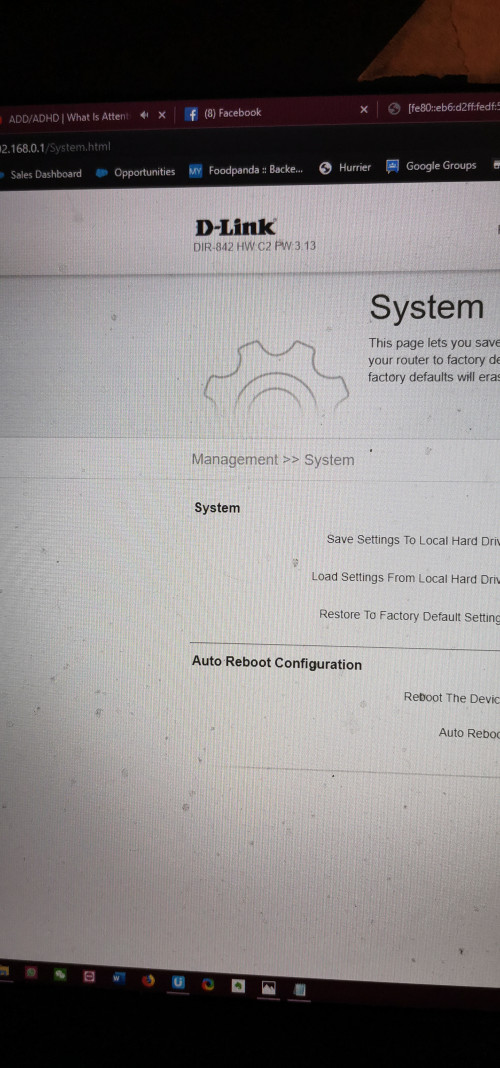
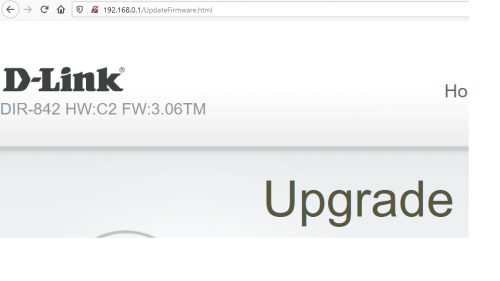
user posted image

mine got FW:3.06TM at the end ..
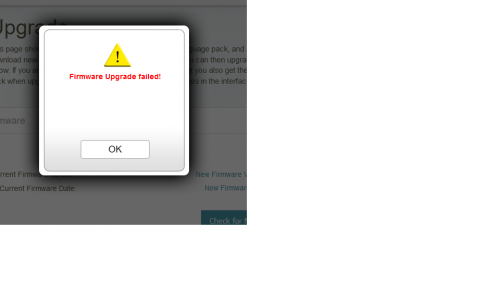
how do u guy update ... mine show update failed

user posted image
Chan Hensem
post Apr 18 2020, 07:56 PM

New Member
*
Junior Member
28 posts

Joined: Jan 2011
QUOTE(Mushwashan @ Apr 17 2020, 09:41 PM)
user posted image

mine got FW:3.06TM at the end ..
how do u guy update ... mine show update failed

user posted image
*
Read again the guide at 1st page, you cant simply upgrade when the router in normal mode, look closely from step 4 to get your router to Recovery Mode.

I upgrade from 3.06TM, once I managed to get into the recovery mode of DLink, I flash the 3.10, then I flash the 3.13bo5

now I plan to upgrade to 3.13B09 (solve hardcoded issue) .

DLink
stormer.lyn
post May 11 2020, 08:57 PM

Regular
******
Senior Member
1,132 posts

Joined: Apr 2014
From: Shah Alam, Selangor
Thanks to everyone on this thread, especially those who gave pointers on how to upgrade the firmware. Successful upgrade to 3.13b09 with all your pointers.
notworthy.gif
Now MCO time I itchy and got rid of the @unifi because, well, itchy la. Now have to redo all my smarthome wireless devices, haha!
JuneResources
post May 23 2020, 01:59 PM

ONE Stop Resources
*******
Senior Member
4,168 posts

Joined: Mar 2012
From: Kuala Lumpur


QUOTE(stormer.lyn @ May 11 2020, 08:57 PM)
Thanks to everyone on this thread, especially those who gave pointers on how to upgrade the firmware. Successful upgrade to 3.13b09 with all your pointers.
notworthy.gif
Now MCO time I itchy and got rid of the @unifi because, well, itchy la. Now have to redo all my smarthome wireless devices, haha!
*
May I know yours version is from which version upgrade to 3.13b09?
My one is DIR-842 HW:C2 FW:3.06TM

So can upgrade?

Btw, yours Dlink after upgrade 3.13 then USB can functions?

Thanks a lot.
stormer.lyn
post May 24 2020, 09:12 AM

Regular
******
Senior Member
1,132 posts

Joined: Apr 2014
From: Shah Alam, Selangor
QUOTE(JuneResources @ May 23 2020, 01:59 PM)
May I know yours version is from which version upgrade to 3.13b09?
My one is DIR-842 HW:C2 FW:3.06TM

So can upgrade?

Btw, yours Dlink after upgrade 3.13 then USB can functions?

Thanks a lot.
*
JuneResources
Mine is the same as yours, HW:C2 but the FW was 3.05TM? 3.01TM? I'm not sure now, but it was 3.0 something TM

I upgrade the FW to the first one as in the instructions above, and then when I restarted the router, it automatically downloaded the upgrades and notified me "there are upgrades available". Unfortunately the USB does not work for any of the FW. I thought maybe it was the latest FW, so I downgraded using the whole process again, but all the FW doesn't support the USB. I decided not to manually upgrade to the beta09 FW. Not a killer for me as I have a NAS on the network.

Do note that after the FW upgrade, there is no AP or repeater mode, the router only is a router.

This post has been edited by stormer.lyn: May 24 2020, 09:27 AM
JuneResources
post May 25 2020, 11:26 AM

ONE Stop Resources
*******
Senior Member
4,168 posts

Joined: Mar 2012
From: Kuala Lumpur


QUOTE(stormer.lyn @ May 24 2020, 09:12 AM)
JuneResources
Mine is the same as yours, HW:C2 but the FW was 3.05TM? 3.01TM? I'm not sure now, but it was 3.0 something TM

I upgrade the FW to the first one as in the instructions above, and then when I restarted the router, it automatically downloaded the upgrades and notified me "there are upgrades available". Unfortunately the USB does not work for any of the FW. I thought maybe it was the latest FW, so I downgraded using the whole process again, but all the FW doesn't support the USB. I decided not to manually upgrade to the beta09 FW. Not a killer for me as I have a NAS on the network.

Do note that after the FW upgrade, there is no AP or repeater mode, the router only is a router.
*
I got try already... No matter downgrade or upgrade.. All showed "Firmware upgraded failed".
Crapped this router damn so tied with TM firmware..

Yesterday reset back to factory, and resetting balik..
See this few days my device will experience WiFi suddenly showed "Connected - No Internet", but LAN no issued with Connected internet access..

Damn seriously, I hope I don't want to spend $$ to buy router..

Did anyone experienced to claim warranty of Dlink? Can I just directly claim warranty from Dlink? The TM technical kinda pieces of shit.
stormer.lyn
post May 25 2020, 12:11 PM

Regular
******
Senior Member
1,132 posts

Joined: Apr 2014
From: Shah Alam, Selangor
QUOTE(JuneResources @ May 25 2020, 11:26 AM)
I got try already... No matter downgrade or upgrade.. All showed "Firmware upgraded failed".
Crapped this router damn so tied with TM firmware..

Yesterday reset back to factory, and resetting balik..
See this few days my device will experience WiFi suddenly showed "Connected - No Internet", but LAN no issued with Connected internet access..

Damn seriously, I hope I don't want to spend $$ to buy router..

Did anyone experienced to claim warranty of Dlink? Can I just directly claim warranty from Dlink? The TM technical kinda pieces of shit.
*
You cannot do the normal FW upgrade from inside the router page, you have to do the special FW upgrade by pressing the reset button, and entering factory FW upgrade mode
acbc
post May 25 2020, 12:15 PM

Look at all my stars!!
*******
Senior Member
9,046 posts

Joined: Jan 2003
Use own router. Not expensive these days. Used high end routers now less than the price of new low end routers.
JuneResources
post May 25 2020, 12:53 PM

ONE Stop Resources
*******
Senior Member
4,168 posts

Joined: Mar 2012
From: Kuala Lumpur


QUOTE(stormer.lyn @ May 25 2020, 12:11 PM)
You cannot do the normal FW upgrade from inside the router page, you have to do the special FW upgrade by pressing the reset button, and entering factory FW upgrade mode
*
Ya.. I got try the step at First page there.

Power off and unplug the plug > Press the reset button > Keep continue press RESET button and turn on the router..

But my router power indicator keep blinking more than 1 hour still keep blinking..
Then I power off and turn on the router like normal, then everything OK. So it's seems like unable to reset factory by pressing the RESET button.
JuneResources
post May 25 2020, 12:57 PM

ONE Stop Resources
*******
Senior Member
4,168 posts

Joined: Mar 2012
From: Kuala Lumpur


QUOTE(acbc @ May 25 2020, 12:15 PM)
Use own router. Not expensive these days. Used high end routers now less than the price of new low end routers.
*
Purchase new router still at least RM100 or above..
Unless RM50 I'm OK deal for it... Since it's family using, so no point use high end routers (Unless I play games that is another stories already). rolleyes.gif

I'm concern don't cari masalah for me especially WiFi suddenly no internet connections but LAN internet connections OK OR another round WiFi internet connections OK but LAN no internet connections.
stormer.lyn
post May 25 2020, 01:14 PM

Regular
******
Senior Member
1,132 posts

Joined: Apr 2014
From: Shah Alam, Selangor
QUOTE(JuneResources @ May 25 2020, 12:53 PM)
Ya.. I got try the step at First page there.

Power off and unplug the plug > Press the reset button > Keep continue press RESET button and turn on the router..

But my router power indicator keep blinking more than 1 hour still keep blinking..
Then I power off and turn on the router like normal, then everything OK. So it's seems like unable to reset factory by pressing the RESET button.
*
Your process correct, but not complete tongue.gif Before you start you download the FW to your computer. Unzip it. Set a static IP address for your PC. Enter the router into Factory FW mode. Upload the FW from your PC to the router. Then only when you restart the router will have the new FW. Once you have new non-@unifi FW, you can update FW like normal from the router page. Hope this helps
acbc
post May 25 2020, 01:26 PM

Look at all my stars!!
*******
Senior Member
9,046 posts

Joined: Jan 2003
QUOTE(JuneResources @ May 25 2020, 12:57 PM)
Purchase new router still at least RM100 or above..
Unless RM50 I'm OK deal for it... Since it's family using, so no point use high end routers (Unless I play games that is another stories already). rolleyes.gif

I'm concern don't cari masalah for me especially WiFi suddenly no internet connections but LAN internet connections OK OR another round WiFi internet connections OK but LAN no internet connections.
*
Well, modding an existing router is risky is no backup. Kena before. Luckily managed to borrow a spare from a friend.
JuneResources
post May 25 2020, 08:06 PM

ONE Stop Resources
*******
Senior Member
4,168 posts

Joined: Mar 2012
From: Kuala Lumpur


QUOTE(stormer.lyn @ May 25 2020, 01:14 PM)
Your process correct, but not complete  tongue.gif Before you start you download the FW to your computer. Unzip it. Set a static IP address for your PC. Enter the router into Factory FW mode. Upload the FW from your PC to the router. Then only when you restart the router will have the new FW. Once you have new non-@unifi FW, you can update FW like normal from the router page. Hope this helps
*
That one FW file of course got download to my PC before do the reset router.
Those set the IP address I have done already.

I'm not sure during I reset the router, don't know my step correct or not. This is because when I press RESET button on my router during the power off (and unplug), after that I plug in power supply with power ON the router, I still hold and press RESET button on my router.

Then I see the router power indicator blinking and I straight release RESET button. Don't know my step correct or not? rclxub.gif

And I also see from First Page saying that some of the router a bit "special". So even you already power ON the router, you still need to hold and press RESET button on my router continuously more than 10 sec (OR less than 10 sec)... And then bila I release the RESET button, then I'm a bit lost already..
stormer.lyn
post May 25 2020, 09:27 PM

Regular
******
Senior Member
1,132 posts

Joined: Apr 2014
From: Shah Alam, Selangor
QUOTE(JuneResources @ May 25 2020, 08:06 PM)
That one FW file of course got download to my PC before do the reset router.
Those set the IP address I have done already.

I'm not sure during I reset the router, don't know my step correct or not. This is because when I press RESET button on my router during the power off (and unplug), after that I plug in power supply with power ON the router, I still hold and press RESET button on my router.

Then I see the router power indicator blinking and I straight release RESET button. Don't know my step correct or not? rclxub.gif

And I also see from First Page saying that some of the router a bit "special". So even you already power ON the router, you still need to hold and press RESET button on my router continuously more than 10 sec (OR less than 10 sec)... And then bila I release the RESET button, then I'm a bit lost already..
*
Once the router is blinking, you go to PC and type 192.168.0.1 in browser, what do you see?
I also think your PC must be connected by cable, not wireless, because the router wireless never start up yet.

JuneResources
post May 25 2020, 11:31 PM

ONE Stop Resources
*******
Senior Member
4,168 posts

Joined: Mar 2012
From: Kuala Lumpur


QUOTE(stormer.lyn @ May 25 2020, 09:27 PM)
Once the router is blinking, you go to PC and type 192.168.0.1 in browser, what do you see?
I also think your PC  must be connected by cable, not wireless, because the router wireless never start up yet.
*
Just like this below:-

This site can’t be reached 192.168.0.1 took too long to respond.
Try:

Checking the connection
Checking the proxy and the firewall
Running Windows Network Diagnostics
ERR_CONNECTION_TIMED_OUT


And then my LAN appear "earth" icon with showing "Unidentified Network"..

JuneResources
post May 25 2020, 11:36 PM

ONE Stop Resources
*******
Senior Member
4,168 posts

Joined: Mar 2012
From: Kuala Lumpur


QUOTE(acbc @ May 25 2020, 01:26 PM)
Well, modding an existing router is risky is no backup. Kena before. Luckily managed to borrow a spare from a friend.
*
I don't mind already as I got backup router also from TM, but more crapped brand Netis DL4480V1 since already get renew contract during YEP last year.
The Netis is more crapped router because the WiFi signal strength kinda week. but LAN extremely BEST compare from Dlink..

One more thing the Netis suffix @Unifi SSID cannot be remove, not like Dlink have shortcut use mobile version..
(Sorry, no ads post at my wifi SSID unless Unifi got pay to me for publishing marketing purposes.. whistling.gif )
moneyworks
post May 27 2020, 08:11 PM

New Member
*
Junior Member
11 posts

Joined: Aug 2005
QUOTE(ldragon @ Dec 19 2018, 09:45 PM)
It is annoying that the Unifi supplied "D-Link DIR-842 Revision C" can't use our own SSID & stuck with xxxx@unifi

This guide is to remove that SSID restriction. ** USB Port are missing after the upgrade **
Disclaimer, do it on your own risk, your device's configuration will be lost after upgrade this firmware

Getting ready:
Download latest firmware from D-Link Malaysia (if failed this is the backup plan)
https://www.dlink.com.sg/dir-842/#firmware

Download latest firmware from D-Link.com
ftp://ftp2.dlink.com/PRODUCTS/DIR-842/REV...RE_v3.10B05.zip

Extract this file: DIR-842_REVC_FIRMWARE_v3.10B05.zip
Procedure for DIR series routers
1, Store a copy of the router firmware (.BIN) on the HDD of a local PC. Download the FW file ahead of time.
2, Connect an Ethernet cable between one of the LAN ports on the rear of the router and the network port on the local PC
3, Configure the PC with a static IP address other than 192.168.0.1 (e.g. 192.168.0.5)
Attached Image
4, Power down the router and unplug the power cord
5, Press and hold the reset button on the rear of the router for 3 to 5 seconds and re-plug the power cord without releasing the reset button
6, Continue to hold the reset button until the power light keeps blinking on and off. NOTE: For some DIR series, continue holding the reset button up to 10 seconds.
7, Open a web browser and enter the following address: http://192.168.0.1/
8, Wait for the D-Link Router Recovery Mode page to load (See below)

user posted image

9, Using the Choose File button, select the router firmware stored on the local PC (DIR842C1_FW302b03_middle.bin) and then press Upload
10, After the firmware successfully loads, a Success page will display
11, If the Success page fails to display, then repeat steps 3 through 9

After the flash completed, login to 192.168.0.1 (admin & no password)
Click management , upgrade, select file "DIR842C1_FW310b05.bin". Press Upload  sweat.gif
Good Luck  thumbup.gif

Latest firmware is available in this FTP server
ftp://ftp2.dlink.com/PRODUCTS/DIR-842/REVC/
*
Thank you very much. It works on my DIR-842 unifi routers. I follow exactly the same instruction and works without problem. I then upgrade to 13b05 fw downloaded from the same FTP server given and it works without problem too. Few things that I have tried (to be smart and ended up I am not that smart):
1. Flash the directly to 13b05 skip step 9-11. It doesn't work
2. Try to skip upgrade to 10b05 after step 11. It doesn't work too. Have to upgrade to 10b05 after that again upgrade to 13b05, then it will work

Hope my experience helps those who has an extra unifi DIR-842 but wanted to get rid of the "@unifi" SSID, just like me...

FYI, the Postman method to change the SSID posted by other doesn't work on DIR-842. Those shared on the forum don't work as it works on cgi script only. It might work with other way using postman method but I can't find any so flashing the firmware is the quickest and easiest way.

Thank you bo Dragon sharing this very useful and detail tutorial
JuneResources
post May 28 2020, 09:47 AM

ONE Stop Resources
*******
Senior Member
4,168 posts

Joined: Mar 2012
From: Kuala Lumpur


QUOTE(moneyworks @ May 27 2020, 08:11 PM)
Thank you very much. It works on my DIR-842 unifi routers. I follow exactly the same instruction and works without problem. I then upgrade to 13b05 fw downloaded from the same FTP server given and it works without problem too. Few things that I have tried (to be smart and ended up I am not that smart):
1. Flash the directly to 13b05 skip step 9-11. It doesn't work
2. Try to skip upgrade to 10b05 after step 11. It doesn't work too. Have to upgrade to 10b05 after that again upgrade to 13b05, then it will work

Hope my experience helps those who has an extra unifi DIR-842 but wanted to get rid of the "@unifi" SSID, just like me...

FYI, the Postman method to change the SSID posted by other doesn't work on DIR-842. Those shared on the forum don't work as it works on cgi script only. It might work with other way using postman method but I can't find any so flashing the firmware is the quickest and easiest way.

Thank you  bo Dragon sharing this very useful and detail tutorial
*
Wanna to ask you at Step 6 to Step 8.

Once you press and hold RESET button at the rear during power off and unplug, then you turn on and power on the router.
Is it you release press RESET button once the router POWER indicator blinking already?

And then how you can access the router recovery mode? Is it wait after POWER indicator stable already, then access the router recovery mode?

Thanks a lot.

Mushwashan
post Jun 29 2020, 11:12 AM

Getting Started
**
Junior Member
64 posts

Joined: Sep 2013
From: Perak


QUOTE(JuneResources @ May 28 2020, 09:47 AM)
Wanna to ask you at Step 6 to Step 8.

Once you press and hold RESET button at the rear during power off and unplug, then you turn on and power on the router.
Is it you release press RESET button once the router POWER indicator blinking already?

And then how you can access the router recovery mode? Is it wait after POWER indicator stable already, then access the router recovery mode?

Thanks a lot.
*
aku pon stuck kat sini tunggu sampai subuh gitu je harey...
JuneResources
post Jun 29 2020, 03:29 PM

ONE Stop Resources
*******
Senior Member
4,168 posts

Joined: Mar 2012
From: Kuala Lumpur


QUOTE(Mushwashan @ Jun 29 2020, 11:12 AM)
aku pon stuck kat sini tunggu sampai subuh gitu je harey...
*
Sama saja..
At the end, aku cuma buat normal reset saja..

Ini Dlink unifi tak boleh pakai punya, unless betul betul selalu reset button sampai rosak saja.. laugh.gif
noname87
post Jul 14 2020, 10:14 AM

New Member
*
Junior Member
20 posts

Joined: May 2008


Anyone know how to set up this router as a repeater or extender ?
D-Link DIR-842

Thanks.
hollyweed
post Sep 24 2020, 04:47 PM

Getting Started
**
Junior Member
67 posts

Joined: May 2015

Where to get Firmware Version: 3.06TM?

I need it for backup before i flash to 3.13. Incase if fail, got backup..

Any sifu can help?
TSldragon
post Sep 24 2020, 08:25 PM

Regular
******
Senior Member
1,026 posts

Joined: Jan 2003
From: Kuala Lumpur, Malaysia
QUOTE(hollyweed @ Sep 24 2020, 04:47 PM)
Where to get Firmware Version: 3.06TM?

I need it for backup before i flash to 3.13. Incase if fail, got backup..

Any sifu can help?
*
We can't find the original TM firmware.
stormer.lyn
post Sep 25 2020, 11:05 PM

Regular
******
Senior Member
1,132 posts

Joined: Apr 2014
From: Shah Alam, Selangor
QUOTE(Mushwashan @ Jun 29 2020, 11:12 AM)
aku pon stuck kat sini tunggu sampai subuh gitu je harey...
*
QUOTE(JuneResources @ Jun 29 2020, 03:29 PM)
Sama saja..
At the end, aku cuma buat normal reset saja..

Ini Dlink unifi tak boleh pakai punya, unless betul betul selalu reset button sampai rosak saja.. laugh.gif
*
Huh, strange. Since the last time I was here, I've again re-flashed the firmware of my DIR-842, this time with OpenWrt. Same procedure, no issues with the reset button, entering the recovery mode, or the flashing.

OpenWrt is a bit cryptic, plenty of reading to do to set up properly, but is rock solid, and I now have the use of the USB port. Don't know how come you all have so much trouble flashing the router.
laksamana
post Sep 26 2020, 07:46 PM

Regular
******
Senior Member
1,356 posts

Joined: Nov 2006
From: An Illuminati organization ..


After about 5 tries, managed to reset this dumb router properly and flashed to latest 3.13 firmware

Going to disable DHCP and give it a fixed IP

This silly router will act nicely as an Access Point for one of the bedrooms, connected with a wired backhaul to my main router
laksamana
post Sep 26 2020, 07:50 PM

Regular
******
Senior Member
1,356 posts

Joined: Nov 2006
From: An Illuminati organization ..


QUOTE(ldragon @ Sep 24 2020, 08:25 PM)
We can't find the original TM firmware.
*
Found this for TM configuration

https://www.dlink.com.sg/dir-842/#firmware

https://dlink.com.sg/wp-content/uploads/201...01b05beta01.zip

This post has been edited by laksamana: Sep 26 2020, 07:50 PM
TSldragon
post Sep 26 2020, 08:24 PM

Regular
******
Senior Member
1,026 posts

Joined: Jan 2003
From: Kuala Lumpur, Malaysia
QUOTE(laksamana @ Sep 26 2020, 07:50 PM)
Good find
austinjklim
post Nov 5 2020, 10:55 AM

Getting Started
**
Junior Member
72 posts

Joined: Dec 2010
Morning sifu sifu.

Just wanna ask is there any performance difference/improvement over 3.06 to 3.10 or any of the latest firmware.

Currently on the 3.06 by TM.

If there is a improvement over software upgrade, i don't mind manually upgrading it to 3.10 above.
MIYK
post Nov 10 2020, 03:48 AM

New Member
*
Newbie
19 posts

Joined: Nov 2017
QUOTE(noname87 @ Jul 14 2020, 10:14 AM)
Anyone know how to set up this router as a repeater or extender ?
D-Link DIR-842

Thanks.
*
Any sifu mind to share any method? As for unifi original 842, when I disable ipv6 and set default to AP/extender. It doesn't work. Please help
knzamy
post Nov 14 2020, 01:45 AM

New Member
*
Newbie
1 posts

Joined: Jan 2013
hello bro, how u get the recovery page working? i still got no luck to reach that page
baem.ab90
post Dec 2 2020, 09:26 PM

New Member
*
Junior Member
15 posts

Joined: Sep 2013


got this router from TM. plan to setup as my 2nd router to connect to my main wirelessly, like WDS or WLAN bridge. check through the options, has "repeater mode" which doesn't let me do a site survey. why TM always give crappy router every time. useless brick now. might as well flash openwrt.
ThornsFC
post Dec 9 2020, 05:59 PM

New Member
*
Junior Member
47 posts

Joined: Apr 2018
QUOTE(baem.ab90 @ Dec 2 2020, 09:26 PM)
got this router from TM. plan to setup as my 2nd router to connect to my main wirelessly, like WDS or WLAN bridge. check through the options, has "repeater mode" which doesn't let me do a site survey. why TM always give crappy router every time. useless brick now. might as well flash openwrt.
*
Yeah it's pointless to have the repeater mode option when there's no way to setup and connect to the router WiFi. (FW:3.01TM)

Wanted to flash it through recovery mode (pressed reset button with power unplugged), managed to get the power LED to blink but it wouldn't let me access 192.168.0.1, couldn't even ping.
hollyweed
post Dec 24 2020, 03:37 PM

Getting Started
**
Junior Member
67 posts

Joined: May 2015

Hello guys, sorry to be out of topic a lil bit.

At the momment, my D-Link DIR-842 C2 is using 3.06TM firmware. However after update my phone OS to IOS14, it detects the WIFI as Weak Security.
In result, all video calls becomes very laggy and unusable anymore.

When I check the Wireless security mode in the router setting(192.168.0.1), only WPA/WPA2(TKIP) is available.

Is there any firmware for this router that can support the security mode up to WPA2(AES) or WPA3?


Thanks in advance!

notworthy.gif notworthy.gif

This post has been edited by hollyweed: Dec 24 2020, 03:44 PM
darkwalker
post Jan 21 2021, 11:41 AM

New Member
*
Junior Member
34 posts

Joined: May 2010
May I know if what's the latest firmware for DIR-842 C2? Wonder if it would override the TM original version to enable the MAC filtering featuer?
Max
post Jan 21 2021, 01:15 PM

Regular
******
Senior Member
1,705 posts

Joined: Jan 2003
From: Sepang - Putrajaya - Cyberjaya


842 C2. Currently on 3.13 firmware.
darkwalker
post Jan 21 2021, 06:19 PM

New Member
*
Junior Member
34 posts

Joined: May 2010
QUOTE(Max @ Jan 21 2021, 01:15 PM)
842 C2. Currently on 3.13 firmware.
*
May I know if the 3.13 supports MAC filter feature? The 3.06 doesn't have the advance setting option for MAC address filter.
Max
post Jan 22 2021, 09:03 AM

Regular
******
Senior Member
1,705 posts

Joined: Jan 2003
From: Sepang - Putrajaya - Cyberjaya


QUOTE(darkwalker @ Jan 21 2021, 06:19 PM)
May I know if the 3.13 supports MAC filter feature? The 3.06 doesn't have the advance setting option for MAC address filter.
*
Let me check later.. and update..
Jasonjinct
post Feb 3 2021, 11:27 PM

Getting Started
**
Junior Member
185 posts

Joined: Mar 2008
From: Butterworth, Penang


Hi all Sifus, currently using DIR-842 HW:C2 FW:3.01TM.

Wanted to upgrade to v3.13 as the firmware includes support for WPA3.
So based on the release notes: The firmware v3.13 must be upgraded from the transitional version of firmware v3.02b03_middle.

Edited: Found it, v3.02b03_middle is inside v3.10B05.zip

This post has been edited by Jasonjinct: Feb 4 2021, 08:13 AM
khayfc
post Apr 21 2021, 06:07 PM

New Member
*
Junior Member
9 posts

Joined: May 2009
QUOTE(JuneResources @ Jun 29 2020, 03:29 PM)
Sama saja..
At the end, aku cuma buat normal reset saja..

Ini Dlink unifi tak boleh pakai punya, unless betul betul selalu reset button sampai rosak saja.. laugh.gif
*
ok done update FM 3.06tm to latest in one try maybe got some step missing.....
StevenL
post Apr 22 2021, 10:57 PM

Enthusiast
*****
Junior Member
732 posts

Joined: Jul 2010
QUOTE(Jasonjinct @ Feb 3 2021, 11:27 PM)
Hi all Sifus, currently using DIR-842 HW:C2 FW:3.01TM.

Wanted to upgrade to v3.13 as the firmware includes support for WPA3.
So based on the release notes: The firmware v3.13 must be upgraded from the transitional version of firmware v3.02b03_middle.

Edited: Found it, v3.02b03_middle is inside v3.10B05.zip
*
Hi

Have you any success in flashing to v3.13? Kindly advise the steps if you did
StevenL
post Apr 22 2021, 10:58 PM

Enthusiast
*****
Junior Member
732 posts

Joined: Jul 2010
QUOTE(Jasonjinct @ Feb 3 2021, 11:27 PM)
Hi all Sifus, currently using DIR-842 HW:C2 FW:3.01TM.

Wanted to upgrade to v3.13 as the firmware includes support for WPA3.
So based on the release notes: The firmware v3.13 must be upgraded from the transitional version of firmware v3.02b03_middle.

Edited: Found it, v3.02b03_middle is inside v3.10B05.zip
*
Hi

Have you any success in flashing to v3.13? Kindly advise the steps if you did

I intend to use this as repeater
stormer.lyn
post Sep 6 2021, 07:07 PM

Regular
******
Senior Member
1,132 posts

Joined: Apr 2014
From: Shah Alam, Selangor
OpenWRT 21.02.0 stable released for D-link DIR-842. Here is the instruction page, along with a full instruction video.

I still have my router as a spare, and just in case I need to use USB tethering with a cellular modem. biggrin.gif
yukissken
post Sep 8 2021, 07:28 PM

New Member
*
Junior Member
33 posts

Joined: Jan 2006
From: OUG


After upgrade to verion 3.10 i cant connect to unifi internet.
What is miss inside the setting?
yukissken
post Sep 8 2021, 08:29 PM

New Member
*
Junior Member
33 posts

Joined: Jan 2006
From: OUG


QUOTE(yukissken @ Sep 8 2021, 07:28 PM)
After upgrade to verion 3.10 i cant connect to unifi internet.
What is miss inside the setting?
*
Settle already
prokiller1199
post Oct 7 2021, 09:40 PM

Hi there.
*****
Senior Member
966 posts

Joined: Apr 2016


Today I tried to access DLINK firmware recovery room, cannot even access the website.

prokiller1199
post Oct 7 2021, 10:08 PM

Hi there.
*****
Senior Member
966 posts

Joined: Apr 2016


QUOTE(imalmighty @ Jan 12 2019, 01:43 PM)
Out of nowhere it works suddenly
*
Mine just cant LOL, wonder in the end did xjoshualaw29 flash successfully?
phyz
post Nov 27 2021, 07:17 PM

Casual
***
Junior Member
334 posts

Joined: Jan 2008


QUOTE(prokiller1199 @ Oct 7 2021, 09:40 PM)
Today I tried to access DLINK firmware recovery room, cannot even access the website.
*
Did not work with mine too...is there any way to get into that page?Currently v3.07TM dry.gif
Cincai.La
post Nov 28 2021, 01:07 AM

Getting Started
**
Junior Member
183 posts

Joined: Jun 2020
From: IPOH


QUOTE(phyz @ Nov 27 2021, 07:17 PM)
Did not work with mine too...is there any way to get into that page?Currently v3.07TM dry.gif
*
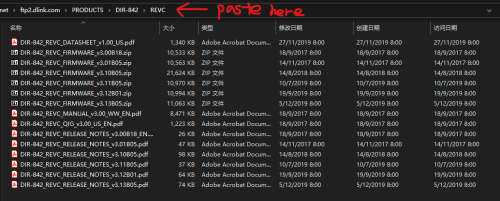
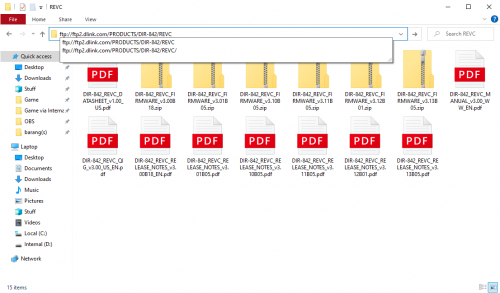
It still working. Copy this link (ftp://ftp2.dlink.com/PRODUCTS/DIR-842/REVC/) to your file explorer.

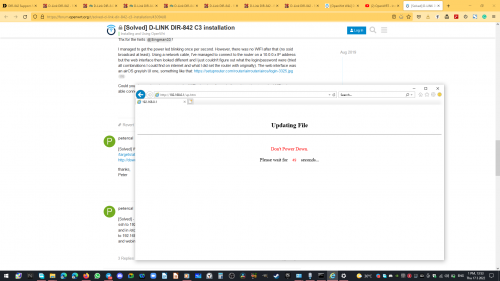
user posted image
prokiller1199
post Dec 1 2021, 05:14 PM

Hi there.
*****
Senior Member
966 posts

Joined: Apr 2016


QUOTE(Cincai.La @ Nov 28 2021, 01:07 AM)
It still working. Copy this link (ftp://ftp2.dlink.com/PRODUCTS/DIR-842/REVC/) to your file explorer.

user posted image
*
I cannot access the recovery room although follow all steps with button.
sailou
post Dec 12 2021, 06:09 PM

On my way
****
Senior Member
617 posts

Joined: Mar 2005
From: Mars


1.Download the 2 firmware into your pc from DLINK FIRMWARE
2.You will need to download 3.10 and 3.13. You only need the DIR842C1_FW302b03_middle.bin from 3.10.
3.Extract the .bin into your pc.
4.Unplug the power. Poke the reset button and hold. Power on your router. Keep your eye on the power LED. Once it started to blink immediately let go of the reset button.
5.You can safely enter 192.168.0.1 now. (Remember to set the ip as in page 1)
6.Upload DIR842C1_FW302b03_middle.bin and start upgrading.
7.When the upgrading is completed, just login thru the DLINK UI by clicking login without typing any password.
8.Go to the upgrade page and upload the 3.13 .bin and upgrade.
9.Done. Do your UNIFI setting.

MHaffiezMNazri
tarpaucase
Mushwashan
JuneResources
MIYK
knzamy
ThornsFC
StevenL
prokiller1199
phyz
xjoshualaw29

This post has been edited by sailou: Dec 12 2021, 07:08 PM
JuneResources
post Dec 16 2021, 12:27 AM

ONE Stop Resources
*******
Senior Member
4,168 posts

Joined: Mar 2012
From: Kuala Lumpur


QUOTE(sailou @ Dec 12 2021, 06:09 PM)
1.Download the 2 firmware into your pc from DLINK FIRMWARE
2.You will need to download 3.10 and 3.13. You only need the DIR842C1_FW302b03_middle.bin from 3.10.
3.Extract the .bin into your pc.
4.Unplug the power. Poke the reset button and hold. Power on your router. Keep your eye on the power LED. Once it started to blink immediately let go of the reset button.
5.You can safely enter 192.168.0.1 now. (Remember to set the ip as in page 1)
6.Upload DIR842C1_FW302b03_middle.bin and start upgrading.
7.When the upgrading is completed, just login thru the DLINK UI by clicking login without typing any password.
8.Go to the upgrade page and upload the 3.13 .bin and upgrade.
9.Done. Do your UNIFI setting.

MHaffiezMNazri
tarpaucase
Mushwashan
JuneResources
MIYK
knzamy
ThornsFC
StevenL
prokiller1199
phyz
xjoshualaw29
*
Haha.. I done already. Use another dlink router can access Recovery Mode last few months
I'm realize some of the dlink router unable to access Recovery mode. If cannot access Recovery mode, that means your dlink router semi-faulty (unable to access Recovery Mode). In this case, nothing can do...
sailou
post Dec 16 2021, 09:51 AM

On my way
****
Senior Member
617 posts

Joined: Mar 2005
From: Mars


QUOTE(JuneResources @ Dec 16 2021, 12:27 AM)
Haha.. I done already. Use another dlink router can access Recovery Mode last few months
I'm realize some of the dlink router unable to access Recovery mode. If cannot access Recovery mode, that means your dlink router semi-faulty (unable to access Recovery Mode). In this case, nothing can do...
*
I have exactly same problem like everyone else. Tried multiple times until I use the bolded part method.
prokiller1199
post Dec 17 2021, 07:24 PM

Hi there.
*****
Senior Member
966 posts

Joined: Apr 2016


QUOTE(sailou @ Dec 16 2021, 09:51 AM)
I have exactly same problem like everyone else. Tried multiple times until I use the bolded part method.
*
so u can't access the recovery GUI before. now can?
sailou
post Dec 17 2021, 07:54 PM

On my way
****
Senior Member
617 posts

Joined: Mar 2005
From: Mars


QUOTE(prokiller1199 @ Dec 17 2021, 07:24 PM)
so u can't access the recovery GUI before. now can?
*
Yes. At first totally cannot access the recovery GUI although the power LED blinking despite trying many times.

Then I change method. Just kept my eye on the power LED. Once it blink immediately release reset button.

It works on my first try and subsequent tries also good.
prokiller1199
post Dec 17 2021, 07:55 PM

Hi there.
*****
Senior Member
966 posts

Joined: Apr 2016


QUOTE(sailou @ Dec 17 2021, 07:54 PM)
Yes. At first totally cannot access the recovery GUI although the power LED blinking despite trying many times.

Then I change method. Just kept my eye on the power LED. Once it blink immediately release reset button.

It works on my first try and subsequent tries also good.
*
okok I will try.
JuneResources
post Dec 17 2021, 10:43 PM

ONE Stop Resources
*******
Senior Member
4,168 posts

Joined: Mar 2012
From: Kuala Lumpur


QUOTE(sailou @ Dec 16 2021, 09:51 AM)
I have exactly same problem like everyone else. Tried multiple times until I use the bolded part method.
*
My old dlink router got try at least 1 or 2 years, no hope for it.
Luckily one of my friend cancel the fiber package, so leave the router throw like trash.
So request my friend give me the dlink router for doing some testing..

Who know use my friend very easy go to recovery GUI.
Then I use the same method way for my old dlink. Unfortunately, "The Page was not found" and does not show any recovery GUI.

I predict that some of dlink router uni** purposes remove the recovery GUI..
wsian
post Dec 18 2021, 02:50 PM

Getting Started
**
Junior Member
73 posts

Joined: Mar 2007
I had the same problem initially but later reset to the factory default (192.168.0.1) and make sure router works in this range. After that the recovery appeared.
If your router was not in 192.168.0.x, maybe you can try this.

This post has been edited by wsian: Dec 18 2021, 03:49 PM
jsnkok
post Mar 11 2022, 10:52 PM

Casual
***
Junior Member
345 posts

Joined: Apr 2005
From: Kajang
For those on firmware 3.06TM, please try 192.168.0.10. I was about to give up after 2 days of trying to load openwrt before this works for me.
Sheppel P
post Mar 17 2022, 04:24 PM

New Member
*
Probation
2 posts

Joined: Jul 2019
Evening,

#1 About downloading the firmware. If you paste the link given on file explorer it will request to open external software instead. This is because it leads to the file instead (i think?). You need to direct it to folder (picture shown) and it should work. I tell this because I literally download external software that requires money (I do trial instead) just to access it.

#9 That part where you need to flash firmware through Recovery Mode sent me nuts for an hour. I used firefox and ms edge, after clicked upload, nothing freaking happens! Until I use Internet Explorer (don't know why), it finally works!!!!

That's all from me incase somebody encounters the same problem as me, you can refer above for solution.

My original router firmware was v3.06TM

user posted image
user posted image


Attached thumbnail(s)
Attached Image
JuneResources
post Aug 14 2022, 09:06 AM

ONE Stop Resources
*******
Senior Member
4,168 posts

Joined: Mar 2012
From: Kuala Lumpur


Anybody already get the Dlink x1860z?
Can somebody share how about the wifi name still have @unifi suffix?

Meanwhile, how the firmware? Is it original from dlink?
Max
post Aug 30 2022, 11:38 AM

Regular
******
Senior Member
1,705 posts

Joined: Jan 2003
From: Sepang - Putrajaya - Cyberjaya


QUOTE(JuneResources @ Aug 14 2022, 09:06 AM)
Anybody already get the Dlink x1860z?
Can somebody share how about the wifi name still have @unifi suffix?

Meanwhile, how the firmware? Is it original from dlink?
*
X1860Z doesnt have @unifi wifi suffix.

firmware customized for TM. doesn't have for download at DLink portal. only available X1860.
JuneResources
post Aug 30 2022, 05:37 PM

ONE Stop Resources
*******
Senior Member
4,168 posts

Joined: Mar 2012
From: Kuala Lumpur


QUOTE(Max @ Aug 30 2022, 11:38 AM)
X1860Z doesnt have @unifi wifi suffix.

firmware customized for TM. doesn't have for download at DLink portal. only available X1860.
*
Would you mind to share the bottom dlink of information? (of course if you want censored the serial number or MAC address, i'm understand of it)
Just curious that Z version is using what hardware version?

I saw the X1860 official one is:-

Hardware: A1
Firmware: v1.02B06

Mind to share the firmware n hardware details?

Thanks a lot.

This post has been edited by JuneResources: Aug 30 2022, 05:38 PM
Max
post Aug 30 2022, 07:06 PM

Regular
******
Senior Member
1,705 posts

Joined: Jan 2003
From: Sepang - Putrajaya - Cyberjaya


QUOTE(JuneResources @ Aug 30 2022, 05:37 PM)
Would you mind to share the bottom dlink of information? (of course if you want censored the serial number or MAC address, i'm understand of it)
Just curious that Z version is using what hardware version?

I saw the X1860 official one is:-

Hardware: A1
Firmware: v1.02B06

Mind to share the firmware n hardware details?

Thanks a lot.
*
From DLink Wifi Connect
(This app only support TM Z router. X1860Z/X3060Z)

Attached Image


This post has been edited by Max: Aug 30 2022, 07:08 PM
SUSMyProLife
post Aug 30 2022, 07:45 PM

I bully wumao & MPKL
*******
Senior Member
2,075 posts

Joined: Sep 2021
From: nowhere

https://www.netis-systems.com/Home/detail/id/227.html

it seems like x1860z is ODM rebrand from infamous Netis (maker of crap orange 4-in-1 router-gateway)
PRSXFENG
post Aug 30 2022, 08:17 PM

Look at all my stars!!
*******
Senior Member
2,608 posts

Joined: Nov 2020


QUOTE(MyProLife @ Aug 30 2022, 07:45 PM)
https://www.netis-systems.com/Home/detail/id/227.html

it seems like x1860z is ODM rebrand from infamous Netis (maker of crap orange 4-in-1 router-gateway)
*
Huh? How do these 2 router share the same design yet different brands

https://www.dlink.com.my/product/ax1800-wi-...al-band-router/
SUSMyProLife
post Aug 30 2022, 08:27 PM

I bully wumao & MPKL
*******
Senior Member
2,075 posts

Joined: Sep 2021
From: nowhere

QUOTE(PRSXFENG @ Aug 30 2022, 08:17 PM)
Huh? How do these 2 router share the same design yet different brands

https://www.dlink.com.my/product/ax1800-wi-...al-band-router/
*
think this is like illegear laptop

illegear share same design with tongfang own mechrevo and also other brands like XMG or eleuktronics
JuneResources
post Aug 30 2022, 11:02 PM

ONE Stop Resources
*******
Senior Member
4,168 posts

Joined: Mar 2012
From: Kuala Lumpur


QUOTE(Max @ Aug 30 2022, 07:06 PM)
From DLink Wifi Connect
(This app only support TM Z router. X1860Z/X3060Z)

Attached Image
*
Just wondering if use firmware X1860 (without Z version) root to X1860Z device, whether can work or not? hmm.gif
That's damn high risk since there is no recovery original IMG file firmware.. doh.gif


QUOTE(PRSXFENG @ Aug 30 2022, 08:17 PM)
Huh? How do these 2 router share the same design yet different brands

https://www.dlink.com.my/product/ax1800-wi-...al-band-router/
*
QUOTE(MyProLife @ Aug 30 2022, 08:27 PM)
think this is like illegear laptop

illegear share same design with tongfang own mechrevo and also other brands like XMG or eleuktronics
*
Can't believe got copy cat either Dlink or Netis...
Look same design, but spec slightly different?

Netis - 880MHz dual-core CPU
Dlink - 1GHz dual-core CPU


Start to suspect nowadays Dlink quality not like what I'm thinking before... sad.gif

This post has been edited by JuneResources: Aug 30 2022, 11:03 PM
SUSMyProLife
post Aug 30 2022, 11:18 PM

I bully wumao & MPKL
*******
Senior Member
2,075 posts

Joined: Sep 2021
From: nowhere

QUOTE(JuneResources @ Aug 30 2022, 11:02 PM)
Just wondering if use firmware X1860 (without Z version) root to X1860Z device, whether can work or not? hmm.gif
That's damn high risk since there is no recovery original IMG file firmware.. doh.gif
Can't believe got copy cat either Dlink or Netis...
Look same design, but spec slightly different?

Netis - 880MHz dual-core CPU
Dlink - 1GHz dual-core CPU
Start to suspect nowadays Dlink quality not like what I'm thinking before... sad.gif
*
cannot cross flash at all. 100% i guess is completely different hardware and software although based on MTK soc & wifi solution. even app use is completely different

the normal retail version is made directly by d-link own factory that can use the normal "D-link wi-fi" app (first one)

while Z version aka netis version can only use the third one "d-link wifi connect" app, this point is kinda sus plus my random googling of another Z model that leads me to netis own version

user posted image
JuneResources
post Aug 30 2022, 11:34 PM

ONE Stop Resources
*******
Senior Member
4,168 posts

Joined: Mar 2012
From: Kuala Lumpur


QUOTE(MyProLife @ Aug 30 2022, 11:18 PM)
cannot cross flash at all. 100% i guess is completely different hardware and software although based on MTK soc & wifi solution. even app use is completely different

the normal retail version is made directly by d-link own factory that can use the normal "D-link wi-fi" app (first one)

while Z version aka netis version can only use the third one "d-link wifi connect" app, this point is kinda sus plus my random googling of another Z model that leads me to netis own version

user posted image
*
Guess need white rat to disassemble the X1860 VS X1860Z to see how the motherboard inside same or not already. bangwall.gif
I remember last time the previous one DIR-842 retail VS DIR-842 unifi firmware. The only different is the USB and without USB..

If cross flash to retail version, then the USB (DIR-842 unifi firmware) is no more function already.

So back to this one X1860Z and without Z version. If the hardware version totally not the same, I think we just abandon for this flashing firmware projects already. cry.gif
Damn crapped final dig some inform, realize that unifi give crapped again router wifi 6... doh.gif
PRSXFENG
post Aug 31 2022, 09:49 AM

Look at all my stars!!
*******
Senior Member
2,608 posts

Joined: Nov 2020


QUOTE(JuneResources @ Aug 30 2022, 11:02 PM)
Just wondering if use firmware X1860 (without Z version) root to X1860Z device, whether can work or not? hmm.gif
That's damn high risk since there is no recovery original IMG file firmware.. doh.gif
Can't believe got copy cat either Dlink or Netis...
Look same design, but spec slightly different?

Netis - 880MHz dual-core CPU
Dlink - 1GHz dual-core CPU
Start to suspect nowadays Dlink quality not like what I'm thinking before... sad.gif
*
Hmm, 880Mhz for sure it's the MediaTek MT7621 platform
Not sure what the 1Ghz one is based on though, Realtek maybe?
Max
post Sep 2 2022, 11:18 AM

Regular
******
Senior Member
1,705 posts

Joined: Jan 2003
From: Sepang - Putrajaya - Cyberjaya


QUOTE(JuneResources @ Aug 30 2022, 11:34 PM)
Guess need white rat to disassemble the X1860 VS X1860Z to see how the motherboard inside same or not already. bangwall.gif
I remember last time the previous one DIR-842 retail VS DIR-842 unifi firmware. The only different is the USB and without USB..

If cross flash to retail version, then the USB (DIR-842 unifi firmware) is no more function already.

So back to this one X1860Z and without Z version. If the hardware version totally not the same, I think we just abandon for this flashing firmware projects already. cry.gif 
Damn crapped final dig some inform, realize that unifi give crapped again router wifi 6...  doh.gif
*
need a while before some one (or me) crack open it.. still new.. laugh.gif

btw, someone pointed out that this Z router might be not from DLink as the design same as Netis router.

Netis N6T

Netis N6


PRSXFENG
post Sep 2 2022, 02:58 PM

Look at all my stars!!
*******
Senior Member
2,608 posts

Joined: Nov 2020


to add to the confusion, I can find the same router under this "stonet" brand

the site seems like a total copy of the netis site

https://www.stonet.cc/Home/detail/id/3.html

info from https://fccid.io/T58N6R

seems like its netcore -> netis -> stonet
weird

someone with the X1860Z, is there an FCC ID at the sticker below? that's the easiest way to figure out

This post has been edited by PRSXFENG: Sep 2 2022, 03:01 PM
Max
post Sep 2 2022, 03:27 PM

Regular
******
Senior Member
1,705 posts

Joined: Jan 2003
From: Sepang - Putrajaya - Cyberjaya


QUOTE(PRSXFENG @ Sep 2 2022, 02:58 PM)
to add to the confusion, I can find the same router under this "stonet" brand

the site seems like a total copy of the netis site

https://www.stonet.cc/Home/detail/id/3.html

info from https://fccid.io/T58N6R

seems like its netcore -> netis -> stonet
weird

someone with the X1860Z, is there an FCC ID at the sticker below? that's the easiest way to figure out
*
hm.. i didnt notice there's FCC sticker underneath.. unsure.gif
usual login sticker is there..

but will check back later at home.
delaciox
post Sep 3 2022, 11:47 PM

Getting Started
**
Junior Member
185 posts

Joined: Dec 2008
From: Puchong


QUOTE(PRSXFENG @ Aug 31 2022, 09:49 AM)
Hmm, 880Mhz for sure it's the MediaTek MT7621 platform
Not sure what the 1Ghz one is based on though, Realtek maybe?
*
Maybe is mt7622b chipset, 1.35ghz

Linksys e8450 use this chipset also 128mb nand flash

I will go find 2nd hand cheap to dissembly dig inside

This post has been edited by delaciox: Sep 3 2022, 11:52 PM
SUSMyProLife
post Sep 4 2022, 05:07 AM

I bully wumao & MPKL
*******
Senior Member
2,075 posts

Joined: Sep 2021
From: nowhere

https://fccid.io/T58N6TR/Internal-Photos/In...-Photos-5919345

This is netis N6TR version which has 1+3 wan/lan ports (identical to 1860Z) the chipset might be from ZXIC (ZTE subsidiary) which may explain the disparate of clock speed.

So 1860Z might be base on this board/hardware version


https://www.netcoretec.com/product-center/f...group/1046.html

China telecom version kek

https://www.right.com.cn/forum/thread-4069685-1-1.html

No one give a damm for port wrt onto it

This post has been edited by MyProLife: Sep 4 2022, 06:20 AM
delaciox
post Sep 5 2022, 05:51 PM

Getting Started
**
Junior Member
185 posts

Joined: Dec 2008
From: Puchong


QUOTE(MyProLife @ Sep 4 2022, 05:07 AM)
https://fccid.io/T58N6TR/Internal-Photos/In...-Photos-5919345

This is netis N6TR version which has 1+3 wan/lan ports (identical to 1860Z) the chipset might be from ZXIC (ZTE subsidiary) which may explain the disparate of clock speed.

So 1860Z might be base on this board/hardware version
https://www.netcoretec.com/product-center/f...group/1046.html

China telecom version kek

https://www.right.com.cn/forum/thread-4069685-1-1.html

No one give a damm for port wrt onto it
*
Arm cpu 😯😯
Netcore version got people cracked got root permission, but firmware is mod openwrt version. It got people ported this router is good use for adguard🤤🤤


Dunno dlink version is same or not
SUSMyProLife
post Sep 5 2022, 06:20 PM

I bully wumao & MPKL
*******
Senior Member
2,075 posts

Joined: Sep 2021
From: nowhere

QUOTE(delaciox @ Sep 5 2022, 05:51 PM)
Arm cpu 😯😯
Netcore version got people cracked got root permission, but firmware is mod openwrt version. It got people ported this router is good use for adguard🤤🤤
Dunno dlink version is same or not
*
No clue also if no open source stuff, as dead as realtek
Azims
post Dec 28 2022, 06:52 PM

Getting Started
**
Junior Member
211 posts

Joined: Oct 2014
QUOTE(jsnkok @ Mar 11 2022, 10:52 PM)
For those on firmware 3.06TM, please try 192.168.0.10. I was about to give up after 2 days of trying to load openwrt before this works for me.
*
Wow thanks man. I almost gave up. 3.13 -> openwrt
xe3r0 P
post Jan 11 2023, 02:47 AM

New Member
*
Probation
5 posts

Joined: Jan 2023
my dlink x1860z became netcore..lol


Attached thumbnail(s)
Attached Image
Max
post Jan 13 2023, 04:17 PM

Regular
******
Senior Member
1,705 posts

Joined: Jan 2003
From: Sepang - Putrajaya - Cyberjaya


QUOTE(xe3r0 @ Jan 11 2023, 02:47 AM)
my dlink x1860z became netcore..lol
*
Updated firmware?
xe3r0 P
post Jan 14 2023, 03:04 AM

New Member
*
Probation
5 posts

Joined: Jan 2023
QUOTE(Max @ Jan 13 2023, 04:17 PM)
Updated firmware?
*
no. I downloaded the firmware from netcore offical web and just throw it on my x1860z local update. but i dont recommend to try. You will need some tweak to use it.the firmware just got CN language..here some screenshot of the firmware.I already translate a little

user posted image
user posted image
user posted image
user posted image
user posted image
user posted image
user posted image
Max
post Jan 15 2023, 01:48 PM

Regular
******
Senior Member
1,705 posts

Joined: Jan 2003
From: Sepang - Putrajaya - Cyberjaya


QUOTE(xe3r0 @ Jan 14 2023, 03:04 AM)
no. I downloaded the firmware from netcore offical web and just throw it on my x1860z local update.  but i dont recommend to try. You will need some tweak to use it.the firmware just got CN language..here some screenshot of the firmware.I already translate a little
» Click to show Spoiler - click again to hide... «

*
Oh.. i see.. hows the performance?

xe3r0 P
post Jan 15 2023, 11:25 PM

New Member
*
Probation
5 posts

Joined: Jan 2023
QUOTE(Max @ Jan 15 2023, 01:48 PM)
Oh.. i see.. hows the performance?
*
I dont really see any different.but I notice when on original firmware my ancient device hardly to find my wifi ssid.. with this netcore.. seems okay..
den1662
post Feb 12 2023, 03:24 PM

New Member
*
Newbie
1 posts

Joined: Feb 2006
QUOTE(jsnkok @ Mar 11 2022, 10:52 PM)
For those on firmware 3.06TM, please try 192.168.0.10. I was about to give up after 2 days of trying to load openwrt before this works for me.
*
Thank you for this wonderful finding thumbup.gif thumbup.gif . Bengong betul TM pergi default to 192.168.0.10, mine is 3.07TM dated 20 May 2021.

The symptom is, when you connect the cable, LAN in Windows unable to recognize it as "Network", it will appear as "Unidentified Network". So you will never able to browse to 192.168.0.1 as the LAN connection is not established. Another thing, TM disabled UI firmware update as well.

Do you mind share how you discover the dot 10 IP? I'm happy with my OpenWRT now, adblock, parental control, network statistics, some IoT & some automation.


v3noob
post Apr 5 2023, 04:06 PM

New Member
*
Newbie
4 posts

Joined: Jul 2007
Hi all, I have a router previously provided by TM DIR-842 C2 and got a new router when upgrading the wifi. So i was planning to use it as a wireless repeater, but from the guides I check online the setting page (192.168.0.1) seems to be different from everything I got from the internet. Also it seems like ISP have limited only some functions of the router?

When I have my pc connected to the wifi and this router using Lan cable. How do i access both of the setting pages.

It does have a repeater mode but not "site survey" like shown in other guides. Can anyone let me know what am i missing out on?
Say if i am unable to set it up wirelessly, it is still possible connect it through a cable and still use it as an wifi extender

If anyone have any other options other than tossing the router back into the box and store, I'd appreciate it.
Musafir_86
post Apr 7 2023, 05:54 PM

On my way
****
Junior Member
541 posts

Joined: Jun 2007
From: Sungai Petani/Alor Setar (Kedah).


QUOTE(phyz @ Nov 27 2021, 07:17 PM)
Did not work with mine too...is there any way to get into that page?Currently v3.07TM dry.gif
*
Hi there, is your DIR-842 revision C1 or C2? I wonder if C2 really got firmware version 3.07 from TM?
Brotherjoe
post Apr 7 2023, 06:25 PM

Look at all my stars!!
*******
Senior Member
2,215 posts

Joined: Jan 2003
From: Ipoh/Penang/PJ/Melaka
QUOTE(Musafir_86 @ Apr 7 2023, 05:54 PM)
Hi there, is your DIR-842 revision C1 or C2? I wonder if C2 really got firmware version 3.07 from TM?
*
user posted image
yujinloh
post Jul 15 2023, 06:06 PM

New Member
*
Newbie
15 posts

Joined: Dec 2017


Teardown of DIR-X1860Z

Chips on the board:
ZXIC ZX279128R
Fudan Micro FM25S01A
Winbond Electronics W632GU6NB-11 256MB ROM
Mediatek MT7975DN
Mediatek MT7905DAN
Grouptek HST-48020DAR

user posted image
user posted image
user posted image
user posted image
user posted image
user posted image
user posted image
user posted image

This post has been edited by yujinloh: Jul 15 2023, 06:11 PM
edward88
post Jul 22 2023, 05:09 PM

Casual
***
Junior Member
351 posts

Joined: Jul 2007


QUOTE(xe3r0 @ Jan 11 2023, 02:47 AM)
my dlink x1860z became netcore..lol
*
hi .. can share step to do it ?
i upload firmware but login blank.. haha..

thanks
xe3r0 P
post Aug 4 2023, 10:47 PM

New Member
*
Probation
5 posts

Joined: Jan 2023
QUOTE(edward88 @ Jul 22 2023, 05:09 PM)
hi .. can share step to do it ?
i upload firmware but login blank.. haha..

thanks
*
what I remember.. you need to ssh login the router..su login it..mount the /www something like that..and edit some file there..sorry.. I cant recall what I do..maybe You can try DM me..and provide some picture about the problem..maybe..just maybe i can remember something.

lygsl
post Aug 26 2023, 04:29 PM

New Member
*
Junior Member
43 posts

Joined: Oct 2012
For those using fimware 3.07TM, set your pc to 192.168.0.100 and default gateway to 192.168.0.10, and you will be able to get into recovery page.
cikonon
post Aug 30 2023, 05:30 PM

New Member
*
Junior Member
38 posts

Joined: Oct 2006


Been having trouble with the recovery page as well. Could not load the page with either 192.168.0.1 or 192.168.0.10 on 3.06TM.

Found out there is signed TM OpenWRT firmware which allows direct firmware upgrade in the admin page. Had try the firmware and successfully updated to OpenWRT.

Link for the TM router discussion
https://forum.openwrt.org/t/d-link-dir-842-...oad-form/157443

Direct link for the TM signed firmware
http://sebastianschaper.net/openwrt/openwr...y-TM_signed.bin

Then follow the OEM installation method will do. Upload the factory.bin firmware, then without powering it off, change IP to 192.168.1.2 and login to 192.168.1.1 (openWRT default). Upgrade the firmware with sysupgrade.bin
Naveen.laa P
post Mar 15 2024, 03:55 PM

New Member
*
Probation
1 posts

Joined: Jul 2022
QUOTE(edward88 @ Jul 22 2023, 05:09 PM)
hi .. can share step to do it ?
i upload firmware but login blank.. haha..

thanks
*
Any chance u fixed it?if so can u pls help im stuck with a blank page too😂
eq8all
post Dec 1 2024, 05:25 PM

Casual
***
Junior Member
351 posts

Joined: Jan 2005
From: Ampang | Selangor | The Valley


Well I just bought 1 for 20 hengget w/ a DIR-850l "balang Nescafe" same priced. Only to mess around w/ openwrt when I can find the time.

For DIR-842's move to 3.13 fw if y'all wanna get rid of that dreaded @unifi ssid AND DISABLE DNS relay back off again PROPERLY. Contrary to the usual "i can now haz porn back bites, TM ALSO filters out legitimate DNS providers' websites such as Control D and even infosec forums so YES y'all WANNA GET TO 3.13 no matter what.

From either the 1st really old version 3.01 (OR the back to the 3.02 middle bin), all you gotta do afterwards is just hit "check for new firmware", upgrade and repeat until it gets to 3.13. This is IF the 3.02 -> 3.10b flash are giving you problems.

That "blank page" would only happen if you didn't dc the ethernet adapter when that happens and rc it back to default obtain IP automatically, hit f5 to reload the recovery mode page back it'll appear.

I was able to test and flash openwrt 23.05.5 successfully but reverted back to stock 3.13 only because I couldn't yet figure out as to why I'm seeing TWO WAN conns in the settings and as mentioned above, will probably need some time to get around to that.

Else and as others more sifu than I am has already said in this thread, you'd only stick to this 842 for whatever reason but if you're well overdue for any other decent enough way better brand routers GO FOR IT. Preferably just in case do some research on your targets about which has the best possible openwrt support too.

This post has been edited by eq8all: Dec 1 2024, 05:27 PM


Change to:
| Lo-Fi Version
0.1492sec    0.40    6 queries    GZIP Disabled
Time is now: 8th December 2025 - 05:59 PM