

QUOTE(imalmighty @ Dec 29 2018, 11:23 AM)
Hi, wat seem to go wrong? I cant login to 192.168.0.1 i failed at step 7.....

The reset button is at the bottomUnifi D-Link DIR-842 - Remove @unifi SSID
|
|
 Dec 29 2018, 01:46 PM Dec 29 2018, 01:46 PM
|
 
Senior Member
1,026 posts Joined: Jan 2003 From: Kuala Lumpur, Malaysia 
|
QUOTE(imalmighty @ Dec 29 2018, 11:23 AM) Hi, wat seem to go wrong? I cant login to 192.168.0.1 i failed at step 7..... The reset button is at the bottom |
|
|
|
|
|
Dec 29 2018, 02:52 PM
|

Junior Member
304 posts Joined: Aug 2018 
|
Hi,
I tried to do it yesterday but then the recovery page didnt seems to load eventhough followed the instructions carefully and i did the static IP address correctly as well. The router power light was already blinking after holding the reset button for more than 5 seconds. Then I let go and somewhat the page didnt load. This post has been edited by xjoshualaw29: Dec 29 2018, 02:54 PM |
|
|
Dec 31 2018, 09:55 AM
|
|
Junior Member
304 posts Joined: Aug 2018
|
Hello,
I still have the same issue as yesterday. I don't know what seems to be the problem. 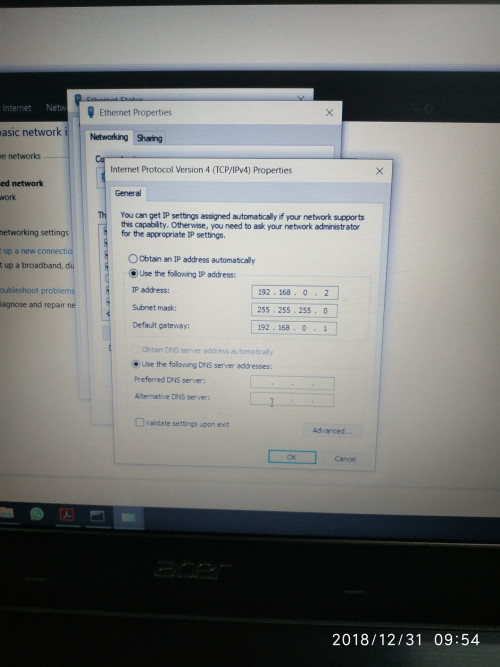 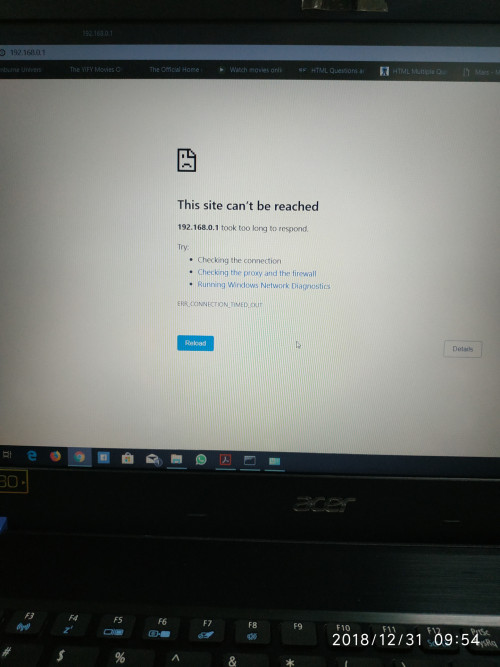 |
|
|
 Dec 31 2018, 01:17 PM Dec 31 2018, 01:17 PM
|

Senior Member
732 posts Joined: Dec 2017
|
QUOTE(xjoshualaw29 @ Dec 31 2018, 09:55 AM) Hello, Same here, used different laptop, different LAN cable and ports, duno wat problem could it be...I still have the same issue as yesterday. I don't know what seems to be the problem. Either antivirus/firewall BS kacau, or router firmware issue. Btw, your firmware name and date last updated, wat is it? Mine 2018 april make. Date last updated:2018-05-23 19:59:00 DIR-842 HW:C2 FW:3.01TM Edit: I suspect the firmware version is the culprit. Those who were successful, Idragon,misspinky and island0806, is your original TM firmware v3.00? I suspect TM has removed recovery mode. This post has been edited by imalmighty: Dec 31 2018, 02:35 PM |
|
|
Dec 31 2018, 04:03 PM
|

Junior Member
309 posts Joined: Jul 2012  
|
QUOTE(imalmighty @ Dec 31 2018, 02:17 PM) Same here, used different laptop, different LAN cable and ports, duno wat problem could it be... My friend told..his firmware DIR-842 HW:C2 FW:3.01TM. It's not broken version, maybe you had miss something..Either antivirus/firewall BS kacau, or router firmware issue. Btw, your firmware name and date last updated, wat is it? Mine 2018 april make. Date last updated:2018-05-23 19:59:00 DIR-842 HW:C2 FW:3.01TM Edit: I suspect the firmware version is the culprit. Those who were successful, Idragon,misspinky and island0806, is your original TM firmware v3.00? I suspect TM has removed recovery mode. just make sure, during reset only use lan 1 connect to your pc or laptop, unplug the wire connect to other ports. The reset button below your router, not behind its..at first time, my friend thought the wps button for reset because c1 is using wps button for reset but for our region c2 reset button at below of router.. for ip address just follow like island said or can use any ip address like 192.168.0.2 or 3..default gateway just fill 192.168.0.1..the reset way a bit tricky, unplug wire power, reset it and hold its a few second..then plug in again power cord, bare in mind just hold the reset button until you connect again the power cord..then enter 192.168.0.1 with still holding the reset button until you see the recovery mode..when you see the recovery mode, then you may release the reset button..do as island said in the steps..after successful the first file firmware, just straight update the second file firmware and lastly reset again your router..normal reset..before you make setup for unifi or maxis thingy..bare in mind, nat options doesn't show after that so cannot disabled or enabled..my friend said, before this his wireless not consistent stable of speed..a bit lag when streaming video..after done this firmware..a bit improve for a moment..well you know tm router..plus dlink..yucks..my friend use its for temporary before have budget soon to change different router..he will sell it soon.. |
|
|
Dec 31 2018, 04:59 PM
|
|
Senior Member
1,026 posts Joined: Jan 2003 From: Kuala Lumpur, Malaysia
|
imalmighty There is only 1 firmware release by TM FW:3.01TM . Take note this "FW:3.01TM" firmware are no where to be found & there are no U-turn after the "upgrade"
|
|
|
|
|
|
Dec 31 2018, 08:41 PM
|
|
Junior Member
304 posts Joined: Aug 2018
|
QUOTE(imalmighty @ Dec 31 2018, 01:17 PM) Same here, used different laptop, different LAN cable and ports, duno wat problem could it be... It's the same.Either antivirus/firewall BS kacau, or router firmware issue. Btw, your firmware name and date last updated, wat is it? Mine 2018 april make. Date last updated:2018-05-23 19:59:00 DIR-842 HW:C2 FW:3.01TM Edit: I suspect the firmware version is the culprit. Those who were successful, Idragon,misspinky and island0806, is your original TM firmware v3.00? I suspect TM has removed recovery mode. |
|
|
Dec 31 2018, 08:43 PM
|
|
Junior Member
304 posts Joined: Aug 2018
|
QUOTE(misspinky @ Dec 31 2018, 04:03 PM) My friend told..his firmware DIR-842 HW:C2 FW:3.01TM. It's not broken version, maybe you had miss something.. I see... I just want to play with it since it's just a spare haha. I'm currently using a Tenda AC10U so it's not an issue as it doesn't support IPv6 unless Tenda make a software update for it then most likely i won't need to reuse the TM router just to use IPv6.just make sure, during reset only use lan 1 connect to your pc or laptop, unplug the wire connect to other ports. The reset button below your router, not behind its..at first time, my friend thought the wps button for reset because c1 is using wps button for reset but for our region c2 reset button at below of router.. for ip address just follow like island said or can use any ip address like 192.168.0.2 or 3..default gateway just fill 192.168.0.1..the reset way a bit tricky, unplug wire power, reset it and hold its a few second..then plug in again power cord, bare in mind just hold the reset button until you connect again the power cord..then enter 192.168.0.1 with still holding the reset button until you see the recovery mode..when you see the recovery mode, then you may release the reset button..do as island said in the steps..after successful the first file firmware, just straight update the second file firmware and lastly reset again your router..normal reset..before you make setup for unifi or maxis thingy..bare in mind, nat options doesn't show after that so cannot disabled or enabled..my friend said, before this his wireless not consistent stable of speed..a bit lag when streaming video..after done this firmware..a bit improve for a moment..well you know tm router..plus dlink..yucks..my friend use its for temporary before have budget soon to change different router..he will sell it soon.. |
|
|
Jan 1 2019, 08:11 AM
|
|
Junior Member
309 posts Joined: Jul 2012
|
QUOTE(xjoshualaw29 @ Dec 31 2018, 09:43 PM) I see... I just want to play with it since it's just a spare haha. I'm currently using a Tenda AC10U so it's not an issue as it doesn't support IPv6 unless Tenda make a software update for it then most likely i won't need to reuse the TM router just to use IPv6. if wanna stick IPv6 for a moment can. later on, we are back to basic IPv4 as usual because uncertainty connection. This router suite for an extra ap if house that have another floor. For permanent main router usage, better skip or change to this one that not given by tm. This is just basic one with basic setting not much more can do and not very interesting, about coverage area my friend told his old tplink much better than this router his router have 3 aerial..put same location..plus the settings much more can get than than this dlink..dlink just good for high end or gaming one..if want basic to medium better your tenda and tplink..even, high end and gaming one the owner sell cheaper..  |
|
|
Jan 1 2019, 11:18 PM
|
|
Senior Member
732 posts Joined: Dec 2017
|
Duno why, i still cant get the 192.168.0.1 to load. I tried different scenarios, pull out the power cable, off and on the switch still fail...
Probably broadcom link chip is the culprit. All 3 of my laptops use that |
|
|
Jan 2 2019, 11:47 AM
|
|
Senior Member
1,791 posts Joined: Jul 2011
|
Is it worth to remove the so call "@unifi" SSID name as a result to get USB share port disable?
I rather to maintain the USB share port function and ignore the change of the SSID name. |
|
|
Jan 2 2019, 01:36 PM
|
|
Senior Member
1,026 posts Joined: Jan 2003 From: Kuala Lumpur, Malaysia
|
QUOTE(imalmighty @ Jan 1 2019, 11:18 PM) Duno why, i still cant get the 192.168.0.1 to load. I tried different scenarios, pull out the power cable, off and on the switch still fail... try 10 sec resetProbably broadcom link chip is the culprit. All 3 of my laptops use that ping 192.168.0.1 (once got reply directly load the recovery page) |
|
|
Jan 12 2019, 01:43 PM
|
|
Senior Member
732 posts Joined: Dec 2017
|
Out of nowhere it works suddenly
|
|
|
|
|
|
Jan 12 2019, 02:29 PM
|

Senior Member
2,741 posts Joined: Jan 2007
|
No USB port to remove @unifi? No for me.  revo_evon liked this post
|
|
|
Jan 12 2019, 11:13 PM
|
|
Senior Member
1,026 posts Joined: Jan 2003 From: Kuala Lumpur, Malaysia
|
QUOTE(JayceOoi @ Jan 12 2019, 02:29 PM) No USB port to remove @unifi? No for me. No u-turn , didn't manage to get the original firmware from TM Unifi / D-Link  |
|
|
Jan 13 2019, 11:20 AM
Show posts by this member only | IPv6 | Post
#36
|
|
Junior Member
132 posts Joined: Jun 2017
|
Anyone know this dlink dir842 can do port bridge from lan4 to ssid? I set the 2.4ghz wifi to iptv however hypptv superb laggy and unable to watch. The older huawei router can bind lan4 to another ssid which is very stable to me. Else can anyone pls suggest what router can bind lan port to ssid? Thanks in adv
|
|
|
Jan 14 2019, 06:54 AM
|
|
Senior Member
732 posts Joined: Dec 2017
|
QUOTE(hioniq @ Jan 13 2019, 11:20 AM) Anyone know this dlink dir842 can do port bridge from lan4 to ssid? I set the 2.4ghz wifi to iptv however hypptv superb laggy and unable to watch. The older huawei router can bind lan4 to another ssid which is very stable to me. Else can anyone pls suggest what router can bind lan port to ssid? Thanks in adv If can avoid wireless, do so, unless no choice. Wireless is not a good way of transmiting real time data, unless u can make make hypptv delay by say, 5 minutes, more room and time for your stb to buffer data, your stb can download streaming data b4hand this way. |
|
|
Jan 16 2019, 07:09 PM
|

Junior Member
513 posts Joined: Jan 2019
|
QUOTE(JayceOoi @ Jan 12 2019, 02:29 PM) No USB port to remove @unifi? No for me. @unifi can be easily removed with postman & interceptor method on chrome extension...https://forum.lowyat.net/index.php?showtopi...post&p=89567231 This post has been edited by Pica888: Jan 16 2019, 07:23 PM |
|
|
Jan 20 2019, 10:12 PM
Show posts by this member only | IPv6 | Post
#39
|

Junior Member
10 posts Joined: Jul 2012 From: Kuala Lumpur, MALAYSIA
|
Wow this seems new!
I wanted to try, but it's not working. ONE WAY works, but this is easily overridden if you login using web! APPARENTLY if you login using phone, it will redirect to mobile page: http://192.168.0.1/MobileWiFi.html On this page, you can delete it manually. LIKE I SAID, if you login using web, it will override that back. In the mean time, if anyone can really remove the @unifi, do share info. I hate it! |
|
|
Jan 21 2019, 08:52 AM
|
|
Senior Member
2,741 posts Joined: Jan 2007
|
QUOTE(MHaffiezMNazri @ Jan 20 2019, 10:12 PM) Wow this seems new! Will it comes back after reboot router?I wanted to try, but it's not working. ONE WAY works, but this is easily overridden if you login using web! APPARENTLY if you login using phone, it will redirect to mobile page: http://192.168.0.1/MobileWiFi.html On this page, you can delete it manually. LIKE I SAID, if you login using web, it will override that back. In the mean time, if anyone can really remove the @unifi, do share info. I hate it! |
| Change to: |  0.0272sec 0.0272sec
 0.32 0.32
 6 queries 6 queries
 GZIP Disabled GZIP Disabled
Time is now: 6th December 2025 - 11:59 PM |
 Quote
Quote