Outline ·
[ Standard ] ·
Linear+
Unifi D-Link DIR-842 - Remove @unifi SSID
|
eclectice
|
 Jan 22 2019, 10:48 AM Jan 22 2019, 10:48 AM
|

|
QUOTE(xjoshualaw29 @ Dec 31 2018, 09:55 AM) Hello, I still have the same issue as yesterday. I don't know what seems to be the problem. 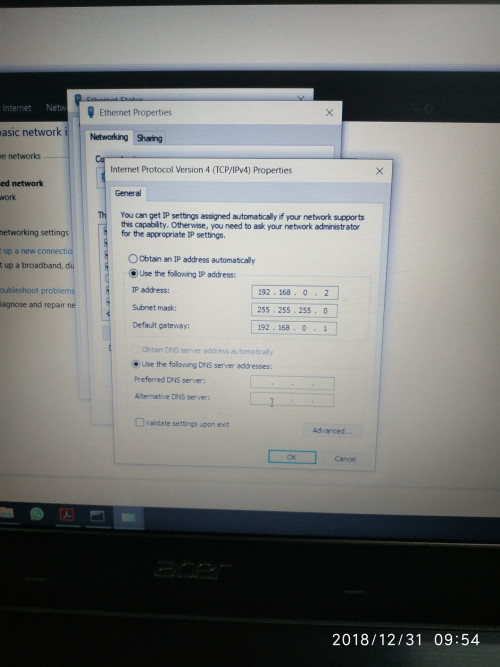 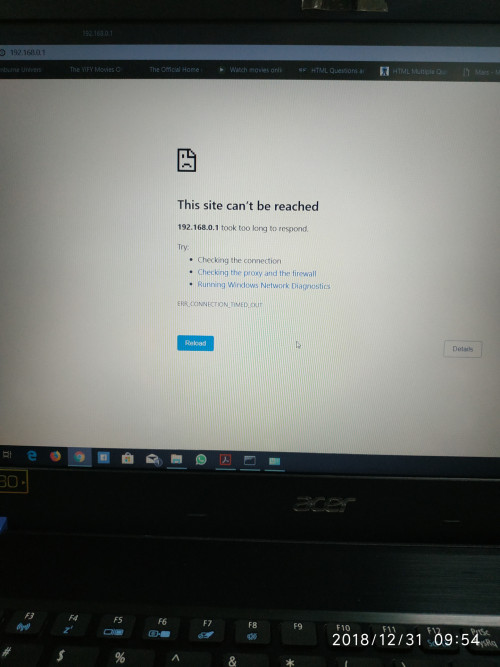 To verify the DNS is working or not to resolve the name address from the Internet into its IP address correctly, on the DOS command prompt, type: nslookup w.google.comYou should get DNS resolution, at least like this output: Server: google-public-dns-a.google.com
Address: 8.8.8.8
Non-authoritative answer:
Name: www3.l.google.com
Addresses: 2404:6800:4001:80d::200e
172.217.31.110
Aliases: w.google.comSo, if the automatic DNS resolution is not working, use the manual DNS setup instead on the TCP/IP properties (you can use Google DNS). Probably, the default DNS from the router side could not resolve it when you use the automatic DNS setup. This post has been edited by eclectice: Jan 22 2019, 10:48 AM |
|
|
|
|
|
Pica888
|
Jan 22 2019, 09:32 PM
|
|
|
QUOTE(MHaffiezMNazri @ Jan 20 2019, 10:12 PM) In the mean time, if anyone can really remove the @unifi, do share info. I hate it! Try the postman method, i successfully removed@unifi suffix on both ZTE and TPLink VR1200v using this method. QUOTE(JayceOoi @ Jan 21 2019, 08:52 AM) Will it comes back after reboot router? and the @unifi suffix is gone even after router rebooted.. This post has been edited by Pica888: Jan 22 2019, 09:55 PM |
|
|
|
|
|
cheenon
|
Feb 1 2019, 01:05 AM
|
New Member

|
QUOTE(Pica888 @ Jan 22 2019, 09:32 PM) Try the postman method, i successfully removed@unifi suffix on both ZTE and TPLink VR1200v using this method. and the @unifi suffix is gone even after router rebooted.. Can You give a guide on how? I hve installed everything. but couldn't get like the post suggest. cant find SSID or ESSID name on postman with interceptor |
|
|
|
|
|
Pica888
|
Feb 1 2019, 07:07 PM
|
|
|
QUOTE(cheenon @ Feb 1 2019, 01:05 AM) Can You give a guide on how? I hve installed everything. but couldn't get like the post suggest. cant find SSID or ESSID name on postman with interceptor The guidance provided by KKS21199 is very detailed...try to search for "@unifi" on postman and delete it.. The interface might be different depending on the modem brand, mine is VR1200v  This post has been edited by Pica888: Feb 1 2019, 10:14 PM
 |
|
|
|
|
|
davidw89
|
Jul 20 2019, 01:59 AM
|
Getting Started
|
Anyone using V 3.10? I would like to "upgrade" but the problem is I'm not sure how to configure it to work properly with Unifi afterwards. Also, is this version stable?
This post has been edited by davidw89: Jul 20 2019, 01:59 AM
|
|
|
|
|
|
davidw89
|
Jul 21 2019, 12:24 AM
|
Getting Started
|
DIR842-C2 UNIFI firmware Just completed flashing today  . DIR842C1_FW310b05.bi did not work for me, it shows up with an error message. So I had to use the latest version 3.11B05, which you can get from here: https://support.dlink.com/productinfo.aspx?m=DIR-842Follow set to put router into recovery mode, flash this firmware (DIR842C1_FW302b03_middle.bin), reboot, change IP address to automatically detect and then flash with the latest version. Works great! |
|
|
|
|
|
RetroMayday
|
Jul 23 2019, 10:09 AM
|
Getting Started
|
QUOTE(davidw89 @ Jul 21 2019, 12:24 AM) DIR842-C2 UNIFI firmware Just completed flashing today . DIR842C1_FW310b05.bi did not work for me, it shows up with an error message. So I had to use the latest version 3.11B05, which you can get from here: https://support.dlink.com/productinfo.aspx?m=DIR-842Follow set to put router into recovery mode, flash this firmware (DIR842C1_FW302b03_middle.bin), reboot, change IP address to automatically detect and then flash with the latest version. Works great! Someone is working on OpenWrt support for DIR-842 C2.  https://github.com/openwrt/openwrt/pull/2259 https://github.com/openwrt/openwrt/pull/2259 |
|
|
|
|
|
davidw89
|
Jul 23 2019, 11:57 PM
|
Getting Started
|
QUOTE(RetroMayday @ Jul 23 2019, 12:09 PM) Someone is working on OpenWrt support for DIR-842 C2. https://github.com/openwrt/openwrt/pull/2259Interesting! Cool!! How much better is OpenWrt compared to the firmware provided by TP-Link? |
|
|
|
|
|
RetroMayday
|
Jul 24 2019, 08:38 AM
|
Getting Started
|
QUOTE(davidw89 @ Jul 23 2019, 11:57 PM) Interesting! Cool!! How much better is OpenWrt compared to the firmware provided by TP-Link? 1. Latest security and performance improvements on much newer Linux LTS kernels. 2. Upcoming OpenWrt 19.07 has network "flow offloading" which improves routing performance by ~2x. 3. Smart Queue Management that fights Buffer Bloat and lowers routing latency. This post has been edited by RetroMayday: Jul 24 2019, 11:17 AM |
|
|
|
|
|
taqu
|
Jul 24 2019, 10:57 AM
|
|
|
QUOTE(RetroMayday @ Jul 24 2019, 08:38 AM) 1. Latest security and performance improvesments on much newer Linux LTS kernels. 2. Upcoming OpenWrt 19.07 has network "flow offloading" which improves routing performance by ~2x. 3. Smart Queue Management that fights Buffer Bloat and lowers routing latency. Finally OpenWRT supports "flow offload" which TP-Link calls "NAT Boost", others call "CTF" (Cut-through forwarding) etc I really hope the port would be a success. Many DIR-842 users can benefit  |
|
|
|
|
|
filage
|
Jul 27 2019, 06:00 PM
|
|
|
Hi guys, may I know whats the default password for this router? With firmware 3.01TM
This post has been edited by filage: Jul 27 2019, 06:00 PM
|
|
|
|
|
|
jackcolentern P
|
Jul 31 2019, 10:04 PM
|
New Member
|
QUOTE(RetroMayday @ Jul 23 2019, 10:09 AM) Someone is working on OpenWrt support for DIR-842 C2. https://github.com/openwrt/openwrt/pull/2259Hi, changes has been merged. Feel free to test it out Unfortunately, seems like Dlink does not provide firmware download for for C2, so you cant go back to C2 firmware after flashing (you can go back to C1 stock firmware but you will lose the USB functionality) Current Openwrt snapshot based on 4.19 kernel has a broken Flow offload (HWNAT) which limit your lan-wan speed to around 350Mbps max, you can build a 4.14 firmware and everything will works fine. |
|
|
|
|
|
RetroMayday
|
Jul 31 2019, 10:28 PM
|
Getting Started
|
QUOTE(jackcolentern @ Jul 31 2019, 10:04 PM) Hi, changes has been merged. Feel free to test it out Unfortunately, seems like Dlink does not provide firmware download for for C2, so you cant go back to C2 firmware after flashing (you can go back to C1 stock firmware but you will lose the USB functionality) Current Openwrt snapshot based on 4.19 kernel has a broken Flow offload (HWNAT) which limit your lan-wan speed to around 350Mbps max, you can build a 4.14 firmware and everything will works fine. Thanks for all the hard work.  It was much more difficult than I hoped.  They've located the commit that caused the problem. Should be fixed soon. https://bugs.openwrt.org/index.php?do=detai...mary&sort2=desc |
|
|
|
|
|
jackcolentern P
|
Jul 31 2019, 10:43 PM
|
New Member
|
QUOTE(RetroMayday @ Jul 31 2019, 10:28 PM) Thanks for all the hard work. It was much more difficult than I hoped. They've located the commit that caused the problem. Should be fixed soon. https://bugs.openwrt.org/index.php?do=detai...mary&sort2=descIf you want to test, I can give you a 4.14 based firmware to try out, but please remember that you cant go back to C2 firmware afterwards. and please remember that there is a (small) chance to brick your device if you are not careful ya  |
|
|
|
|
|
RetroMayday
|
Aug 1 2019, 09:21 AM
|
Getting Started
|
QUOTE(jackcolentern @ Jul 31 2019, 10:43 PM) If you want to test, I can give you a 4.14 based firmware to try out, but please remember that you cant go back to C2 firmware afterwards. and please remember that there is a (small) chance to brick your device if you are not careful ya Thanks but I'll wait for release version, seeing that the OpenWrt repo is still in full churning mode. |
|
|
|
|
|
jackcolentern P
|
Aug 1 2019, 02:33 PM
|
New Member
|
QUOTE(RetroMayday @ Aug 1 2019, 09:21 AM) Thanks but I'll wait for release version, seeing that the OpenWrt repo is still in full churning mode. Ok no problem!  |
|
|
|
|
|
fainonline
|
Aug 28 2019, 05:03 PM
|
New Member
|
QUOTE(davidw89 @ Jul 21 2019, 12:24 AM) DIR842-C2 UNIFI firmware Just completed flashing today . DIR842C1_FW310b05.bi did not work for me, it shows up with an error message. So I had to use the latest version 3.11B05, which you can get from here: https://support.dlink.com/productinfo.aspx?m=DIR-842Follow set to put router into recovery mode, flash this firmware (DIR842C1_FW302b03_middle.bin), reboot, change IP address to automatically detect and then flash with the latest version. Works great! Thanks, it works! now i don't need to see @Unifi thingy anymore  |
|
|
|
|
|
yujinloh
|
Sep 14 2019, 01:18 AM
|
New Member
|
Thx OP ldragon for making this guide Tried on a DIR-842 C2 firmware 3.01TM and it works without issues. Here's what I did 1.Download 3.11B05 and 3.10B05 firmware from here. 2.Extract the .bin firmware (DIR842C1_FW302b03_middle.bin and DIR842C1_FW311b05.bin) 3.Set the default ip to 192.168.0.5 (refer to op) 4.Put the router into recovery.(remember to note down isp username and password) 5.Flash DIR842C1_FW302b03_middle.bin and then DIR842C1_FW311b05.bin. 6.Change back to default ip when upgrade firmware to 3.11 success. Now @unifi is dead |
|
|
|
|
|
Max
|
Sep 20 2019, 07:54 PM
|
|
|
thanx for all the help in here. managed to flash as suggested. now i can get close to 300mps as my package. b4 this only around 100ish mbps speed test.  |
|
|
|
|
|
Max
|
Sep 20 2019, 08:29 PM
|
|
|
Ok.. after updated.. my internet is ok.. but hypptv problem..
Can view for awhile only.. then satellite dish with X.
I have try reset the vlan setting.. still the same..
|
|
|
|
|



 Quote
Quote


 0.0262sec
 0.26
0.26
 6 queries
 GZIP Disabled