

QUOTE(JadenFongV @ Nov 2 2018, 09:03 AM)
Do u all switch on the router/modem for 24/7?

yes.Unifi Official TM UniFi High Speed Broadband Thread V36, READ 1ST PAGE FOR TURBO SPEED INFO!
|
|
 Nov 2 2018, 09:31 AM Nov 2 2018, 09:31 AM
Return to original view | Post
#1
|
 
Senior Member
1,304 posts Joined: Mar 2010  
|
QUOTE(JadenFongV @ Nov 2 2018, 09:03 AM) Do u all switch on the router/modem for 24/7? yes. |
|
|
|
|
|
Nov 2 2018, 05:23 PM
Return to original view | Post
#2
|
|
Senior Member
1,304 posts Joined: Mar 2010
|
QUOTE(JCogent @ Nov 2 2018, 03:48 PM) BTU >> Concealed Cat6 >> Router >> Laptop = 100Mbps not sure if this helps, but.. try checking if your BTU >> Concealed CAT6 >> Router connection - Is your Router capable to display connection speed from BTU (i.e. is it showing Gigabit speed here?) BTU >> Router >> Concealed Cat6 >> Laptop = 300Mbps - what about here, is it showing Gigabit speed for Router to BTU connection? shows Gigabit speed or 100Mbps. if it's showing Gigabit speed, try performing speedtest again for BTU >> Concealed Cat6 >> Router >> Laptop = 100Mbps but with some restarts done. if it still shows 100Mbps, try letting it run for some time 10-15mins, then test again. try it with tm.speedtest.net website instead of the original version. ------------------ My 100Mbps sometimes drop its connection to 50Mbps, and while i'm troubleshooting it for some minutes, it just cranks back to 100Mbps as per normal without doing anything - just a certain period of time. not sure why, but it's not that serious (happened 1-2x times so far) so i let it be & just monitor it. This post has been edited by pokchik: Nov 2 2018, 05:27 PM |
|
|
Nov 2 2018, 10:03 PM
Return to original view | Post
#3
|
|
Senior Member
1,304 posts Joined: Mar 2010
|
QUOTE(SSJBen @ Nov 2 2018, 08:47 PM) Good. hear, hear!No more stupid roll-the-dice-guess-who-wins packages. Everyone pay the same according to the plan they subscribe to, that's the way it should have been in the first place. but have to wait till its implementation, though.. hopefully no u-turns or telco pleas etc. postponing the actual implementation. |
|
|
Nov 8 2018, 02:09 PM
Return to original view | Post
#4
|
|
Senior Member
1,304 posts Joined: Mar 2010
|
waiting for TM to officially announce >100Mbps plans..
 |
|
|
Nov 12 2018, 09:20 AM
Return to original view | Post
#5
|
|
Senior Member
1,304 posts Joined: Mar 2010
|
QUOTE(Sylleth @ Nov 12 2018, 08:59 AM) Just got Turbo-ed from 10Mbps to 100Mbps about 1.5 week ago. urm.. However everyday when I do the speedtest and download something, the speed is unstable. Sometimes it'll get you as high as 8MB/s (that's the highest peak I've seen so far, but it lasted for only few minutes), and sometimes as low as 2MB/s and I'm the only one using the Internet. So far the stable download speed I'm getting is between 2MB/s to 5MB/s. Is there a catch there? Like, is it not constantly 10MB/s but "UP" to 10MB/s? have you ever experienced 100Mbps or close to 100Mbps at all for the past 1.5weeks? i mean, the way you phrase your question is not being  for not reaching 100Mbps, for not reaching 100Mbps,but rather about your connection not up to 10Mbps. and how do you confirm your upgrade, is your online Unifi portal showing 100Mbps Turbo Upgrade 2018? This post has been edited by pokchik: Nov 12 2018, 09:21 AM |
|
|
Nov 12 2018, 10:06 AM
Return to original view | Post
#6
|
|
Senior Member
1,304 posts Joined: Mar 2010
|
QUOTE(voncrane @ Nov 12 2018, 09:25 AM) Mbps vs MBps.. ah, damn. my bad.   |
|
|
|
|
|
Nov 12 2018, 10:11 AM
Return to original view | Post
#7
|
|
Senior Member
1,304 posts Joined: Mar 2010
|
QUOTE(Sylleth @ Nov 12 2018, 09:30 AM)  Turbo 100Mbps, so I should be getting 10MB/s download speed. Though yeah voncrane kinda confirmed my suspicion, usually they always say it's "UP TO" 10Mbps, not constant so  Afternoon and evening I get worse speed, about 3MB/s to 5MB/s. I had high hopes when I got the Turbo but ehh, I guess it's still quite a huge improvement since this is quite an old UNIFI package for years. |
|
|
Nov 17 2018, 03:15 PM
Return to original view | Post
#8
|
|
Senior Member
1,304 posts Joined: Mar 2010
|
Shit, RM129 become RM159 after 24mths.
TM penipu scammer. I got conned. |
|
|
Dec 4 2018, 11:46 AM
Return to original view | Post
#9
|
|
Senior Member
1,304 posts Joined: Mar 2010
|
QUOTE(weikee @ Dec 4 2018, 09:33 AM) My original speed was 30mbps/10mbps with old btu (100mbps). Submitted my unifi Turbo upgrade on 30th Nov, yesterday evening i just try reboot my BTU. And my speed bump up to 100mbps/50mbps. your 100/50 sounds like 100Mbps package,Now need to wait TM to change my BTU. Any idea how long it take for the replacement of BTU? either Turbo or BEST. What is your package now stated in ur unifi portal? If ur old BTU/ONU is 100, meant for your 100Mbps.. Then why would u need to change ur BTU? This post has been edited by pokchik: Dec 4 2018, 11:47 AM |
|
|
Dec 4 2018, 12:20 PM
Return to original view | Post
#10
|
|
Senior Member
1,304 posts Joined: Mar 2010
|
QUOTE(weikee @ Dec 4 2018, 11:52 AM) The portal and speed test 1. what is your current BTU/ONU? 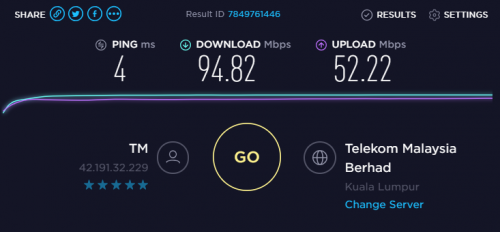 2. if your speedtest is performed via LAN, just make sure that the connection quality is Gigabit (i.e. LAN port, ethernet cable, etc). |
|
|
Dec 4 2018, 12:22 PM
Return to original view | Post
#11
|
|
Senior Member
1,304 posts Joined: Mar 2010
|
QUOTE(MusicForLife @ Dec 4 2018, 12:07 PM) Requested to so called downgrade my RYE 100mbps to current RM129, was told that if we terminate the line before the contract ends, we have to pay RM129 x “remaining month”. 1. current : unifi RYE 2017 100Mbps RM189 or so.WTH?! Then what’s the point to terminate. 2. if you change to 100Mbps BEST, you'll start new contract paying RM129/mth. 3. the contract is 24mths. 4. if you terminate the BEST package before 24mth contract ends, you'll need to pay RM129 x Remaining Month. what was your question again? This post has been edited by pokchik: Dec 4 2018, 12:24 PM |
|
|
Dec 4 2018, 12:35 PM
Return to original view | Post
#12
|
|
Senior Member
1,304 posts Joined: Mar 2010
|
QUOTE(weikee @ Dec 4 2018, 12:27 PM) Btu is old Huawei, the connection speed to my mikrotik router only 100mbps. then you have the right to request for a new ONU/BTU to support your 300Mbps.Tested on wifi 5ghz and LAN, all same result. LAN to router is 1gbps, WiFi is ~300mbps phrase your story properly, i.e. lay down your facts right since not all TM CS are technical enough. sometimes they're technically good, but psychologically drained because too many customers do not comprehend the difference between wifi, wired, 100Mbps, Gigabit, etc. and always barking up like mad because of #jahanamkanTM campaign. LiveChat/100/TM Point visit - your choice, and you're right that it should not be charged for replacement. |
|
|
Dec 4 2018, 04:36 PM
Return to original view | Post
#13
|
|
Senior Member
1,304 posts Joined: Mar 2010
|
QUOTE(St. Teh @ Dec 4 2018, 04:14 PM) Cannot downgrade? ANy reason? currently only 30Mbps & 100Mbps available.rumoured for >100Mbps packages somewhere in Feb'19 (best case i guess). This post has been edited by pokchik: Dec 4 2018, 04:37 PM |
|
|
|
|
|
Dec 4 2018, 04:39 PM
Return to original view | Post
#14
|
|
Senior Member
1,304 posts Joined: Mar 2010
|
QUOTE(weikee @ Dec 4 2018, 01:37 PM) Portal didn't mention of change of btu. there was a case before that Unifi's router/BTU info for a user is not the same aswhat the user physically own.. so maybe there was a mismatch that Unifi thought your router's capable when in fact it really is not. |
|
|
Dec 4 2018, 04:51 PM
Return to original view | Post
#15
|
|
Senior Member
1,304 posts Joined: Mar 2010
|
QUOTE(Bensonc @ Dec 4 2018, 04:39 PM) I understand 100 percent speed is not possible, but I am receiving 20/300 as of now, which is less than 10 percent, can't really be.... i would like to propose proper troubleshooting, if you're still not convinced.. or "can't really be"Isn't powerline consider LAN, or what LAN you are referring to? segmentize your connection like so: [Internet] --A--> [ONU/BTU] --B--> [Router] --C-->[Device] start from your [Device] working upwards toward [Internet] 1. check your [Equipment] capability, and also you connection --x--> capability, can it support/capable enough to deliver/receive 300Mbps. 2. work from [Device] upwards to your router directly, cut-out --C--> (basically your powerline) and connect your laptop directly to your router. can you get the 300Mbps? if you segmentize, you're able to just troubleshoot a bit more to find out the real culprit for your 20Mbps. --------- *i did the same with my in-law's 500Mbps. they complain that they're getting only 30Mbps UL/30Mbps DL. turns out they're still using 2.4GHz wifi (TPLink AC1200) and their devices' limitation. tested wired connection via laptop showing 500Mbps and with the devices that we have, i was only able to get max. 250Mbps DL with my RT-AC86U + iPhone 7. This post has been edited by pokchik: Dec 4 2018, 04:59 PM |
|
|
Dec 4 2018, 05:00 PM
Return to original view | Post
#16
|
|
Senior Member
1,304 posts Joined: Mar 2010
|
QUOTE(Bensonc @ Dec 4 2018, 04:56 PM) I shall work on it to get a long cat 6 cable. thanks for the advise. get CAT 7 if your budget allows, maybe?(what's with the distance and all.. probably CAT 7 better option) |
|
|
Dec 4 2018, 05:19 PM
Return to original view | Post
#17
|
|
Senior Member
1,304 posts Joined: Mar 2010
|
QUOTE(duke_hunt @ Dec 4 2018, 05:10 PM) hhmm...i just saw my service got upgraded to 500mbps yesterday, upload can hit 100mbps while download via wifi for desktop, laptop and phone is at max 50mbps... i had a dejavu feeling.. same problem like weikee, it seems?i didnt received any sms regarding the completion of the upgrade.. i have restarted the BTU but with same result... so, basically i have to contact cust service regarding this, correct? thanks is advance.. https://forum.lowyat.net/index.php?showtopi...post&p=91123506 This post has been edited by pokchik: Dec 4 2018, 05:20 PM |
|
|
Jan 2 2019, 03:23 PM
Return to original view | Post
#18
|
|
Senior Member
1,304 posts Joined: Mar 2010
|
QUOTE(jiaen0509 @ Jan 2 2019, 12:23 PM) My BTU Lan1 not lighting and Router red light. is it something like this?Is it Router issue or BTU LAN1 port issue? Any sifu know it? |
|
Topic ClosedOptions
|
| Change to: |  0.0346sec 0.0346sec
 0.55 0.55
 7 queries 7 queries
 GZIP Disabled GZIP Disabled
Time is now: 5th December 2025 - 08:44 PM |
 Quote
Quote