Outline ·
[ Standard ] ·
Linear+
Unifi Official TM UniFi High Speed Broadband Thread V36, READ 1ST PAGE FOR TURBO SPEED INFO!
|
ldragon
|
 Nov 3 2018, 12:35 AM Nov 3 2018, 12:35 AM
|

|
QUOTE(kevin916587 @ Nov 3 2018, 12:13 AM) Anyone using Dlink DIR-842, hardware version C2? Can please share your download spd/upload spd/your package technician came my home and changed the router, this is the second DLINK i got from TM. the first Dlink was suspected malfunction, and they changed the new Dlink same model, believe it can delivers speed up to 80% of my plan Wifi 5Ghz - standing in right in front of the modem 366Mbps download/192Mbps upload (800Mbps) plan, is this the optimum speed i expect for? refer to this review https://www.blacktubi.com/review/d-link-dir-842-review/ |
|
|
|
|
|
ldragon
|
Nov 20 2018, 10:41 PM
|
|
|
Use it as an AP. SSID without @unifi QUOTE(imalmighty @ Nov 20 2018, 09:52 PM) So one cant perform the usual "baptise" routine to "salvate" TM variant dir842 from TM's custom firmware? Flash regional firmware like c1200 v1's eu firmware is no go? I thought dir842@rm80 is a steal! Haha |
|
|
|
|
|
ldragon
|
Nov 20 2018, 10:54 PM
|
|
|
QUOTE(imalmighty @ Nov 20 2018, 10:53 PM) U mean when it is at AP mode, the @unifi suffix will disappear? Yes |
|
|
|
|
|
ldragon
|
Nov 20 2018, 11:02 PM
|
|
|
QUOTE(imalmighty @ Nov 20 2018, 10:59 PM) I see, thx. So, it is a wise choice that i pulled the brake on getting a Dlink Dir842@RM80? How much does it worth in you guys eyes? Haha i am selling off my D-Link DIR-842 AC1200. Upgrading to AC2600 |
|
|
|
|
|
ldragon
|
Nov 21 2018, 12:58 AM
|
|
|
QUOTE(cskean @ Nov 21 2018, 12:30 AM) So for the DIR-842, which method we are using to remotely access to it? It would be convenient if it comes with such option, as I don't need to go back to my parent house to troubleshoot for them... This is how you can remote access the router or home CCTV etc. Free for D-Link user. www.dlinkddns.com |
|
|
|
|
|
ldragon
|
Dec 3 2018, 08:40 PM
|
|
|
QUOTE(owikh84 @ Dec 3 2018, 08:12 PM) 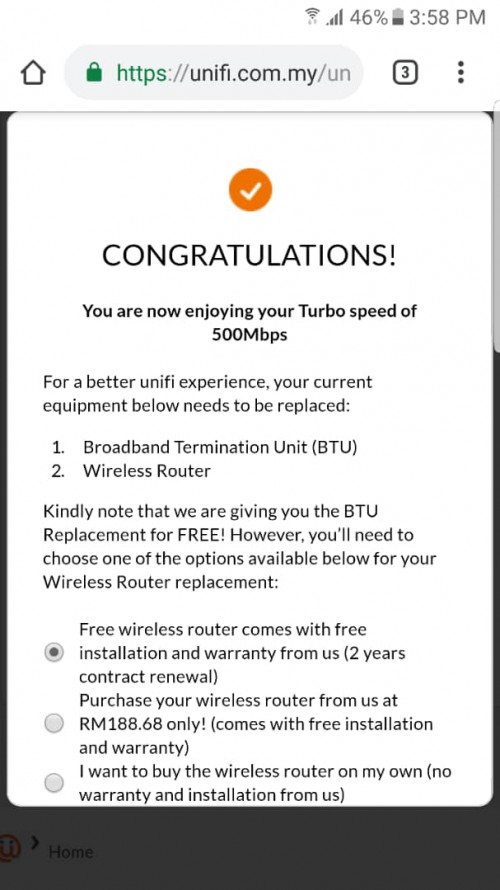 What do you guys think? Should I opt for the RM188.68 router or any other better option? The wireless router they sell is AC1200 best for 300Mbps wi-fi. Better spend RM300 - RM500 for AC2600 |
|
|
|
|
|
ldragon
|
Dec 4 2018, 12:45 PM
|
|
|
QUOTE(weikee @ Dec 4 2018, 11:52 AM) The portal and speed test  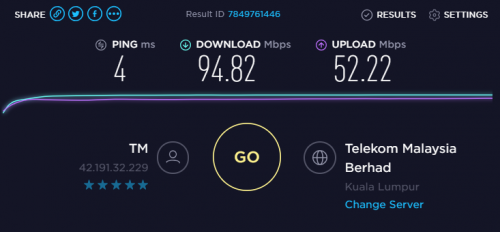 What is the model of the BTU? upload photos |
|
|
|
|
|
ldragon
|
Dec 4 2018, 02:06 PM
|
|
|
QUOTE(weikee @ Dec 4 2018, 01:36 PM) Can't recall now. Is confirm 100mbps because i can check connection speed on my mikrotik. the btu is silver color what is the model of your mikrotik router? |
|
|
|
|
|
ldragon
|
Dec 4 2018, 02:52 PM
|
|
|
QUOTE(weikee @ Dec 4 2018, 02:41 PM) https://mikrotik.com/product/hap_ac2#fndtn-specificationsGood stuff with Gigabit ports  |
|
|
|
|
|
ldragon
|
Dec 4 2018, 04:00 PM
|
|
|
QUOTE(gedebe @ Dec 4 2018, 03:51 PM) what kind of router we will get when TM turbo and do u think is it worth it? I think the warranty is just 1 year as i was offered the same just now. D-Link 842 AC1200. The wi-fi is good for 300Mbps |
|
|
|
|
|
ldragon
|
Dec 4 2018, 10:02 PM
|
|
|
QUOTE(weikee @ Dec 4 2018, 09:47 PM) Just check again my btu, not silver is the black huawei hg850a, is confirm this one can't use 1gbps, must be helping many friend setup till i thought i have the silver btu  Same as my 1st BTU from Unifi "black huawei hg850a" all the ports 10/100Mbps . Got it replaced when I got the "Thank you surprise" free 100Mbps upgrade. Make a report they going to replace it. |
|
|
|
|
|
ldragon
|
Dec 5 2018, 01:40 PM
|
|
|
QUOTE(okaoki @ Dec 5 2018, 01:16 PM) I'm currently on Unifi VIP 10 (free upgrade from 5 Mbps) paying Rm 149 (157.95) per month , without contract using old hardware (modem and router). Is there any deals for old user , and plans . Is free upgrade on the way? do i terminate this account and get unifi advance? OR switch to MaxisHomefibre??? PLease anyone give me some advice. Are you on landed or high rise property ? Landed: VIP 10 , free turbo upgrade 100Mbps price remain the same. Might as well sign up Unifi Lite 100Mbps RM129 High rise property: VIP 10 , 50Mbps RM99 ?? walk in TM Point and inquire. |
|
|
|
|
|
ldragon
|
Dec 5 2018, 03:01 PM
|
|
|
QUOTE(okaoki @ Dec 5 2018, 02:49 PM) Landed house , does the Unifi lite offer STB? do they send me new hardwares? modem router and even cables etc. i know i get my contract refresh . Im just mad im still 149 for vip 10 , been using unifi for 7 years. goto Tmpoint / change package web: https://unifi.com.my. During on-site installation , inform them to link your old STB to the new package & it is FOC |
|
|
|
|
|
ldragon
|
Dec 5 2018, 03:09 PM
|
|
|
QUOTE(DavidtheSingle @ Dec 5 2018, 02:16 PM) HI, I recently get the 500mbps upgrade and because of my old router innatech rg4332 I can't get max speed.I go to unifi account to check whether I get the modem upgrade but just btu replacement and no modem replacement. I don't want to spend money on a new modem and if can get about 300mbps happy already. 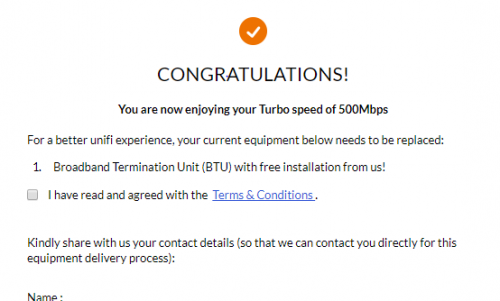 Please attach photos of your BTU (modem) & wireless router. As what we know the "Riger Innatech RG4332" wireless router This post has been edited by ldragon: Dec 5 2018, 03:13 PM |
|
|
|
|
|
ldragon
|
Dec 5 2018, 03:18 PM
|
|
|
QUOTE(DavidtheSingle @ Dec 5 2018, 03:12 PM) Oops, I mean wireless router, because I saw his post and he can replace free wireless router. Free wireless router from TM Unifi = renew 2 yrs Unifi contract |
|
|
|
|
|
ldragon
|
Dec 5 2018, 04:15 PM
|
|
|
QUOTE(DavidtheSingle @ Dec 5 2018, 04:11 PM) 100mbps but my cable is cat6 test both BTU (modem) & wireless router LAN ports. check the status 100Mbps or 1Gbps |
|
|
|
|



 Quote
Quote
 0.2260sec
 0.75
0.75
 7 queries
 GZIP Disabled