Welcome Guest ( Log In | Register )

Bump Topic Topic Closed RSS Feed

Outline · [ Standard ] · Linear+

Unifi Official TM UniFi High Speed Broadband Thread V36, READ 1ST PAGE FOR TURBO SPEED INFO!

views
     
blacktubi
post Nov 14 2018, 11:37 AM

-
Group Icon
Elite
8,408 posts

Joined: Jul 2008

QUOTE(imalmighty @ Nov 13 2018, 11:52 PM)
What's the difference in putting the switch b4 router like blacktubi, swap the order of router and switch. hmm.gif

From ur setup, seems like u dont have to dial pppoe on AP anymore
*
My setup is a lot more simpler.

This is involve transporting normal LAN traffic and HyppTV traffic in a single pipe after the router.

May have some issue with HyppTV quality due to QoS.

JohnLai
I always wondered how big is the impact of speed after the patch.

My 4200U laptop with SSD can speedtest at 1G just fine.

This post has been edited by blacktubi: Nov 14 2018, 11:38 AM
blacktubi
post Nov 19 2018, 10:17 PM

-
Group Icon
Elite
8,408 posts

Joined: Jul 2008

QUOTE(SilentVampire @ Nov 19 2018, 03:51 PM)
Hope no one is still using the DIR-850L. Yet another new vulnerability discovered on this lousy router: https://www.lowyat.net/2018/173577/yet-anot...ication-bypass/
*
TM and TIME units are not affected by this.

EDIT: Only affect hardware revision A. TM and TIME are providing revision B.

This post has been edited by blacktubi: Nov 19 2018, 10:17 PM
blacktubi
post Nov 21 2018, 12:17 PM

-
Group Icon
Elite
8,408 posts

Joined: Jul 2008

QUOTE(darkearth @ Nov 21 2018, 11:55 AM)
Hi,

Need a recommendation, of the recommended 800mbps routers in page 1 , which one is the most value for money ?
*
If you are looking for value for money, that will probably be Archer C2300.
blacktubi
post Nov 22 2018, 05:25 PM

-
Group Icon
Elite
8,408 posts

Joined: Jul 2008

QUOTE(cskean @ Nov 22 2018, 04:56 PM)
Hmm, a bit strange here.

Previously I tried speedtest with CAT 6 LAN connection with my TP Link AC1200, I was able to achieved 780+-Mbps DL and over 200Mbps UL...

Today I went to cut the same cable into few shorter one, and test it again. The max I could get is about 570~650Mbps DL only. UL wise not much difference...

Is there anything to do with the connector quality or other issue here?

Microcode issue solved. Using i5-3210M, 8GB DDR3, 250GB SSD, Unifi 800MB~
*
Did you messed up the crimping? laugh.gif

AC1200 is not a good router for 800Mbps. The speed may be limited when you have more devices going on.
blacktubi
post Nov 22 2018, 10:01 PM

-
Group Icon
Elite
8,408 posts

Joined: Jul 2008

QUOTE(cskean @ Nov 22 2018, 06:12 PM)
Just check on my CAT 6 cable, it printed there "DINTEK UTP Cat.6 STRANDED-24AWG*4P-CM ANSI/TIA-568-C.2 ETL VERIFIED ISO/IEC 11801 & EN50173"

Bought this cable at LYP Viewnet, around 25ft for RM70~75. That time didn't have much awareness of the brand, and quality. Only told the staff I want Cat 6 cable and the length.

Anyone can tell whether this cable is reliable? Otherwise I should proceed with the UGreen cable as most of the forummer recommended this brand.

Is UGreen a SOLID or STRANDED type of cable? So the flat type of cable is more reliable than those round one?

If SOLID cable provide better quality connection, beside UGreen, which brand is recommended and the price of it?

I saw a brand name Vention from shopee, looks good, but dunno reliable or not...

So sifus please share some knowledge with me here~

TQVM~
*
DINTEK is rather well known in manufacturing Ethernet cable. Many people use it on mass deployment. smile.gif

The shop probably messed up the crimping.

CAT5E and CAT6 use different RJ45 and crimped very differently .

QUOTE(Mart @ Nov 22 2018, 09:38 PM)
hi guys,

need your opinion, i just got turbo 500mbps

my current equipment and the connection,
BTU (Huawei HG850a) ---> cat5 --- Asus AC66U ---> WiFi 5ghz ---> PC

no matter how i test, im stuck at 100 dl & ul (LAN cable or Wifi). unfortunately i dont have CAT5e or CAT6.

im suspecting its the BTU since its 100mbps only. Any of you experience the same thing ? Just would like to validate my suspicion
*
The BTU is rated up to 100Mbps only. smile.gif

This post has been edited by blacktubi: Nov 22 2018, 10:02 PM

blacktubi
post Nov 23 2018, 11:49 AM

-
Group Icon
Elite
8,408 posts

Joined: Jul 2008

QUOTE(cskean @ Nov 22 2018, 11:01 PM)
Frankly speaking, prior to the Unifi Turbo, I have very minimum knowledge about networking. Only after I start to persue for my turbo and following closely with this thread since v35, I started to gain more knowledge...

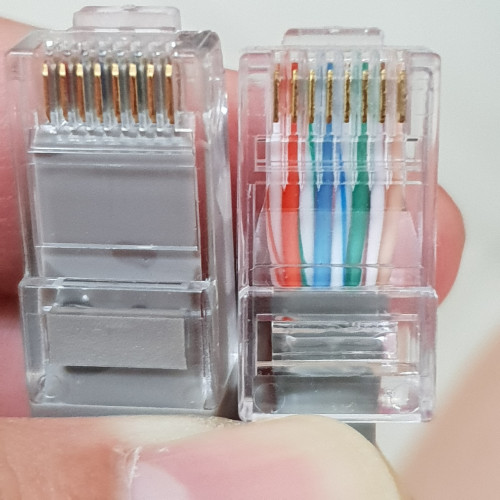
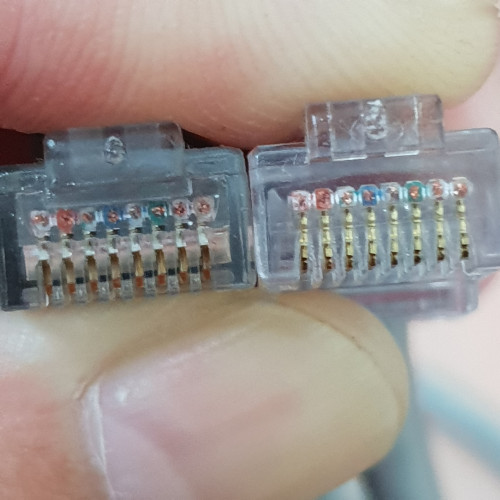
I will attached the photos of my Cat 6 cable for reference, so that it is easy to see whether is tye crimping issue, or other thing else...

» Click to show Spoiler - click again to hide... «


The left connector was done by the LYP seller, which I originally bought the cable from. And the right one was done by the computer shop I visited today.

Hopefully from here, sifus can tell whether my money was wasted on the crimping, or something else cause the slower speed from the same cable...
*
The crimping is definitely messed up.

There are a lot of tutorials on Youtube.
blacktubi
post Dec 3 2018, 05:41 PM

-
Group Icon
Elite
8,408 posts

Joined: Jul 2008

QUOTE(stxksy @ Dec 3 2018, 03:06 PM)
Noted. Will try this too. Thank you for the tips.
*
Is it running the latest firmware?

The QoS engine is enabled by default. Dont pull any devices into the priority then it will be disabled.
blacktubi
post Dec 3 2018, 09:01 PM

-
Group Icon
Elite
8,408 posts

Joined: Jul 2008

QUOTE(stxksy @ Dec 3 2018, 06:26 PM)
I have yet check the firmware. I am not sure I have any device registered in QoS and I'm afraid I had so that's the reason?
*
It could be. Do take a look at that page.

QUOTE(Doraku @ Dec 3 2018, 08:33 PM)
Fuhh TNB fibre broadband now on pilot project :0

https://mobile.twitter.com/pos4you/status/1...537440551993344
*
I wonder who is the upstream wholesale data provider. There’s only a handful of providers here. hmm.gif

This post has been edited by blacktubi: Dec 3 2018, 09:03 PM
blacktubi
post Dec 6 2018, 02:38 PM

-
Group Icon
Elite
8,408 posts

Joined: Jul 2008

QUOTE(Doraku @ Dec 5 2018, 08:57 PM)
But C7 V5 already pricey for him sweat.gif
Yea i wondering too, i wish Blacktubi tell its startup time in his review tho.

Dont forget the worst part, then C1200 rebooting again after the self reboot bangwall.gif
*
Kinda fast actually

I think it is around 1 minute +
blacktubi
post Dec 6 2018, 04:20 PM

-
Group Icon
Elite
8,408 posts

Joined: Jul 2008

QUOTE(JohnLai @ Dec 6 2018, 02:49 PM)
1 minute ++ ? Any random reboot issue?

ASUS 1300UHP only takes 20 - 22 seconds to bootup complete.
*
I don't remember my 1300UHP is that fast. hmm.gif

But the Archer C5400X is ridiculously fast at around 30 seconds.
blacktubi
post Dec 14 2018, 03:52 PM

-
Group Icon
Elite
8,408 posts

Joined: Jul 2008

QUOTE(JohnLai @ Dec 13 2018, 09:56 PM)
blacktubi

What are 5ghz channel range available for TP-Link C6 v2 which you had tested?
*
Can't remember but definitely no DFS channels available.
blacktubi
post Dec 17 2018, 01:50 AM

-
Group Icon
Elite
8,408 posts

Joined: Jul 2008

QUOTE(labtec @ Dec 17 2018, 01:34 AM)
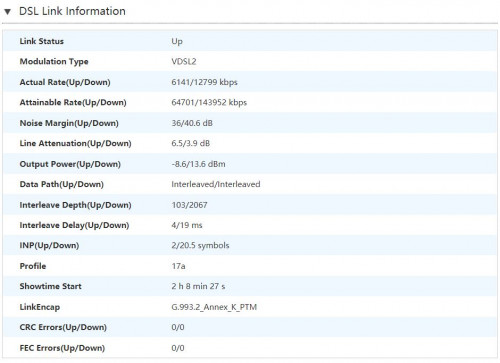
tmnet told me my area just has copper line so can only support unifi 10Mbps, but i saw that my ZTE model show attainable rate(up/down) is 64701/143952 kbps. it should able to support 100Mbps right?

user posted image
*
Maximum speed depends on many factors. Could be due to the equipment at their side as well.

Best course of action is to escalate it to them and wait for answer.
blacktubi
post Dec 30 2018, 01:54 PM

-
Group Icon
Elite
8,408 posts

Joined: Jul 2008

QUOTE(okboy @ Dec 30 2018, 07:02 AM)
updated the latest beta firmware. But still 300++mbps

hmm.gif  hmm.gif
*
Please test it on Ethernet LAN and disable any antivirus in your PC.

Download the Speedtest app for the best accuracy.
blacktubi
post Dec 30 2018, 01:57 PM

-
Group Icon
Elite
8,408 posts

Joined: Jul 2008

QUOTE(yakumo @ Dec 30 2018, 01:05 PM)
Not actually the question I am asking,
The question I was asking Was how much in Megabyte, I should get,
Speed test I get about 770Mbps down, and 210Mbps upload.

On steam downloading gta5 its getting 40Megabyte per sec, and later drop to 28Megabyte per sec
*
Steam is highly dependent on PC performance.

As the files are being extracted by CPU and stored into your storage drive, the client will cap the download speed to maximum your PC can handle.

On my i5-7400 with a crap SSD I can only get around 40MB/s. Check your task manager and see if it maxed out your CPU or storage.

I have seen 90MB/s with a good NVME SSD and i7-8600.

EDIT: Steam have really good CDN so there’s nothing to do with routing.

This post has been edited by blacktubi: Dec 30 2018, 01:59 PM
blacktubi
post Jan 6 2019, 11:52 PM

-
Group Icon
Elite
8,408 posts

Joined: Jul 2008

QUOTE(borgyang @ Jan 6 2019, 11:42 PM)
Thanks for your advice. I will upgrade the router soon.

I thought if the BTU support the turbo speed and using CAT6 cable, it wouldn’t be a problem right? In that case, how to check if the BTU HG8240W are set to 100Mbps ethernet port speed?
*
Just connect your computer to LAN 1 of the BTU and see the status of your Local Area Connection.

It should indicate the link speed.

QUOTE(borgyang @ Jan 6 2019, 11:51 PM)
I saw a list of router model in the first post, green text. I would like to avoid choosing a router which has a lot hardware, firmware and connectivity issues. Can you please recommend which one is most commonly used and can support up to 300Mbps speed?
*
For 300Mbps, I guess Archer C6 is a good pick. Best performance in the class. Budget option as well.


This post has been edited by blacktubi: Jan 6 2019, 11:53 PM
blacktubi
post Jan 27 2019, 11:56 PM

-
Group Icon
Elite
8,408 posts

Joined: Jul 2008

QUOTE(kazekage_09 @ Jan 27 2019, 07:39 PM)
Hello guys.

I just login to my unifi account today and notice that I'd been upgraded to 500mbps. So from my understanding (I'm very lame at all these technical and networking stuffs) in order to get the desired speed, my router and my adapter must be able to suppport the high speed right?

So here my router model. It is TPLink N750 Wireless Dual Band Gigabit Router model TL-WDR4300. I googled it specs and this shows up:

"Simultaneous 2.4GHz 300Mbps and 5GHz 450Mbps connections for 750Mbps of total available bandwidth"

Meaning maximum I will get from 5GHz is just 450Mbps right?

My adapter is DLink AC1200 Wireless Dual Band USB Adapter  Model DWA-182 which I cross-checked with the 1st page and it says it support until 500Mbps.

Both my hardwares can support the turbo right?

But I still get the old speed on Testspeed. Download 50mbps and upload 100mbps. What else that I need to do?

Thanks
*
Nope, your equipment need to be replaced.

Get a Wireless AC router. Expect maximum of around 60% of claimed speed even with good signal.
blacktubi
post Jan 28 2019, 03:16 PM

-
Group Icon
Elite
8,408 posts

Joined: Jul 2008

QUOTE(soonwai @ Jan 28 2019, 01:26 PM)
I suggest a Mikrotik RB4011iGS+5HacQ2HnD-IN. The product model alone makes it sound so impressive.
*
Routing and flexibility wise no doubt this Mikrotik will demolish the Asus. But I wouldn't recommend something like this to normal consumers. laugh.gif

But WiFi wise, I am pretty confident the Asus would be quite a lot faster. QCA9984 is kinda old at this point.

I still love the fact that Mikrotik publish routing test results for their equipments.
blacktubi
post Jan 29 2019, 11:17 AM

-
Group Icon
Elite
8,408 posts

Joined: Jul 2008

QUOTE(nikrizal @ Jan 29 2019, 10:56 AM)
Now thinking of RT-AC86U instead as it's newer and claimed to have better wireless penetration! Anyone would support this claim?
*
It is but the top of the line in terms of wireless penetration is of course the GT-AC5300.

I have yet to compare the RT-AX88U.

Topic ClosedOptions
 

Change to:
| Lo-Fi Version
0.1534sec    0.29    7 queries    GZIP Disabled
Time is now: 6th December 2025 - 05:03 AM