

Wanna ask if possibility use m.2 NVME SSD on z77 mobo using PCIE x1 or x16 adapter?
Thanks in advance

This post has been edited by lat_lonelyboyz: Nov 21 2018, 07:36 AM
NVME SSD on Z77 mobo
|
|
 Oct 29 2018, 03:35 PM, updated 8y ago Oct 29 2018, 03:35 PM, updated 8y ago
Show posts by this member only | Post
#1
|
 
Senior Member
1,625 posts Joined: Jul 2009 From: PENANG - IPOH 
|
Hi all,
Wanna ask if possibility use m.2 NVME SSD on z77 mobo using PCIE x1 or x16 adapter? Thanks in advance This post has been edited by lat_lonelyboyz: Nov 21 2018, 07:36 AM |
|
|
|
|
|
Oct 29 2018, 03:47 PM
Show posts by this member only | Post
#2
|

Senior Member
1,197 posts Joined: Apr 2007 
|
what is ur mobo model? tell me the model i tell u can or cannot.
|
|
|
Oct 29 2018, 03:51 PM
Show posts by this member only | Post
#3
|
|
Senior Member
1,625 posts Joined: Jul 2009 From: PENANG - IPOH
|
QUOTE(popopi @ Oct 29 2018, 03:47 PM) what is ur mobo model? tell me the model i tell u can or cannot. it's GA-Z77P-D3 |
|
|
Oct 29 2018, 03:57 PM
Show posts by this member only | IPv6 | Post
#4
|
 
Elite
24,351 posts Joined: Nov 2004 From: Setapak, Kuala Lumpur
|
QUOTE(lat_lonelyboyz @ Oct 29 2018, 03:35 PM) Hi all, Yes, you can. Wanna ask if possibility use m.2 NVME SSD on z77 mobo using PCIE x1 or x16 adapter? Thanks in advance https://www.win-raid.com/t871f50-Guide-How-...-UEFI-BIOS.html At least PCIE X4 3.0 adapters are recommended for M.2 PCIE SSDs. If you use PCIE X1 or X2, your M.2 PCIE SSD could get bottlenecked. PCIE 2.0 X1 = 5GT/s PCIE 3.0 X1 = 8GT/s More details: https://en.wikipedia.org/wiki/PCI_Express |
|
|
Oct 29 2018, 04:05 PM
Show posts by this member only | Post
#5
|
|
Senior Member
1,625 posts Joined: Jul 2009 From: PENANG - IPOH
|
QUOTE(TristanX @ Oct 29 2018, 03:57 PM) Yes, you can. if used PCIE X16 run at X4 gen3, thats mean my primary GPU will run at x8 right? because just saw some website sell PCIE X16 adapter for m.2 NVME SSD sockethttps://www.win-raid.com/t871f50-Guide-How-...-UEFI-BIOS.html At least PCIE X4 3.0 adapters are recommended for M.2 PCIE SSDs. If you use PCIE X1 or X2, your M.2 PCIE SSD could get bottlenecked. PCIE 2.0 X1 = 5GT/s PCIE 3.0 X1 = 8GT/s More details: https://en.wikipedia.org/wiki/PCI_Express This post has been edited by lat_lonelyboyz: Oct 29 2018, 04:06 PM |
|
|
Oct 29 2018, 04:15 PM
Show posts by this member only | IPv6 | Post
#6
|
|
Elite
24,351 posts Joined: Nov 2004 From: Setapak, Kuala Lumpur
|
QUOTE(lat_lonelyboyz @ Oct 29 2018, 04:05 PM) if used PCIE X16 run at X4 gen3, thats mean my primary GPU will run at x8 right? because just saw some website sell PCIE X16 adapter for m.2 NVME SSD socket Yes, your GPU will run X8. You just lose slight performance. Weaker graphic cards may not lose at all.GTX 1080 PCIE Scaling: https://www.techpowerup.com/reviews/NVIDIA/...xpress_Scaling/ RTX 2080 Ti PCIE Scaling: https://www.techpowerup.com/reviews/NVIDIA/...xpress_Scaling/ This post has been edited by TristanX: Oct 29 2018, 04:16 PM |
|
|
|
|
|
Oct 29 2018, 09:52 PM
Show posts by this member only | Post
#7
|
|
Senior Member
1,625 posts Joined: Jul 2009 From: PENANG - IPOH
|
QUOTE(TristanX @ Oct 29 2018, 04:15 PM) Yes, your GPU will run X8. You just lose slight performance. Weaker graphic cards may not lose at all. Sound like quite ok for me as I'm not purely gaming. What I concern is just ran out of my SATA3 slot and plan to use PCIE slot instead. Some more, got plenty seller out there sell their m.2 NVME SSD that might be future proof for upgrade my mobo later instead stick with with common 2.5 SATA SSDGTX 1080 PCIE Scaling: https://www.techpowerup.com/reviews/NVIDIA/...xpress_Scaling/ RTX 2080 Ti PCIE Scaling: https://www.techpowerup.com/reviews/NVIDIA/...xpress_Scaling/ Thanks boss  |
|
|
Oct 29 2018, 10:02 PM
Show posts by this member only | IPv6 | Post
#8
|

Senior Member
2,834 posts Joined: Feb 2006 
|
QUOTE(lat_lonelyboyz @ Oct 29 2018, 09:52 PM) Sound like quite ok for me as I'm not purely gaming. What I concern is just ran out of my SATA3 slot and plan to use PCIE slot instead. Some more, got plenty seller out there sell their m.2 NVME SSD that might be future proof for upgrade my mobo later instead stick with with common 2.5 SATA SSD You could, but why would you do that?Thanks boss 1. SATA SSD is much cheaper and pretty much similar as far as everyday use is concerned 2. Upgrading to a platform with native NVMe M.2 boot support will reduce headache in troubleshooting 3. Future-proofing Z77? Seriously? Go Coffee-lake at least, IMHO This post has been edited by mbr: Oct 29 2018, 10:03 PM |
|
|
Oct 29 2018, 10:30 PM
Show posts by this member only | Post
#9
|
|
Senior Member
1,625 posts Joined: Jul 2009 From: PENANG - IPOH
|
QUOTE(mbr @ Oct 29 2018, 10:02 PM) You could, but why would you do that? 1. if quite same price why not...that's why plan tu use adapter 1st before upgrading my whole system and asking here whether can support or not. 1. SATA SSD is much cheaper and pretty much similar as far as everyday use is concerned 2. Upgrading to a platform with native NVMe M.2 boot support will reduce headache in troubleshooting 3. Future-proofing Z77? Seriously? Go Coffee-lake at least, IMHO 3. That's my plan. so invest for common 2.5 SATA SSD is quite waste because already got 1. So for future upgrade, if using m.2 NVME adapter now, will reduce my headache and not sacrificed speed as well |
|
|
Oct 30 2018, 07:53 AM
|
|
Senior Member
1,197 posts Joined: Apr 2007
|
QUOTE(lat_lonelyboyz @ Oct 29 2018, 03:51 PM) it's GA-Z77P-D3 It is not supported.The only support is using M.2 slot but running on SATA Signal lane. NVMe required PCIe Signal lane which is not presented in GA-Z77P-D3's mSATA port. my advice is to get M.2 SATA SSD... this should be sufficient for normal desktop use. NVMe does not really improve much vs the money spent. If insist on the NVMe. I will say go build a new system.  Good Luck. |
|
|
Oct 30 2018, 08:37 AM
|
|
Senior Member
1,625 posts Joined: Jul 2009 From: PENANG - IPOH
|
QUOTE(popopi @ Oct 30 2018, 07:53 AM) It is not supported. Oh i see. thanks buddy. The only support is using M.2 slot but running on SATA Signal lane. NVMe required PCIe Signal lane which is not presented in GA-Z77P-D3's mSATA port. my advice is to get M.2 SATA SSD... this should be sufficient for normal desktop use. NVMe does not really improve much vs the money spent. If insist on the NVMe. I will say go build a new system. Good Luck. |
|
|
Oct 30 2018, 08:59 AM
Show posts by this member only | IPv6 | Post
#12
|
|
Elite
24,351 posts Joined: Nov 2004 From: Setapak, Kuala Lumpur
|
QUOTE(popopi @ Oct 30 2018, 07:53 AM) It is not supported. What did you get this data? The SATA signal line.The only support is using M.2 slot but running on SATA Signal lane. NVMe required PCIe Signal lane which is not presented in GA-Z77P-D3's mSATA port. my advice is to get M.2 SATA SSD... this should be sufficient for normal desktop use. NVMe does not really improve much vs the money spent. If insist on the NVMe. I will say go build a new system. Good Luck. The PCI Express X16 slots connects directly to the CPU. 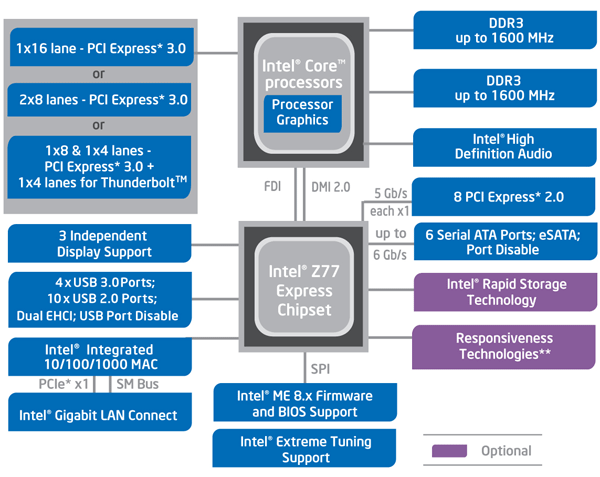 https://hothardware.com/reviews/z77-motherb...-gigabyte-intel This post has been edited by TristanX: Oct 30 2018, 10:05 AM |
|
|
Oct 30 2018, 10:25 AM
|
|
Senior Member
1,197 posts Joined: Apr 2007
|
QUOTE(TristanX @ Oct 30 2018, 08:59 AM) What did you get this data? The SATA signal line. Good study...The PCI Express X16 slots connects directly to the CPU. https://hothardware.com/reviews/z77-motherb...-gigabyte-intel The PCIe direct connect to CPU is called PEG. This is the graphic card slot. The SATA does not shows on M.2. But it is clearly stated on the printed port. "M.2 SATA". Also Z77 is quite old for the NVMe support. https://www.gigabyte.com/Motherboard/GA-Z77P-D3-rev-11#ov "Onboard mSATA slot for mSATA SSDs"  As u can see it is stated mSATA... AND my apologies... This is mSATA... not M.2... totally different type of connector... This board does not have M.2 Slot.. it only have mSATA port. This post has been edited by popopi: Oct 30 2018, 10:28 AM |
|
|
|
|
|
Oct 30 2018, 10:38 AM
Show posts by this member only | IPv6 | Post
#14
|
|
Elite
24,351 posts Joined: Nov 2004 From: Setapak, Kuala Lumpur
|
QUOTE(popopi @ Oct 30 2018, 10:25 AM) Good study... Well, TS intends to buy M.2 PCIE adapter. It uses PCI Express slots. PCI Express is universal. You can put 10Gbps (PCIE X4) network card, IO card, SATA card, m.2 PCIE (PCIE X4) card, USB 3.1 gen 2 card (PCIE X4) on it. Yes, you can put PCIE X1 card on PCI Express X16 slot too. The PCIe direct connect to CPU is called PEG. This is the graphic card slot. The SATA does not shows on M.2. But it is clearly stated on the printed port. "M.2 SATA". Also Z77 is quite old for the NVMe support. https://www.gigabyte.com/Motherboard/GA-Z77P-D3-rev-11#ov "Onboard mSATA slot for mSATA SSDs" As u can see it is stated mSATA... AND my apologies... This is mSATA... not M.2... totally different type of connector... This board does not have M.2 Slot.. it only have mSATA port. But.... if you touch PCIe X16 slot. Option 1 Z68 chipset onwards populated slots: PCIE X16 (PCIE X16 for the GPU) PCIE X16 (nothing) Option 2 : PCIE X16 (PCIE X8 for the GPU) PCIE X16 (PCIE X4 for M2.PCIE card) Option 3: PCIE X16 (PCIE X8 for the GPU) PCIE X16 (PCIE X1 or X2 for other devices) Option 4 (multi-GPU): PCIE X16 (PCIE X8 for the GPU) PCIE X16 (PCIE X8 fo the GPU) Option 5 (multi-GPU): PCIE X16 (PCIE X8 for the GPU) PCIE X16 (PCIE X4 fo the GPU) PCIE X16 (PCIE X4 fo the GPU) This post has been edited by TristanX: Oct 30 2018, 10:59 AM |
|
|
Oct 30 2018, 12:30 PM
|
|
Senior Member
1,197 posts Joined: Apr 2007
|
QUOTE(TristanX @ Oct 30 2018, 10:38 AM) Well, TS intends to buy M.2 PCIE adapter. It uses PCI Express slots. PCI Express is universal. You can put 10Gbps (PCIE X4) network card, IO card, SATA card, m.2 PCIE (PCIE X4) card, USB 3.1 gen 2 card (PCIE X4) on it. Yes, you can put PCIE X1 card on PCI Express X16 slot too. Tristanx, Thanks for the correction.But.... if you touch PCIe X16 slot. Option 1 Z68 chipset onwards populated slots: PCIE X16 (PCIE X16 for the GPU) PCIE X16 (nothing) Option 2 : PCIE X16 (PCIE X8 for the GPU) PCIE X16 (PCIE X4 for M2.PCIE card) Option 3: PCIE X16 (PCIE X8 for the GPU) PCIE X16 (PCIE X1 or X2 for other devices) Option 4 (multi-GPU): PCIE X16 (PCIE X8 for the GPU) PCIE X16 (PCIE X8 fo the GPU) Option 5 (multi-GPU): PCIE X16 (PCIE X8 for the GPU) PCIE X16 (PCIE X4 fo the GPU) PCIE X16 (PCIE X4 fo the GPU) Yes TS, if you are getting the M.2 PCIe adaptor... make sure your BIOS able to support or not for bootable PCIe devices. My experience with older platform is that even you have all the hardware. the BIOS will not detect and the Win10 Installation will not "see" the NVMe devices. and cannot format to install. if the adaptor is cheap, it is worth a try.... I am telling based on my experience with Intel's product knowledge.... |
|
|
Oct 30 2018, 02:17 PM
|
|
Senior Member
1,625 posts Joined: Jul 2009 From: PENANG - IPOH
|
my bad didn't mention about wanna use on boot device or not. my apologies
ok I will make a simple situation here. 1. buying PCIE adapter for NVMe because ran out SATA3 slot. currently got one 2.5 SATA SSD used to boot device. if my mobo PCIE X16 can support the adapter, even running on PCIE X4, that's good news because still can using it even not as boot device. 2. Intend to buy adapter + m.2 NVMe SSD instead of 2.5 SSD because plan to upgrade my whole system in future which can utilize native m.2 NVMe SSD. so quite waste buying another 2.5 SSD SATA IF just run on SATA2 instead PCIE X4 SSD using adapter my apologise if got some misleading here |
|
|
Oct 30 2018, 02:27 PM
Show posts by this member only | IPv6 | Post
#17
|
|
Elite
24,351 posts Joined: Nov 2004 From: Setapak, Kuala Lumpur
|
QUOTE(popopi @ Oct 30 2018, 12:30 PM) Tristanx, Thanks for the correction. Yeah, can use this too.Yes TS, if you are getting the M.2 PCIe adaptor... make sure your BIOS able to support or not for bootable PCIe devices. My experience with older platform is that even you have all the hardware. the BIOS will not detect and the Win10 Installation will not "see" the NVMe devices. and cannot format to install. if the adaptor is cheap, it is worth a try.... I am telling based on my experience with Intel's product knowledge.... https://www.win-raid.com/t871f50-Guide-How-...-UEFI-BIOS.html QUOTE(lat_lonelyboyz @ Oct 30 2018, 02:17 PM) my bad didn't mention about wanna use on boot device or not. my apologies M.2 PCIE is the future. ok I will make a simple situation here. 1. buying PCIE adapter for NVMe because ran out SATA3 slot. currently got one 2.5 SATA SSD used to boot device. if my mobo PCIE X16 can support the adapter, even running on PCIE X4, that's good news because still can using it even not as boot device. 2. Intend to buy adapter + m.2 NVMe SSD instead of 2.5 SSD because plan to upgrade my whole system in future which can utilize native m.2 NVMe SSD. so quite waste buying another 2.5 SSD SATA IF just run on SATA2 instead PCIE X4 SSD using adapter my apologise if got some misleading here I cant imagine if there is PCIE X16 M.2 SSD. lol |
|
|
Oct 30 2018, 02:31 PM
|

All Stars
14,909 posts Joined: Jul 2005 
|
Before you proceed with buying the NVME SSD, you need to modify the BIOS and addd the NVME module so the motherboard will be able to boot from NVME SSD
Without the NVME module added into the BIOS, your motherboard will not be able to boot from it |
|
|
Oct 30 2018, 02:45 PM
|
|
Senior Member
1,625 posts Joined: Jul 2009 From: PENANG - IPOH
|
QUOTE(TristanX @ Oct 30 2018, 02:27 PM) Yeah, can use this too. will make my current SATA SSD like common 3.5 HDD LOL. that's why for future proof update, I want PCIE SSD even using adapter. i know, it will just run (if my mobo support) at only PCIE X4 gen2.0 but still, faster than 2.5 SSD SATA3https://www.win-raid.com/t871f50-Guide-How-...-UEFI-BIOS.html M.2 PCIE is the future. I cant imagine if there is PCIE X16 M.2 SSD. lol This post has been edited by lat_lonelyboyz: Oct 30 2018, 02:46 PM |
|
|
Oct 30 2018, 02:51 PM
Show posts by this member only | IPv6 | Post
#20
|
|
Elite
24,351 posts Joined: Nov 2004 From: Setapak, Kuala Lumpur
|
QUOTE(lat_lonelyboyz @ Oct 30 2018, 02:45 PM) will make my current SATA SSD like common 3.5 HDD LOL. that's why for future proof update, I want PCIE SSD even using adapter. i know, it will just run (if my mobo support) at only PCIE X4 gen2.0 but still, faster than 2.5 SSD SATA3 PCIE 2.0 X4 is 20GT/s or 2.5 Gigabytes per second. Still significantly faster than SATA. It depends on brand and model. |
|
Topic ClosedOptions
|
| Change to: |  0.0211sec 0.0211sec
 0.35 0.35
 5 queries 5 queries
 GZIP Disabled GZIP Disabled
Time is now: 15th December 2025 - 12:31 PM |
 Quote
Quote