

Speed really can reached 500mb with LAN.
got my Time service within 1week.


This post has been edited by yorae9: Oct 28 2018, 04:54 PM
TIME [OFFICIAL] TIME Fibre Broadband™ v4, Experience the ONE TRUE 2Gbps
|
|
 Oct 28 2018, 04:53 PM Oct 28 2018, 04:53 PM
Return to original view | IPv6 | Post
#1
|
 
Junior Member
186 posts Joined: Jan 2003  
|
Thanks yeapch01 for the helpful service provided earlier.
Speed really can reached 500mb with LAN. got my Time service within 1week. This post has been edited by yorae9: Oct 28 2018, 04:54 PM |
|
|
|
|
|
Mar 25 2019, 11:08 PM
Return to original view | IPv6 | Post
#2
|
|
Junior Member
186 posts Joined: Jan 2003
|
same here tonight i get high ping for local server Mobile legend server around 80ms+ constantly for time 8-10pm
when i do speedtest, I m very surprise get only 38mb down, 71mb up(im on 500mbps package) for few test consistently. did anyone experience same with me?  This post has been edited by yorae9: Mar 25 2019, 11:09 PM |
|
|
Jul 19 2019, 03:17 PM
Return to original view | Post
#3
|
|
Junior Member
186 posts Joined: Jan 2003
|
Wonder if there anyone face problem as mine?
I test using speedtest.net and get 20mbps speed download (was 500mbps package). But if use time website speed test, i get 500mbps for both download/upload  |
|
|
Jul 21 2019, 08:33 AM
Return to original view | Post
#4
|
|
Junior Member
186 posts Joined: Jan 2003
|
QUOTE(Matrix4.1 @ Jul 19 2019, 03:48 PM) Dont use Umobile as Server. Use TIME or TM. I dont think it is a coincident im getting all download 20mbps at 3 different server. 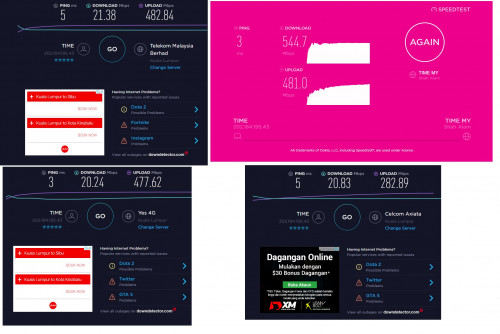 |
|
|
Jul 21 2019, 09:24 PM
Return to original view | Post
#5
|
|
Junior Member
186 posts Joined: Jan 2003
|
QUOTE(kmrdeva @ Jul 21 2019, 09:29 AM) Tested using a wifi connection to the router or wired? Test using wired connection... This is what i get on wired connection (Windows 10 PC connected to router). [attachmentid=10287433]  |
|
|
Jul 22 2019, 11:36 AM
Return to original view | Post
#6
|
|
Junior Member
186 posts Joined: Jan 2003
|
QUOTE(jjj2 @ Jul 21 2019, 10:30 PM) Hi, thank you for using TIME Fibre. yea using stock router ac1200.Are you using TIME stock router ? If so, please kindly screenshot the followings : Click on Advanced Tab, screenshot 1) Network > Internet settings 2) QOS 3) IPv6 4) System Tools > System Parameters Feel free to email to support@timefibre.com Thanks. just drop an email to support@timefibre.com. hopefully solution will come out |
| Change to: |  0.0296sec 0.0296sec
 0.48 0.48
 7 queries 7 queries
 GZIP Disabled GZIP Disabled
Time is now: 14th December 2025 - 10:48 AM |
 Quote
Quote