Welcome Guest ( Log In | Register )

Outline · [ Standard ] · Linear+

TIME [OFFICIAL] TIME Fibre Broadband™ v4, Experience the ONE TRUE 2Gbps

views
     
xKeneshirox
post Oct 21 2018, 12:56 PM

Casual
***
Junior Member
338 posts

Joined: Jun 2010
Question for sifus. TIME messaged me to say I got the 500Mbps upgrade, but when I did a speedtest, via LAN to the router, I still get abt 100Mbps. Is there something I'm supposed to do?
LAN cable is a cat5 iirc, if that makes a difference.

Is this a hardware limitation still? Or should I change my cat5 cables to cat6 or something?
xKeneshirox
post Oct 21 2018, 01:31 PM

Casual
***
Junior Member
338 posts

Joined: Jun 2010
QUOTE(FusionXY @ Oct 21 2018, 02:02 PM)
Cat 5 limit to 100Mbps only.

You should change to CAT 5E, CAT 6 or CAT 7.

Thanks.
*
Guess I'm going shopping liao. Thanks!
xKeneshirox
post Oct 21 2018, 03:11 PM

Casual
***
Junior Member
338 posts

Joined: Jun 2010
QUOTE(FusionXY @ Oct 21 2018, 02:02 PM)
Cat 5 limit to 100Mbps only.

You should change to CAT 5E, CAT 6 or CAT 7.

Thanks.
*
Just changed all cables to Cat5e, still getting just 100Mbps. Should I contact TIME directly?
xKeneshirox
post Oct 21 2018, 06:15 PM

Casual
***
Junior Member
338 posts

Joined: Jun 2010
QUOTE(FusionXY @ Oct 21 2018, 06:35 PM)
What's your laptop specs and which router that you're using?
I'm using a desktop. Mobo is GA-B85M-D3H.

xKeneshirox
post Oct 21 2018, 08:00 PM

Casual
***
Junior Member
338 posts

Joined: Jun 2010
QUOTE(FusionXY @ Oct 21 2018, 08:15 PM)
Hi. What's the link speed shown on your Desktop?

Thanks.
*


Attached thumbnail(s)
Attached Image
xKeneshirox
post Oct 21 2018, 09:50 PM

Casual
***
Junior Member
338 posts

Joined: Jun 2010
QUOTE(FusionXY @ Oct 21 2018, 09:52 PM)
Try disable antivirus and firewall. Is NAT Boost enabled on your router?

Thanks
*
NAT Boost enabled. No antivirus or firewall. Still the same.
xKeneshirox
post Oct 22 2018, 01:09 PM

Casual
***
Junior Member
338 posts

Joined: Jun 2010
QUOTE(wirelessbuyer @ Oct 22 2018, 01:58 AM)
From the previous discussion, the most common issues that is bottlenecking the speed is as below:

» Click to show Spoiler - click again to hide... «

If all of the common issues above is not related to you, then you might need to connect directly to your modem from your PC via LAN (this will bypass the router). Just setup a PPPOE connection on your windows with your PPPOE username and password. Here, you can perform speedtest to check the 'raw' speed that is coming from the ISP.

I hope this will help.
*
Got a couple of things,
1. How do I get to the "speed and duplex"?
2. NAT Boost is enabled
3. Router is the recent upgrade offered by TIME
4. I'm not sure where the WAN speed setting is. Sorry >.<
5. Duplex is Auto-Negotiation
6. QOS is disabled

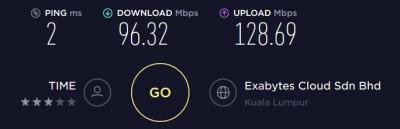
It seems that when I perform speedtests, the download is consistently 90+, but the upload spikes suddenly to 500 then drops back to 100

This post has been edited by xKeneshirox: Oct 22 2018, 01:19 PM

xKeneshirox
post Oct 22 2018, 02:47 PM

Casual
***
Junior Member
338 posts

Joined: Jun 2010
QUOTE(wirelessbuyer @ Oct 22 2018, 03:21 PM)
First of all what is your ethernet adapter speed on your pc? https://goo.gl/Vfq65o

1. The speed and duplex setting can be find here.
Windows setting > Network & Internet > Change adapter option > Right click your LAN adapter (not wifi adapter yah) > Properties > Configure > Advance tab > Look for speed & duplex > It should be Auto Negotiation but try to change it manually to 1Gbps and retest. Also try to disable the option for power saver, energy efficient temporarily and see if there is any changes.

5. Try to change manually to 1000Mbps full duplex temporarily and restart the router. See whether it helps
*
Alright.
The ethernet adapter shows 100Mbps only. Not sure how to fix that. Have updated drivers to the latest.
xKeneshirox
post Oct 22 2018, 07:02 PM

Casual
***
Junior Member
338 posts

Joined: Jun 2010
QUOTE(wirelessbuyer @ Oct 22 2018, 07:09 PM)
Can you try with other cable? Must be cat 5e or above, you can even use the cable bundle together on the router box to perform the testing
*
Yeah. Using it now. Went out to buy fresh cat6 cables :/


Change to:
| Lo-Fi Version
0.0315sec    0.34    7 queries    GZIP Disabled
Time is now: 6th December 2025 - 09:22 PM