Outline ·
[ Standard ] ·
Linear+
TIME [OFFICIAL] TIME Fibre Broadband™ v4, Experience the ONE TRUE 2Gbps
|
pizzaboyj
|
 Oct 19 2018, 08:01 AM Oct 19 2018, 08:01 AM
|

|
QUOTE(blacktubi @ Oct 18 2018, 12:12 AM) THIS, couldn't stress this enough. Good find. Same thing from the router side. Enabling additional features like Antivirus, QoS, browsing history and etc will impact the maximum capable speed. yup and in some cases, even PPPoE can take a toll on CPU, it shouldn't but low end routers smh |
|
|
|
|
|
pizzaboyj
|
Oct 31 2018, 09:52 AM
|
|
|
QUOTE(psyduck89 @ Oct 31 2018, 09:19 AM) So, for 500mbps package, we need what router? Btw, tplink advertise c1200 can get 867mbps, now can only 300... False advertising?? 867mbps is always theoretical speed pppoe, qos, all take a hit on the cpu utilization and what your upper limit on available bandwidth will end up being also your receiver being 2x2 or 3x3 is also a factor here... |
|
|
|
|
|
pizzaboyj
|
Oct 31 2018, 03:43 PM
|
|
|
QUOTE(psyduck89 @ Oct 31 2018, 11:52 AM) my receiver 4x4.. but result not even half of advertised speed..  sorry, yes, your phone may have 4x4 support, but the ac1200 is way underpowered to even deliver 500mbps properly on its own, unless you use a primary router to handle pppoe and other routing functions, and leave the ac1200 to be purely just a wifi AP, then you may reach the 500mbps mark |
|
|
|
|
|
pizzaboyj
|
Mar 20 2019, 02:32 PM
|
|
|
seems like it, maybe 10mins ago all my overseas connections suddenly became very unresponsive
|
|
|
|
|
|
pizzaboyj
|
Apr 30 2019, 03:08 PM
|
|
|
I checked again today and was able to claim the DIR882 for free with the contract renewal.... anyone else? 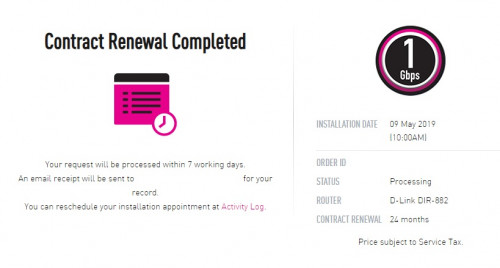 |
|
|
|
|
|
pizzaboyj
|
May 10 2019, 03:35 PM
|
|
|
My service just went down. USJ Heights area. Anyone else?
|
|
|
|
|
|
pizzaboyj
|
May 23 2019, 11:06 PM
|
|
|
Hi guys, I'm moving house this weekend and need to relocate my Time 1GBps, its supported in the new place, but the next available slot is 7th June T_T Is there a way to help speed up the process?  |
|
|
|
|
|
pizzaboyj
|
Aug 23 2019, 11:24 AM
|
|
|
Oof LOS on my BTU while I was in the middle of work!
Anyone else?
|
|
|
|
|
|
pizzaboyj
|
Nov 21 2019, 12:00 AM
|
|
|
Managed to upgrade to the Beta 4.0 firmware from DLink RU support site lol, performance and stability is way better IMO. I'm only using it as an AP so no biggie to flash stuff. 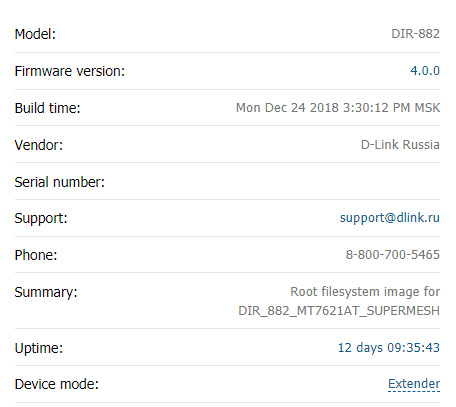 |
|
|
|
|
|
pizzaboyj
|
Nov 22 2019, 09:17 AM
|
|
|
QUOTE(x-1o8-x @ Nov 21 2019, 06:47 AM) i tried that and actually got very bad latency. currently using 3.5.2 and it's pretty stable so far eh you're right, switched to 3.5.2 and its way more stable and feels faster. tried the US firmware? the firmware dates are newer too. |
|
|
|
|
|
pizzaboyj
|
Feb 6 2020, 03:42 PM
|
|
|
hi folks
So I have been having really inconsistent download speeds the last couple of weeks. Decided to log a ticket with TIME support. SI came, inspected the ONU, from wall patch port reading I "think" it was -5x (I could be wrong here) but from the Huawei ONU was -29 ish.
On a 1Gbps plan I was getting inconsistent D/U speeds ranging from 400-600 Down.
The SI first said it was due to the fibre cable being used "Blue Vs Green" and that "Green was better", also tried to charge me RM30 for it.
Got him to show me if it worked, nope, reading went to -25, U/D speeds remained the same inconsistent as ever.
Then he said its probably the riser to the home cable issue, asked me to file report to my building management as that is outside his scope.
Now I am skeptical throughout this entire process. So would like to know what are the RX readings should I be looking out for and would changing the fibre cable from "Blue" to "Green" (asssuming APC vs UPC) make any difference? Did some light reading but I am by no means an expert at this.
|
|
|
|
|





 Quote
Quote
 0.0297sec
 0.53
0.53
 7 queries
 GZIP Disabled