

Below is the screenshot of my current setup. How do I solve this?

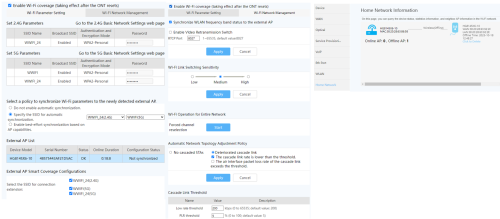
Would also like to ask if it is normal to have 2 SSID under 5G?
TIME [OFFICIAL] TIME Fibre Broadband™ v4, Experience the ONE TRUE 2Gbps
|
|
 Sep 2 2024, 02:06 AM Sep 2 2024, 02:06 AM
Return to original view | IPv6 | Post
#1
|
 
Probation
29 posts Joined: Sep 2019 
|
Hi guys, may I ask how do I setup another unit of HG8145X6-10 from TIME as a mesh? I thought the setup would be easy since two units are the same model but I think I ended up setting it as AP instead (I placed the second unit in another room and could only access Internet via Ethernet connection. The WLAN indicator does not light on.)
Below is the screenshot of my current setup. How do I solve this? Would also like to ask if it is normal to have 2 SSID under 5G? |
|
|
|
|
|
Sep 2 2024, 11:39 PM
Return to original view | IPv6 | Post
#2
|
|
Probation
29 posts Joined: Sep 2019
|
QUOTE(jjj2 @ Sep 2 2024, 08:04 AM) Please refer back to recent post for this. I've tried the below 3 times but still not able to pair successfully. The WPS on the ONT blinks forever... (Also tried to reset my 2nd unit before retrying but still the same)  QUOTE If your 1st unit is in ONT mode (has optic fiber connected to it), then the 2nd unit of X6 you will need to convert it to AP mode by pressing & hold the WPS button for 15s, when all the lights lit up, release it & it will auto reboot to become AP mode. Place your 2nd unit of X6 near to the ONT, the WPS light on the ONT will light up, press the WPS button on the ONT & it will start blinking, the AP will start pairing with the ONT, after successfully paired, the WPS light on the ONT will off. I also tried the following: 1. Press & hold second unit's WPS button for 15s, after all lights lit up, release it and reboot into AP mode 2. After reboot, connect to the 2nd unit via WIFI BlazingSpeed_TIME_xxx 3. Choose Uplink and select the ONT's WIFI and enter the WIFI password 4. After a minute or two, the BlazingSpeed_TIME_xxx disappear. However, the WLAN indicator on this second unit WILL turn off also, just left the Power and WPS indicator continue to light up. 5. If I connect my laptop to my second unit via Ethernet, I'm able to access Internet without issue. Just that this second unit seems will not emit any WIFI signal. Home Network Information -> Will indicate it as Offline AP as per screenshot 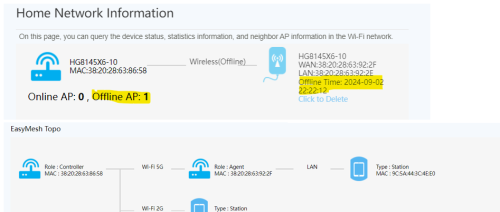 Any idea what setup went wrong? |
|
|
Sep 4 2024, 01:28 AM
Return to original view | IPv6 | Post
#3
|
|
Probation
29 posts Joined: Sep 2019
|
QUOTE(ordinaryguy96 @ Sep 2 2024, 11:39 PM) I've tried the below 3 times but still not able to pair successfully. The WPS on the ONT blinks forever... (Also tried to reset my 2nd unit before retrying but still the same) Finally, I was able to pair the second unit of HG8145X6-10 after some trial and error. I think the main culprit was having two SSID under 5G network (and one of them having the same SSID name as 2.4G, no clue why it has 2 SSID names setup under 5G network I also tried the following: 1. Press & hold second unit's WPS button for 15s, after all lights lit up, release it and reboot into AP mode 2. After reboot, connect to the 2nd unit via WIFI BlazingSpeed_TIME_xxx 3. Choose Uplink and select the ONT's WIFI and enter the WIFI password 4. After a minute or two, the BlazingSpeed_TIME_xxx disappear. However, the WLAN indicator on this second unit WILL turn off also, just left the Power and WPS indicator continue to light up. 5. If I connect my laptop to my second unit via Ethernet, I'm able to access Internet without issue. Just that this second unit seems will not emit any WIFI signal. Home Network Information -> Will indicate it as Offline AP as per screenshot Any idea what setup went wrong? ). Just to share my issue and possible solution that works for me here. Issue: Not able to pair the second unit of HG8145X6-10 by pressing the WPS button on the main unit & second unit. Tried Step 1 to 5 in my previous post but ended up just able to use via Ethernet connection (the mesh unit does not emit any Wifi signal, the WLAN indicator of the second unit will not light on and the Configuration Status will show Not synchronized and it will show the AP as Offline in Home Network Information). Possible Solution 1. Make sure there is only one SSID setup each under 2.4G & 5G network. Check under Advanced -> WLAN -> 2.4G/ 5G Basic Network Settings. Delete if you have more than one. (Else may try to deselect the extra one mentioned in the last step below) 2. Reset the second unit of router if you have setup anything before. After reset, press & hold second unit's WPS button for 15s, after all lights lit up, release it and reboot into AP mode. 3. After reboot, connect to the 2nd unit via WIFI BlazingSpeed_TIME_xxx 4. Choose Uplink and select the ONT's WIFI and enter the WIFI password 5. After a minute or two, the BlazingSpeed_TIME_xxx will disappear. The WLAN and WPS indicator on the second unit will light on if it is working and the status will show the AP is online. If WLAN indicator does not light on, may also try different combination under 'Select a policy to synchronize wi-fi parameters to the newly detected external ap' & 'Select the SSID for connection extension' (for my case I have to deselect the second SSID under 5G network for the WLAN indicator to light on). eauyong liked this post
|
|
|
Mar 9 2025, 10:45 PM
Return to original view | IPv6 | Post
#4
|
|
Probation
29 posts Joined: Sep 2019
|
QUOTE(ChenKaiWen @ Feb 11 2025, 02:40 PM) Yes. I requested CS for the change to Bridge mode via Live Chat. They did it very quickly and asked me to reboot the TIME router. However, the new router failed to setup and when I login to TIME router, I could still see WAN Mode is "Route WAN" instead of "Bridge WAN" and the Wifi SSID was also left enabled... I contacted CS again and asked them to verify whether it has been changed to Bridge mode, they confirmed it has been changed and reminded me to plug into LAN 1 of the TIME router. I screenshot the WAN Mode and asked why it is not showing "Bridge WAN". After a while, they just asked me to leave contact number for them to call back instead... After live chat changed bridge mode, you shouldn’t be able to connect to internet using the huawei unit. Connect WAN of your own router to LAN 1 of the huawei. Set up PPPoe username and password, which can be obtained in the TIME app. No VLAN required. It should work just like that. In the end, I came across this post https://forum.lowyat.net/index.php?showtopi...#entry110590642 and followed the instructions there only then managed to setup bridge mode successfully. Credits to the member for giving such details instruction  Definitely more helpful than TIME CS... Definitely more helpful than TIME CS... |
| Change to: |  0.0288sec 0.0288sec
 0.34 0.34
 7 queries 7 queries
 GZIP Disabled GZIP Disabled
Time is now: 1st December 2025 - 11:42 AM |
 Quote
Quote