Welcome Guest ( Log In | Register )

Outline · [ Standard ] · Linear+

TIME [OFFICIAL] TIME Fibre Broadband™ v4, Experience the ONE TRUE 2Gbps

views
     
mr_geforce
post Sep 19 2024, 07:38 PM

Getting Started
**
Junior Member
267 posts

Joined: Jul 2012
QUOTE(Xange @ Sep 16 2024, 10:02 AM)
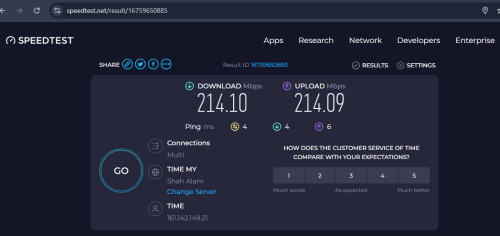
user posted image

yay! finally done ditching maxis fiber 1 year since Time contractor started laying cable in my apartment... had been stuck with paying extra to upgrade from 30mbps to 100mbps for years even after they provide speed upgrade and decided to hold it for family package users.

my astro over internet is also so much better and rarely have buffering issue as compare with at maxis on both tm and maxis infra (tm infra was the worst of all, and yes, maxis lay their fiber in my apartment too after time finished theirs, and migrated me to maxis infra just 2 weeks ago)

my betrayal was real when Time installer came to lay fiber from the box into my home, and my neighbour opposite my house just subscribed to maxis fibre and the installer arrived about the same time looking at me changing from maxis fibre to time fibre  whistling.gif i guess they will ask me soon about how is my experience with time later...

by the way, I work as a project engineer in a M&E engineering company, while working on some project and tender, I had a chance to meet with Huawei's staff and while exchanging info, I was told that Time's backbone is powered by Huawei eh?
*
Hi, I am wondering how you can get so low latency for download & upload?

your pc is connected to internet via wifi or LAN?
mr_geforce
post Sep 21 2024, 06:31 PM

Getting Started
**
Junior Member
267 posts

Joined: Jul 2012
QUOTE(Xange @ Sep 19 2024, 08:08 PM)
my laptop is connecting to the router over 5GHz wifi. also tested using my desktop connected over LAN Cat6 cable also have about the same result, latency all single digit. of course during the transfer it spike up to around 50-60.

in case u wonder, here is the video record on the test i did just now. https://youtu.be/NzMdyylSQ3U
*
nice.. just tested again today on PC via wifi 5Ghz, behind one wall, distance from device about 5 meters. Today able to get single digit latency on download & upload (with some spike in between).. i am thinking whether its due to channel interference or what.. as i am staying in a apartment.

That day was tested using mobile phone via wifi 5Ghz beside the device also can get very high latency, although the ping is single digit.
mr_geforce
post Mar 6 2025, 11:04 AM

Getting Started
**
Junior Member
267 posts

Joined: Jul 2012
QUOTE(contestchris @ Mar 5 2025, 11:32 AM)
Does anyone pay Time Fiber bill via PosOnline?

Can you prepay your bill in advance?

If yes, do you lose the RM2 auto-debit rebate?
*
last time i pay lump sump rm500 in advance, every month it deduct from it and also incl the RM2 auto debit rebate (I have registered with autodebit before i do the advance payment)
mr_geforce
post Apr 3 2025, 06:47 PM

Getting Started
**
Junior Member
267 posts

Joined: Jul 2012
QUOTE(slack3r @ Apr 3 2025, 10:00 AM)
I'm on the 500Mbps plan but I think they gave free upgrade so I think it's 600Mbps plan now

Is that possible? Request to be moved to public ip? How long does it usually take?
*
I am on 200mbps.. time very efficient.. once requested they will help to switch to public IP within few minutes.
mr_geforce
post May 9 2025, 05:31 PM

Getting Started
**
Junior Member
267 posts

Joined: Jul 2012
QUOTE(mjamil85 @ May 8 2025, 12:48 PM)
Yesterday around 10:30AM, suddently my Asus TUF Gaming router stop receiving WAN IP from TIME Wifi Modem Router (Bridge Mode).

Perform troubleshoot option (Factory reset Asus Router, restore backup config, disable DNS-over-TLS in WAN) still failed getting WAN IP.

Then I found the problem.

WAN Connection Type: PPPOE option in WAN setting with User & Password no more supported cause stop receiving WAN IP.

Switch connection type to 'Automatic IP', then start receiving IP from Time modem & can access to internet.

Also for IPV6, Native IPV6 also not working & only works when switch to 'Passthrough' option and getting IPV6 address.
So my question, what the hell Time is doing messup with the Time Modem config cause this issue?
*
huhu.. why not delete the backdoor access (remote) to prevent time from accessing the time modem and mess with the setting inside.
mr_geforce
post May 9 2025, 06:05 PM

Getting Started
**
Junior Member
267 posts

Joined: Jul 2012
QUOTE(ChenKaiWen @ May 9 2025, 05:35 PM)
TR-069 is not used for configuring ONT as far as I know. All ONT connected can receive config directly from OLT.
*
Oh.. now i learn new things.
mr_geforce
post May 14 2025, 07:41 AM

Getting Started
**
Junior Member
267 posts

Joined: Jul 2012
QUOTE(westlife @ May 13 2025, 01:45 PM)
i am testing in front of the main wifi router, previously i can get full speed, and now sometimes i can get full speed but not all the time.

suspect it is the bandwidth that is shared by too many residents during peak hours, so cannot hit the max speed.

wifi 5 has much higher bandwidth, and i dun believe, it is due to the wifi router issue as i can hit the max speed with no prob with the wifi 5 mesh router (tri-band) somemore.
*
hey.. i think might be you can try to set the transmit power in the pc wireless adapter setting to maximum and test the speed afterwards.
mr_geforce
post Jun 9 2025, 07:08 PM

Getting Started
**
Junior Member
267 posts

Joined: Jul 2012
The public IP address from Time, is it fixed IP address that bind to our account? yesterday turn off the router for 1 minute and after that realize getting back the same public IP address.

mr_geforce
post Jun 10 2025, 01:21 PM

Getting Started
**
Junior Member
267 posts

Joined: Jul 2012
QUOTE(westlife @ Jun 9 2025, 10:14 PM)
There will be lease duration from the dhcp ip u get from isp for the public holiday.

It depends if the lease is renewed.
*
owhhh. thanks for the clarification
mr_geforce
post Jun 10 2025, 01:25 PM

Getting Started
**
Junior Member
267 posts

Joined: Jul 2012
QUOTE(ChenKaiWen @ Jun 9 2025, 08:58 PM)
No it’s not static. I can request new IP by just redailing PPPoE on my router
*
i see.. probably mine is not leased yet in that 1 minute time as explained by westlife


Change to:
| Lo-Fi Version
0.0358sec    0.42    7 queries    GZIP Disabled
Time is now: 3rd December 2025 - 12:21 PM