Welcome Guest ( Log In | Register )

Outline · [ Standard ] · Linear+

TIME [OFFICIAL] TIME Fibre Broadband™ v4, Experience the ONE TRUE 2Gbps

views
     
e_mc_square
post Feb 19 2023, 11:26 PM

Enthusiast
*****
Senior Member
768 posts

Joined: Dec 2008


I wonder if 1 unit of Huawei HG8145X6 Wifi 6 router is enough to cover a 1100 sqft house?

My fiber optic point is at far most of living room wall and my master room opposite of it.
e_mc_square
post Feb 21 2023, 04:13 PM

Enthusiast
*****
Senior Member
768 posts

Joined: Dec 2008


QUOTE(jjj2 @ Feb 21 2023, 08:37 AM)

*
VERYYYY SAD!!!!
Today TIME come to install, they use their optical meter test and said my fiber optic signal tak cantik. -68db.
Then they said I need to find my condo contractor to fix the fiber optic connector.

I played around with the connector and found that nothing special, I can just buy one in shopee for few ringgit and replace it.

But what bugging me is, "Is it really the connector problem? Or I need to cut the wire?"
If cut the wire, I need special tools.

So, usually is cable problem or connector problem? doh.gif
e_mc_square
post Feb 21 2023, 04:33 PM

Enthusiast
*****
Senior Member
768 posts

Joined: Dec 2008


QUOTE(failed.hashcheck @ Feb 21 2023, 04:24 PM)
Most often it is connector/bad splicing. And likely not on your end.
There are lots of fault points along its way before the cable reached your unit.
*
Oh, splicing mean the fiber optic didn't properly cut off when put on the connector is it?


If the cable is like broken inside the wall already.....

Woah~ mean I need to route an external one or hack the wall ar?
OH NO~~~~
e_mc_square
post Feb 21 2023, 05:45 PM

Enthusiast
*****
Senior Member
768 posts

Joined: Dec 2008


QUOTE(failed.hashcheck @ Feb 21 2023, 05:24 PM)
could be not cleanly cut, or dirty, or not aligned properly when its being fused. or simply not aligned will in case of mechanical spice.

Fiber broken inside wall is rare. unless it is kinked during installation.
Just call your management to investigate. Unlike copper installation, fiber is not something you could do yourself without specialized equipment and lengthy training even if the fault is within your unit.
*
Ya, I saw the fiber so small, like hair.
I think need specialize tools also.

Good to know. Thanks!
e_mc_square
post Feb 23 2023, 09:04 AM

Enthusiast
*****
Senior Member
768 posts

Joined: Dec 2008


QUOTE(jjj2 @ Feb 22 2023, 09:45 AM)
Hi, usually Installer will only check by using power meter & if reading is not optimum, they cannot proceed with activation. It could be caused by cable or connector or a bad splice etc. On-site diagnostic can tell you the exact problem.
You cant do it yourself unless you have the proper tools & skills.

Refer to your management, if it's under warranty, then they will repair for free under terms & conditions. Else, after warranty, you will have to pay for it.
My team is in Penang now, if your house is here, then we could assist.

Thanks.
*
Wow, that is great to hear that.
Can you PM me your number and what is the charges?
e_mc_square
post Feb 24 2023, 11:37 AM

Enthusiast
*****
Senior Member
768 posts

Joined: Dec 2008


QUOTE(jjj2 @ Feb 23 2023, 11:27 AM)
Sent smile.gif
*
Thank you JJ and his co-worker come to my house to fix the fiber optic signal issue.
Although a bit pricy, but they've done it professionally with all the necessary tools.
Efficient and professional.

thumbup.gif thumbsup.gif thumbup.gif thumbsup.gif thumbup.gif thumbsup.gif


Highly recommended for those who in Penang can find him to solve your internet issue.

Hopefully the times router installation will be smooth next Monday. rclxms.gif
e_mc_square
post Feb 27 2023, 05:42 PM

Enthusiast
*****
Senior Member
768 posts

Joined: Dec 2008


I wonder what is the benefit if I set the Wifi name of 2.4Ghz and 5Ghz with same name?

Or best practice is actually set the separately?

e_mc_square
post Feb 27 2023, 06:31 PM

Enthusiast
*****
Senior Member
768 posts

Joined: Dec 2008


QUOTE(jjj2 @ Feb 27 2023, 05:49 PM)
If you have good mesh systems that can handle Bandsteering well (Eg. Asus etc), then you dont have to manually switch between the freq band...
But if you have those poor bandsteering handling devices like Time Huawei devices, then setting bandsteering will result some smart devices like smart tvs, floor sweeping robot, speakers, smart electrical switch etc. not able to connect to Internet.
*
Thanks for the explain man.

You mentioned before the HG8145X6 bandsteering is not good.
I guess I better keep them separately. dry.gif
e_mc_square
post Mar 3 2023, 09:14 AM

Enthusiast
*****
Senior Member
768 posts

Joined: Dec 2008


QUOTE(Addword @ Mar 2 2023, 02:35 PM)
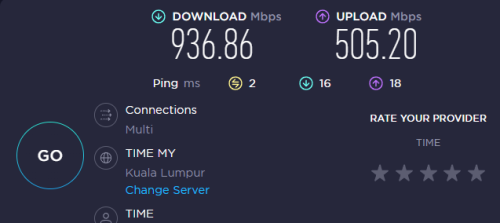
Just subscribed Time 1Gbps, getting this speed via LAN CAT5e. Acceptable? Any tips to hit 4 digits? laugh.gif

user posted image tongue.gif
*
I wonder what is the typical usage for house hold to go for 1Gbps subscription?
e_mc_square
post Apr 5 2023, 05:24 PM

Enthusiast
*****
Senior Member
768 posts

Joined: Dec 2008


QUOTE(jjj2 @ Mar 30 2023, 11:04 PM)
No extra charge
*
Hello JJ~ Is me! The one you help me to fix my fiber optic issue in Penang.

Damn, I self host a cloud and suddenly the public IP failed to work this morning.
And ngam ngam you guys talked about this few days back.

You mean I just make a call to Times and tell them don't CGNAT my IP because I need it for my home server is it?
e_mc_square
post Apr 5 2023, 09:26 PM

Enthusiast
*****
Senior Member
768 posts

Joined: Dec 2008


QUOTE(jjj2 @ Apr 5 2023, 09:05 PM)
Hi, just call the CS & request them to switch to Public IP as you have some apps need public IP to work  tongue.gif

Thanks.
*
Hmm... I am not sure if I know I am in public IP or not.
Because I can't connect to the ddns I generate. If I use VPN, then I can connect to the ddns.
Without VPN, seems all the port is blocked. 80, 8080, 21, 22, etc. Not sure why.

I just call and tell them "Please switch to Public IP" that's all?
Do you know a way how to check if current is Public IP or not?

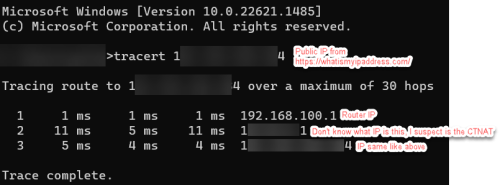
Below are the tutorial I found, I wonder if this is a good way to tell I am in Public IP or not. cry.gif
QUOTE
1. Get your public IP address as stated in the method above.
2. Note down this public IP.
3. Open the command prompt (Press Windows + type cmd in the search bar).
4. Enter the following command → tracert your public IP address.
5. Hit enter.
6. If there is just a single hop in the results, you are not behind CGNAT.
7. But if there are two hops, your ISP uses CGNAT to conserve bandwidth.
user posted image

This post has been edited by e_mc_square: Apr 5 2023, 09:28 PM
e_mc_square
post Apr 6 2023, 08:31 AM

Enthusiast
*****
Senior Member
768 posts

Joined: Dec 2008


QUOTE(faizyunus @ Apr 6 2023, 02:56 AM)
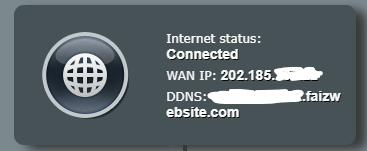
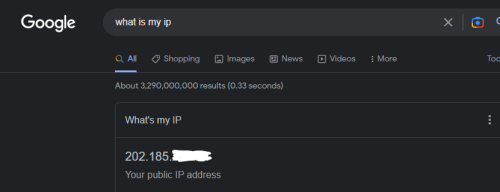
Very simple way to check if you are on public IP or not.

Login to your router. Take note of WAN IP address:
user posted image

Then go and google : What is my IP
user posted image

If both of these IPs match, congrats you are on Public IP.
*
Ya, I checked, It is public IP.
I can't ping that public IP outside the network.
Not sure why. It was ok pass few days.
Looks like it is blocked by the CGNAT.

Haiz...


e_mc_square
post Apr 6 2023, 10:48 AM

Enthusiast
*****
Senior Member
768 posts

Joined: Dec 2008


QUOTE(faizyunus @ Apr 6 2023, 09:00 AM)
Oh that is strange. My monitoring system still able to ping my network just fine.

user posted image
*
My house PC can ping my office public IP
My office PC cannot ping my house public IP.
Both I use https://whatismyipaddress.com/ to get the public IP.

Sad man, I thought I finally can utilize my dust-collecting-PC in my house as a cloud server.
I was working fine last week. FTP, SSH, Nextcloud.

But... Really sad.
e_mc_square
post Apr 6 2023, 05:47 PM

Enthusiast
*****
Senior Member
768 posts

Joined: Dec 2008


QUOTE(faizyunus @ Apr 6 2023, 01:04 PM)
Just out of curiosity, you mentioned ping your house public IP. Not sure if your router has this setting enabled or not?
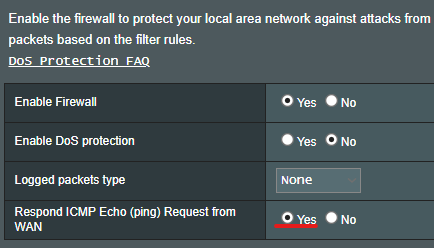
user posted image

Usually I will never leave this setting enabled. I only enable when troubleshooting network issue.

Alternatively you can go with ZeroTier for remote access needs. For my network I use both OpenVPN and ZeroTier. Never exposed my devices directly to the internet for security reasons.

Hopefully TIME manages to resolve your issue.
*
First of all, I want to say I am still a noob in networking. Despite I am a programmer. biggrin.gif

I am using the default router Huawei HG8145X6

I used a DDNS so that I got a domain that linked to my home public IP. Out of surprise, I found that router able to run a DDNS application. I setup gnuip/dynu. Can't run duckDNS.
DDNS consider safe?

I got no knowledge to setup a self VPN and I just see this "ZeroTier" wording yesterday when I am searching the net from my issue.
But since you mention it, I will do some research on this. Thank you very much for the recommendation.

Yes, I called Times this morning and tell them I can't ping my public IP. Then their tech team help me to do some config and BOOM! I can ping already.
FTP, SSH, Nextcloud all come back. biggrin.gif

Again, thank the community to keep me not giving up to solve the issue. Especiall JJ.
notworthy.gif
e_mc_square
post Apr 7 2023, 10:25 AM

Enthusiast
*****
Senior Member
768 posts

Joined: Dec 2008


QUOTE(faizyunus @ Apr 6 2023, 08:36 PM)
I see. That explains a lot. ISP provided routers have remote management which allow TIME to remotely configure the settings on the router.
Dynamic DNS is safe. Each router brand have their own set of Dynamic DNS providers that you can choose from so its hit or miss. Most would just run the client on their server/PC
*
What?! Seriously! They can remote configure the router? This is new.

Ya, like the DuckDNS, the can keep the IP update running in server PC instead of router.
e_mc_square
post Apr 10 2023, 10:56 PM

Enthusiast
*****
Senior Member
768 posts

Joined: Dec 2008


QUOTE(blacktubi @ Apr 7 2023, 10:48 AM)
This is not new

Even since 4 years ago with the C1200 or DIR-850L, TIME can remotely access, provision and configure the router with TR-069 interface. In fact, most if not all ISPs do the same thing in Malaysia.

Hence, buy your own router for better privacy.
*
Thank you for your recommendation sifu. I will take note on that.


Change to:
| Lo-Fi Version
0.0367sec    0.66    7 queries    GZIP Disabled
Time is now: 23rd December 2025 - 11:39 PM