Welcome Guest ( Log In | Register )

Outline · [ Standard ] · Linear+

TIME [OFFICIAL] TIME Fibre Broadband™ v4, Experience the ONE TRUE 2Gbps

views
     
bsb85my
post Mar 21 2019, 12:11 AM

╮(╯_╰)╭
*****
Senior Member
744 posts

Joined: Oct 2004
From: ~Somewhere on Earth~


Today just installed TIME with 500mbps. Evening still okay with the speed.
At night slow like snail. Max only 30mbps only. What is going on?

**Rage mode on**

And when I change the DNS using Cloudflare one in the router, it doesn't connect at all. Even Google DNS seems hard to connect also

This post has been edited by bsb85my: Mar 21 2019, 12:13 AM
bsb85my
post Mar 21 2019, 03:01 PM

╮(╯_╰)╭
*****
Senior Member
744 posts

Joined: Oct 2004
From: ~Somewhere on Earth~


Issue fixed. I changed the 5G wireless channel to non-DFS (dynamic frequency selection) channel such as: 36, 40, 44, 149, 153, 157, or 161 and all back to normal

But I don't know why wired connection only 60mbps, slower than wifi a lot.
bsb85my
post Nov 21 2023, 02:36 AM

╮(╯_╰)╭
*****
Senior Member
744 posts

Joined: Oct 2004
From: ~Somewhere on Earth~


Hi, I'm a TIME subscriber for many years. I'm currently using a modem and a TP-link black router, which both provided by TIME.

However, recently my router seems got problem. So I purchased a Huawei HG8145X6 (has a TIME logo on top) to replace my devices.

As far as I know, the new device is packed with router and modem 2 in 1 (correct my if I'm wrong)

I'm trying to set up my internet. However, I don't find any place to enter my TIME login credentials. So I'm stuck on setting up to connect to the internet.

Would anyone please advice me? Thanks!
bsb85my
post Nov 21 2023, 06:52 PM

╮(╯_╰)╭
*****
Senior Member
744 posts

Joined: Oct 2004
From: ~Somewhere on Earth~


QUOTE(slackinux @ Nov 21 2023, 06:06 PM)
You need to login as admin user to key in the PPoE username and password field.
You need to call TIME customer support to get this admin login. Normal user login won't see the PPoE settings.
Huawei HG8145X6 actually not bad.
I have been using 2 units of Huawei HG8145X6 to form a simple mesh network in 2 storeys terrace house since I subscribed 2 months ago.
*
Do you mean that I'll need to login as a "superadmin" in order to enter my PPoE details?

Because when I enter using "admin", I can't find anywhere to enter PPoE details.
bsb85my
post Apr 25 2024, 12:35 PM

╮(╯_╰)╭
*****
Senior Member
744 posts

Joined: Oct 2004
From: ~Somewhere on Earth~


Hi,

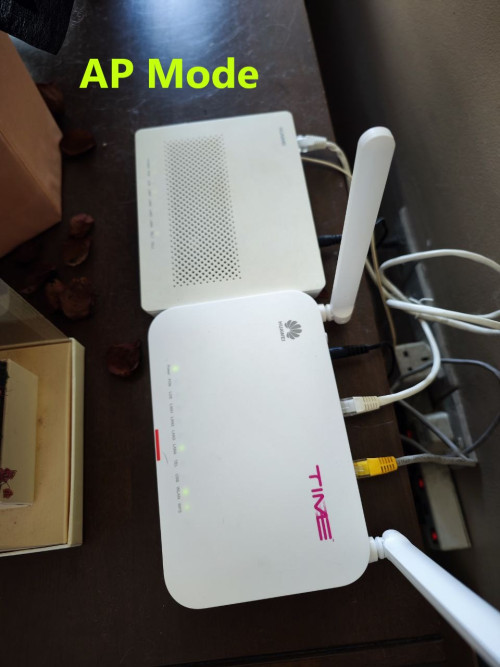
I recently purchased a HG8145X6 from other seller. And I would like to connect directly to the internet using ONLY HG8145X6.

My current working method is connect HG8145X6 as AP mode to the BTU modem, which it's the traditional way.


user posted image


I want to use only the HG8145X6 to connect to the internet.
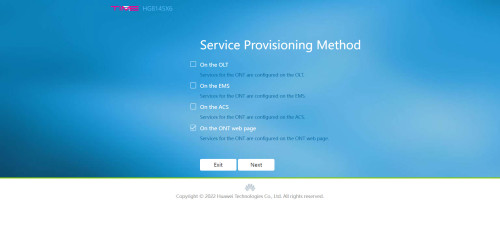
I'm able to log in to the "superadmin" page, changed to GPON, and setup my PPPoE account

user posted image

user posted image


However, I'm not able to connect to the internet. The PON light keeps blinking in green.
The router showing these:

user posted image

user posted image


Does anyone know what setting I've done it wrongly?
Kindly advice. Thanks!


Change to:
| Lo-Fi Version
0.0295sec    0.52    7 queries    GZIP Disabled
Time is now: 8th December 2025 - 06:28 PM